Minecraft version
Back to mods 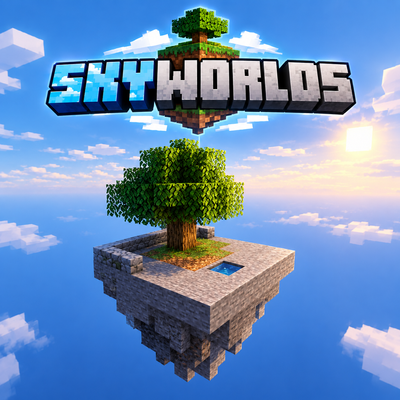
CurseForge · Minecraft mod
Sky Worlds
A SkyBlock world type with islands built in: empty overworld, Nether and End, a starting island, and /island create for a plot of your own.
Choose a version Pick your version below, then grab the matching file.
Quick answer
Which Sky Worlds release should I use?
Latest stable file SkyWorlds 0.2.1
Game version 1.21.1
Loader NeoForge
Sky Worlds SkyWorlds 0.2.1 targets 1.21.1 with NeoForge. The project page does not say whether this file belongs on the client, dedicated server, or both. No extra mods listed for this file.
Where it goes
Is Sky Worlds required on the client, server, or both?
The project page does not say whether this file belongs on the client, dedicated server, or both.
Client Source doesn’t say
Dedicated server Source doesn’t say
Loader for this release NeoForge
Required install it here Optional supported, not mandatory Not supported do not install here Source doesn’t say do not assume
The source does not explicitly classify this release as client-only or server-only.
What else does Sky Worlds SkyWorlds 0.2.1 need?
SkyWorlds 0.2.1. Change the file and its required mods may change too.
This file does not list any required mods. Do not add a library just because a different file uses it.
This file does not list any required or optional mods.
Before you install it
Add Sky Worlds without breaking your instance.
Built for Sky Worlds SkyWorlds 0.2.1. Pick another file and the loader, install side or required mods may change.
- 01
Stick to this file
Use SkyWorlds 0.2.1. It targets 1.21.1 with NeoForge; another release may have different loader, side or dependency requirements.
- 02
Bring the mods it needs
This file does not list any required mods. Do not add a library just because a different file uses it.
- 03
Put it on the correct side
The project page does not say whether this file belongs on the client, dedicated server, or both.
- 04
Pick the file you checked
Use the “Get this file” button beside SkyWorlds 0.2.1. It opens that exact file at the source.
About this project
What does Sky Worlds add?
SkyWorlds
An empty sky, one slab of stone with a tree on it, and a plot of your own a thousand blocks across.
A SkyBlock world type with islands built in. Pick SkyWorlds on the world-creation screen and the overworld, the Nether and the End are all empty - no layers, no bedrock, nothing but void. The first player to log in lands on the spawn island; everyone else types /island create and gets one of their own.
No blocks, no items, no recipes. SkyWorlds does one thing: it hands out worlds and plots.
The island
Nine by nine of smooth stone, a low wall along the north and west edge, three by three of dirt with a grown oak already on it - not a sapling, because waiting out a sapling before the first log is not a challenge, it is a pause - and a one-block water source sunk into the slab so it cannot run off the edge. The spawn island and every player's island are the same plot, so nobody starts better off than anybody else.
Your own ground
/island create puts your island on the next free spot of a spiral around spawn and moves your respawn point there. From then on:
/island home- back to your island/island spawn- back to the spawn island/island visit <player>- to somebody else's/island listand/island delete <player>- for operators; delete asks before it wipes
Zones
Every island sits in the middle of a zone, a square of chunks around it, and by default you can only build inside your own. Between two zones lies no-man's land nobody can build in, so one player's dark room is never over another's farm.
Default sizes, all configurable:
| Zone radius | 1000 blocks |
| Gap between zones | 500 blocks |
| Clear around spawn | 3000 blocks |
| Wiped on delete | 160 blocks |
Outside the zones - the spawn island, the space around it, the land between - everyone may use things but nobody may build: doors open, buttons work, chests stay shut to strangers. That can be switched off, and so can the protection as a whole, for servers that would rather sort it out among themselves.
Teams
With FTB Teams installed, an island belongs to the party rather than to one player. Joining a party asks first: your island is merged into theirs, and the mod tells you plainly what you are about to give up. Without FTB Teams every island simply belongs to its player - the mod has no hard dependency on anything.
For pack makers
Everything is in skyworlds-common.toml: whether the starting island is built at all, whether /island is offered, how big zones are, whether protection is on, and whether the world-creation screen should preselect the SkyWorlds type so nobody has to find it. The world preset is a plain data pack file - a pack can override it and keep the islands.
Where it comes from
These islands grew up in Data Center in the Sky, a pack where you build a server farm on a SkyBlock island. They worked well enough on their own that they became a mod of their own. If you want the racks, the mining and the market around them, look at Data Center; if you just want a sky world that hands out plots, this is that half by itself.
Both installed together is fine - Data Center leaves /island to SkyWorlds and keeps out of its way.
How it was made
Built with Claude Code. Every design decision is mine.
Requirements
NeoForge 21.1 or newer for Minecraft 1.21.1. Server and client, singleplayer and multiplayer. FTB Teams optional.
Project description from CurseForge.
Pick your setup
Sky Worlds by Minecraft version and loader
Choose the version and loader you play, then open the matching release.
Check the dependencies, then try the file in a copied instance before changing a world you care about.
Recent files
Sky Worlds versions and loaders
SkyWorlds 0.2.1
skyworlds0.2.1.jar
28 Sept 2026
Client Source doesn’t say Server Source doesn’t say Dependencies No extras listed Listed on Release listing
Check the 1.21.1 · NeoForge setup 1.21.1NeoForge release
SkyWorlds 0.2.0
skyworlds0.2.0.jar
22 Sept 2026
Client Source doesn’t say Server Source doesn’t say Dependencies No extras listed Listed on Release listing
Check the 1.21.1 · NeoForge setup 1.21.1NeoForge release
SkyWorlds 0.1.0
skyworlds0.1.0.jar
22 Sept 2026
Client Source doesn’t say Server Source doesn’t say Dependencies No extras listed Listed on Release listing
Check the 1.21.1 · NeoForge setup 1.21.1NeoForge release
Looking for an older file? The official CurseForge project page is in Resources.