Xaero's World Map Needed by Province 0.2.3 for 26.3.jar
requiredMatching file found Matched file: xaeroworldmap-fabric-26.3-1.47.2.jar
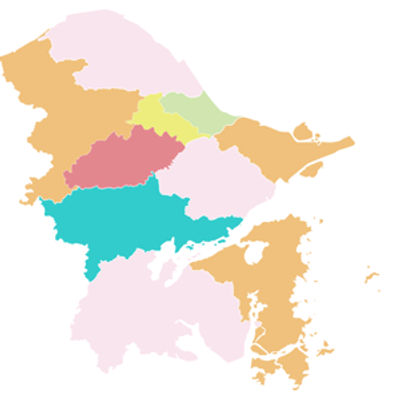
CurseForge · Minecraft mod
Draw provinces, states and counties on Xaero's World Map and Minimap as crisp vector overlays with borders, labels and PNG export.
Quick answer
Province 0.2.3 for 26.3.jar targets 26.3 with Fabric. The project page does not say whether this file belongs on the client, dedicated server, or both. All 2 required mods have matching files.
Where it goes
The project page does not say whether this file belongs on the client, dedicated server, or both.
The source does not explicitly classify this release as client-only or server-only.
Province 0.2.3 for 26.3.jar. Change the file and its required mods may change too.
Install Xaero's World Map, Fabric API first. We found matching files for this game-version and loader setup. 5 come through another mod in the chain.
5 extra mods were pulled in by other dependencies. Indented rows show who needs each one. We only count dependency files that match this setup. A file for another loader does not fill the gap.
Before you install it
Built for Province 0.2.3 for 26.3.jar. Pick another file and the loader, install side or required mods may change.
Use Province 0.2.3 for 26.3.jar. It targets 26.3 with Fabric; another release may have different loader, side or dependency requirements.
Install Xaero's World Map, Fabric API first. We found matching files for this game-version and loader setup. 5 come through another mod in the chain.
The project page does not say whether this file belongs on the client, dedicated server, or both.
Use the “Get this file” button beside Province 0.2.3 for 26.3.jar. It opens that exact file at the source.
About this project
Province
Draw your own administrative divisions straight onto the map.
Province is a client-side Fabric mod that lets you trace regions — provinces, states, counties, districts, whatever you call them — on top of Xaero's World Map and Minimap. Every region is stored as a vector outline and drawn as a colored overlay with borders and place names, so it stays crisp when you zoom out and stays aligned with the terrain when you zoom in.
Nothing is sent to the server, and nothing is written into the save's chunk data: your regions are a separate set of vector data stored on your own machine.
FEATURES
Six drawing tools
_ Brush — hold and drag to select; width adjustable from 2 to 48 pixels.
_ Line, Rectangle, Ellipse — hold Shift while dragging to constrain to horizontal/vertical lines, squares and circles.
_ Eraser — rub out part of what you have already selected.
_ Magic Wand — one click selects the area enclosed by your own strokes, the parent boundary and the neighboring regions. If it cannot find an enclosed area, it does nothing rather than swallowing the whole parent region.
Borders follow the block grid
Region outlines are snapped to block edges: all vertices land on integer coordinates, so a diagonal edge becomes a staircase of blocks and a circle is assembled block by block. Your borders therefore line up with the terrain and never leave half-block gaps, even at maximum zoom.
Up to five nesting levels
L1 (the coarsest) down to L5. A level-N region can only be drawn inside a level-(N−1) region, and siblings can never overlap. Every region carries a name, one of 16 dye colors, and a level.
A tree for the whole hierarchy
Create top-level regions and children, rename them, recolor them, change their level, collapse branches, drag a region up or down to reorder it among its siblings, or delete it together with everything below it. Each row has its own visibility checkbox.
Administrative level names built in
Over a hundred level suffixes, drawn from administrative divisions around the world and across history — Chinese dynasties, Japanese prefectures, US counties, Polish powiat and more. Duplicate names are disambiguated in the picker. Add your own suffixes too; built-in ones cannot be deleted. A small 中 / EN button flips the picker between Chinese and English, and long English names scroll slowly when you hover them.
Place names that place themselves
Names are drawn in a final pass, on top of every fill and border, so a later region can never cover an earlier region's label. The label tries the bounding-box center first, then searches the region for a spot that fits and stays near the center — fitting wins over being central. A slider lets names overflow (or be required to fit inside) their region by −12 to +12 pixels, and narrow slivers can be excluded from horizontal fitting entirely. Regions with several disconnected parts are labeled per part.
Serial markers when a name just will not fit
Optional. Regions whose name could not be drawn anywhere get a circled serial number ①②③ instead, with a matching legend in a screen corner. Only regions actually on screen are numbered, up to 20 of them.
Area readout
Each region reports its area in square blocks. Switch on kilo-blocks ² and anything above one million square blocks is shown as e.g. 1234.567 kilo-blocks².
Export maps with your regions baked in
Export the part of the map you are looking at, or the entire world map, to PNG. Fills, borders and place names are all redrawn at the export resolution, so the image matches what you see. Labels are rendered with the game's own pixel font. Files land in province/exports/ inside your world folder, and the folder opens automatically when the export finishes.
A title toast when you walk into a region
Optional. When you cross into a new region, its name flashes up in the vanilla title style. Fade-in, hold and fade-out durations are all configurable.
Built for large maps
Fills are drawn with scanlines and borders by edge subdivision, and both can be made cheaper independently with smart precision reduction — fill cost grows with area while border cost grows with outline length, so they are two separate switches. Short border segments can also be merged, which is exact by default and can be relaxed for very detailed coastlines.
REQUIREMENTS
Province is a Fabric mod for client use. Pick the build that matches your Minecraft version — the part after + in the file name is the Minecraft version it is built for.
| 26.2 build | 1.21.11 build | 1.21.1 build | 1.20.1 build | |
|---|---|---|---|---|
| Minecraft | 26.2 | 1.21.11 | 1.21.1 | 1.20.1 |
| Java | 25 | 21 | 21 | 17 |
| Fabric Loader | 0.19.3+ | 0.15.0+ | 0.19.3+ | 0.19.3+ |
| Fabric API | 26.2 line | 1.21.11 line | 1.21.1 line | 1.20.1 line |
Required dependency: Xaero's World Map — the world map overlay, the editor and the map export all go through it. It is declared as a hard dependency, so install it alongside Province.
Xaero's Minimap is needed only for the minimap overlay.
Temporarily, all four builds carry the same version number, 0.2.1, with the Minecraft version appended as build metadata — 0.2.1+26.2, 0.2.1+1.20.1 and so on. That suffix is how the files are told apart, and it is also the version the mod reports in game. Installing a build made for a different game version makes Minecraft stop with an error on startup instead of misbehaving silently.
INSTALLATION
Install Fabric Loader for your Minecraft version.
Drop Fabric API and Xaero's World Map into .minecraft/mods.
Drop the matching Province-0.2.1+<minecraft version>.jar into .minecraft/mods.
CONTROLS
| Key | Action |
|---|---|
| P | Open / close the region editor (on the Xaero world map screen) |
| R | Toggle the whole region layer on and off |
Both keys can be rebound in Options → Controls → Key Binds, under the Provinces category. The editor has no on-screen entry button; those two keys are the only way in.
Once the editor is open, the map still pans and zooms as usual, and a panel appears on the left: tools, level selector, region tree, settings and the two export buttons.
WHERE YOUR DATA LIVES
_ Single player: <world folder>/province/<dimension>.nbt — one file per dimension.
_ On a server: config/province/worlds/<server address or default>/<dimension>.nbt.
_ Exported images: <world folder>/province/exports/.
_ Settings: config/mc-province/settings.nbt. Custom level names go to config/mc-province/levels.nbt.
Because the data is purely local, your regions travel with you between modpacks and machines — but other players, and the server, never see them. To move a set of regions to another world, copy the province folder (or a single dimension file) across while the game is closed; the files store absolute world coordinates and outlines, not terrain, so the shapes and names arrive unchanged.
From version 0.2.1 on, region outlines are snapped to the block grid. Saves written by earlier builds are converted automatically the first time they are loaded — position, hierarchy, names and colors are preserved, while the outlines are re-grown on the grid, which can shift an edge by about a block.
LICENSE AND SOURCE
Released under the MIT License. Source code: https://github.com/KaibuchiShuuki/Province
Feedback, bug reports and suggestions are welcome — the issue tracker is the best place for them.
Project description from CurseForge.
Pick your setup
Choose the version and loader you play, then open the matching release.
Check the dependencies, then try the file in a copied instance before changing a world you care about.
Recent files
Province-0.2.3-26.3.jar
14 Nov 2026
Province-0.2.3-26.2.jar
14 Nov 2026
Province-0.2.3-26.1.2.jar
14 Nov 2026
Province-0.2.3-1.21.11.jar
14 Nov 2026
Province-0.2.3-1.21.1.jar
14 Nov 2026
Province-0.2.3-1.20.1.jar
14 Nov 2026
Province-0.2.2+26.2.jar
17 Oct 2026
Province-0.2.2+1.21.11.jar
17 Oct 2026
Province-0.2.2+1.21.1.jar
17 Oct 2026
Province-0.2.2+1.20.1.jar
17 Oct 2026
Province-0.2.1+1.20.1.jar
16 Oct 2026
Province-0.2.1+1.21.1.jar
16 Oct 2026
Looking for an older file? The official CurseForge project page is in Resources.
 mod
This is a modern 26.2 version of traincraft.
 mod
This provides more support and network management commands for Beyond Dimension.
 mod
Adventure time inspired dungeon crawler on a train. Procedurally generated carriages on a infinite sable physics train. Rich narrative, with custom made mods for a completely unique experience.