Better Harvest Levels Optional for Better Item Stats 1.0.0 (1.20.1)
optionalMatching file found Matched file: Better Harvest Levels 2.1.0 (Fabric 1.20.1)
CurseForge · Minecraft mod
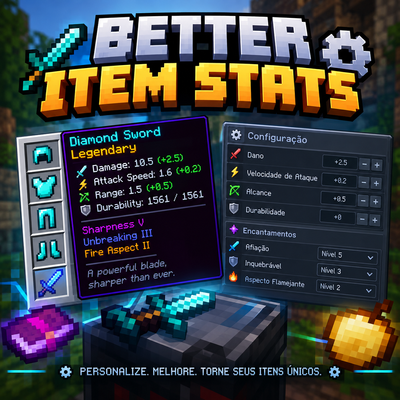
Customize item attributes like durability, mining speed, attack damage, attack speed, armor, and more through a simple JSON configuration.
Quick answer
Better Item Stats 1.0.0 (1.20.1) targets 1.20.1 with Fabric. The project page does not say whether this file belongs on the client, dedicated server, or both. All 1 required mods have matching files.
Where it goes
The project page does not say whether this file belongs on the client, dedicated server, or both.
The source does not explicitly classify this release as client-only or server-only.
Better Item Stats 1.0.0 (1.20.1). Change the file and its required mods may change too.
Install Fabric API first. We found matching files for this game-version and loader setup.
We only count dependency files that match this setup. A file for another loader does not fill the gap.
Before you install it
Built for Better Item Stats 1.0.0 (1.20.1). Pick another file and the loader, install side or required mods may change.
Use Better Item Stats 1.0.0 (1.20.1). It targets 1.20.1 with Fabric; another release may have different loader, side or dependency requirements.
Install Fabric API first. We found matching files for this game-version and loader setup.
The project page does not say whether this file belongs on the client, dedicated server, or both.
Use the “Get this file” button beside Better Item Stats 1.0.0 (1.20.1). It opens that exact file at the source.
About this project
Better Item Stats is a lightweight configuration-focused utility for Minecraft 1.20.1 Fabric that allows modpack authors to customize item statistics by registry ID without modifying the original content mod.
It works with both vanilla and modded items and is designed to complement progression and harvest-level systems by handling the numerical properties of items separately.
- Durability Overrides — Set an exact maximum durability for damageable items.
- Mining Speed Overrides — Change an item's effective mining speed without changing which blocks the item can harvest.
- Attack Damage — Override the final player attack damage for an item.
- Attack Speed — Override the final player attack speed for an item.
- Armor Attributes — Configure armor, armor toughness, and knockback resistance.
- Vanilla & Modded Items — Target any item using its registry ID.
- Mining Tooltips — Display mining information for configured items, even when mining speed is not being overridden.
- Per-Entry Configuration — Enable or disable individual item entries and only change the attributes you specify.
- Lightweight Integration — Uses Fabric API for client-side tooltip integration without requiring content mods.
Only the attributes specified in an entry are modified. Other item attributes and modifiers remain unchanged.
When Better Harvest Levels 2.0.1 or newer is installed, Better Item Stats can read the active harvest-level override for an item at runtime.
The integration can:
Display the effective Better Harvest Levels harvest tier.
Display the item's detected digging speed.
Correct existing harvest-level tooltip lines from compatible tooltip providers.
Add the effective harvest level for configured custom items when showMiningTooltip is enabled.
Example tooltip:
2 Harvest Level
5 Digging Speed
The integration is completely optional. Better Harvest Levels remains responsible for harvest tiers, tool requirements, and progression rules. Better Item Stats only reads the effective values for tooltip display and does not replace or modify those rules.
The configuration file is located at:
config/betteritemstats/items.json
Example:
{
  "configVersion": 1,
  "enabled": true,
  "overrides": [
    {
      "target": "minecraft:iron_sword",
      "type": "item",
      "durability": 300,
      "attackDamage": 6.5,
      "attackSpeed": 1.6,
      "slot": "mainhand"
    }
  ]
}
| Field | Description |
|---|---|
target |
Registry ID of the target item. |
type |
Item type. Currently supports item. |
enabled |
Enables or disables the individual entry. Defaults to true. |
durability |
Sets the item's maximum durability. |
miningSpeed |
Replaces the item's effective mining speed when the item is already effective against the block. |
showMiningTooltip |
Enables mining information in the tooltip. |
attackDamage |
Sets the final player attack damage while the item is equipped in the configured slot. |
attackSpeed |
Sets the final player attack speed while the item is equipped in the configured slot. |
armor |
Sets the armor value supplied by the item. |
armorToughness |
Sets the armor toughness value supplied by the item. |
knockbackResistance |
Sets the knockback resistance supplied by the item. |
slot |
Equipment slot used by the configured combat attributes. Supports mainhand, offhand, head, chest, legs, and feet. |
Only the fields included in an entry are changed.
You can display an item's mining information without overriding its original mining speed:
{
  "target": "abstoneedition:bismuth_pickaxe",
  "type": "item",
  "showMiningTooltip": true
}
When Better Harvest Levels has an active tier override for the item, the effective harvest level is displayed alongside the detected digging speed.
If another tooltip mod already provides equivalent mining information for a specific item, showMiningTooltip can be disabled:
"showMiningTooltip": false
Better Item Stats does not replace harvest levels, tool tiers, block requirements, or tool suitability.
For example, changing:
"miningSpeed": 5.0
does not make an item capable of harvesting blocks that it could not previously harvest.
This allows Better Item Stats to be used alongside Better Harvest Levels and similar progression systems while keeping item statistics and harvest rules separate.
Install Fabric Loader for Minecraft 1.20.1.
Install Fabric API.
Place the Better Item Stats JAR in the mods folder on both the client and server.
Start the game once to generate the configuration file.
Edit config/betteritemstats/items.json.
Restart the game or server after changing the configuration.
Better Harvest Levels is optional and is only required when you want its configured harvest levels to be displayed through the Better Item Stats tooltip integration.
- Minecraft: 1.20.1
- Mod Loader: Fabric
- Environment: Client & Server
- Required: Fabric API
- Optional: Better Harvest Levels 2.0.1+
- Java: 17+
Better Item Stats works with both vanilla and modded items and does not require the original content mod that adds the target item to be modified.
Created by zClashTM.
Better Item Stats is licensed under the MIT License.
Project description from CurseForge.
Pick your setup
Choose the version and loader you play, then open the matching release.
Check the dependencies, then try the file in a copied instance before changing a world you care about.
Recent files
better-item-stats-1.20.1-fabric-1.0.0.jar
24 Sept 2026
Looking for an older file? The official CurseForge project page is in Resources.
 mod
modPrimeClient is the custom Client-side Mod made specifically for Pixelmon Prime. It enables the ability to communicate with the server using the PrimeAPI.
 mod
modHuge utility collection. Health bar, what i'am looking at and alot more awesome things.
 mod
modHighly editable in-game store.