Minecraft version
Back to mods 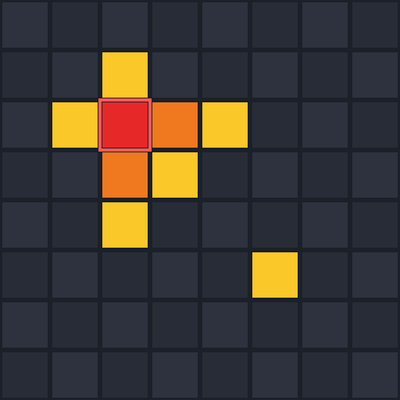
CurseForge · Minecraft mod
LagFinder
Find WHERE your server lags: ranks the hottest chunks with their block entities and mobs, highlights them in the world, exports an HTML heatmap. Server-side, no client mod needed.
Choose a version Pick your version below, then grab the matching file.
Quick answer
Which LagFinder release should I use?
Latest stable file LagFinder 1.0.0 - NeoForge 1.21.8
Game version 1.21.8
Loader NeoForge
LagFinder 1.0.0 - NeoForge 1.21.8 targets 1.21.8 with NeoForge. The project page does not say whether this file belongs on the client, dedicated server, or both. No extra mods listed for this file.
Where it goes
Is LagFinder required on the client, server, or both?
The project page does not say whether this file belongs on the client, dedicated server, or both.
Client Source doesn’t say
Dedicated server Source doesn’t say
Loader for this release NeoForge
Required install it here Optional supported, not mandatory Not supported do not install here Source doesn’t say do not assume
The source does not explicitly classify this release as client-only or server-only.
What else does LagFinder 1.0.0 - NeoForge 1.21.8 need?
LagFinder 1.0.0 - NeoForge 1.21.8. Change the file and its required mods may change too.
This file does not list any required mods. Do not add a library just because a different file uses it.
This file does not list any required or optional mods.
Before you install it
Add LagFinder without breaking your instance.
Built for LagFinder 1.0.0 - NeoForge 1.21.8. Pick another file and the loader, install side or required mods may change.
- 01
Stick to this file
Use LagFinder 1.0.0 - NeoForge 1.21.8. It targets 1.21.8 with NeoForge; another release may have different loader, side or dependency requirements.
- 02
Bring the mods it needs
This file does not list any required mods. Do not add a library just because a different file uses it.
- 03
Put it on the correct side
The project page does not say whether this file belongs on the client, dedicated server, or both.
- 04
Pick the file you checked
Use the “Get this file” button beside LagFinder 1.0.0 - NeoForge 1.21.8. It opens that exact file at the source.
About this project
What does LagFinder add?
LagFinder
Your server is lagging and spark tells you "block entity ticking: 34%". Great - but where? Which chunk, which farm, whose base?
LagFinder answers that in one minute, with no client mod:
/lagfinder start 30    - sample 30 seconds (zero overhead when idle)
/lagfinder top         - the hottest chunks, ranked

#1 overworld chunk [5, 5]   4.04 ms/tick (42%)  [BE 1.13  ent 2.91]  zombie 2.42, hopper 1.13  near Steve (12 m)  [tp]
#2 overworld chunk [60, 60] 0.48 ms/tick (5%)   [BE 0.48]            hopper 0.48                                  [tp]

/lagfinder show        - glowing red/orange/yellow markers over the hottest chunks, visible to every player, even vanilla clients
/lagfinder hide        - remove the markers
/lagfinder export      - self-contained HTML heatmap + table you can open in a browser or send to your players
/lagfinder status      - is sampling running, how many ticks were measured
(/lagmap works as an alias for every command.)
What it measures, per chunk
- block entities (hoppers, furnaces, modded machines) - with the type that costs most
- entities - with the mob type that costs most
- scheduled block & fluid ticks and random ticks
- what share of the whole server tick that chunk takes, and the nearest player
- click [tp] in chat to teleport straight to the chunk
Why LagFinder
- Real measurement, not an estimate. Every block entity, entity, block tick and random tick is timed with nanosecond precision and attributed to its chunk.
- Server-side only. Nothing to install for players. Works with vanilla clients.
- No dependencies. No Fabric API, no Architectury, no Kotlin.
- Zero overhead when not sampling - one boolean check per hook. Start it only when you need it.
- Spiritual successor to LagGoggles (1.12) and Observable (up to 1.21.4), rebuilt from scratch for 1.21.8 - 26.3.
Versions
Fabric (Quilt works too) and NeoForge: 1.21.8, 1.21.9, 1.21.10, 1.21.11, 26.1.x, 26.2, 26.3. Java 21 for 1.21.x, Java 25 for 26.x. Pick the file that matches your game version and loader.
Permission level 2 (op) is required for /lagfinder.
How to read the result
ms/tick is how much of every server tick that chunk costs. A vanilla tick has 50 ms; a chunk that takes 10+ ms/tick on its own is the reason your TPS drops. The breakdown tells you what in that chunk is expensive (a mob farm, a wall of hoppers, a modded machine), and the nearest player tells you whose it is.
Found a bug or want a feature? Use the Issues tab.
Project description from CurseForge.
Pick your setup
LagFinder by Minecraft version and loader
Choose the version and loader you play, then open the matching release.
Minecraft version
26.2
3 loader buildsMinecraft version
26.1.2
3 loader buildsMinecraft version
26.1.1
3 loader buildsMinecraft version
26.1
3 loader buildsMinecraft version
1.21.11
3 loader buildsMinecraft version
1.21.10
3 loader buildsMinecraft version
1.21.9
2 loader buildsMinecraft version
1.21.8
3 loader buildsCheck the dependencies, then try the file in a copied instance before changing a world you care about.
Recent files
LagFinder versions and loaders
LagFinder 1.0.0 - NeoForge 1.21.8
lagfinder-neoforge-1.0.0+1.21.8.jar
24 Sept 2026
Client Source doesn’t say Server Source doesn’t say Dependencies No extras listed Listed on Release listing
Check the 1.21.8 · NeoForge setup 1.21.8NeoForge release
LagFinder 1.0.0 - NeoForge 1.21.10
lagfinder-neoforge-1.0.0+1.21.10.jar
24 Sept 2026
Client Source doesn’t say Server Source doesn’t say Dependencies No extras listed Listed on Release listing
Check the 1.21.10 · NeoForge setup NeoForge1.21.10 release
LagFinder 1.0.0 - NeoForge 1.21.11
lagfinder-neoforge-1.0.0+1.21.11.jar
24 Sept 2026
Client Source doesn’t say Server Source doesn’t say Dependencies No extras listed Listed on Release listing
Check the 1.21.11 · NeoForge setup NeoForge1.21.11 release
LagFinder 1.0.0 - NeoForge 26.1.x
lagfinder-neoforge-1.0.0+26.1.2.jar
24 Sept 2026
Client Source doesn’t say Server Source doesn’t say Dependencies No extras listed Listed on Release listing
Check the 26.1.2 · NeoForge setup NeoForge26.126.1.126.1.2 release
LagFinder 1.0.0 - NeoForge 26.2
lagfinder-neoforge-1.0.0+26.2.jar
24 Sept 2026
Client Source doesn’t say Server Source doesn’t say Dependencies No extras listed Listed on Release listing
Check the 26.2 · NeoForge setup NeoForge26.2 release
LagFinder 1.0.0 - NeoForge 26.3 (beta)
lagfinder-neoforge-1.0.0+26.3.jar
24 Sept 2026
Client Source doesn’t say Server Source doesn’t say Dependencies No extras listed Listed on Release listing
Check the 26.3 · NeoForge setup NeoForge26.3 beta
LagFinder 1.0.0 - Fabric 1.21.11
lagfinder-fabric-1.0.0+1.21.11.jar
24 Sept 2026
Client Source doesn’t say Server Source doesn’t say Dependencies No extras listed Listed on Release listing
Check the 1.21.11 · Fabric setup FabricQuilt1.21.11 release
LagFinder 1.0.0 - Fabric 1.21.8-1.21.10
lagfinder-fabric-1.0.0+1.21.8.jar
24 Sept 2026
Client Source doesn’t say Server Source doesn’t say Dependencies No extras listed Listed on Release listing
Check the 1.21.10 · Fabric setup Fabric1.21.8Quilt1.21.9 release
LagFinder 1.0.0 - Fabric 26.1.x
lagfinder-fabric-1.0.0+26.1.2.jar
24 Sept 2026
Client Source doesn’t say Server Source doesn’t say Dependencies No extras listed Listed on Release listing
Check the 26.1.2 · Fabric setup FabricQuilt26.126.1.1 release
LagFinder 1.0.0 - Fabric 26.2
lagfinder-fabric-1.0.0+26.2.jar
24 Sept 2026
Client Source doesn’t say Server Source doesn’t say Dependencies No extras listed Listed on Release listing
Check the 26.2 · Fabric setup FabricQuilt26.2 release
LagFinder 1.0.0 - Fabric 26.3
lagfinder-fabric-1.0.0+26.3.jar
24 Sept 2026
Client Source doesn’t say Server Source doesn’t say Dependencies No extras listed Listed on Release listing
Check the 26.3 · Fabric setup FabricQuilt26.3 release
Looking for an older file? The official CurseForge project page is in Resources.
 mod
mod CurseForge + Modrinth · Minecraft
AntOS Computer | Quests + Guidebook
An immersive and fully functioning computer that provides an anternative to the stale and overused quest book and guide book
 mod
mod CurseForge · Minecraft
Unbind
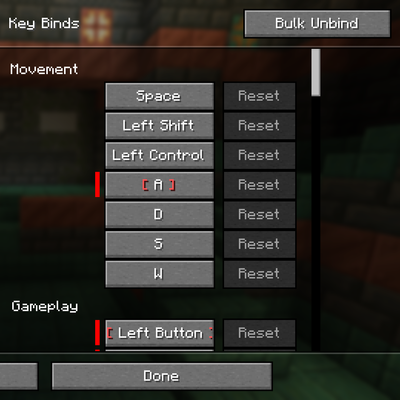
Adds options to unbind many keys at once in settings and automatically attempts to clear conflicts
 mod
mod CurseForge · Minecraft
FTB Evolution Companion
A bespoke companion mod for the FTB Evolution modpack. Fixing duplication, crash and performance problems that configs, datapacks and scripts cannot reach