Minecraft version
Back to mods 
CurseForge · Minecraft mod
OreSense - The Ore Finding Compass
An ore finder / ore detector for survival prospecting: load the Ore Sensor with an ore sample and amethyst shards, then follow its needle, lamps and lock chime to the nearest vein of vanilla or modded ore.
Choose a version Pick your version below, then grab the matching file.
Quick answer
Which OreSense - The Ore Finding Compass release should I use?
Latest stable file OreSense 1.1.0 - 26.3 (Quilt)
Game version 26.3
Loader Quilt
OreSense - The Ore Finding Compass OreSense 1.1.0 - 26.3 (Quilt) targets 26.3 with Quilt. The project page does not say whether this file belongs on the client, dedicated server, or both. No extra mods listed for this file.
Where it goes
Is OreSense - The Ore Finding Compass required on the client, server, or both?
The project page does not say whether this file belongs on the client, dedicated server, or both.
Client Source doesn’t say
Dedicated server Source doesn’t say
Loader for this release Quilt
Required install it here Optional supported, not mandatory Not supported do not install here Source doesn’t say do not assume
The source does not explicitly classify this release as client-only or server-only.
What else does OreSense - The Ore Finding Compass OreSense 1.1.0 - 26.3 (Quilt) need?
OreSense 1.1.0 - 26.3 (Quilt). Change the file and its required mods may change too.
This file does not list any required mods. Do not add a library just because a different file uses it.
This file does not list any required or optional mods.
Before you install it
Add OreSense - The Ore Finding Compass without breaking your instance.
Built for OreSense - The Ore Finding Compass OreSense 1.1.0 - 26.3 (Quilt). Pick another file and the loader, install side or required mods may change.
- 01
Stick to this file
Use OreSense 1.1.0 - 26.3 (Quilt). It targets 26.3 with Quilt; another release may have different loader, side or dependency requirements.
- 02
Bring the mods it needs
This file does not list any required mods. Do not add a library just because a different file uses it.
- 03
Put it on the correct side
The project page does not say whether this file belongs on the client, dedicated server, or both.
- 04
Pick the file you checked
Use the “Get this file” button beside OreSense 1.1.0 - 26.3 (Quilt). It opens that exact file at the source.
About this project
What does OreSense - The Ore Finding Compass add?
OreSense
A prospecting compass powered by amethyst shards. An ore finder for Forge, Fabric, Quilt, and NeoForge.
Tune the Ore Sensor with a sample, load it with amethyst shards, and follow the needle to the vein. Samples can be ore blocks, their drops, or items made purely from that material. It works as an ore detector for vanilla ores, modded ores, and amethyst geodes.
Current mod version: 1.1.0.
Features
- A compass-style dial at vanilla pixel scale, with a red needle, above/below lamps, a charge gauge, and a window showing your sample.
- Find coal, copper, iron, gold, redstone, lapis, diamond, emerald, quartz, ancient debris, and amethyst geodes—including deepslate and Nether ore variants where available.
- Use samples such as ingots, nuggets, storage blocks, raw ore blocks, cut copper, netherite scrap, and amethyst shards. Mixed-material recipes, such as pickaxes and golden apples, are not followed.
- Supports modded ores through the ore tags used by each loader, with samples discovered from their drops and recipes.
- Hold up to 64 amethyst shards. The gently pulsing charge gauge shows your remaining charge even when the Sample slot is empty.
- The needle pulses faster as you approach a vein. Indicator lamps show whether it is above or below you, and cyan sonar rings show the sensor is searching.
- Data-pack friendly: add your own item-to-block targets under data/<namespace>/sample_aliases/.
How to use it
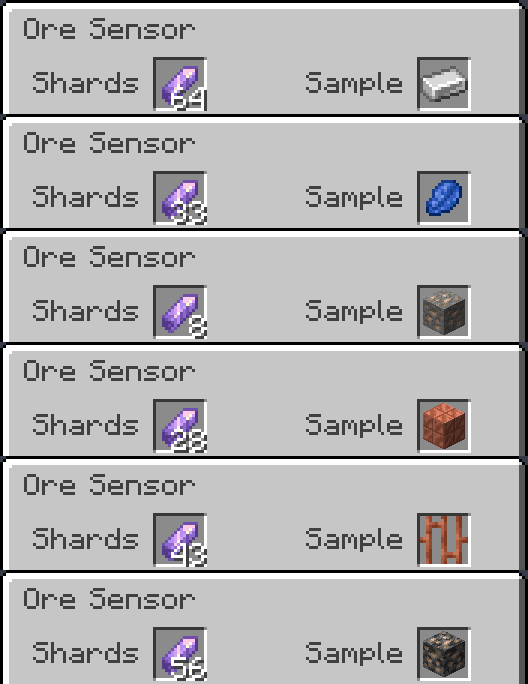
- Tune it: Right-click to open the sensor and place a sample in the Sample slot. Only items the sensor can actually find are accepted.
- Charge it: Put amethyst shards in the Shards slot.
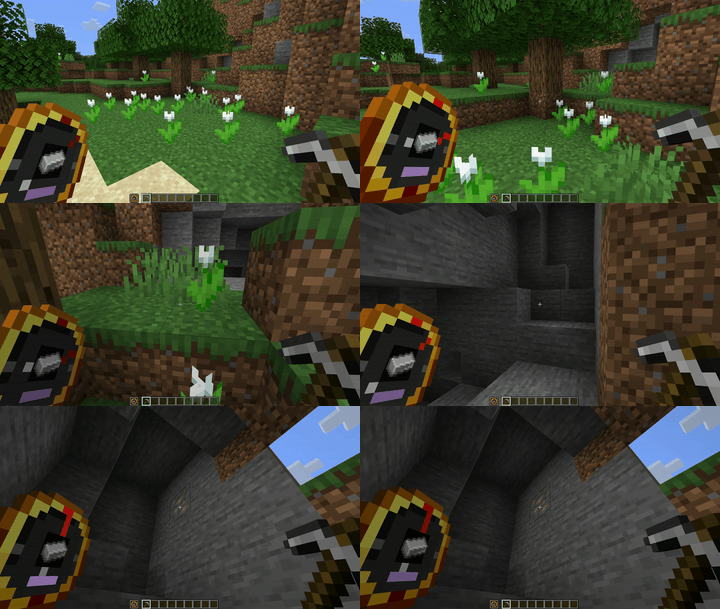
- Follow it: Hold the sensor in either hand. A chime announces a lock, and the needle points toward the vein.
- Mine it: Swap to your pickaxe—the lock stays while the sensor is in your inventory. Mining the first block spends one shard; the remaining blocks in that lock cost no additional charge.
- Skip it: Sneak-right-click to release a lock and search for another vein. Releasing within four blocks spends one shard if that lock has not already been paid for.
A grey needle at rest with cyan rings sweeping the face means the sensor is searching and has found nothing in range. If it finds a vein but has no shards, the gauge pulses red.
Spending about ten seconds outside scan range releases the lock without spending another shard. Creative mode never consumes charges.
Recipe
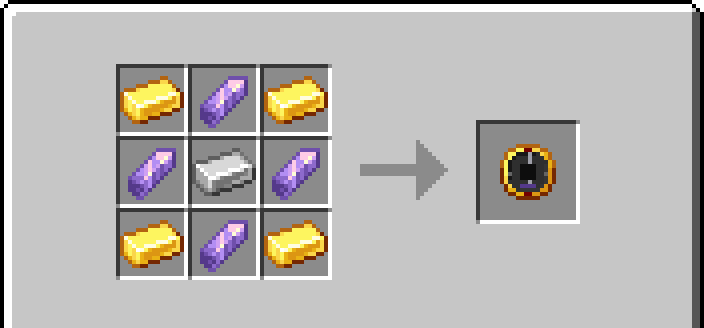
Four gold ingots, four amethyst shards, and one iron ingot.
Place gold ingots in the corners, amethyst shards on the edges, and an iron ingot in the middle. Equivalent ingots from the loader’s common tags are accepted. The recipe unlocks when you pick up an amethyst shard.
What’s new in 1.1.0
Open the settings screen from OreSense’s Config button in the mod list, on the title screen or from the pause menu’s Mods screen in a world; Fabric uses Mod Menu. Forge builds for Minecraft 1.17.1, 1.18, 1.18.1, 1.18.2, 1.19, 1.19.1, 1.19.2, 1.19.3 and 1.20 have no Mods button in the pause menu, so there the screen opens from the title screen's mod list; on NeoForge 21.9.16-beta (Minecraft 1.21.9) the Mods screen crashes before it opens, fixed in NeoForge 21.10, so edit config/oresense-client.toml by hand.
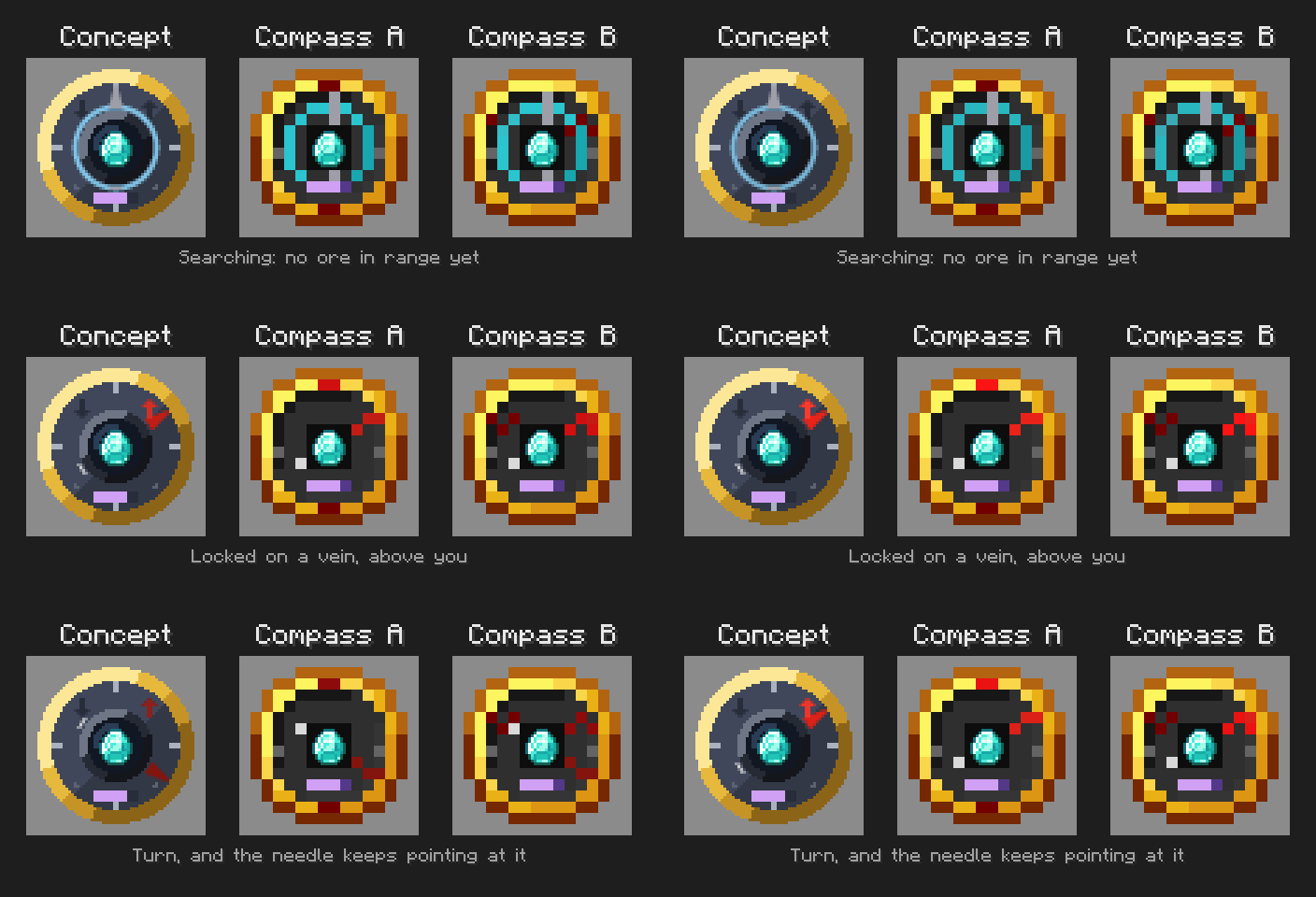
- Choose from three dial skins: Concept (the original v0.0.1 64 px dial), Compass A (the 1.0 art, the default), and Compass B (Compass A with arrow lamps on the face).
- Pulsing lights is on by default; turning it off holds the needle glow, sonar sweep, and charge gauge pulse steady while the needle still turns.
- Choose charging per vein, per size, or per block mined. A lock’s price, vein size cap, and grace time are fixed when it is made.
- When a lock costs something other than one shard per vein, its price appears above the hotbar when it locks and in the sensor’s tooltip until it is paid.
- Closest selects the closest vein; Largest selects the largest vein in range, with the nearer vein winning a size tie. Changing the vein choice releases a lock that is not yet paid for.
- The shorter sensor tooltip shows the sample, shards, and any warning; hold Shift for instructions. If the sensor cannot afford a vein, its tooltip says how many shards it needs.
- Fabric and Quilt: /reload re-reads config/oresense.json.
Existing configuration files and sensors keep working, and new settings start at their defaults. Clients and servers running 1.0.3 and 1.1.0 can still join each other in both directions.
Supported versions
| Loader | Minecraft versions |
|---|---|
| Forge | 1.17.1–26.3, except 1.20.5 and 1.21.2 |
| Fabric | Every stable release from 1.17–26.3 |
| Quilt | Every stable release from 1.17–26.3 |
| NeoForge | Every stable release from 1.20.1–26.3 |
Download the file for your exact Minecraft version and loader. Each combination has its own build. When updating, replace any older OreSense jar in your mods folder; do not keep two OreSense jars in the same instance. Snapshots and Minecraft pre-releases are excluded.
Requirements
- Install OreSense on both the client and server.
- Fabric and Quilt require Fabric API for the same Minecraft version.
- Fabric builds require Fabric Loader 0.19.5 or newer.
- Forge 1.20.1 runs on any Forge 47.x release, from 47.0.0 up.
- Quilt builds for 1.17, 1.17.1, 1.18, and 1.18.1 require exactly Quilt Loader 0.26.4. Later Quilt builds require 0.30.1 or newer.
- Java 17 for Minecraft 1.17 through 1.20.4 (Java 16 is the minimum on 1.17 and 1.17.1), Java 21 for 1.20.5 through 1.21.11, and Java 25 for 26.x.
- Check each file’s release notes for its specific loader and dependency requirements.
Configuration
Configuration files are created on first launch:
| Loader | Configuration file |
|---|---|
| Forge / NeoForge | config/oresense-common.toml |
| Fabric / Quilt | config/oresense.json |
Adjust scan range (horizontalRange, verticalRange), scan interval (scanIntervalTicks), optional text readings (showDirection, showActionBar), and oresOnly (default true; false lets any block serve as a sample).
The default scan range is 32 blocks horizontally and 16 blocks vertically.
Restart after editing. In multiplayer, the server configuration controls scanning and the optional text readings.
Transparency
Every part of OreSense was built or modified with AI assistance (Claude, through Claude Code), directed and reviewed by me. That covers the mod code, the procedurally generated textures, the ports to all 122 Minecraft version and loader combinations, the build and test pipeline, and the written text here, in the changelogs and in the release notes. AI is how I can apply a fix to every version and loader at once and keep the project moving. I decide what the mod does and review what is produced, and every build is started on a dedicated server and joined with a real client before release. Screenshots and GIFs are real game captures, not AI-generated.
Links
Project description from CurseForge.
Pick your setup
OreSense - The Ore Finding Compass by Minecraft version and loader
Choose the version and loader you play, then open the matching release.
Minecraft version
26.2
2 loader buildsMinecraft version
26.1.2
2 loader buildsMinecraft version
26.1.1
2 loader buildsMinecraft version
26.1
2 loader buildsMinecraft version
1.21.11
2 loader buildsMinecraft version
1.21.10
2 loader buildsMinecraft version
1.21.9
2 loader buildsMinecraft version
1.21.8
2 loader buildsMinecraft version
1.21.7
2 loader buildsMinecraft version
1.21.6
2 loader buildsMinecraft version
1.21.5
2 loader buildsShowing the newest 12 of 33 game versions. Older files are in the list below.
Check the dependencies, then try the file in a copied instance before changing a world you care about.
Recent files
OreSense - The Ore Finding Compass versions and loaders
OreSense 1.1.0 - 26.3 (Quilt)
oresense-quilt-26.3-1.1.0.jar
30 Oct 2026
Client Source doesn’t say Server Source doesn’t say Dependencies No extras listed Listed on Release listing
Check the 26.3 · Quilt setup Quilt26.3 release
OreSense 1.1.0 - 26.2 (Quilt)
oresense-quilt-26.2-1.1.0.jar
30 Oct 2026
Client Source doesn’t say Server Source doesn’t say Dependencies No extras listed Listed on Release listing
Check the 26.2 · Quilt setup Quilt26.2 release
OreSense 1.1.0 - 26.1.2 (Quilt)
oresense-quilt-26.1.2-1.1.0.jar
30 Oct 2026
Client Source doesn’t say Server Source doesn’t say Dependencies No extras listed Listed on Release listing
Check the 26.1.2 · Quilt setup Quilt26.1.2 release
OreSense 1.1.0 - 26.1.1 (Quilt)
oresense-quilt-26.1.1-1.1.0.jar
30 Oct 2026
Client Source doesn’t say Server Source doesn’t say Dependencies No extras listed Listed on Release listing
Check the 26.1.1 · Quilt setup Quilt26.1.1 release
OreSense 1.1.0 - 26.1 (Quilt)
oresense-quilt-26.1-1.1.0.jar
30 Oct 2026
Client Source doesn’t say Server Source doesn’t say Dependencies No extras listed Listed on Release listing
Check the 26.1 · Quilt setup Quilt26.1 release
OreSense 1.1.0 - 1.21.9 (Quilt)
oresense-quilt-1.21.9-1.1.0.jar
30 Oct 2026
Client Source doesn’t say Server Source doesn’t say Dependencies No extras listed Listed on Release listing
Check the 1.21.9 · Quilt setup Quilt1.21.9 release
OreSense 1.1.0 - 1.21.8 (Quilt)
oresense-quilt-1.21.8-1.1.0.jar
30 Oct 2026
Client Source doesn’t say Server Source doesn’t say Dependencies No extras listed Listed on Release listing
Check the 1.21.8 · Quilt setup 1.21.8Quilt release
OreSense 1.1.0 - 1.21.7 (Quilt)
oresense-quilt-1.21.7-1.1.0.jar
30 Oct 2026
Client Source doesn’t say Server Source doesn’t say Dependencies No extras listed Listed on Release listing
Check the 1.21.7 · Quilt setup 1.21.7Quilt release
OreSense 1.1.0 - 1.21.6 (Quilt)
oresense-quilt-1.21.6-1.1.0.jar
30 Oct 2026
Client Source doesn’t say Server Source doesn’t say Dependencies No extras listed Listed on Release listing
Check the 1.21.6 · Quilt setup 1.21.6Quilt release
OreSense 1.1.0 - 1.21.5 (Quilt)
oresense-quilt-1.21.5-1.1.0.jar
30 Oct 2026
Client Source doesn’t say Server Source doesn’t say Dependencies No extras listed Listed on Release listing
Check the 1.21.5 · Quilt setup 1.21.5Quilt release
OreSense 1.1.0 - 1.21.4 (Quilt)
oresense-quilt-1.21.4-1.1.0.jar
30 Oct 2026
Client Source doesn’t say Server Source doesn’t say Dependencies No extras listed Listed on Release listing
Check the 1.21.4 · Quilt setup 1.21.4Quilt release
OreSense 1.1.0 - 1.21.3 (Quilt)
oresense-quilt-1.21.3-1.1.0.jar
30 Oct 2026
Client Source doesn’t say Server Source doesn’t say Dependencies No extras listed Listed on Release listing
Check the 1.21.3 · Quilt setup 1.21.3Quilt release
Looking for an older file? The official CurseForge project page is in Resources.
 mod
CurseForge · Minecraft
Simply Pots
A mod that adds biome specific Pots randomly in your world with useful loot.
 mod
CurseForge · Minecraft
Anvil reset scroll
This mod introduces Reset Scroll. It allows you to keep your gear forever without worrying about the vanilla anvil repair limits.No Anvil Expensive,No Expensive Never Too Expensive
 mod
CurseForge · Minecraft
XP: Attribute Core
It adds a wide variety of RPG-style attributes