Minecraft version
Back to mods 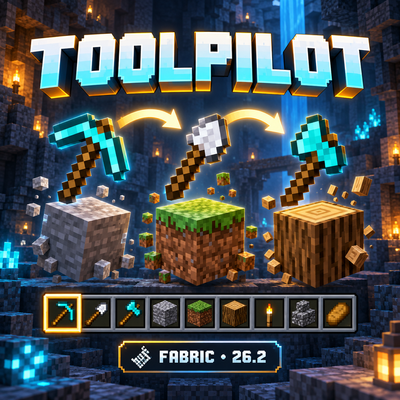
CurseForge · Minecraft mod
Tool Pilote
Its a Mod that let you automaticly switch Tools to break a Block.
Choose a version Pick your version below, then grab the matching file.
Quick answer
Which Tool Pilote release should I use?
Latest stable file toolpilot-1.0.0-mc26.2.jar
Game version 26.2
Loader Fabric
Tool Pilote toolpilot-1.0.0-mc26.2.jar targets 26.2 with Fabric. The project page does not say whether this file belongs on the client, dedicated server, or both. No extra mods listed for this file.
Where it goes
Is Tool Pilote required on the client, server, or both?
The project page does not say whether this file belongs on the client, dedicated server, or both.
Client Source doesn’t say
Dedicated server Source doesn’t say
Loader for this release Fabric
Required install it here Optional supported, not mandatory Not supported do not install here Source doesn’t say do not assume
The source does not explicitly classify this release as client-only or server-only.
What else does Tool Pilote toolpilot-1.0.0-mc26.2.jar need?
toolpilot-1.0.0-mc26.2.jar. Change the file and its required mods may change too.
This file does not list any required mods. Do not add a library just because a different file uses it.
This file does not list any required or optional mods.
Before you install it
Add Tool Pilote without breaking your instance.
Built for Tool Pilote toolpilot-1.0.0-mc26.2.jar. Pick another file and the loader, install side or required mods may change.
- 01
Stick to this file
Use toolpilot-1.0.0-mc26.2.jar. It targets 26.2 with Fabric; another release may have different loader, side or dependency requirements.
- 02
Bring the mods it needs
This file does not list any required mods. Do not add a library just because a different file uses it.
- 03
Put it on the correct side
The project page does not say whether this file belongs on the client, dedicated server, or both.
- 04
Pick the file you checked
Use the “Get this file” button beside toolpilot-1.0.0-mc26.2.jar. It opens that exact file at the source.
About this project
What does Tool Pilote add?
ToolPilot
Spend less time switching tools and more time building and exploring. ToolPilot automatically selects a suitable tool from your hotbar when you start or continue mining a block.
Digging dirt? Switch to a shovel. Chopping logs? Grab an axe. Mining ore? ToolPilot considers whether a tool can harvest the block, then compares mining speed—including Efficiency enchantments.
Features
- Automatic tool selection: Chooses suitable tools from your nine hotbar slots.
- Durability protection: Skips tools with low durability and switches to a suitable replacement. If your held tool reaches the reserve and no replacement is available, mining stops with a notification.
- Configurable reserve: Keep between 1 and 100 durability points in reserve, or select 0 to disable protection. The default is 10.
- Manual control: Sneak to temporarily bypass automatic switching and protection. This option can be disabled.
- Customizable hotkeys: Change both shortcuts through Minecraft’s key-binding settings.
- Saved settings: Includes English and German translations.
Controls
- F8: Toggle ToolPilot.
- F9: Open settings.
- Change shortcuts under Options → Controls → Key Binds → ToolPilot.
ToolPilot is enabled by default and operates in Survival mode. It selects existing hotbar tools when you mine; it does not start mining automatically. Fortune and Silk Touch are not automatically prioritized.
Requirements
Minecraft Java 26.2, Fabric Loader 0.19.3+, Fabric API for 26.2, and Java 25+. Install the mod on your client by placing its JAR in your instance’s mods folder.
Tested together with Neon Clicker X. Neither mod requires the other.
Development disclosure
The mod code is primarily AI-generated and was compiled and automatically tested in Minecraft. The cover is AI-generated promotional artwork, not an in-game screenshot.
17:58
Project description from CurseForge.
Pick your setup
Tool Pilote by Minecraft version and loader
Choose the version and loader you play, then open the matching release.
Check the dependencies, then try the file in a copied instance before changing a world you care about.
Recent files
Tool Pilote versions and loaders
toolpilot-1.0.0-mc26.2.jar
27 Sept 2026
Client Source doesn’t say Server Source doesn’t say Dependencies No extras listed Listed on Release listing
Check the 26.2 · Fabric setup Fabric26.2 release
Looking for an older file? The official CurseForge project page is in Resources.
 mod
CurseForge · Minecraft
CollectionMaster
Turn gathered resources into rewards through configurable item collections and milestones.
 mod
CurseForge + Modrinth · Minecraft
Simple Music Control
Reduced delay between music tracks, next track keybind, now playing widget and more
 mod
CurseForge · Minecraft
Fast Horse Potion and Breeding
Fast Horse , Breeding Horse, Horse Potion,Horse Zero Fall Damage