Fabric API Needed by collectionmaster_1.0.1_mc26.2_neoforge.jar
requiredNo matching file

CurseForge · Minecraft mod
Turn gathered resources into rewards through configurable item collections and milestones.
Quick answer
collectionmaster_1.0.1_mc26.2_neoforge.jar targets 26.2 with NeoForge. The project page does not say whether this file belongs on the client, dedicated server, or both. 1 required mod needs a matching file.
Where it goes
The project page does not say whether this file belongs on the client, dedicated server, or both.
The source does not explicitly classify this release as client-only or server-only.
collectionmaster_1.0.1_mc26.2_neoforge.jar. Change the file and its required mods may change too.
Install Fabric API first, but 1 required mod has no matching file for this setup. Do not mix loader builds to force a match.
We only count dependency files that match this setup. A file for another loader does not fill the gap.
Before you install it
Built for collectionmaster_1.0.1_mc26.2_neoforge.jar. Pick another file and the loader, install side or required mods may change.
Use collectionmaster_1.0.1_mc26.2_neoforge.jar. It targets 26.2 with NeoForge; another release may have different loader, side or dependency requirements.
Install Fabric API first, but 1 required mod has no matching file for this setup. Do not mix loader builds to force a match.
The project page does not say whether this file belongs on the client, dedicated server, or both.
Use the “Get this file” button beside collectionmaster_1.0.1_mc26.2_neoforge.jar. It opens that exact file at the source.
About this project
CollectionMaster adds collectible item collections to Minecraft. Discover a collection by finding its target item, contribute items to complete progressively larger milestones, and claim item rewards as you advance.
Open the catalog with K by default. The key can be changed in Minecraft's Controls settings. You can also use either command:
/collectionmaster/cmasterIn multiplayer, install the mod on both the server and each connecting client.
The catalog groups discovered collections by category. It shows each collection's target item, current progress, milestone requirements, and rewards. Undiscovered collections are not listed individually; the catalog can show an aggregate count of how many remain. Use the mouse wheel over the milestone area to browse milestones.
Choose 1, Stack, or All to deliver items from your inventory. A delivery is limited to the amount needed by the remaining milestones. Completed milestone rewards appear on their cards and can be claimed there. If the inventory cannot fit a reward, it remains pending.
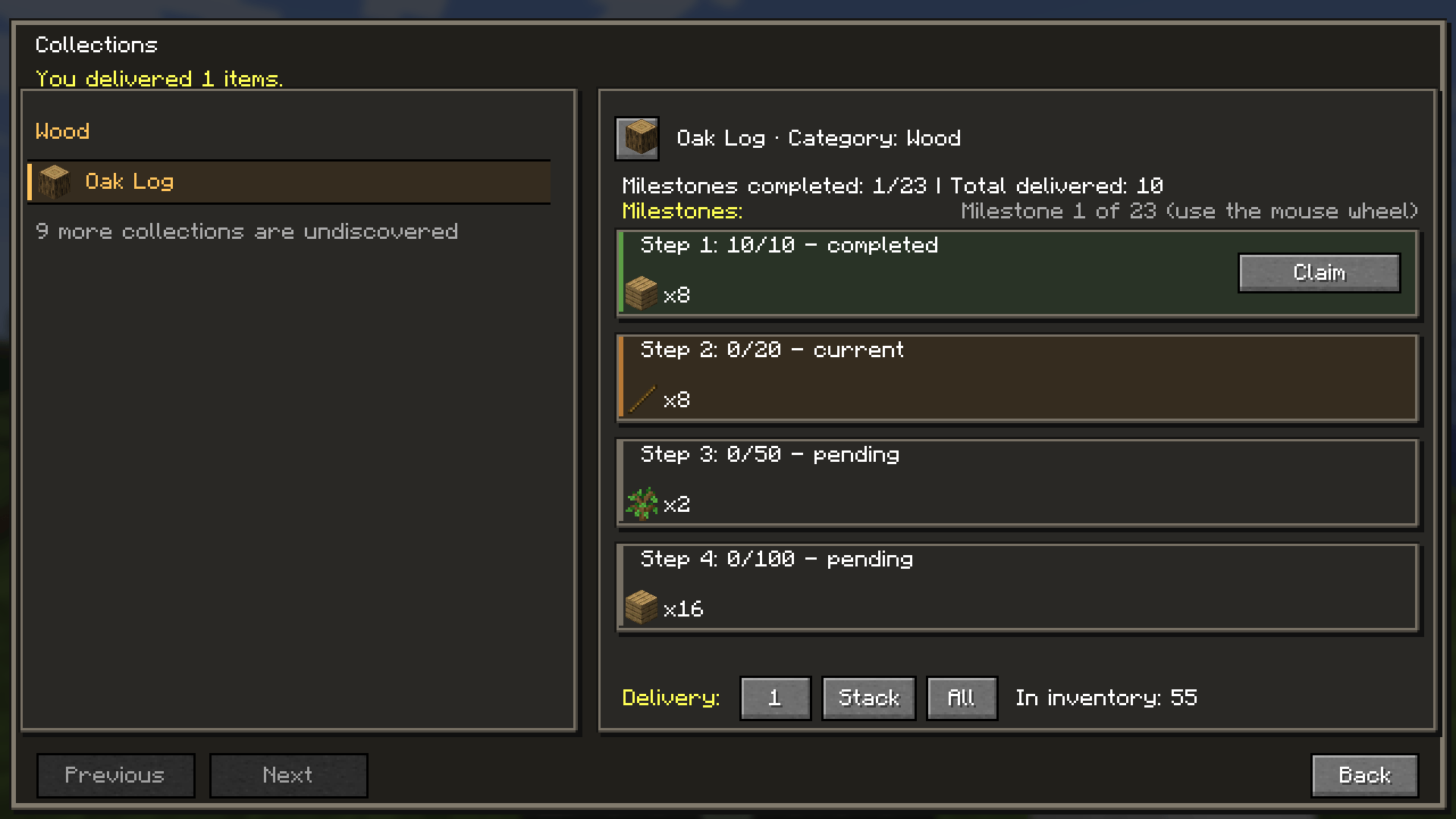
Collection definitions are JSON files in:
config/collectionmaster/collections/
The directory is scanned recursively, so you can organize definitions in subfolders. On first launch, the mod installs ten example collection files. Existing files are preserved.
A minimal custom collection can omit both milestone fields and inherit the global milestone amounts and rewards:
{
  "id": "collectionmaster:amethyst",
  "name": "Amethyst",
  "category": "Ores",
  "target_item_ids": ["minecraft:amethyst_shard"],
  "enabled": true
}
Every definition requires a unique collection id, a name, a category, and exactly one target item in target_item_ids. Item IDs use Minecraft's namespace:path format. The enabled field is optional and defaults to true.
The global options file is config/collectionmaster.json. It contains:
default_milestone_amounts: 23 positive, strictly increasing item requirements. The built-in sequence is 10, 20, 50, 100, 250, 500, 1000, 2500, 5000, 10000, 20000, 30000, 40000, 50000, 60000, 70000, 80000, 90000, 100000, 200000, 300000, 400000, 500000.default_milestone_rewards: 23 reward groups, one for each default milestone. Each reward has an item_id and a positive count. A group may contain more than one reward.show_locked_collections: controls whether the catalog displays the aggregate count of undiscovered collections; defaults to true.The global reward table is shared by collections that do not provide their own reward definition. Edit the options file to change the defaults for newly defined collections that inherit them.
Use milestone_rewards when a collection should keep the global milestone amounts but use a different reward table. It replaces the entire global reward table and must contain exactly 23 reward groups, in milestone order:
"milestone_rewards": [
  [{"item_id": "minecraft:amethyst_block", "count": 2}],
  [{"item_id": "minecraft:experience_bottle", "count": 4}]
]
The snippet shows the shape only: a complete collection definition must provide all 23 groups. Each group is a list so a milestone can grant multiple item types.
Use milestones to define a collection's milestone numbers, requirements, and rewards directly:
"milestones": [
  {
    "number": 1,
    "required_amount": 32,
    "rewards": [{"item_id": "minecraft:amethyst_block", "count": 2}]
  },
  {
    "number": 2,
    "required_amount": 128,
    "rewards": [
      {"item_id": "minecraft:amethyst_block", "count": 4},
      {"item_id": "minecraft:experience_bottle", "count": 8}
    ]
  }
]
Milestone numbers must start at 1 and be consecutive; requirements must be positive and increase from one milestone to the next. Each milestone needs at least one reward. Use either milestones or milestone_rewards in a collection file, not both.

Project description from CurseForge.
Pick your setup
Choose the version and loader you play, then open the matching release.
Check the dependencies, then try the file in a copied instance before changing a world you care about.
Recent files
6 Nov 2026
6 Nov 2026
6 Nov 2026
6 Nov 2026
6 Nov 2026
6 Nov 2026
30 Oct 2026
30 Oct 2026
29 Oct 2026
29 Oct 2026
29 Oct 2026
28 Oct 2026
Looking for an older file? The official CurseForge project page is in Resources.
 mod
A minecraft JSON5/TOML configuration library
 mod
Adds mineable graphene ore for crafting powerful graphene armor and tools
 mod
Multicore optimization: faster chunk generation on every core, a lag analyzer that finds what slows your server, and a TPS Guard. Same world as vanilla.