Minecraft version
Back to mods 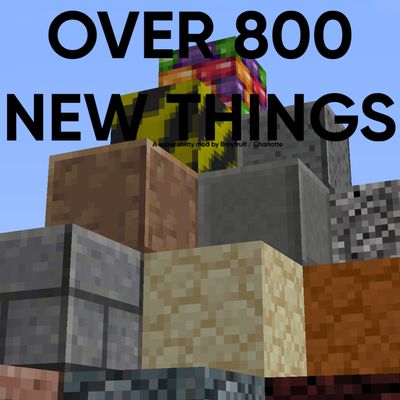
CurseForge · Minecraft mod
Razberry Edition (MAJOR UPDATE)
New building blocks, mostly inspired by Classic, indev, Pre 1.14, Untagged and Untittled, Places and The Backrooms / Liminal Spaces.
Choose a version Pick your version below, then grab the matching file.
Quick answer
Which Razberry Edition (MAJOR UPDATE) release should I use?
Latest stable file razzberryedition-5.0.2-neoforge-26.1.2.jar
Game version 26.1.1, 26.1.2
Loader NeoForge
Razberry Edition (MAJOR UPDATE) razzberryedition-5.0.2-neoforge-26.1.2.jar targets 26.1.1, 26.1.2 with NeoForge. The project page does not say whether this file belongs on the client, dedicated server, or both. No extra mods listed for this file.
Where it goes
Is Razberry Edition (MAJOR UPDATE) required on the client, server, or both?
The project page does not say whether this file belongs on the client, dedicated server, or both.
Client Source doesn’t say
Dedicated server Source doesn’t say
Loader for this release NeoForge
Required install it here Optional supported, not mandatory Not supported do not install here Source doesn’t say do not assume
The source does not explicitly classify this release as client-only or server-only.
What else does Razberry Edition (MAJOR UPDATE) razzberryedition-5.0.2-neoforge-26.1.2.jar need?
razzberryedition-5.0.2-neoforge-26.1.2.jar. Change the file and its required mods may change too.
This file does not list any required mods. Do not add a library just because a different file uses it.
This file does not list any required or optional mods.
Before you install it
Add Razberry Edition (MAJOR UPDATE) without breaking your instance.
Built for Razberry Edition (MAJOR UPDATE) razzberryedition-5.0.2-neoforge-26.1.2.jar. Pick another file and the loader, install side or required mods may change.
- 01
Stick to this file
Use razzberryedition-5.0.2-neoforge-26.1.2.jar. It targets 26.1.1, 26.1.2 with NeoForge; another release may have different loader, side or dependency requirements.
- 02
Bring the mods it needs
This file does not list any required mods. Do not add a library just because a different file uses it.
- 03
Put it on the correct side
The project page does not say whether this file belongs on the client, dedicated server, or both.
- 04
Pick the file you checked
Use the “Get this file” button beside razzberryedition-5.0.2-neoforge-26.1.2.jar. It opens that exact file at the source.
About this project
What does Razberry Edition (MAJOR UPDATE) add?
New building blocks, mostly inspired by Classic, indev, Pre 1.14, Untagged and Untittled, Places and The Backrooms / Liminal Spaces.
(Not every) Blocks:
Polished stone (Block, Stairs, Slab, Wall)
Stumps (all wood types, includes stripped)
Stubs (Bone, Bamboo and Stripped Bamboo)
Polished Dirt
Error (Block, Stairs, Slab)
Modern Error (Block, Stairs, Slab)
Very Modern Error (Block, Stairs, Slab)
Nullpoint (Block, Stairs, Slab)
Inverted Error (Block, Stairs, Slab)
Grey Tiles (Block, Stairs, Slab)
Polished Bedrock (Block, Stairs, Slab)
Debug
White (Block, Stairs, Slab)
Black (Block, Stairs, Slab)
Smooth Stone Stairs and Wall
Brick Fence
Ballpit (Block, Stairs, Slab)
Metal Tile (Block, Stairs, Slab)
Rusty Metal Tile (Block, Stairs, Slab)
Black Metal Tile (Block, Stairs, Slab)
Metal Plate (Block, Stairs, Slab)
Wetathered Metal Plate (Block, Stairs, Slab)
Black metal Plate (Block, Stairs, Slab)
Rusty Metal Plate (Block, Stairs, Slab)
AND LOADS MORE
Project description from CurseForge.
Pick your setup
Razberry Edition (MAJOR UPDATE) by Minecraft version and loader
Choose the version and loader you play, then open the matching release.
Minecraft version
26.1.1
1 loader buildCheck the dependencies, then try the file in a copied instance before changing a world you care about.
Recent files
Razberry Edition (MAJOR UPDATE) versions and loaders
razzberryedition-5.0.2-neoforge-26.1.2.jar
30 Oct 2026
Client Source doesn’t say Server Source doesn’t say Dependencies No extras listed Listed on Release listing
Check the 26.1.2 · NeoForge setup NeoForge26.1.126.1.2 release
razzberryedition-5.0.0-neoforge-26.1.2.jar
25 Oct 2026
Client Source doesn’t say Server Source doesn’t say Dependencies No extras listed Listed on Release listing
Check the 26.1.2 · NeoForge setup NeoForge26.1.126.1.2 release
razzberryedition-1.0.1-neoforge-26.1.2.jar
29 Sept 2026
Client Source doesn’t say Server Source doesn’t say Dependencies No extras listed Listed on Release listing
Check the 26.1.2 · NeoForge setup NeoForge26.1.126.1.2 release
Looking for an older file? The official CurseForge project page is in Resources.
 mod
mod CurseForge · Minecraft
Check Engine
Your modpack's check engine light. Crash, missing mod, broken recipe or "Invalid player data" kick? It tells you what broke and how to fix it, in plain English. Undo bad updates, find the faulty mod, back up and rescue your worlds. Never touches gameplay.
 mod
mod CurseForge · Minecraft
RealDie
RealDIE completely redesigns the death screen in Minecraft, turning player death into an immersive, atmospheric experience.
 mod
mod CurseForge · Minecraft
Show the Lyrics
Shows the synced lyrics of whatever you're playing out in the world around you!