better-creative Optional for Creative Admin creative-admin-2.1.1.jar
optionalMatching file found Matched file: better-creative-2.1.1.jar
CurseForge · Minecraft mod
Lock creative tabs and items per group of players from an in-game admin screen. The server enforces every rule, whatever the client runs.
Quick answer
Creative Admin creative-admin-2.1.1.jar targets 1.21.1 with NeoForge. The project page does not say whether this file belongs on the client, dedicated server, or both. No extra mods listed for this file.
Where it goes
The project page does not say whether this file belongs on the client, dedicated server, or both.
The source does not explicitly classify this release as client-only or server-only.
creative-admin-2.1.1.jar. Change the file and its required mods may change too.
This file does not list any required mods. Do not add a library just because a different file uses it.
1 extra mod was pulled in by another dependency. Indented rows show who needs each one. We only count dependency files that match this setup. A file for another loader does not fill the gap.
Before you install it
Built for Creative Admin creative-admin-2.1.1.jar. Pick another file and the loader, install side or required mods may change.
Use creative-admin-2.1.1.jar. It targets 1.21.1 with NeoForge; another release may have different loader, side or dependency requirements.
This file does not list any required mods. Do not add a library just because a different file uses it.
The project page does not say whether this file belongs on the client, dedicated server, or both.
Use the “Get this file” button beside creative-admin-2.1.1.jar. It opens that exact file at the source.
About this project




Creative Admin locks creative tabs and items per group of players, from an in-game admin screen. The server enforces every rule, whatever the client runs.
Creative mode for your builders, without the items that break your server.

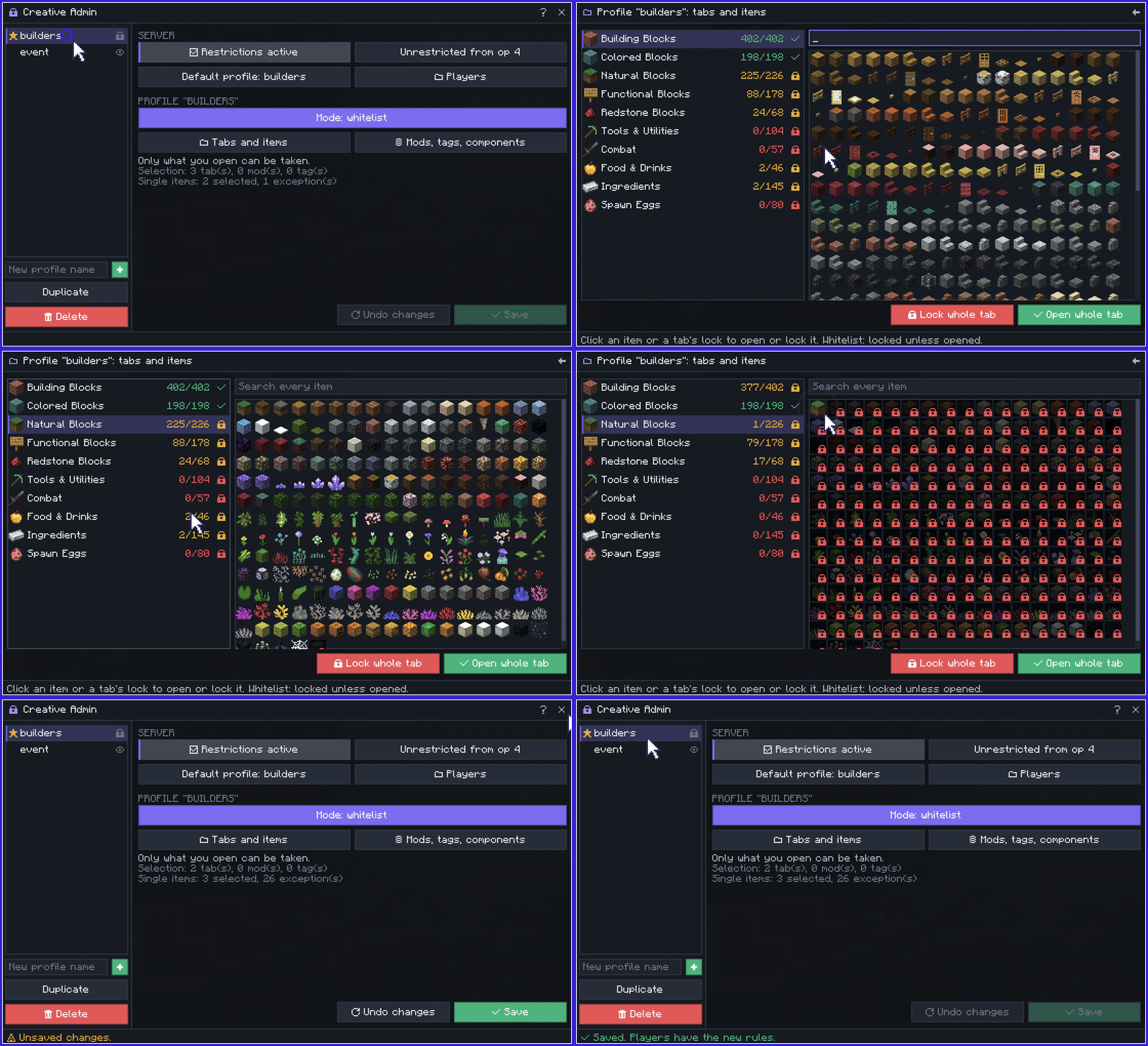
 Whitelist or blacklist: lock everything but your selection, or open everything but it.
 Any scale: whole tabs, whole mods, item tags or single items, with exceptions.
 What you see is what they get: the grid shows the final result of every rule.
 Safe saves: a save based on an outdated copy is refused, never overwrites another admin.
 Built-in help: the ? button explains every page, rule and command.

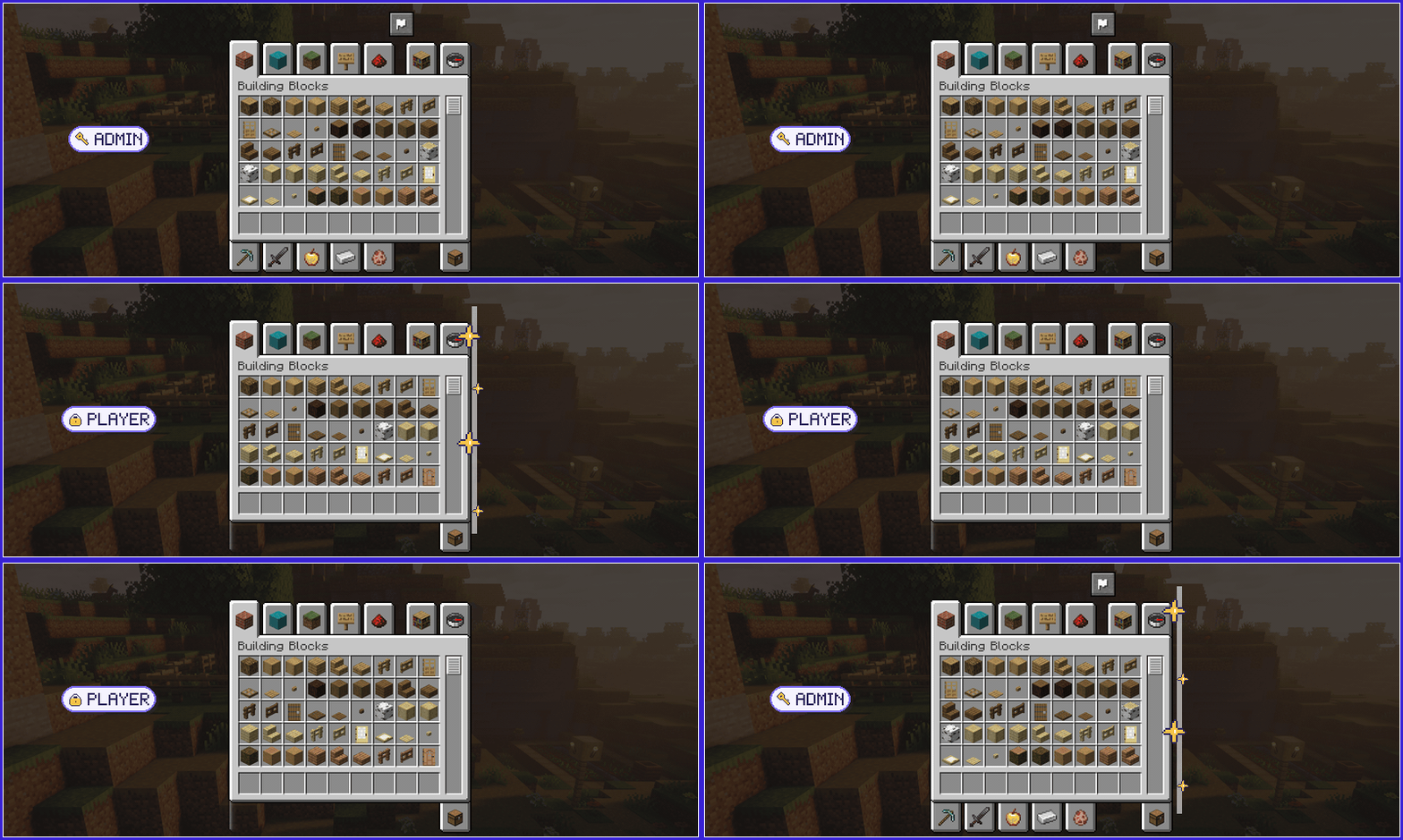
 By group: a LuckPerms or CustomPerm group meta picks the profile, no hard dependency.
 By player: assign a profile in the screen or with
 /creativeadmin profile.
 Staff bypass:
 creativeadmin.bypass, or an op level you choose.
Hidden, not greyed: with the mod on their client, players never see what is locked.

 Any client: vanilla clients and edited configs get exactly the same rules.
Every path: creative menu, search, saved hotbars, pick-block and item browser mods.
 Owned items left alone: moving, splitting or dropping what a player owns is never refused.
 Fails closed: a broken file refuses rather than allows, and the screen turns read-only.
A bug or an idea? Open an issue.

Creative Admin verrouille des onglets et des objets créatifs par groupe de joueurs, depuis une interface en jeu. Le serveur applique chaque règle, quel que soit le client.
Le mode créatif pour vos bâtisseurs, sans les objets qui cassent votre serveur.

Liste blanche ou noire : tout verrouiller sauf votre sélection, ou tout ouvrir sauf elle.
À toute échelle : onglets entiers, mods entiers, tags d'objets ou objets seuls, avec exceptions.
Ce que vous voyez fait foi : la grille montre le résultat final de toutes les règles.
Enregistrement sûr : un enregistrement fait sur une copie périmée est refusé, sans écraser un autre admin.
Aide intégrée : le bouton ? explique chaque page, règle et commande.

Par grade : une méta de grade LuckPerms ou CustomPerm choisit le profil, sans dépendance.
Par joueur : affectez un profil dans l'interface ou avec /creativeadmin profile.
Passe-droit staff : creativeadmin.bypass, ou un niveau d'op au choix.
Masqué, pas grisé : avec le mod côté client, les joueurs ne voient jamais ce qui est verrouillé.

Tout client : clients vanilla et configs modifiées subissent exactement les mêmes règles.
Chaque accès : menu créatif, recherche, barres sauvegardées, pick-block et mods de recherche d'objets.
Inventaire respecté : déplacer, séparer ou jeter ce qu'un joueur possède n'est jamais refusé.
Échec sûr : un fichier cassé refuse au lieu d'autoriser, et l'interface passe en lecture seule.
Un bug ou une idée ? Ouvrez un ticket.
Better Creative sorts, pins and hides creative tabs on the client. Installed together, a tab the server locks stays out of its settings too. Neither mod needs the other.
Better Creative trie, épingle et masque les onglets créatifs côté client. Installés ensemble, un onglet verrouillé par le serveur sort aussi de ses réglages. Aucun des deux mods n'a besoin de l'autre.

Author / Auteur: THEFricadelle | License / Licence: All Rights Reserved
Project description from CurseForge.
Pick your setup
Choose the version and loader you play, then open the matching release.
Check the dependencies, then try the file in a copied instance before changing a world you care about.
Recent files
3 Oct 2026
29 Sept 2026
Looking for an older file? The official CurseForge project page is in Resources.
 mod
modA flexible attribute framework for Minecraft. Configure attribute bounds, connect stats, and customize entity base values through datapacks and live server settings.
 mod
modCreate custom NPC traders and shops with in-game GUIs, player skins, limits, and cooldowns!
 mod
modA working smartphone in Minecraft — photos, music, chat, and apps other mods can add.