[TaCZ] Timeless and Classics Zero Guns Needed by TaCZ: Lights taczlights-1.0.1.jar
requiredMatching file found Matched file: tacz-neoforge-1.21.1-1.2.0-hotfix.jar
CurseForge · Minecraft mod
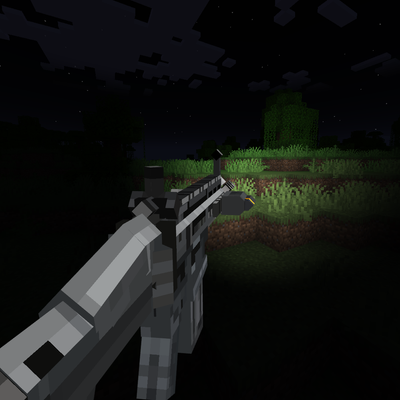
Adds TaCZ compatibility with Veil, as well as multiple visual effects using Veil
Quick answer
TaCZ: Lights taczlights-1.0.1.jar targets 1.21.1 with NeoForge. The project page does not say whether this file belongs on the client, dedicated server, or both. All 4 required mods have matching files.
Where it goes
The project page does not say whether this file belongs on the client, dedicated server, or both.
The source does not explicitly classify this release as client-only or server-only.
taczlights-1.0.1.jar. Change the file and its required mods may change too.
Install [TaCZ] Timeless and Classics Zero Guns, Veil Lib, [TaCZ] Timeless and Classics Zero, Veil first. We found matching files for this game-version and loader setup. 6 come through another mod in the chain.
6 extra mods were pulled in by other dependencies. Indented rows show who needs each one. We only count dependency files that match this setup. A file for another loader does not fill the gap.
Before you install it
Built for TaCZ: Lights taczlights-1.0.1.jar. Pick another file and the loader, install side or required mods may change.
Use taczlights-1.0.1.jar. It targets 1.21.1 with NeoForge; another release may have different loader, side or dependency requirements.
Install [TaCZ] Timeless and Classics Zero Guns, Veil Lib, [TaCZ] Timeless and Classics Zero, Veil first. We found matching files for this game-version and loader setup. 6 come through another mod in the chain.
The project page does not say whether this file belongs on the client, dedicated server, or both.
Use the “Get this file” button beside taczlights-1.0.1.jar. It opens that exact file at the source.
About this project
TaCZ Lights brings real dynamic lighting to Timeless and Classics Zero, powered by Veil. Flashlights light up the world in front of you, lasers put a dot of light where they hit, and every shot briefly lights up the area around the gun.
Everything is driven by gunpacks: authors add a small taczlights block to their existing TaCZ display files, no extra files and no code needed.
Found in config/taczlights-client.toml. It can be edited while the game is running.
Add a taczlights block to an attachment's display file:
"taczlights": {
  "default_mode": 0,
  "modes": [
    {
      "name": "Flood",
      "lights": [
        { "type": "spot", "bone": "light_pos", "color": "#FFF4E0", "brightness": 1.0, "distance": 24, "angle": 45 }
      ]
    },
    {
      "name": "Focused",
      "lights": [
        { "type": "spot", "bone": "light_pos", "color": "#FFF8F0", "brightness": 3.0, "distance": 60, "angle": 15 }
      ]
    }
  ],
  "laser_light": { "radius": 0.06, "softness": 0.6, "brightness": 2.0 }
}
laser_beam boneslaser_light sets the laser's dot. Lasers without one use the default dot, if the client config allows it"taczlights": { "muzzle_flash": { ... } }/tacz reload or F3+TTaCZ Lights must be installed on both the client and the server.
Found a bug or need help? TaCZ Lights has its own post in the TaCZ Discord server, where I answer questions and help with problems:
When reporting a problem, please include your latest.log and a list of your mods.
Project description from CurseForge.
Pick your setup
Choose the version and loader you play, then open the matching release.
Check the dependencies, then try the file in a copied instance before changing a world you care about.
Recent files
19 Nov 2026
29 Sept 2026
Looking for an older file? The official CurseForge project page is in Resources.
 mod
Doom Block adds a deadly block with instant damage to the game. Flexible settings and full compatibility with NeoForge.
 mod
Allows hotswapping mods live. Adding/updating mods, turning existing ones off/on. Browsing modrinth ingame.
 mod
Adds quality of life features to the stonecutter and more!