Minecraft version
Back to mods 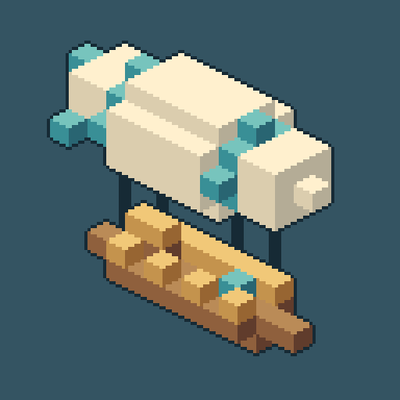
CurseForge · Minecraft mod
Zephyr's Flight
A mod that adds airships and boats to minecraft
Choose a version Pick your version below, then grab the matching file.
Quick answer
Which Zephyr's Flight release should I use?
Latest stable file zephyr-1.20.1-0.1.12.jar
Game version 1.20.1
Loader Forge
Zephyr's Flight zephyr-1.20.1-0.1.12.jar targets 1.20.1 with Forge. The project page does not say whether this file belongs on the client, dedicated server, or both. No extra mods listed for this file.
Where it goes
Is Zephyr's Flight required on the client, server, or both?
The project page does not say whether this file belongs on the client, dedicated server, or both.
Client Source doesn’t say
Dedicated server Source doesn’t say
Loader for this release Forge
Required install it here Optional supported, not mandatory Not supported do not install here Source doesn’t say do not assume
The source does not explicitly classify this release as client-only or server-only.
What else does Zephyr's Flight zephyr-1.20.1-0.1.12.jar need?
zephyr-1.20.1-0.1.12.jar. Change the file and its required mods may change too.
This file does not list any required mods. Do not add a library just because a different file uses it.
This file does not list any required or optional mods.
Before you install it
Add Zephyr's Flight without breaking your instance.
Built for Zephyr's Flight zephyr-1.20.1-0.1.12.jar. Pick another file and the loader, install side or required mods may change.
- 01
Stick to this file
Use zephyr-1.20.1-0.1.12.jar. It targets 1.20.1 with Forge; another release may have different loader, side or dependency requirements.
- 02
Bring the mods it needs
This file does not list any required mods. Do not add a library just because a different file uses it.
- 03
Put it on the correct side
The project page does not say whether this file belongs on the client, dedicated server, or both.
- 04
Pick the file you checked
Use the “Get this file” button beside zephyr-1.20.1-0.1.12.jar. It opens that exact file at the source.
About this project
What does Zephyr's Flight add?
Why should everything you build stay in one place?
Zephyr brings the classic Zeppelin-style experience to Minecraft 1.20.1, letting you turn block-built creations into flying airships, horizontally moving ships, elevators, and rotating platforms.
Build your creation, choose a controller, and set it in motion.
Four Controllers, Four Ways to Move
- Airship Controller: Move forward and backward, turn, and change altitude. Take your custom-built vessel into the skies.
- Ship Controller: Move forward and backward and turn while maintaining altitude.
- Elevator Controller: Move your build straight up and down. Ideal for lifts and rising platforms.
- Turntable Controller: Rotate your creation in place. Ideal for rotating platforms and displays.
Build It. Preview It. Move It.
Right-click a controller to highlight the blocks detected as your craft, then right-click again within ten seconds to activate it.
Use dedicated numpad controls to operate your creation while keeping your normal walking controls. Walk around on board, then dock your craft to return it to regular world blocks for further building.
Whether you’re making a small wooden skiff, a colorful sky cruiser, or a lift for your latest base, Zephyr gives your builds a new dimension of movement.
Project description from CurseForge.
Pick your setup
Zephyr's Flight by Minecraft version and loader
Choose the version and loader you play, then open the matching release.
Check the dependencies, then try the file in a copied instance before changing a world you care about.
Recent files
Zephyr's Flight versions and loaders
zephyr-1.20.1-0.1.12.jar
13 Oct 2026
Client Source doesn’t say Server Source doesn’t say Dependencies No extras listed Listed on Release listing
Check the 1.20.1 · Forge setup 1.20.1Forge release
zeppelin-1.20.1-0.1.11.jar
30 Sept 2026
Client Source doesn’t say Server Source doesn’t say Dependencies No extras listed Listed on Release listing
Check the 1.20.1 · Forge setup 1.20.1Forge release
Looking for an older file? The official CurseForge project page is in Resources.
 mod
mod CurseForge · Minecraft
Pulsar Universe
Become ZENIT, master of gravity, or ECHO, the man of two seconds — and fly seamlessly from your world to space, the Sun and the Moon
 mod
mod CurseForge · Minecraft
Teleportals Are Here
Use our beautiful Teleportals to travel across your world, See your destination before you leave. Take your Pet too!
 mod
mod CurseForge · Minecraft
无限加点-Infinite Stats
A Terraria-style infinite stat point system: kill mobs, level up, and spend points on 108 stats. Plus portable stations, an item editor, EMC transmutation, waypoints, and gun-mod support (TACZ / Superb Warfare).