Minecraft version
Back to mods 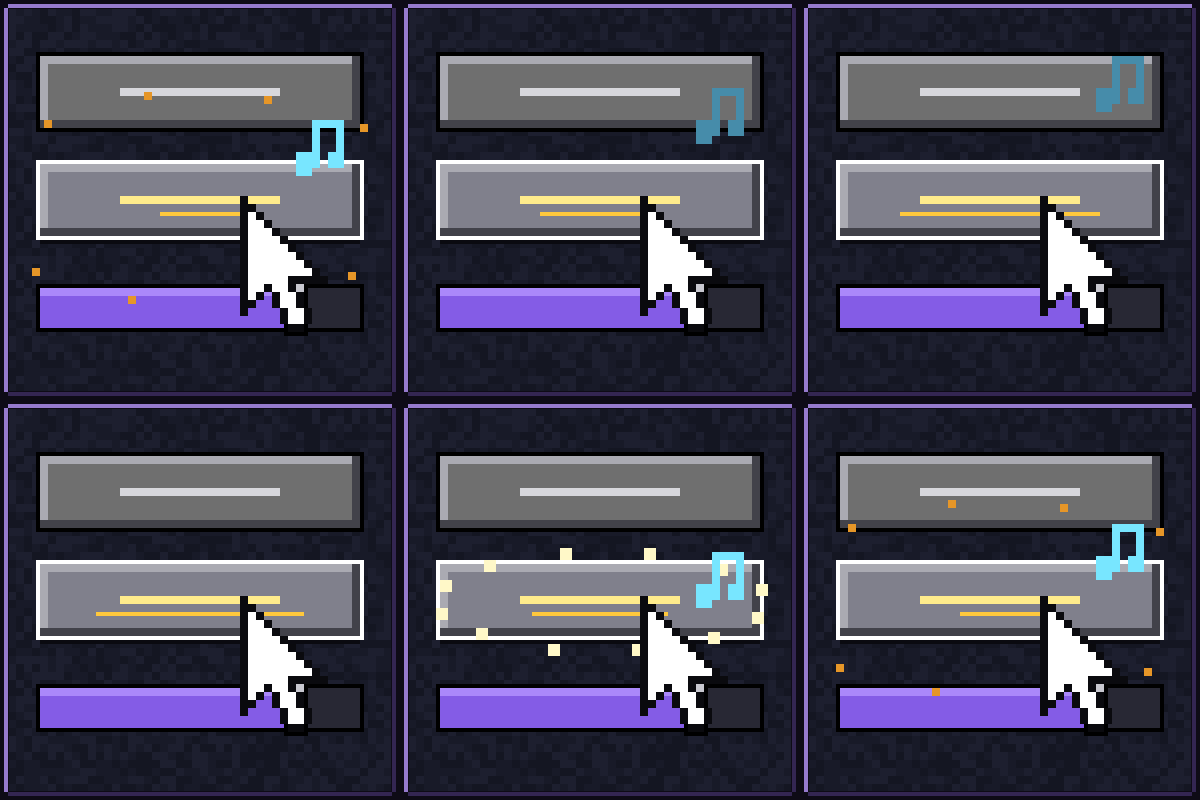
CurseForge · Minecraft mod
Satisfying UI: Buttons with Hover Animations & Sounds
Satisfying buttons for every menu: they rise and glow on hover with a soft tick, sink when clicked, and sliders click in rising notes as you drag. Works on other mods' screens too. Client-side, nothing to configure.
Choose a version Pick your version below, then grab the matching file.
Quick answer
Which Satisfying UI: Buttons with Hover Animations & Sounds release should I use?
Latest stable file Satisfying UI 0.1.1 for Minecraft 1.21.1 (NeoForge)
Game version 1.21.1
Loader NeoForge
Satisfying UI: Buttons with Hover Animations & Sounds Satisfying UI 0.1.1 for Minecraft 1.21.1 (NeoForge) targets 1.21.1 with NeoForge. The project page does not say whether this file belongs on the client, dedicated server, or both. No extra mods listed for this file.
Where it goes
Is Satisfying UI: Buttons with Hover Animations & Sounds required on the client, server, or both?
The project page does not say whether this file belongs on the client, dedicated server, or both.
Client Source doesn’t say
Dedicated server Source doesn’t say
Loader for this release NeoForge
Required install it here Optional supported, not mandatory Not supported do not install here Source doesn’t say do not assume
The source does not explicitly classify this release as client-only or server-only.
What else does Satisfying UI: Buttons with Hover Animations & Sounds Satisfying UI 0.1.1 for Minecraft 1.21.1 (NeoForge) need?
Satisfying UI 0.1.1 for Minecraft 1.21.1 (NeoForge). Change the file and its required mods may change too.
This file does not list any required mods. Do not add a library just because a different file uses it.
This file does not list any required or optional mods.
Before you install it
Add Satisfying UI: Buttons with Hover Animations & Sounds without breaking your instance.
Built for Satisfying UI: Buttons with Hover Animations & Sounds Satisfying UI 0.1.1 for Minecraft 1.21.1 (NeoForge). Pick another file and the loader, install side or required mods may change.
- 01
Stick to this file
Use Satisfying UI 0.1.1 for Minecraft 1.21.1 (NeoForge). It targets 1.21.1 with NeoForge; another release may have different loader, side or dependency requirements.
- 02
Bring the mods it needs
This file does not list any required mods. Do not add a library just because a different file uses it.
- 03
Put it on the correct side
The project page does not say whether this file belongs on the client, dedicated server, or both.
- 04
Pick the file you checked
Use the “Get this file” button beside Satisfying UI 0.1.1 for Minecraft 1.21.1 (NeoForge). It opens that exact file at the source.
About this project
What does Satisfying UI: Buttons with Hover Animations & Sounds add?
Menus that feel good to use.
Every button in the game answers the mouse, and sliders click as they move. Nothing to configure.
- Hover: the button rises a pixel in a quick, smooth motion, and a line of light grows out from its centre underneath.
- A very quiet tick when the mouse arrives on a button - once, not while you stay on it. It is the game's own click sound, pitched up and turned right down.
- Click: the button sinks for a moment, like a real key.
- Sliders (volume, FOV, brightness...): a soft click every 5% as you drag, higher as the value goes up, spaced so a fast drag never rattles.
- Keyboard too: a button picked with Tab or the arrow keys gets the same lift and light, without the tick.
- Disabled buttons stay still, so you can see at a glance what you can't press.
- Every screen: it is done on the game's own button and slider, so the title screen, the options, the world list and other mods' screens get it too.
Tested in game
- Fabric 26.3 and 26.2: the pointer run down the pause menu - each button rises and its line of light grows, with nothing out of place.
- NeoForge 26.2: loads cleanly to the main menu.
Client-side
Nothing to install on the server. Works on any server, in single player and on Realms. It adds no text of its own, so it works in any language.
Made by an indie dev with help from AI tools; every version is tested in game.
Modpacks
Feel free to include it in any modpack, no need to ask!
Like the mod? You can support future updates and new mods on Ko-fi. Totally optional, everything stays free.
Project description from CurseForge.
Pick your setup
Satisfying UI: Buttons with Hover Animations & Sounds by Minecraft version and loader
Choose the version and loader you play, then open the matching release.
Minecraft version
26.2
2 loader buildsMinecraft version
1.21.1
1 loader buildMinecraft version
1.20.1
1 loader buildCheck the dependencies, then try the file in a copied instance before changing a world you care about.
Recent files
Satisfying UI: Buttons with Hover Animations & Sounds versions and loaders
Satisfying UI 0.1.1 for Minecraft 1.21.1 (NeoForge)
satisfyingui-neoforge-mc1.21.1-0.1.1.jar
8 Nov 2026
Client Source doesn’t say Server Source doesn’t say Dependencies No extras listed Listed on Release listing
Check the 1.21.1 · NeoForge setup 1.21.1NeoForge release
Satisfying UI 0.1.1 for Minecraft 1.20.1 (Forge)
satisfyingui-forge-mc1.20.1-0.1.1.jar
8 Nov 2026
Client Source doesn’t say Server Source doesn’t say Dependencies No extras listed Listed on Release listing
Check the 1.20.1 · Forge setup 1.20.1Forge release
Satisfying UI 0.1.0 for Minecraft 26.2 (NeoForge)
satisfyingui-neoforge-mc26.2-0.1.0.jar
30 Sept 2026
Client Source doesn’t say Server Source doesn’t say Dependencies No extras listed Listed on Release listing
Check the 26.2 · NeoForge setup NeoForge26.2 release
Satisfying UI 0.1.0 for Minecraft 26.2 (Fabric)
satisfyingui-mc26.2-0.1.0.jar
30 Sept 2026
Client Source doesn’t say Server Source doesn’t say Dependencies 1 required · 1 unchecked Listed on Release listing
Check the 26.2 · Fabric setup Fabric26.2 release
Satisfying UI 0.1.0 for Minecraft 26.3 (Fabric)
satisfyingui-mc26.3-0.1.0.jar
30 Sept 2026
Client Source doesn’t say Server Source doesn’t say Dependencies 1 required · 1 unchecked Listed on Release listing
Check the 26.3 · Fabric setup Fabric26.3 release
Looking for an older file? The official CurseForge project page is in Resources.
 mod
CurseForge + Modrinth · Minecraft
Ae2 CraftCore
Break the chains of physical patterns! Store your AE2 recipes digitally on storage cells and virtualize your auto-crafting.
 mod
CurseForge · Minecraft
Ultimate Friendly Enderman
Have you ever wanted to tame a friendly Enderman? Build relationships, chat with custom dialogue, and turn Minecraft’s tall mystery mob into your loyal companion!
 mod
CurseForge · Minecraft
EssentialHomes(FABRIC/FORGE)
A simple, server-friendly mod that lets you set named homes and teleport to them.