Minecraft version
Back to mods 
CurseForge · Minecraft mod
Curvegen
Turn ellipses, equations and Bézier curves into blocks, slabs, stairs, walls and more. Preview the build in game, then place it or export it to Litematica.
Choose a version Pick your version below, then grab the matching file.
Quick answer
Which Curvegen release matches 26.3?
Best match for your filters Curve Generator 2.1.0+mc26.3-neoforge
Game version 26.3
Loader NeoForge
Curvegen Curve Generator 2.1.0+mc26.3-neoforge targets 26.3 with NeoForge. The project page does not say whether this file belongs on the client, dedicated server, or both. No extra mods listed for this file.
Where it goes
Is Curvegen required on the client, server, or both?
The project page does not say whether this file belongs on the client, dedicated server, or both.
Client Source doesn’t say
Dedicated server Source doesn’t say
Loader for this release NeoForge
Required install it here Optional supported, not mandatory Not supported do not install here Source doesn’t say do not assume
The source does not explicitly classify this release as client-only or server-only.
What else does Curvegen Curve Generator 2.1.0+mc26.3-neoforge need?
Curve Generator 2.1.0+mc26.3-neoforge on 26.3. Every mod below is checked against that same setup.
This file does not list any required mods. Do not add a library just because a different file uses it.
This file does not list any required or optional mods.
Before you install it
Add Curvegen without breaking your instance.
Built for Curvegen Curve Generator 2.1.0+mc26.3-neoforge on 26.3. Pick another file and the loader, install side or required mods may change.
- 01
Stick to this file
Use Curve Generator 2.1.0+mc26.3-neoforge. It targets 26.3 with NeoForge; another release may have different loader, side or dependency requirements.
- 02
Bring the mods it needs
This file does not list any required mods. Do not add a library just because a different file uses it.
- 03
Put it on the correct side
The project page does not say whether this file belongs on the client, dedicated server, or both.
- 04
Pick the file you checked
Use the “Get this file” button beside Curve Generator 2.1.0+mc26.3-neoforge. It opens that exact file at the source.
About this project
What does Curvegen add?
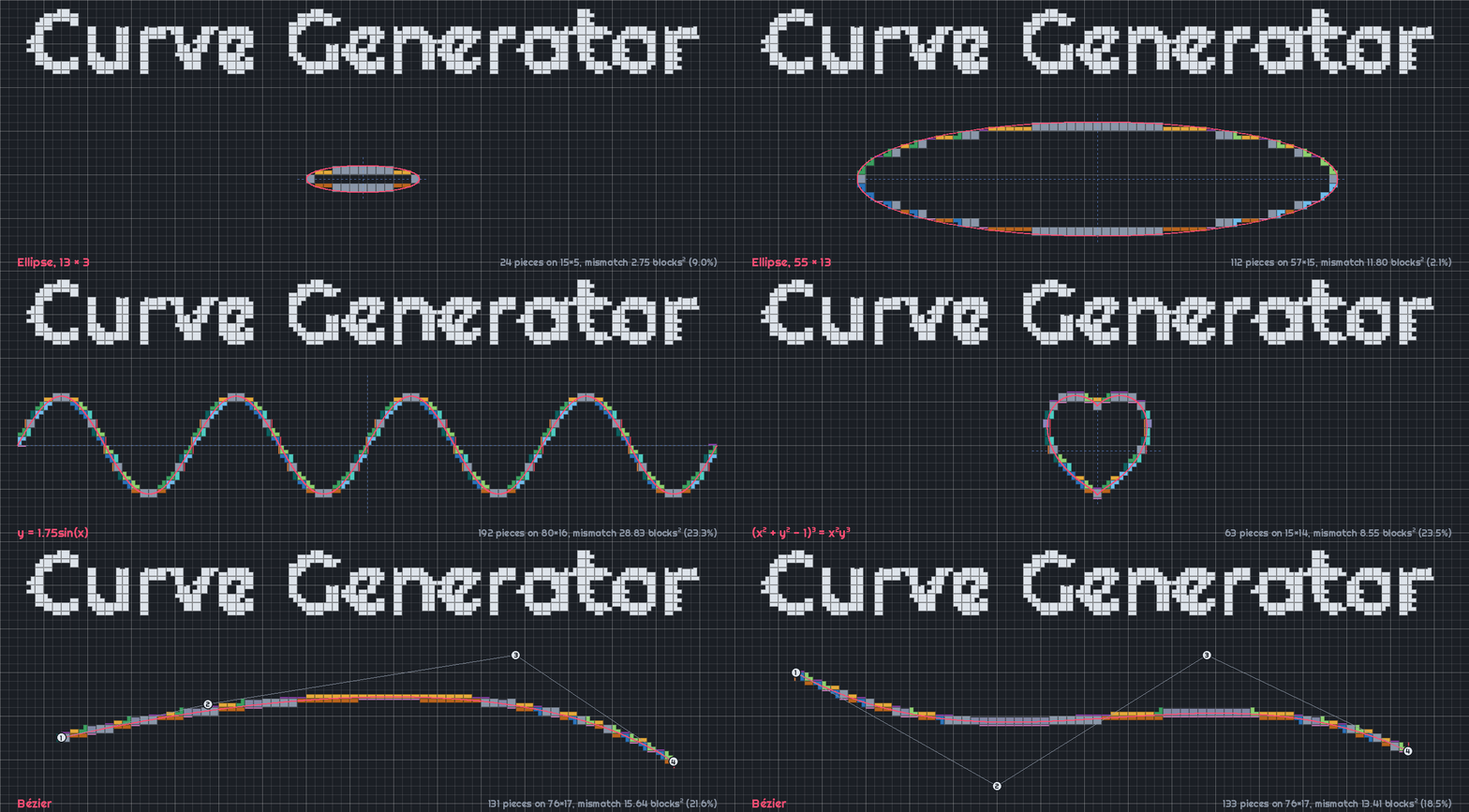



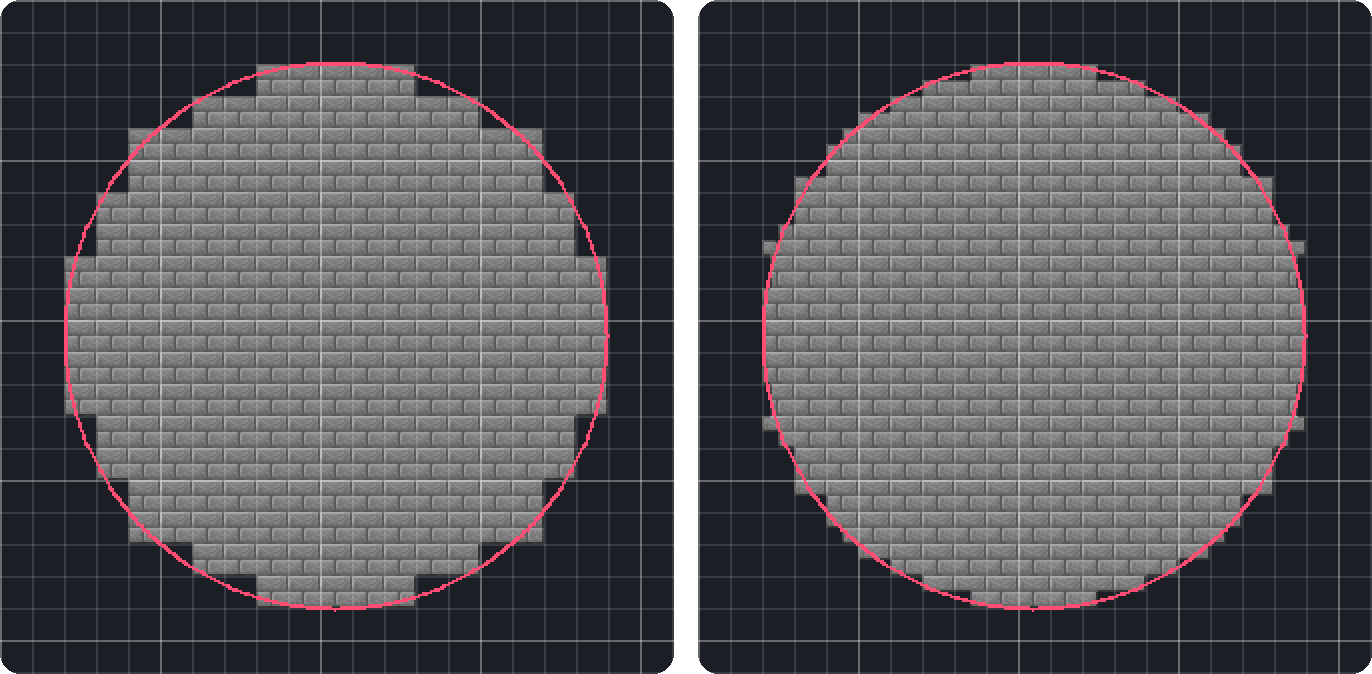
Curve Generator turns 2D and 3D shapes into Minecraft builds. It picks slabs, stairs, walls, fences, panes and other pieces for you, so shapes are smoother and more accurate than those generated with full blocks alone, such as with other tools or mods.
Hold V to open the radial menu, or press G to open the full menu.
Features
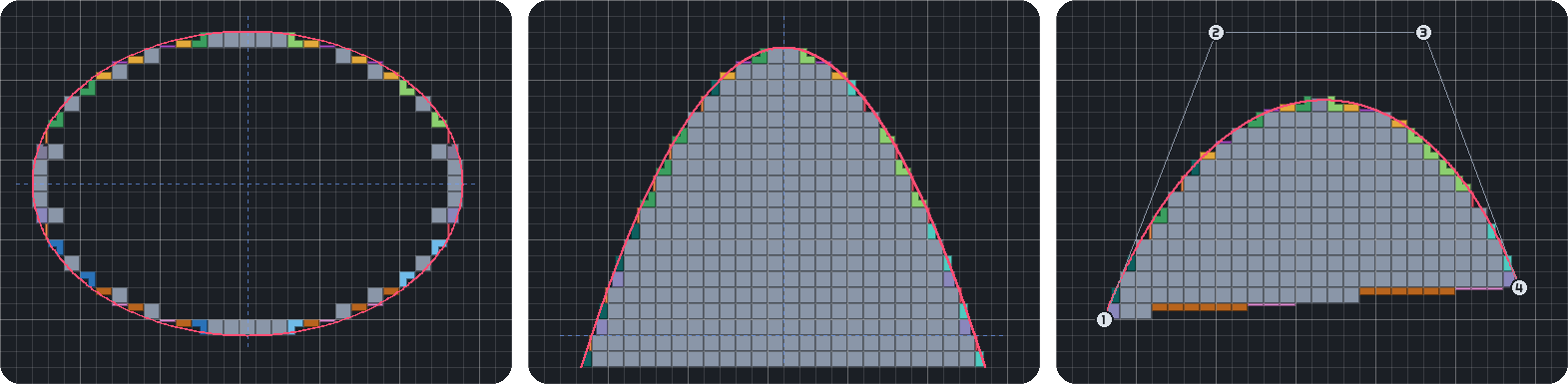
- 2D shapes
- Build ellipses, equations and Bézier curves.
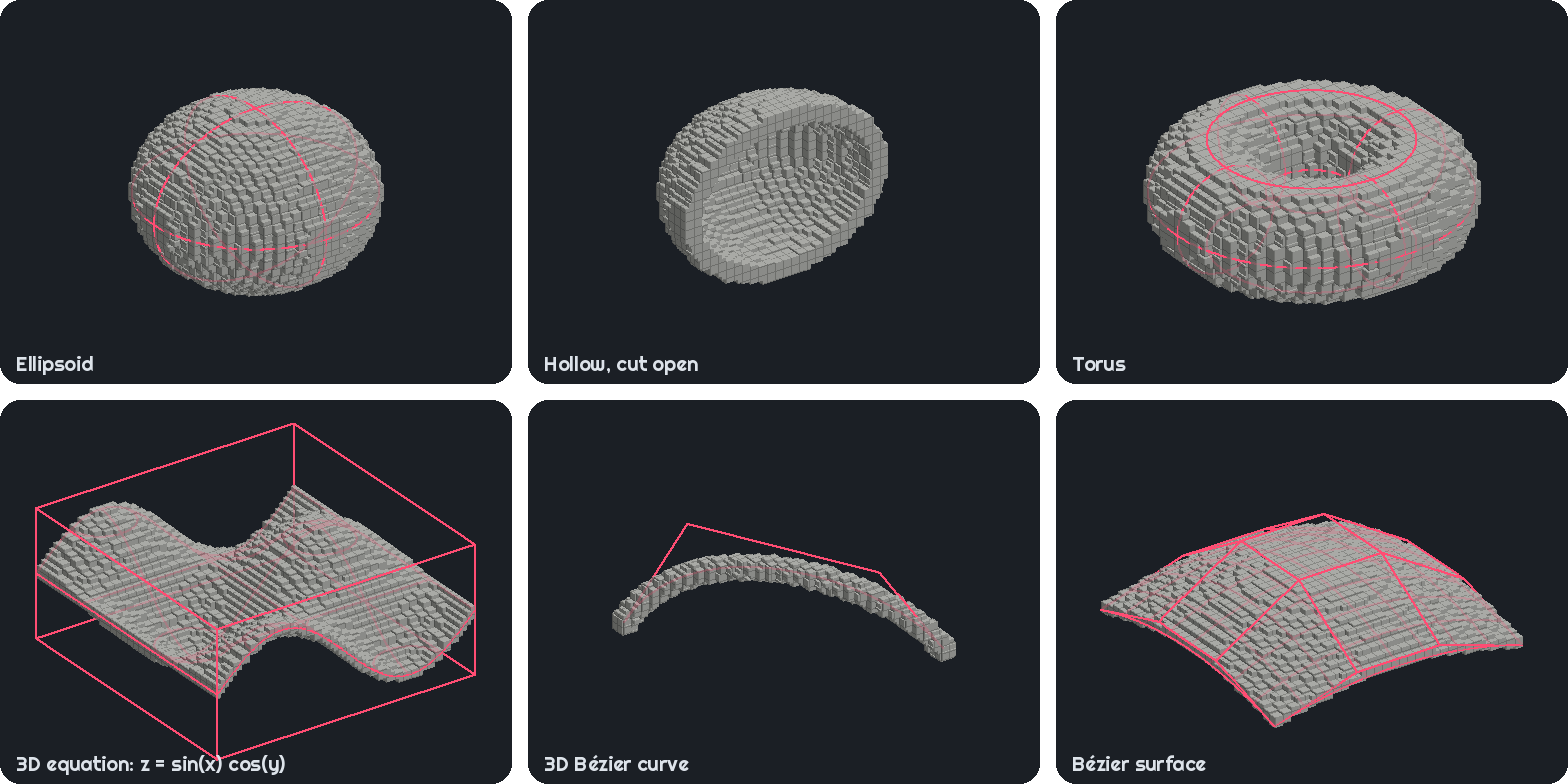
- 3D shapes
- Build ellipsoids, toruses, 3D equations, Bézier curves and surfaces.
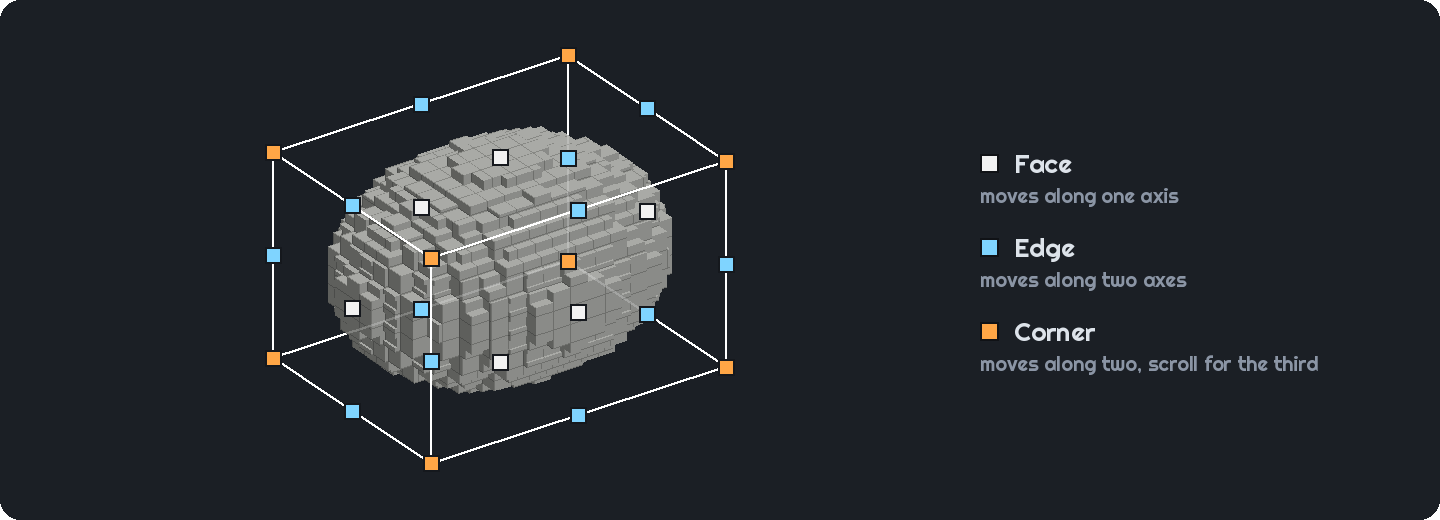
- Editable hologram
- Resize, move and bend your shape in the world before placing it.
- Block types
- Toggle which block types can be used to generate the shape. More block types available can increase accuracy.

- Colour matching
- Pick a colour and let the mod choose blocks with the closest textures.
- Block counts
- See how many of each block you'll need.
- Presets
- Save shapes with their block choices.
- Litematica export
- Save your shape as a
.litematicschematic.
- Save your shape as a
- Server support
- Place builds and undo your last placement even on servers without the mod. You'll need operator rights.
Links
- The wiki contains full documentation on how to use the mod.
- Report a bug or suggest a feature in the issue tracker.

Project description from CurseForge.
Pick your setup
Curvegen by Minecraft version and loader
Choose the version and loader you play, then open the matching release.
Minecraft version
26.2
2 loader buildsMinecraft version
26.1.2
2 loader buildsMinecraft version
26.1.1
2 loader buildsMinecraft version
26.1
2 loader buildsMinecraft version
1.21.11
2 loader buildsMinecraft version
1.21.10
1 loader buildMinecraft version
1.21.9
1 loader buildMinecraft version
1.21.8
1 loader buildMinecraft version
1.21.7
1 loader buildMinecraft version
1.21.6
1 loader buildMinecraft version
1.21.5
1 loader buildShowing the newest 12 of 17 game versions. Older files are in the list below.
Check the dependencies, then try the file in a copied instance before changing a world you care about.
Recent files
Curvegen versions and loaders
Curve Generator 2.1.0+mc26.3-neoforge
curvegen-neoforge-2.1.0.jar
17 Oct 2026
Client Source doesn’t say Server Source doesn’t say Dependencies No extras listed Listed on Release listing
Check the 26.3 · NeoForge setup NeoForge26.3 release
Curve Generator 2.1.0+mc26.3-fabric
curvegen-fabric-2.1.0.jar
17 Oct 2026
Client Source doesn’t say Server Source doesn’t say Dependencies 1 required · 1 unchecked Listed on Release listing
Check the 26.3 · Fabric setup Fabric26.3 release
Curve Generator 2.0.0+mc26.3-neoforge
curvegen-neoforge-2.0.0.jar
8 Oct 2026
Client Source doesn’t say Server Source doesn’t say Dependencies No extras listed Listed on Release listing
Check the 26.3 · NeoForge setup NeoForge26.3 release
Curve Generator 2.0.0+mc26.3-fabric
curvegen-fabric-2.0.0.jar
8 Oct 2026
Client Source doesn’t say Server Source doesn’t say Dependencies 1 required · 1 unchecked Listed on Release listing
Check the 26.3 · Fabric setup Fabric26.3 release
Curve Generator 1.3.1+mc26.3-fabric
curvegen-fabric-1.3.1.jar
6 Oct 2026
Client Source doesn’t say Server Source doesn’t say Dependencies 1 required · 1 unchecked Listed on Release listing
Check the 26.3 · Fabric setup Fabric26.3 release
Curve Generator 1.3.1+mc26.3-neoforge
curvegen-neoforge-1.3.1.jar
6 Oct 2026
Client Source doesn’t say Server Source doesn’t say Dependencies No extras listed Listed on Release listing
Check the 26.3 · NeoForge setup NeoForge26.3 release
Curve Generator 1.3.0+mc26.3-neoforge
curvegen-neoforge-1.3.0.jar
5 Oct 2026
Client Source doesn’t say Server Source doesn’t say Dependencies No extras listed Listed on Release listing
Check the 26.3 · NeoForge setup NeoForge26.3 release
Curve Generator 1.3.0+mc26.3-fabric
curvegen-fabric-1.3.0.jar
5 Oct 2026
Client Source doesn’t say Server Source doesn’t say Dependencies 1 required · 1 unchecked Listed on Release listing
Check the 26.3 · Fabric setup Fabric26.3 release
Curve Generator 1.2.0+mc26.3-neoforge
curvegen-neoforge-1.2.0.jar
4 Oct 2026
Client Source doesn’t say Server Source doesn’t say Dependencies No extras listed Listed on Release listing
Check the 26.3 · NeoForge setup NeoForge26.3 release
Curve Generator 1.2.0+mc26.3-fabric
curvegen-fabric-1.2.0.jar
4 Oct 2026
Client Source doesn’t say Server Source doesn’t say Dependencies 1 required · 1 unchecked Listed on Release listing
Check the 26.3 · Fabric setup Fabric26.3 release
Looking for an older file? The official CurseForge project page is in Resources.
 mod
mod CurseForge + Modrinth · Minecraft
Uncraft Everything
Crafted wrong item? Uncraft everything with this mod!
 mod
mod CurseForge + Modrinth · Minecraft
Glow Paste
Allows making any block emit light with Glow Paste!
 mod
mod CurseForge + Modrinth · Minecraft
AntOS Computer | Quests + Guidebook
An immersive and fully functioning computer that provides an anternative to the stale and overused quest book and guide book