Minecraft version
Back to mods 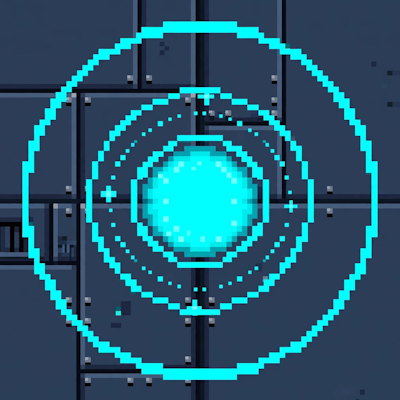
CurseForge · Minecraft mod
Pocket Places
Pocket Places adds a craftable machine that lets you create infinite personal permanent pocket dimensions.
Choose a version Pick your version below, then grab the matching file.
Quick answer
Which Pocket Places release should I use?
Latest stable file pocket_places-1.21.1-neoforge-1.21.1.jar
Game version 1.21.1
Loader NeoForge
Pocket Places pocket_places-1.21.1-neoforge-1.21.1.jar targets 1.21.1 with NeoForge. The project page does not say whether this file belongs on the client, dedicated server, or both. No extra mods listed for this file.
Where it goes
Is Pocket Places required on the client, server, or both?
The project page does not say whether this file belongs on the client, dedicated server, or both.
Client Source doesn’t say
Dedicated server Source doesn’t say
Loader for this release NeoForge
Required install it here Optional supported, not mandatory Not supported do not install here Source doesn’t say do not assume
The source does not explicitly classify this release as client-only or server-only.
What else does Pocket Places pocket_places-1.21.1-neoforge-1.21.1.jar need?
pocket_places-1.21.1-neoforge-1.21.1.jar. Change the file and its required mods may change too.
This file does not list any required mods. Do not add a library just because a different file uses it.
This file does not list any required or optional mods.
Before you install it
Add Pocket Places without breaking your instance.
Built for Pocket Places pocket_places-1.21.1-neoforge-1.21.1.jar. Pick another file and the loader, install side or required mods may change.
- 01
Stick to this file
Use pocket_places-1.21.1-neoforge-1.21.1.jar. It targets 1.21.1 with NeoForge; another release may have different loader, side or dependency requirements.
- 02
Bring the mods it needs
This file does not list any required mods. Do not add a library just because a different file uses it.
- 03
Put it on the correct side
The project page does not say whether this file belongs on the client, dedicated server, or both.
- 04
Pick the file you checked
Use the “Get this file” button beside pocket_places-1.21.1-neoforge-1.21.1.jar. It opens that exact file at the source.
About this project
What does Pocket Places add?
Place a Pocket Core anywhere in the Overworld and use the core to generate a private void world tied to that block.
How it works:
Pocket Core - A heavy, riveted machine block with a glowing cyan core. It has two states: inactive and active, plus a special return variant.
/pocket create <size> - Stand on top of an inactive Pocket Core and run the command.
Example: /pocket create 10 (min: 10 ~ max: 128)
Pocket Places finds a free spot in the pocket_places:pocket_dimension and generates a deepslate bricks floor pocket of the size you specified. The core in the Overworld is linked to that pocket and stores its center coordinates, its size, and its ID. A second core, the Return Core, is automatically placed inside the pocket. It remembers your Overworld dimension and return coordinates.
- Teleporting
Right-click an active Overworld Pocket Core -> teleports you to the center of its pocket.
Right-click the Return Core inside -> teleports you back to where you created it.
- Built for survival
Multi-core support: Place as many cores as you want.
Each one keeps its own data and survives world reloads.
- Permanent Cores mean Permanent Pocket Places.
Both the Pocket Core and the Return Core cannot be broken in Survival or Creative Mode.
Perfect for personal bases, storage vaults, farm chunks, or magic labs — each player can have their own network of pocket places, all accessed through a simple machine block.
Pocket Core Recipe: 4 Obsidian, 3 Ender Eyes, 1 Block of Amethyst, and 1 Heart of the Sea.
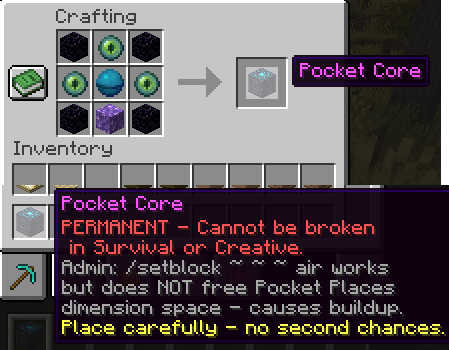
/give @p pocket_places:pocket_core
Project description from CurseForge.
Pick your setup
Pocket Places by Minecraft version and loader
Choose the version and loader you play, then open the matching release.
Check the dependencies, then try the file in a copied instance before changing a world you care about.
Recent files
Pocket Places versions and loaders
pocket_places-1.21.1-neoforge-1.21.1.jar
2 Oct 2026
Client Source doesn’t say Server Source doesn’t say Dependencies No extras listed Listed on Release listing
Check the 1.21.1 · NeoForge setup 1.21.1NeoForge release
Looking for an older file? The official CurseForge project page is in Resources.
 mod
mod CurseForge + Modrinth · Minecraft
Music Player
Play music from many sources like youtube, soundcloud or radio livestreams
 mod
mod CurseForge + Modrinth · Minecraft
Dungeon Train: A Lore-Rich Roguelite RPG Adventure
Adventure time inspired dungeon crawler on a train. Procedurally generated carriages on a infinite sable physics train. Rich narrative, with custom made mods for a completely unique experience.
 mod
mod CurseForge · Minecraft
BLib: Resurrection
Cloned with permission. Continuation of the Blib Library. Dependency of AVP mods.