Minecraft version
Back to mods 
CurseForge · Minecraft mod
Entropy Inversion Protocol
You can deliver devastating strikes to any desired location using extragalactic, "cosmic"-level weaponry that far surpasses current technological limits.
Choose a version Pick your version below, then grab the matching file.
Quick answer
Which Entropy Inversion Protocol release should I use?
beta file entropyinversion [0.2.0]
Game version 1.20.1
Loader Forge
Entropy Inversion Protocol entropyinversion [0.2.0] targets 1.20.1 with Forge. The project page does not say whether this file belongs on the client, dedicated server, or both. No extra mods listed for this file.
Where it goes
Is Entropy Inversion Protocol required on the client, server, or both?
The project page does not say whether this file belongs on the client, dedicated server, or both.
Client Source doesn’t say
Dedicated server Source doesn’t say
Loader for this release Forge
Required install it here Optional supported, not mandatory Not supported do not install here Source doesn’t say do not assume
The source does not explicitly classify this release as client-only or server-only.
What else does Entropy Inversion Protocol entropyinversion [0.2.0] need?
entropyinversion [0.2.0]. Change the file and its required mods may change too.
This file does not list any required mods. Do not add a library just because a different file uses it.
This file does not list any required or optional mods.
Before you install it
Add Entropy Inversion Protocol without breaking your instance.
Built for Entropy Inversion Protocol entropyinversion [0.2.0]. Pick another file and the loader, install side or required mods may change.
- 01
Stick to this file
Use entropyinversion [0.2.0]. It targets 1.20.1 with Forge; another release may have different loader, side or dependency requirements.
- 02
Bring the mods it needs
This file does not list any required mods. Do not add a library just because a different file uses it.
- 03
Put it on the correct side
The project page does not say whether this file belongs on the client, dedicated server, or both.
- 04
Pick the file you checked
Use the “Get this file” button beside entropyinversion [0.2.0]. It opens that exact file at the source.
About this project
What does Entropy Inversion Protocol add?
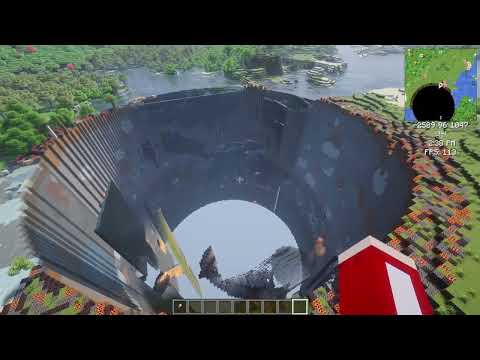
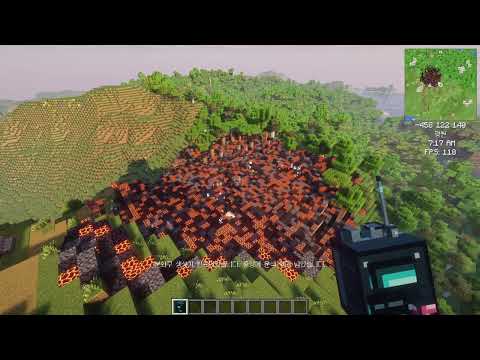
Entropy Inversion Protocol
Entropy Inversion Protocol is a Minecraft Forge 1.20.1 mod.
This project was vibe-coded with the assistance of AI.
Strike a designated position with an advanced weapon from beyond the galaxy, erasing terrain and entities in the surrounding area.
[!CAUTION] Strikes permanently destroy terrain. Back up your world before use.
Quick Start
- Obtain the Entropy Inversion Requestor from the Tools & Utilities tab in Creative mode.
- Hold the item and right-click to enter targeting mode. Crouch and right-click to open the attack mode selector.
- At a range of up to 1,024 blocks, briefly left-click a block or fluid, such as water, to select it. The selected block is highlighted with a cyan outline. Briefly left-click another position to change the target.
- Set the strike radius, then hold left-click for one second to request the strike.
- The selected attack begins after its 10-second countdown.
Controls
| Input | Action |
|---|---|
| Right-click | Enter targeting mode |
| Crouch + right-click | Open attack mode selector; hover over a mode for its description |
| Brief left-click | Select or change the targeted block |
| Hold left-click for 1 second | Request a strike at the selected target |
| Mouse wheel | Adjust the radius in 5-block increments |
| Alt + mouse wheel | Adjust the radius in 1-block increments |
| Right-click or Esc | Cancel targeting |
The mouse wheel does not change hotbar slots while targeting. The initial radius is 10 blocks, and the last selected radius is retained for the next targeting session. The radius can be set from 1 to 200 blocks. The maximum target range is 1,024 blocks. For distant targets, the server loads the relevant chunk and validates the line of sight and target block.
Attack Modes
Crouch and right-click with the Requestor to choose a mode. Hover over a mode to read its in-game description.
- Entropy Inversion Protocol destroys blocks and eliminates entities throughout a full-height cylinder around the target, based on the selected radius.
- Asteroid Guidance calls down a meteor whose size scales with the selected radius. It clears blocks above the target's ground level, carves a bowl-shaped crater within the impact radius, and eliminates entities in the impact area.
- Anti-organic Microbots releases microbots that eliminate living entities throughout a full-height cylinder around the target, based on the selected radius. Targets are marked in advance, and blocks are not damaged. The microbots pass through blocks, so they can reach targets deep underground.
Behavior and Limitations
- Players in Creative or Spectator mode are excluded from entity removal.
- The Requestor is not consumed and has a 10-second cooldown after a strike is requested.
- Target and radius-boundary particles appear while aiming.
- The Requestor cannot be crafted; it is available in Creative mode.
Future Plans
- Cutscenes will be revised to better fit each attack mode.
엔트로피 역전 프로토콜
Entropy Inversion Protocol은 Minecraft Forge 1.20.1용 모드입니다.
이 프로젝트는 AI의 도움을 받아 바이브 코딩으로 개발되었습니다.
은하 너머의 오버테크놀로지 무기로 지정한 좌표를 타격하고, 그 주변의 지형과 엔티티를 소멸시킵니다.
[!CAUTION] 타격은 지형을 영구적으로 파괴합니다. 사용 전에 월드를 백업하세요.
빠른 시작
- 크리에이티브 모드의 도구 및 유용한 물건 탭에서 엔트로피 역전 요청기를 획득합니다.
- 아이템을 들고 우클릭해 조준 모드에 들어갑니다. 웅크린 채 우클릭하면 공격 모드 선택 화면이 열립니다.
- 최대 1024블록 거리에서 바라보는 블록이나 물 같은 액체를 짧게 좌클릭해 목표를 지정합니다. 선택된 블록은 청록색 외곽선으로 강조되며, 다른 지점을 짧게 좌클릭하면 목표를 변경할 수 있습니다.
- 타격 반경을 설정한 뒤 좌클릭을 1초 동안 길게 눌러 타격을 요청합니다.
- 선택한 공격의 10초 카운트다운 후 시작됩니다.
조작법
| 입력 | 동작 |
|---|---|
| 우클릭 | 조준 모드 진입 |
| 웅크린 채 우클릭 | 공격 모드 선택 화면 열기 · 모드 위에 커서를 올려 설명 확인 |
| 짧게 좌클릭 | 바라보는 블록을 목표로 지정하거나 변경 |
| 좌클릭 1초간 누르기 | 지정된 목표에 타격 요청 |
| 마우스 휠 | 반경을 5블록씩 조정 |
| Alt + 마우스 휠 | 반경을 1블록씩 정밀 조정 |
| 우클릭 또는 Esc | 조준 취소 |
첫 조준의 기본 반경은 10블록이며, 반경을 변경하면 다음 조준에도 마지막 값이 유지됩니다. 반경은 1~200블록까지 설정할 수 있습니다. 목표 지정 최대 거리는 1024블록입니다. 먼 거리의 목표는 서버가 해당 청크를 불러온 뒤 시야 경로와 목표 블록을 검증합니다.
공격 모드
요청기를 웅크린 채 우클릭해 모드를 선택하세요. 모드 위에 커서를 올리면 게임 내 설명을 확인할 수 있습니다.
- 엔트로피 역전 프로토콜은 지정한 반경에 따라 목표 주위의 월드 전체 높이 원기둥 범위에서 블록을 파괴하고 엔티티를 제거합니다.
- 소행성 유도는 목표 반경에 비례하는 크기의 소행성을 호출합니다. 충돌 지표 높이 위의 블록을 제거하고 범위 내 충돌 지점에 그릇 모양 분화구를 만들며, 충돌 범위의 엔티티를 제거합니다.
- 반유기체 마이크로봇 살포는 반유기체 마이크로봇을 살포하여 월드 전체 높이 원기둥 범위 내의 생명체를 제거합니다. 제거 대상은 미리 표시되며 블록은 손상되지 않습니다. 마이크로봇이기에 블록을 통과하여 땅 깊숙히 숨은 목표도 제거합니다.
동작 및 제한
- 크리에이티브 및 관전 모드 플레이어는 엔티티 제거 대상에서 제외됩니다.
- 요청기는 소모되지 않으며, 타격 요청 후 10초의 재사용 대기시간이 있습니다.
- 조준 시 목표 지점과 반경 경계에 입자 효과가 표시됩니다.
- 요청기는 제작할 수 없으며 크리에이티브 모드에서 획득할 수 있습니다.
향후 계획
- 각 모드에 따른 컷씬 연출 변경
Project description from CurseForge.
Pick your setup
Entropy Inversion Protocol by Minecraft version and loader
Choose the version and loader you play, then open the matching release.
Check the dependencies, then try the file in a copied instance before changing a world you care about.
Recent files
Entropy Inversion Protocol versions and loaders
entropyinversion [0.2.0]
entropyinversion-0.2.0.jar
6 Oct 2026
Client Source doesn’t say Server Source doesn’t say Dependencies No extras listed Listed on Release listing
Check the 1.20.1 · Forge setup 1.20.1Forge beta
entropyinversion [0.1.1]
entropyinversion-0.1.1.jar
5 Oct 2026
Client Source doesn’t say Server Source doesn’t say Dependencies No extras listed Listed on Release listing
Check the 1.20.1 · Forge setup 1.20.1Forge beta
entropyinversion [0.1.0]
entropyinversion-0.1.0.jar
4 Oct 2026
Client Source doesn’t say Server Source doesn’t say Dependencies No extras listed Listed on Release listing
Check the 1.20.1 · Forge setup 1.20.1Forge beta
entropyinversion [0.0.1]
entropyinversion-0.0.1.jar
3 Oct 2026
Client Source doesn’t say Server Source doesn’t say Dependencies No extras listed Listed on Release listing
Check the 1.20.1 · Forge setup 1.20.1Forge alpha
Looking for an older file? The official CurseForge project page is in Resources.
 mod
mod CurseForge + Modrinth · Minecraft
Remnant Bosses
Face the deadliest bosses ever forged combat, fights, and chaos await!
 mod
mod CurseForge · Minecraft
FatePhantasms
Skill creation from Fate
 mod
mod CurseForge + Modrinth · Minecraft
Just Enough Effect Descriptions (JEED)
JEI/REI/EMI plugin that displays information on all potion and status effects