Headquarters (HQ) Optional for skindependence-1.0.0.jar
optionalMatching file found Matched file: hq-1.0.2.jar
CurseForge · Minecraft mod
Change your skin and cape to any local skin file on your system with official capes included.
Quick answer
skindependence-1.0.0.jar targets 26.3 with Fabric. The project page does not say whether this file belongs on the client, dedicated server, or both. No extra mods listed for this file.
Where it goes
The project page does not say whether this file belongs on the client, dedicated server, or both.
The source does not explicitly classify this release as client-only or server-only.
skindependence-1.0.0.jar. Change the file and its required mods may change too.
This file does not list any required mods. Do not add a library just because a different file uses it.
We only count dependency files that match this setup. A file for another loader does not fill the gap.
Before you install it
Built for skindependence-1.0.0.jar. Pick another file and the loader, install side or required mods may change.
Use skindependence-1.0.0.jar. It targets 26.3 with Fabric; another release may have different loader, side or dependency requirements.
This file does not list any required mods. Do not add a library just because a different file uses it.
The project page does not say whether this file belongs on the client, dedicated server, or both.
Use the “Get this file” button beside skindependence-1.0.0.jar. It opens that exact file at the source.
About this project
(Fabric)
Notice: Any Skins has been renamed to Skindependence.
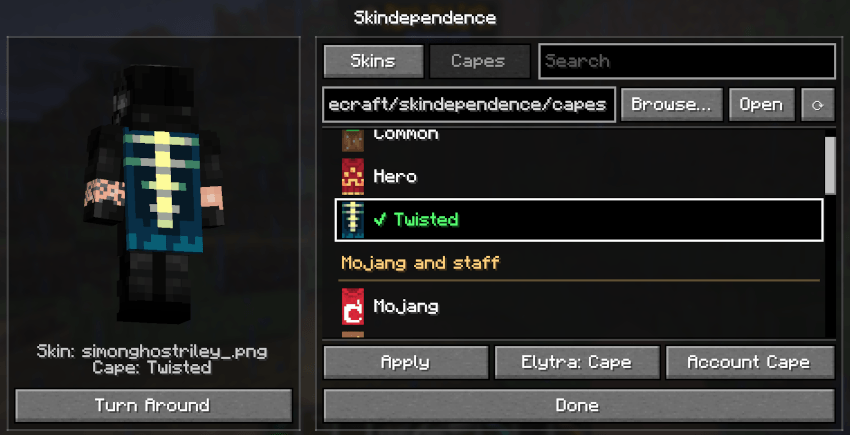
Wear any skin from a folder on your computer, and any cape from a built-in list of more than 80 (or your own), with no account changes and no uploading to websites. Friends with the mod see your skin and cape too.
K (rebindable under Controls > Skindependence) or type /skindependence..png skins into the skins folder (default: .minecraft/skindependence/)..png files into the capes folder (default: .minecraft/skindependence/capes/). They show at the top as "Your capes". HD capes (128x64 and up) work too./skindependence — Open the skin screen (same as the K key).Saved in config/skindependence.json:
{
  "skinsFolder": ".minecraft/skindependence/",
  "capesFolder": ".minecraft/skindependence/capes/",
  "chosenSkin": "skin.png",
  "chosenCape": "cape.png",
  "armStyle": "Wide / Slim",
  "elytraSetting": "Matches Cape / Account's"
}
All set from the screen.
With HQ installed, an "Skindependence" button in the HQ list opens /skindependence. Without HQ the mod works exactly the same.
Project description from CurseForge.
Pick your setup
Choose the version and loader you play, then open the matching release.
Check the dependencies, then try the file in a copied instance before changing a world you care about.
Recent files
17 Oct 2026
17 Oct 2026
6 Oct 2026
4 Oct 2026
Looking for an older file? The official CurseForge project page is in Resources.
 mod
mod(26.x port) Also adds some QoL features and mod compatibility to the original Polymorph mod. No more recipe conflicts!
 mod
modIlluminate your world with a flashlight!
 mod
modA work in progress modern remaster of General Layman's Aesthetic Spying Screen.