Minecraft version
Back to mods 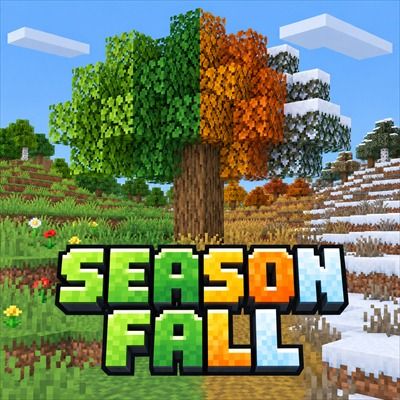
CurseForge · Minecraft mod
Seasonfall
Server-side seasons: biome colours, snow and ice, crop growth and day length follow a smooth year, and players can join without the mod installed.
Choose a version Pick your version below, then grab the matching file.
Quick answer
Which Seasonfall release should I use?
Latest stable file seasonfall-forge-1.0.0+1.20.1.jar
Game version 1.20.1
Loader Forge
seasonfall-forge-1.0.0+1.20.1.jar targets 1.20.1 with Forge. The project page does not say whether this file belongs on the client, dedicated server, or both. No extra mods listed for this file.
Where it goes
Is Seasonfall required on the client, server, or both?
The project page does not say whether this file belongs on the client, dedicated server, or both.
Client Source doesn’t say
Dedicated server Source doesn’t say
Loader for this release Forge
Required install it here Optional supported, not mandatory Not supported do not install here Source doesn’t say do not assume
The source does not explicitly classify this release as client-only or server-only.
What else does seasonfall-forge-1.0.0+1.20.1.jar need?
seasonfall-forge-1.0.0+1.20.1.jar. Change the file and its required mods may change too.
This file does not list any required mods. Do not add a library just because a different file uses it.
This file does not list any required or optional mods.
Before you install it
Add Seasonfall without breaking your instance.
Built for seasonfall-forge-1.0.0+1.20.1.jar. Pick another file and the loader, install side or required mods may change.
- 01
Stick to this file
Use seasonfall-forge-1.0.0+1.20.1.jar. It targets 1.20.1 with Forge; another release may have different loader, side or dependency requirements.
- 02
Bring the mods it needs
This file does not list any required mods. Do not add a library just because a different file uses it.
- 03
Put it on the correct side
The project page does not say whether this file belongs on the client, dedicated server, or both.
- 04
Pick the file you checked
Use the “Get this file” button beside seasonfall-forge-1.0.0+1.20.1.jar. It opens that exact file at the source.
About this project
What does Seasonfall add?
Seasonfall
Seasons for Minecraft servers. Players join with an unmodified game and watch the world change through the year.
Seasonfall runs one continuous year: spring, summer, autumn and winter. Nothing flips over when a season starts; temperatures, colours, crop growth and day length all move smoothly through the year, and every biome responds according to its own climate. Plains swing strongly, jungles barely change, deserts cool down but stay dry, and snowy biomes stay frozen.
It is server-side: players don't need to install anything. Installing Seasonfall on a client is optional and only makes the colour changes show up live instead of the next time the player joins.
What changes
- Temperature: each biome follows a yearly temperature curve scaled to its climate.
- Snow: where winter makes a biome cold enough, rain falls as snow and settles, using the game's own weather. Nothing is placed when winter starts.
- Ice: still water freezes the way it does in snowy biomes, gradually from the edges in.
- Thaw: in spring, snow open to the sky melts a layer at a time and exposed ice turns back into water. Snow and ice under a roof are left alone.
- Leaves and grass: light yellow-green spring leaves, deep summer green, yellow-orange-brown autumn leaves over olive grass, and grey winter leaves and grass. Evergreen, tropical and dry biomes change much less. Players with the mod also see birch, spruce, cherry, azalea and pale oak leaves change.
- Crops: growth speeds up or slows down with the seasons, by crop type (most crops slow to 0.4x in winter; melons, pumpkins and other warm-season crops even more). Crops under a glass roof grow at least at normal speed all year.
- Day length: longer days in summer and longer nights in winter. A full day still takes the usual time.
- Weather: rain and thunderstorms become more or less frequent through the year.
There are no new items, blocks or screens, and no chat messages: players notice the seasons by the world changing around them.
Settings
Everything is in config/seasonfall.json, with a comment above every option:
- season length (24 days each by default), and which dimensions have seasons
- whether the seasons wait while nobody is online (on by default; the server itself keeps running)
- the yearly temperature curve
- leaf and grass colours for every kind of biome, and how many colour steps the year has
- crop growth speeds by group, per crop (vanilla or modded) and per biome
- freezing, snow and the thaw temperature
- summer and winter day length
- per-biome changes for vanilla or modded biomes
Modded biomes get sensible seasons automatically from their own climate and tags.
Operators can use /seasonfall season, /seasonfall setseason, /seasonfall setday, /seasonfall pause, /seasonfall resume and /seasonfall reload.
Compatibility
- Fabric: requires Fabric API.
- NeoForge: no other mods needed.
- Forge: no other mods needed.
- Elapsed: crops left unloaded catch up by the seasons they actually spent unloaded.
- Stormcell: Seasonfall shares the season's climate with the Stormcell weather mod instead of changing vanilla weather.
Source code and issue tracker: github.com/Romoslayer/Seasonfall
Project description from CurseForge.
Pick your setup
Seasonfall by Minecraft version and loader
Choose the version and loader you play, then open the matching release.
Minecraft version
26.2
3 loader buildsMinecraft version
1.21.1
3 loader buildsMinecraft version
1.20.1
3 loader buildsCheck the dependencies, then try the file in a copied instance before changing a world you care about.
Recent files
Seasonfall versions and loaders
seasonfall-forge-1.0.0+1.20.1.jar
9 Oct 2026
Client Source doesn’t say Server Source doesn’t say Dependencies No extras listed Listed on Release listing
Check the 1.20.1 · Forge setup 1.20.1Forge release
seasonfall-forge-1.0.0+1.21.1.jar
9 Oct 2026
Client Source doesn’t say Server Source doesn’t say Dependencies No extras listed Listed on Release listing
Check the 1.21.1 · Forge setup Forge1.21.1 release
seasonfall-neoforge-1.0.0+1.20.1.jar
9 Oct 2026
Client Source doesn’t say Server Source doesn’t say Dependencies No extras listed Listed on Release listing
Check the 1.20.1 · NeoForge setup 1.20.1NeoForge release
seasonfall-neoforge-1.0.0+1.21.1.jar
9 Oct 2026
Client Source doesn’t say Server Source doesn’t say Dependencies No extras listed Listed on Release listing
Check the 1.21.1 · NeoForge setup 1.21.1NeoForge release
seasonfall-fabric-1.0.0+1.20.1.jar
9 Oct 2026
Client Source doesn’t say Server Source doesn’t say Dependencies 1 required · 1 unchecked Listed on Release listing
Check the 1.20.1 · Fabric setup Fabric1.20.1 release
seasonfall-fabric-1.0.0+1.21.1.jar
9 Oct 2026
Client Source doesn’t say Server Source doesn’t say Dependencies 1 required · 1 unchecked Listed on Release listing
Check the 1.21.1 · Fabric setup Fabric1.21.1 release
seasonfall-forge-1.0.0+26.2.jar
6 Oct 2026
Client Source doesn’t say Server Source doesn’t say Dependencies No extras listed Listed on Release listing
Check the 26.2 · Forge setup Forge26.2 release
seasonfall-forge-1.0.0+26.3.jar
6 Oct 2026
Client Source doesn’t say Server Source doesn’t say Dependencies No extras listed Listed on Release listing
Check the 26.3 · Forge setup Forge26.3 release
seasonfall-neoforge-1.0.0+26.2.jar
4 Oct 2026
Client Source doesn’t say Server Source doesn’t say Dependencies No extras listed Listed on Release listing
Check the 26.2 · NeoForge setup NeoForge26.2 release
seasonfall-neoforge-1.0.0+26.3.jar
4 Oct 2026
Client Source doesn’t say Server Source doesn’t say Dependencies No extras listed Listed on Release listing
Check the 26.3 · NeoForge setup NeoForge26.3 release
seasonfall-fabric-1.0.0+26.2.jar
4 Oct 2026
Client Source doesn’t say Server Source doesn’t say Dependencies 1 required · 1 unchecked Listed on Release listing
Check the 26.2 · Fabric setup Fabric26.2 release
seasonfall-fabric-1.0.0+26.3.jar
4 Oct 2026
Client Source doesn’t say Server Source doesn’t say Dependencies 1 required · 1 unchecked Listed on Release listing
Check the 26.3 · Fabric setup Fabric26.3 release
Looking for an older file? The official CurseForge project page is in Resources.
 mod
mod CurseForge · Minecraft
Scrap Tech: Modular Multitool
A standalone, upgradeable multitool with replaceable energy cells and modules. Works as pickaxe, axe, shovel, hoe, shears and more.
 mod
mod CurseForge + Modrinth · Minecraft
TouchFire
👉 Adds an ignition system and makes torches more realistic 🔥 Dropped torches can set nearby flammable blocks on fire.
 mod
mod GitHub · Minecraft
modpacks-ch-github-test
Disposable public fixture for testing the Modpacks.ch GitHub catalogue flow