Minecraft version
Back to mods 
CurseForge · Minecraft mod
Preview Structures
Preview, rotate, and place your structures with a custom-built interface that brings greater control and flexibility to Minecraft Java Edition.
Choose a version Pick your version below, then grab the matching file.
Quick answer
Which Preview Structures release should I use?
Latest stable file ps-26.1.2-neoforge-26.1.2.jar
Game version 26.1.2
Loader NeoForge
Preview Structures ps-26.1.2-neoforge-26.1.2.jar targets 26.1.2 with NeoForge. The project page does not say whether this file belongs on the client, dedicated server, or both. No extra mods listed for this file.
Where it goes
Is Preview Structures required on the client, server, or both?
The project page does not say whether this file belongs on the client, dedicated server, or both.
Client Source doesn’t say
Dedicated server Source doesn’t say
Loader for this release NeoForge
Required install it here Optional supported, not mandatory Not supported do not install here Source doesn’t say do not assume
The source does not explicitly classify this release as client-only or server-only.
What else does Preview Structures ps-26.1.2-neoforge-26.1.2.jar need?
ps-26.1.2-neoforge-26.1.2.jar. Change the file and its required mods may change too.
This file does not list any required mods. Do not add a library just because a different file uses it.
This file does not list any required or optional mods.
Before you install it
Add Preview Structures without breaking your instance.
Built for Preview Structures ps-26.1.2-neoforge-26.1.2.jar. Pick another file and the loader, install side or required mods may change.
- 01
Stick to this file
Use ps-26.1.2-neoforge-26.1.2.jar. It targets 26.1.2 with NeoForge; another release may have different loader, side or dependency requirements.
- 02
Bring the mods it needs
This file does not list any required mods. Do not add a library just because a different file uses it.
- 03
Put it on the correct side
The project page does not say whether this file belongs on the client, dedicated server, or both.
- 04
Pick the file you checked
Use the “Get this file” button beside ps-26.1.2-neoforge-26.1.2.jar. It opens that exact file at the source.
About this project
What does Preview Structures add?
A Complete Redesign. ~ **Preview Structures is back!
Look for the all new Preview Structure Block in the Redstone Tab or Operator Menu.**
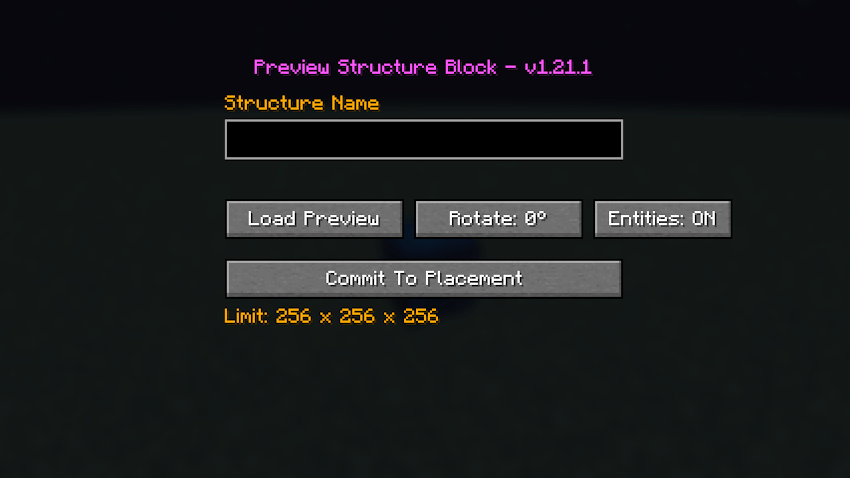
Preview Structures has been rebuilt from the ground up, with a completely new interface and a custom structure preview and placement system.
The original version relied on Minecraft's own Structure Block interface. For this rebuild, I took a different approach: rather than continuing to work around the limitations of the vanilla interface, I created an independent system designed specifically for previewing, rotating, and placing structures.
The result is a more direct building workflow, with a custom GUI and a preview system that puts you in control.
Why the Rewrite?
Sometimes, updating an existing mod isn't the best way forward.
The original Preview Structures served its purpose, but I wanted greater control over the user experience and the underlying implementation. A custom system gave me the freedom to redesign the interface and build the features around the way I wanted structure preview and placement to work.
This is more than a routine update. It's a new implementation of the original idea.
Features
Custom Interface: An independent GUI for managing structure previews and placement.
Structure Preview: Inspect your structure before committing it to the world.
Rotation Controls: Rotate the preview to find the correct orientation before placement.
Command Block Support: Preserve command blocks, their commands, and their configuration when placing structures.
Entity Placement: Place saved entities along with the structure, including paintings and item frames.
256-Block Dimension Limit: Structures are limited to 256 blocks per dimension.
Independent Implementation: Preview Structures uses its own interface and placement workflow rather than hijacking the vanilla Structure Block GUI.
A Note About Entities
Entities are placed with the structure but are not displayed in the preview. This is intentional. The preview focuses on the structure's blocks, while entity placement is handled when the structure is committed to the world.
Structure Size
The current maximum structure dimensions are 256 × 256 × 256 blocks.
This limit is intentional. I want Preview Structures to focus on its core purpose while leaving room for compatibility with other mods that specialize in expanding structure-size limits.
Usage:
Load .nbt from the generated\minecraft\structures folder in your 1.21.1 world save.
Load .nbt from the generated\minecraft\structure folder in your 26.1.2 world save.
Project description from CurseForge.
Pick your setup
Preview Structures by Minecraft version and loader
Choose the version and loader you play, then open the matching release.
Minecraft version
1.21.1
1 loader buildCheck the dependencies, then try the file in a copied instance before changing a world you care about.
Recent files
Preview Structures versions and loaders
ps-26.1.2-neoforge-26.1.2.jar
31 Oct 2026
Client Source doesn’t say Server Source doesn’t say Dependencies No extras listed Listed on Release listing
Check the 26.1.2 · NeoForge setup NeoForge26.1.2 release
ps-1.21.1-neoforge-1.21.1.jar
31 Oct 2026
Client Source doesn’t say Server Source doesn’t say Dependencies No extras listed Listed on Release listing
Check the 1.21.1 · NeoForge setup 1.21.1NeoForge release
Looking for an older file? The official CurseForge project page is in Resources.
 mod
mod CurseForge · Minecraft
Check Engine
Your modpack's check engine light. Crash, missing mod, broken recipe or "Invalid player data" kick? It tells you what broke and how to fix it, in plain English. Undo bad updates, find the faulty mod, back up and rescue your worlds. Never touches gameplay.
 mod
mod CurseForge + Modrinth · Minecraft
Neo ECO AE Extension
Neo ECO AE Extension is an addon for Applied Energistics 2, Provides higher-performance components
 mod
mod CurseForge · Minecraft
Show the Lyrics
Shows the synced lyrics of whatever you're playing out in the world around you!