Minecraft version
Back to mods 
CurseForge · Minecraft mod
Preview Structures
Preview, rotate, and place your structures with a custom-built interface that brings greater control and flexibility.
Choose a version Pick your version below, then grab the matching file.
Quick answer
Which Preview Structures release matches 26.1.2 NeoForge?
Best match for your filters ps-26.1.2-neoforge-26.1.2.jar
Game version 26.1.2
Loader NeoForge
Preview Structures ps-26.1.2-neoforge-26.1.2.jar targets 26.1.2 with NeoForge. The project page does not say whether this file belongs on the client, dedicated server, or both. No extra mods listed for this file.
Where it goes
Is Preview Structures required on the client, server, or both?
The project page does not say whether this file belongs on the client, dedicated server, or both.
Client Source doesn’t say
Dedicated server Source doesn’t say
Loader for this release NeoForge
Required install it here Optional supported, not mandatory Not supported do not install here Source doesn’t say do not assume
The source does not explicitly classify this release as client-only or server-only.
What else does Preview Structures ps-26.1.2-neoforge-26.1.2.jar need?
ps-26.1.2-neoforge-26.1.2.jar on 26.1.2 NeoForge. Every mod below is checked against that same setup.
This file does not list any required mods. Do not add a library just because a different file uses it.
This file does not list any required or optional mods.
Before you install it
Add Preview Structures without breaking your instance.
Built for Preview Structures ps-26.1.2-neoforge-26.1.2.jar on 26.1.2 NeoForge. Pick another file and the loader, install side or required mods may change.
- 01
Stick to this file
Use ps-26.1.2-neoforge-26.1.2.jar. It targets 26.1.2 with NeoForge; another release may have different loader, side or dependency requirements.
- 02
Bring the mods it needs
This file does not list any required mods. Do not add a library just because a different file uses it.
- 03
Put it on the correct side
The project page does not say whether this file belongs on the client, dedicated server, or both.
- 04
Pick the file you checked
Use the “Get this file” button beside ps-26.1.2-neoforge-26.1.2.jar. It opens that exact file at the source.
About this project
What does Preview Structures add?
Preview, rotate, and place structures with total control.
Preview Structures adds a dedicated Preview Structure Block (found in the Redstone Tab) that gives you a proper workflow for working with structures in Minecraft Java Edition.
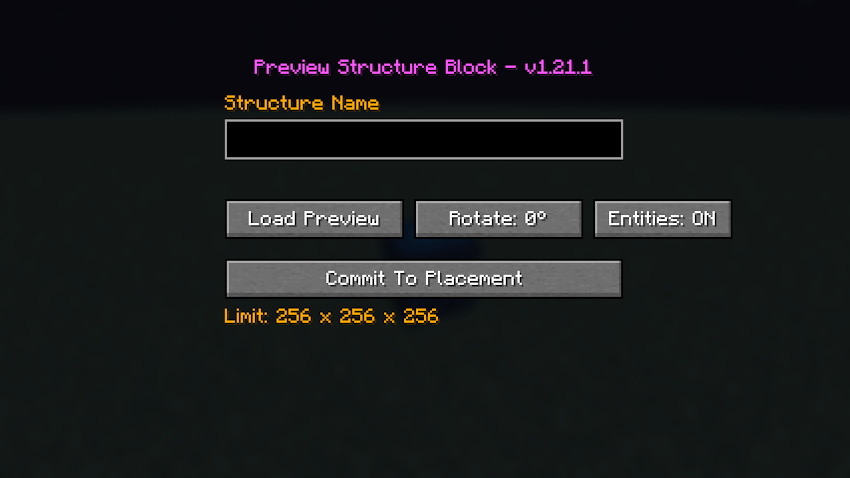
Load any .nbt structure and see it in-world before you place it. Rotate it, check the fit, and commit when it's perfect.
Features
Custom Interface:
A purpose-built GUI for managing structure previews and placement. Independent from the vanilla Structure Block - no workarounds, just a direct workflow.
Live Structure Preview:
Inspect your structure in the world before placing. Make sure you have the space, the position, and the look you want.
Rotation Controls:
Rotate the preview to find the correct orientation before placement.
Command Block Support:
Fully preserves command blocks, including their commands and settings, when placing with Entities: ON.
Entity Placement:
Places saved entities along with your structure, including paintings and item frames.
Entities are placed when the structure is committed to the world and are not shown in the block preview. This keeps the preview focused and clean.
Details:
Structure Size: Up to 256 x 256 x 256 blocks per dimension.
File Location: Loads .nbt files from:
*/minecraft/saves/%worldname%/generated/minecraft/structures (1.21.1)
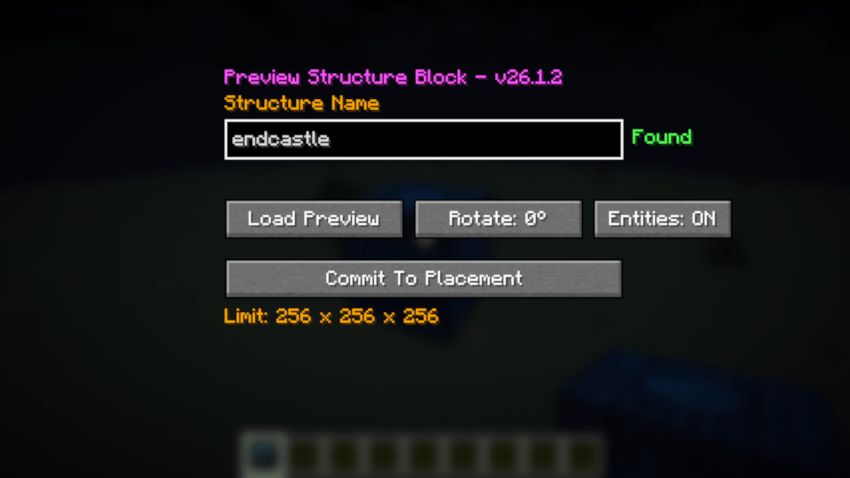
*/minecraft/saves/%worldname%/generated/minecraft/structure (26.1.2)
Preview Structures is a focused, lightweight tool for builders, map makers, and technical players who want precise control over structure placement.
Usage:
Load .nbt from the generated\minecraft\structures folder in your 1.21.1 world save.
Load .nbt from the generated\minecraft\structure folder in your 26.1.2 world save.
Project description from CurseForge.
Pick your setup
Preview Structures by Minecraft version and loader
Choose the version and loader you play, then open the matching release.
Minecraft version
1.21.1
1 loader buildCheck the dependencies, then try the file in a copied instance before changing a world you care about.
Recent files
Preview Structures versions and loaders
ps-26.1.2-neoforge-26.1.2.jar
31 Oct 2026
Client Source doesn’t say Server Source doesn’t say Dependencies No extras listed Listed on Release listing
Check the 26.1.2 · NeoForge setup NeoForge26.1.2 release
Looking for an older file? The official CurseForge project page is in Resources.
 mod
CurseForge + Modrinth · Minecraft
BBL Utility
Various useful items and blocks including block breakers and placers. fluid placers and collectors and resource generators
 mod
CurseForge + Modrinth · Minecraft
Agritech: Evolved (ATE)
Farming automation mod with planters, machines, modules, and power gen.
 mod
CurseForge + Modrinth · Minecraft
Remnants | RPG Mobs
Every mob has the potential to grow stronger, smarter, and more dangerous as they gain levels. With dynamic scaling of health, damage, and special abilities, each encounter becomes a unique challenge that will test your survival skills