Minecraft version
Back to mods 
CurseForge · Minecraft mod
Friend's Wine Meme
A Chinese Meme Mod.
Choose a version Pick your version below, then grab the matching file.
Quick answer
Which Friend's Wine Meme release should I use?
Latest stable file friendwinememe-forge-1.20.1-1.0.6.jar
Game version 1.20.2, 1.20.5, 1.20.1
Loader Forge
Friend's Wine Meme friendwinememe-forge-1.20.1-1.0.6.jar targets 1.20.2, 1.20.5, 1.20.1 with Forge. The project page does not say whether this file belongs on the client, dedicated server, or both. No extra mods listed for this file.
Where it goes
Is Friend's Wine Meme required on the client, server, or both?
The project page does not say whether this file belongs on the client, dedicated server, or both.
Client Source doesn’t say
Dedicated server Source doesn’t say
Loader for this release Forge
Required install it here Optional supported, not mandatory Not supported do not install here Source doesn’t say do not assume
The source does not explicitly classify this release as client-only or server-only.
What else does Friend's Wine Meme friendwinememe-forge-1.20.1-1.0.6.jar need?
friendwinememe-forge-1.20.1-1.0.6.jar. Change the file and its required mods may change too.
This file does not list any required mods. Do not add a library just because a different file uses it.
This file does not list any required or optional mods.
Before you install it
Add Friend's Wine Meme without breaking your instance.
Built for Friend's Wine Meme friendwinememe-forge-1.20.1-1.0.6.jar. Pick another file and the loader, install side or required mods may change.
- 01
Stick to this file
Use friendwinememe-forge-1.20.1-1.0.6.jar. It targets 1.20.2, 1.20.5, 1.20.1 with Forge; another release may have different loader, side or dependency requirements.
- 02
Bring the mods it needs
This file does not list any required mods. Do not add a library just because a different file uses it.
- 03
Put it on the correct side
The project page does not say whether this file belongs on the client, dedicated server, or both.
- 04
Pick the file you checked
Use the “Get this file” button beside friendwinememe-forge-1.20.1-1.0.6.jar. It opens that exact file at the source.
About this project
What does Friend's Wine Meme add?
Mod Overview
Friend's Wine Meme is a Minecraft mod about Chinese memes.
Inspired by the internet, based on the BSD-3 license. Music resources come from the internet; if there is any infringement, please contact me.
Core Gameplay
The game adds an item called Transparent Mode. Hold it, sneak, and right-click any entity or block, and you will see the following animation effect: 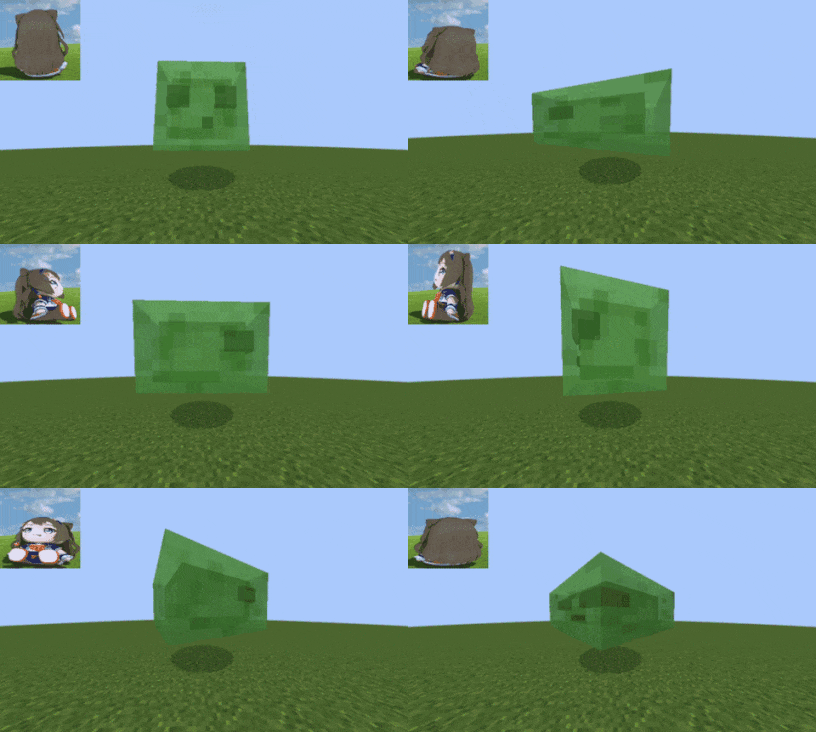
Commands and Configuration
In-game commands and out-of-game config settings are synchronized with each other; if the player is on a server, the server's configuration will be used.
All commands require permission level 2 (that is, op or above).
| Command | Parameter/Min-Max | Description |
|---|---|---|
/friendwinememe reload |
None | Reload the configuration. |
/friendwinememe stopAll |
None | Stop all effects. |
/friendwinememe give |
seconds 0-999999 | Give yourself a "Transparent Mode." If followed by seconds, the duration is set; if not, it is infinite. |
/friendwinememe bounce |
0.1-10.0 | Animation bounce speed. |
/friendwinememe maxHeight |
0.0-3.0 | Animation bounce maximum height multiplier. |
/friendwinememe minHeight |
0.0-1.0 | Animation bounce minimum height multiplier. |
/friendwinememe music |
true/false | Music toggle. |
/friendwinememe distance |
1-100 | Music propagation distance. |
/friendwinememe rotate |
true/false | Animation rotation toggle. |
/friendwinememe rotateSpeed |
0.0-3600.0 | Animation rotation speed. |
Summoning an entity with a timed Transparent Mode duration
Write ForgeData.FriendWineMemeDuration (milliseconds) on the entity; the effect will trigger automatically when the entity joins the world.
Command:
/summon mob ~ ~ ~ {NoAI:1b,ForgeData:{FriendWineMemeDuration:duration (milliseconds)L}}
Summon a slime with an infinite Transparent Mode duration.
/summon minecraft:slime ~ ~ ~ {ForgeData:{FriendWineMemeDuration:-1L}}
Summoning a block disguised as an entity with a timed Transparent Mode duration
Command:
/summon friendwinememe:block_disguise ~ ~ ~ {DurationMs:duration (milliseconds)L,BlockState:{Name:"block registry name"}}
Summon a block entity with an infinite Transparent Mode duration.
/summon friendwinememe:block_disguise ~ ~ ~ {DurationMs:-1L,BlockState:{Name:"minecraft:diamond_block"}}
NBT Fields:
| Field | Description |
|---|---|
DurationMs |
Duration in milliseconds; -1 means infinite. |
EffectStartMs |
Animation start timestamp; if omitted, the current time is used. |
MusicStartMs |
Music start timestamp; 0 means no music. |
Notes
To ensure stability, if the server shuts down/saves the world, all entities and blocks will be restored to their original state.
Credits
GFBS : Auralis for reference in using OpenAL to directly control sound sources, avoiding the limitations and conflicts of the vanilla audio system.
Project description from CurseForge.
Pick your setup
Friend's Wine Meme by Minecraft version and loader
Choose the version and loader you play, then open the matching release.
Minecraft version
1.20.5
1 loader buildMinecraft version
1.20.4
1 loader buildMinecraft version
1.20.3
1 loader buildMinecraft version
1.20.2
1 loader buildMinecraft version
1.20.1
1 loader buildCheck the dependencies, then try the file in a copied instance before changing a world you care about.
Recent files
Friend's Wine Meme versions and loaders
friendwinememe-forge-1.20.1-1.0.6.jar
13 Oct 2026
Client Source doesn’t say Server Source doesn’t say Dependencies No extras listed Listed on Release listing
Check the 1.20.6 · Forge setup 1.20.21.20.51.20.1Forge release
friendwinememe-forge-1.20.1-1.0.5.jar
9 Oct 2026
Client Source doesn’t say Server Source doesn’t say Dependencies No extras listed Listed on Release listing
Check the 1.20.6 · Forge setup 1.20.21.20.51.20.1Forge release
friendwinememe-forge-1.20.1-1.0.4-fix.jar
friendwinememe-1.0.4-fix.jar
8 Oct 2026
Client Source doesn’t say Server Source doesn’t say Dependencies No extras listed Listed on Release listing
Check the 1.20.6 · Forge setup 1.20.21.20.51.20.1Forge release
friendwinememe-forge-1.20.1-1.0.4.jar
8 Oct 2026
Client Source doesn’t say Server Source doesn’t say Dependencies No extras listed Listed on Release listing
Check the 1.20.6 · Forge setup 1.20.21.20.51.20.1Forge release
friendwinememe-forge-1.20.1-1.0.3.jar
8 Oct 2026
Client Source doesn’t say Server Source doesn’t say Dependencies No extras listed Listed on Release listing
Check the 1.20.6 · Forge setup 1.20.21.20.51.20.1Forge release
friendwinememe-forge-1.20.1-1.0.1.jar
6 Oct 2026
Client Source doesn’t say Server Source doesn’t say Dependencies No extras listed Listed on Release listing
Check the 1.20.6 · Forge setup 1.20.21.20.51.20.1Forge release
friendwinememe-forge-1.20.1-1.0.0.jar
5 Oct 2026
Client Source doesn’t say Server Source doesn’t say Dependencies No extras listed Listed on Release listing
Check the 1.20.6 · Forge setup 1.20.21.20.51.20.1Forge release
Looking for an older file? The official CurseForge project page is in Resources.
 mod
mod CurseForge + Modrinth · Minecraft
No Worldborder Tint
Removes the red vignette tint when close to a world border.
 mod
mod CurseForge + Modrinth · Minecraft
[Let's Do] Farm & Charm
The farm calls: Experience the art of advanced agriculture and farmhouse cuisine! Use mincers, cooking pots, as well as new grains and fruit varieties to enhance your culinary and agricultural skills.
 mod
mod CurseForge · Minecraft
Knickknackery
Terraria-style accessories for Curios