Create Needed by 滚木学(aero wheel extra) aeronautics_wheelworks-3.3.1.jar
requiredMatching file found Matched file: Create 6.0.10 for mc1.21.1
CurseForge · Minecraft mod
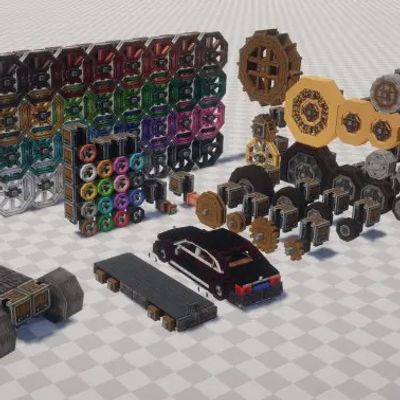
Adds realistic physics and terrain interaction for wheeled vehicles, including tire tracks, speed-dependent steering, and floating / cross-physics block placement.
Quick answer
滚木学(aero wheel extra) aeronautics_wheelworks-3.3.1.jar targets 1.21.1 with NeoForge. The project page does not say whether this file belongs on the client, dedicated server, or both. All 3 required mods have matching files.
Where it goes
The project page does not say whether this file belongs on the client, dedicated server, or both.
The source does not explicitly classify this release as client-only or server-only.
aeronautics_wheelworks-3.3.1.jar. Change the file and its required mods may change too.
Install Create, Create Aeronautics, Sable first. We found matching files for this game-version and loader setup. 5 come through another mod in the chain.
5 extra mods were pulled in by other dependencies. Indented rows show who needs each one. We only count dependency files that match this setup. A file for another loader does not fill the gap.
Before you install it
Built for 滚木学(aero wheel extra) aeronautics_wheelworks-3.3.1.jar. Pick another file and the loader, install side or required mods may change.
Use aeronautics_wheelworks-3.3.1.jar. It targets 1.21.1 with NeoForge; another release may have different loader, side or dependency requirements.
Install Create, Create Aeronautics, Sable first. We found matching files for this game-version and loader setup. 5 come through another mod in the chain.
The project page does not say whether this file belongs on the client, dedicated server, or both.
Use the “Get this file” button beside aeronautics_wheelworks-3.3.1.jar. It opens that exact file at the source.
About this project
A mod for NeoForge that enhances vehicle building and terrain interaction in Minecraft, adding realistic physical mechanics and structural flexibility for wheeled vehicles.
The faster your vehicle moves, the smaller the maximum steering angle becomes, mimicking real-world physics. This can be bypassed with a redstone signal on the suspension.
You can easily change settings (like enabling tire tracks) without restarting the game. Follow this step-by-step guide:
Open Mod Configs
Find the Mod
aeronautics_wheelworks).Adjust Settings
You will see categories like Client, Common, and Server.
Navigate to Server -> Rolling Effect.
Here you can:
Click the save icon on the left to apply changes immediately.
"Version 3.3.0 marks a major milestone. Soyia has merged the features from Super Tracks + Pro Max and Create: Tracks into this mod. This update features a massive refactoring of the core systems and resolves numerous known issues to ensure a more stable experience."
super thank https://www.curseforge.com/minecraft/mc-mods/create-tracks
Project description from CurseForge.
Pick your setup
Choose the version and loader you play, then open the matching release.
Check the dependencies, then try the file in a copied instance before changing a world you care about.
Recent files
23 Nov 2026
31 Oct 2026
aeronautics_wheelworks-3.2.0.jar
17 Oct 2026
10 Oct 2026
6 Oct 2026
6 Oct 2026
6 Oct 2026
6 Oct 2026
Looking for an older file? The official CurseForge project page is in Resources.
 mod
An exploration-focused world map and minimap with cave mapping, waypoints and extensive customization.
 mod
Revive your friends.
 mod
Break the chains of physical patterns! Store your AE2 recipes digitally on storage cells and virtualize your auto-crafting.