Minecraft version
Back to mods 
CurseForge · Minecraft mod
Check Engine
Your modpack's check engine light. Crash, missing mod, broken recipe or "Invalid player data" kick? It tells you what broke and how to fix it, in plain English. Undo bad updates, find the faulty mod, back up and rescue your worlds. Never touches gameplay.
Choose a version Pick your version below, then grab the matching file.
Quick answer
Which Check Engine release matches 1.20.1 Forge?
Best match for your filters Check Engine 0.24.0 (Forge 1.20.1)
Game version 1.20.1
Loader Forge
Check Engine 0.24.0 (Forge 1.20.1) targets 1.20.1 with Forge. The project page does not say whether this file belongs on the client, dedicated server, or both. No extra mods listed for this file.
Where it goes
Is Check Engine required on the client, server, or both?
The project page does not say whether this file belongs on the client, dedicated server, or both.
Client Source doesn’t say
Dedicated server Source doesn’t say
Loader for this release Forge
Required install it here Optional supported, not mandatory Not supported do not install here Source doesn’t say do not assume
The source does not explicitly classify this release as client-only or server-only.
What else does Check Engine 0.24.0 (Forge 1.20.1) need?
Check Engine 0.24.0 (Forge 1.20.1) on 1.20.1 Forge. Every mod below is checked against that same setup.
This file does not list any required mods. Do not add a library just because a different file uses it.
This file does not list any required or optional mods.
Before you install it
Add Check Engine without breaking your instance.
Built for Check Engine 0.24.0 (Forge 1.20.1) on 1.20.1 Forge. Pick another file and the loader, install side or required mods may change.
- 01
Stick to this file
Use Check Engine 0.24.0 (Forge 1.20.1). It targets 1.20.1 with Forge; another release may have different loader, side or dependency requirements.
- 02
Bring the mods it needs
This file does not list any required mods. Do not add a library just because a different file uses it.
- 03
Put it on the correct side
The project page does not say whether this file belongs on the client, dedicated server, or both.
- 04
Pick the file you checked
Use the “Get this file” button beside Check Engine 0.24.0 (Forge 1.20.1). It opens that exact file at the source.
About this project
What does Check Engine add?



Modpack broke after an update? One button puts it back the way it was.
Check Engine finds why your modpack crashes or won't start, tells you the fix in plain words, and can undo what broke it.
Won't start? Know before the long load
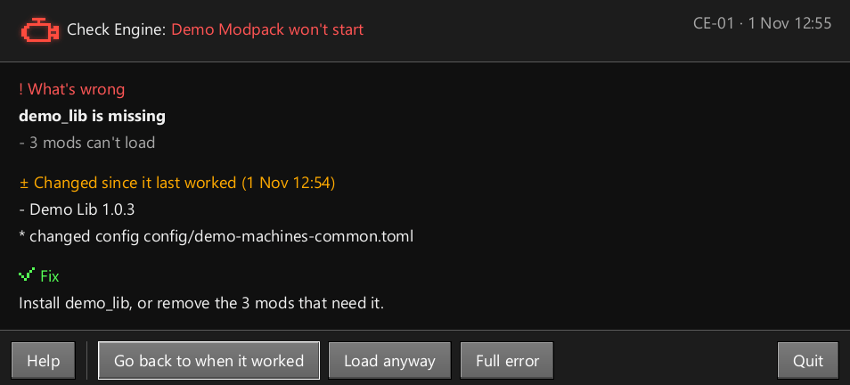
Press Play and get Exit code 1? Check Engine stops it right away: which mod is missing or wrong, and the fix.
Broke after an update? Go back
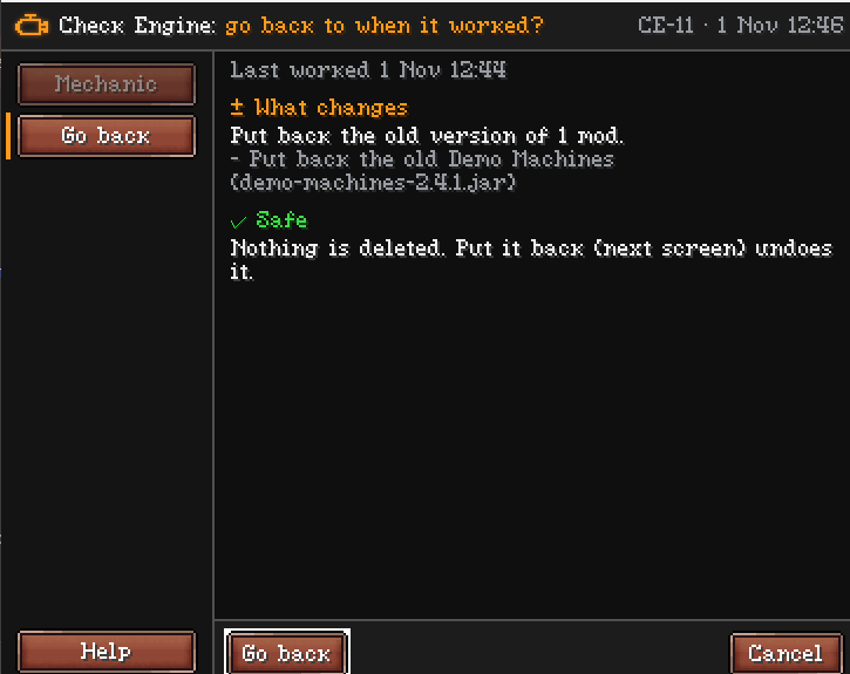
Go back to when it worked turns off new mods, brings back the old version of updated mods, and puts your configs back. Nothing is deleted, and Put it back undoes it.
Making your own modpack? Mods only keeps your config work.
Goes back to the last launch that worked with Check Engine installed.
Crashed? Mechanic
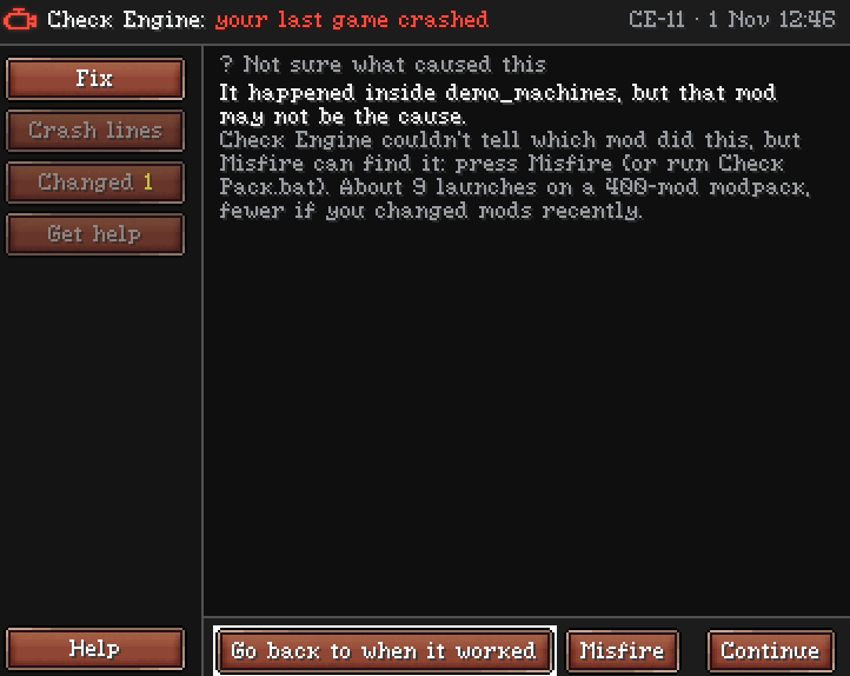
The next launch explains the crash: the cause and the fix, or "not sure" instead of a guess. Copy for help puts it all on your clipboard for your modpack's Discord, with your name, IP and login blanked.
Already crashed? Add Check Engine and press Play: it reads the last crash too.
Never deletes anything. Never goes online. Touches your mods only when you press a button. Works next to other crash helper mods.
Everything it does
| Feature | What it does | How to use it |
|---|---|---|
| Pre-launch check | Stops a broken modpack before the long load: which mod is missing or wrong, and the fix | Automatic when you press Play |
| Go back to when it worked | Turns off new mods, brings back old versions and removed mods, puts configs back. Nothing deleted | Pre-launch window, Mechanic > Fix, or the title button > Go back. If configs changed too, pick Mods only or Mods and configs |
| Put it back | Undoes a Go back | In game right after Go back, or the title button > Go back > Put it back |
| Mechanic | Explains your last crash: the fix (or "not sure"), the key crash lines, what changed | Automatic on the next launch after a crash |
| Copy for help | Everything a helper needs on your clipboard, name, IP and login blanked | Mechanic > Get help > Copy for help, then paste in your modpack's Discord. With another crash helper mod installed, use its window instead |
| Help file | One zip with the reports and logs, name, IP and login blanked | Mechanic > Get help > Make help file, or type /checkengine export |
| Help | Help button on every screen: what is this screen, copy for help, your modpack's help page | Bottom left on every Check Engine screen and on the pre-launch window |
| Misfire (Beta) | Finds the mod behind a crash by switching mods off, a round at a time | Mechanic > Fix > Misfire, then keep launching until it names the mod |
| Pit Stop | Start time, last launches, what changed, every mod by blocks, items and size | Click the Check Engine button on the title screen, or Mods > Check Engine > Config > Open Check Engine |
| Slower start | Tells you once when the game started clearly slower than usual, and what changed | Automatic. The title button shows ↑ |
| Startup warnings | Duplicate mods, known clashes, mods for a newer Java, client-only mods on a server | Automatic, before the title screen. Press Got it to hide one |
| Only tell me when it breaks | No more warnings, just crashes and problems that stop the game | Press it on the warning screen. Turn back on: Mods > Check Engine > Config > Turn warnings on |
| World backups | Warns before a world opens without a mod it uses, or after a mod went back a version | Press Back up worlds or Back up these worlds when the warning shows |
| Can't join (Beta) | Names the mods that don't match the server | Press Fix it on the can't-join screen, Undo to put them back |
| /checkengine scan | Lists recipes and quests that use missing mods | Type it in chat (needs cheats on, or op on a server), then click [Open report] |
| Check Pack.bat | Checks a modpack without starting the game (Windows) | Get it from Releases with the checkengine-cli jar, keep both in one folder, drag your modpack folder onto it |
For modpack makers
You decide what your players see. It's all in config/checkengine-pack.properties, and Check Engine only reads that file, it never changes it.
Switch off any part: set ignition (windows before the game loads, startup warnings), mechanic (crash screen), pit_pass (help when a server kicks a player), misfire (search for the faulty mod), scrapyard (world backup warnings) or pit_crew (/checkengine scan, update notes) to false. Leave a line out and that part stays on.
mode=modpack: players only see what stops the game, crashes and world backup warnings. Everything else stays in checkengine/boot-report.txt and Check Pack.bat for you.
Example file: config/checkengine-pack.example.properties lists every setting, including your modpack's name and Discord link for Check Engine's screens. Copy it to checkengine-pack.properties to use it.
Leave the checkengine/ folder out of your export.
NeoForge 26.1.2 (Java 25) · NeoForge 1.21.1 (Java 21) · Forge 1.20.1 (Java 17). Client, server or both.
Modpacks: yes, please. MIT licensed.
Wrong answer or missed crash? Press Report it in Mechanic, leave a comment, or open an issue.
Project description from CurseForge.
Pick your setup
Check Engine by Minecraft version and loader
Choose the version and loader you play, then open the matching release.
Minecraft version
1.21.1
1 loader buildMinecraft version
1.20.1
1 loader buildCheck the dependencies, then try the file in a copied instance before changing a world you care about.
Recent files
Check Engine versions and loaders
Check Engine 0.24.0 (Forge 1.20.1)
checkengine-forge-1.20.1-0.24.0.jar
1 Nov 2026
Client Source doesn’t say Server Source doesn’t say Dependencies No extras listed Listed on Release listing
Check the 1.20.1 · Forge setup 1.20.1Forge release
Check Engine 0.23.1
checkengine-forge-1.20.1-0.23.1.jar
31 Oct 2026
Client Source doesn’t say Server Source doesn’t say Dependencies No extras listed Listed on Release listing
Check the 1.20.1 · Forge setup 1.20.1Forge release
Check Engine 0.23.0 (Forge 1.20.1)
checkengine-forge-1.20.1-0.23.0.jar
31 Oct 2026
Client Source doesn’t say Server Source doesn’t say Dependencies No extras listed Listed on Release listing
Check the 1.20.1 · Forge setup 1.20.1Forge release
Check Engine 0.22.0 (Forge 1.20.1)
checkengine-forge-1.20.1-0.22.0.jar
30 Oct 2026
Client Source doesn’t say Server Source doesn’t say Dependencies No extras listed Listed on Release listing
Check the 1.20.1 · Forge setup 1.20.1Forge release
Check Engine v0.20.0 (Forge 1.20.1)
checkengine-forge-1.20.1-0.20.0.jar
27 Oct 2026
Client Source doesn’t say Server Source doesn’t say Dependencies No extras listed Listed on Release listing
Check the 1.20.1 · Forge setup 1.20.1Forge release
Check Engine 0.19.0 (Forge 1.20.1)
checkengine-forge-1.20.1-0.19.0.jar
26 Oct 2026
Client Source doesn’t say Server Source doesn’t say Dependencies No extras listed Listed on Release listing
Check the 1.20.1 · Forge setup 1.20.1Forge release
Check Engine 0.18.1 (Forge 1.20.1)
checkengine-forge-1.20.1-0.18.1.jar
22 Oct 2026
Client Source doesn’t say Server Source doesn’t say Dependencies No extras listed Listed on Release listing
Check the 1.20.1 · Forge setup 1.20.1Forge release
Check Engine 0.18.0 (Forge 1.20.1)
checkengine-forge-1.20.1-0.18.0.jar
21 Oct 2026
Client Source doesn’t say Server Source doesn’t say Dependencies No extras listed Listed on Release listing
Check the 1.20.1 · Forge setup 1.20.1Forge release
Check Engine 0.17.0 (Forge 1.20.1)
checkengine-forge-1.20.1-0.17.0.jar
20 Oct 2026
Client Source doesn’t say Server Source doesn’t say Dependencies No extras listed Listed on Release listing
Check the 1.20.1 · Forge setup 1.20.1Forge release
Check Engine 0.16.2 (Forge 1.20.1)
checkengine-forge-1.20.1-0.16.2.jar
19 Oct 2026
Client Source doesn’t say Server Source doesn’t say Dependencies No extras listed Listed on Release listing
Check the 1.20.1 · Forge setup 1.20.1Forge release
Check Engine 0.13.1 (Forge 1.20.1)
checkengine-forge-1.20.1-0.13.1.jar
14 Oct 2026
Client Source doesn’t say Server Source doesn’t say Dependencies No extras listed Listed on Release listing
Check the 1.20.1 · Forge setup 1.20.1Forge release
Check Engine 0.10.0 (Forge 1.20.1)
checkengine-forge-1.20.1-0.10.0.jar
11 Oct 2026
Client Source doesn’t say Server Source doesn’t say Dependencies No extras listed Listed on Release listing
Check the 1.20.1 · Forge setup 1.20.1Forge release
Looking for an older file? The official CurseForge project page is in Resources.
 mod
CurseForge + Modrinth · Minecraft
TrashSlot
Adds a draggable trash slot to all inventory screens. Press T to toggle.
 mod
CurseForge + Modrinth · Minecraft
Waystones
Teleport from waystone to waystone or craft magical scrolls to warp.
 mod
CurseForge + Modrinth · Minecraft
Balm
Abstraction Layer for Multi-Loader Mods