Sodium Optional for ZakoOpt 2.1.2 for 26.3
optionalMatching file found Matched file: Sodium 0.9.2 for Fabric 26.3

CurseForge · Minecraft mod
Client-side optimization addon for Sodium. Up to +80% FPS at busy spawns and over 3x FPS on mob farms, with smoother 1% lows. Works with Lithium, ImmediatelyFast and Iris.
Quick answer
ZakoOpt 2.1.2 for 26.3 targets 26.3 with Fabric, NeoForge. The project page does not say whether this file belongs on the client, dedicated server, or both. All 2 required mods have matching files.
Where it goes
The project page does not say whether this file belongs on the client, dedicated server, or both.
The source does not explicitly classify this release as client-only or server-only.
ZakoOpt 2.1.2 for 26.3 on Fabric. Every mod below is checked against that same setup.
Install Fabric API, ImmediatelyFast first. We found matching files for this game-version and loader setup.
We only count dependency files that match this setup. A file for another loader does not fill the gap.
Before you install it
Built for ZakoOpt 2.1.2 for 26.3 on Fabric. Pick another file and the loader, install side or required mods may change.
Use ZakoOpt 2.1.2 for 26.3. It targets 26.3 with Fabric, NeoForge; another release may have different loader, side or dependency requirements.
Install Fabric API, ImmediatelyFast first. We found matching files for this game-version and loader setup.
The project page does not say whether this file belongs on the client, dedicated server, or both.
Use the “Get this file” button beside ZakoOpt 2.1.2 for 26.3. It opens that exact file at the source.
About this project
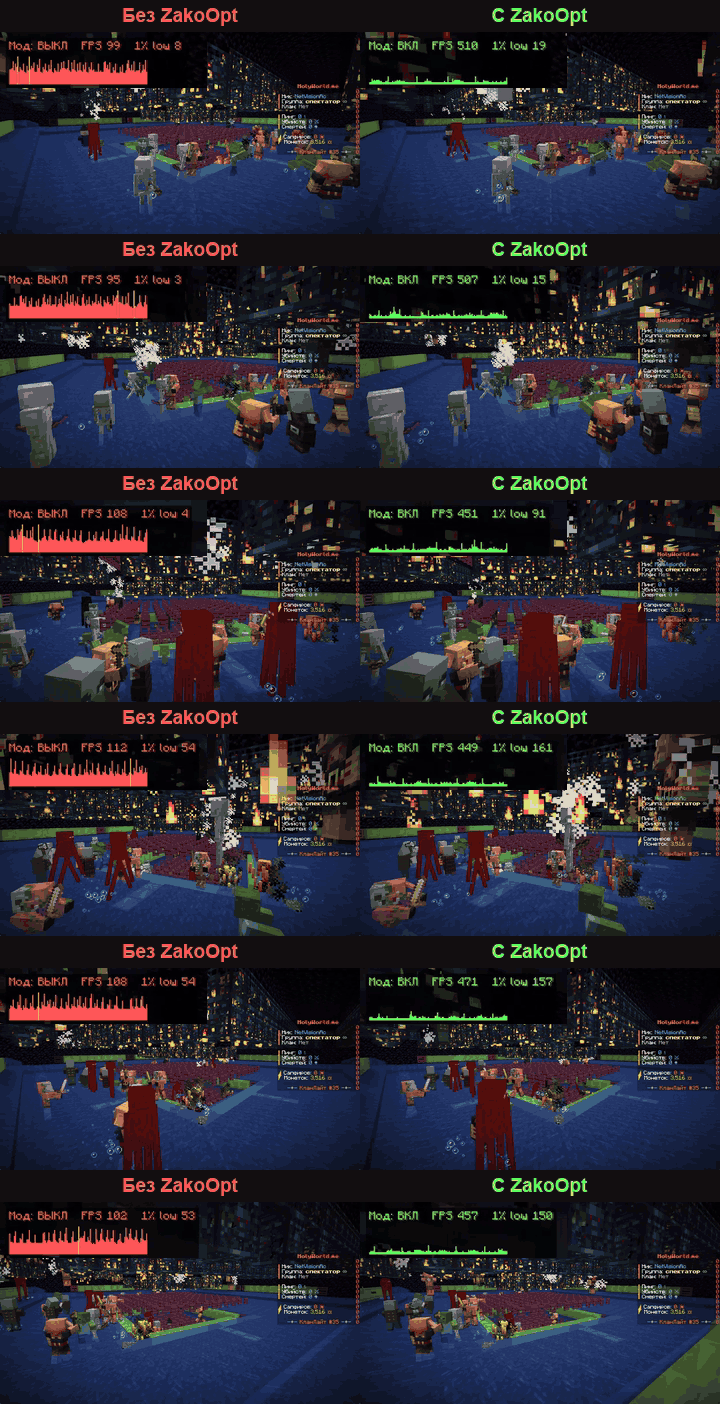
ZakoOpt is a client-side mod that takes CPU load off rendering entities, block entities, particles and the HUD. It helps most on busy spawns with crowds of players, on farms (mobs, spawners, pistons), around piles of dropped items and holograms, and in big Create factories.
The gain depends on your PC and the scene. If your GPU is the bottleneck or there is little on screen, you may see no difference. If your FPS drops, turn options off one by one (each has a tooltip) and report it on GitHub.
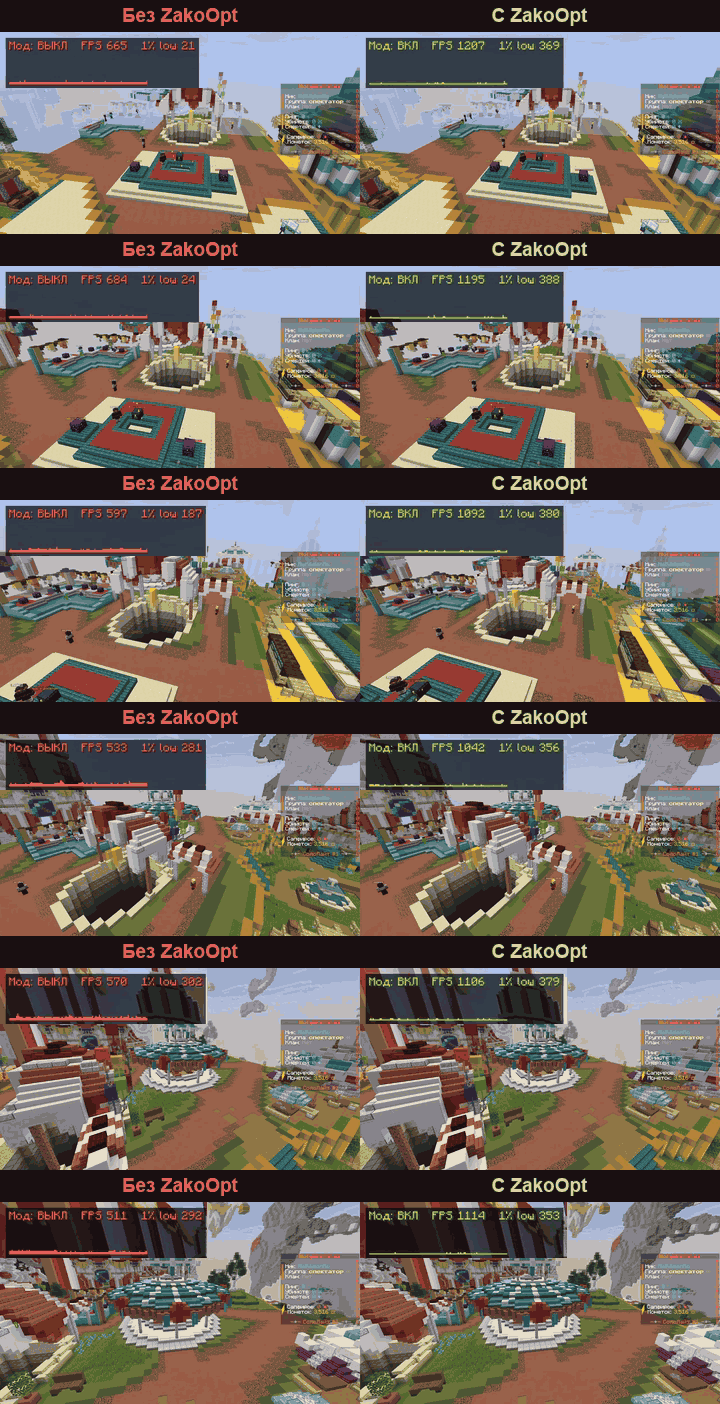
Recorded on the same replay: Ryzen 9 7950X3D limited to 12 threads, RTX 5080, 1920×1080, Sodium 0.8.14 + Lithium 0.21.4 + ImmediatelyFast 1.14.3, Minecraft 1.21.11. Your numbers will differ.
Create (NeoForge 1.21.1)
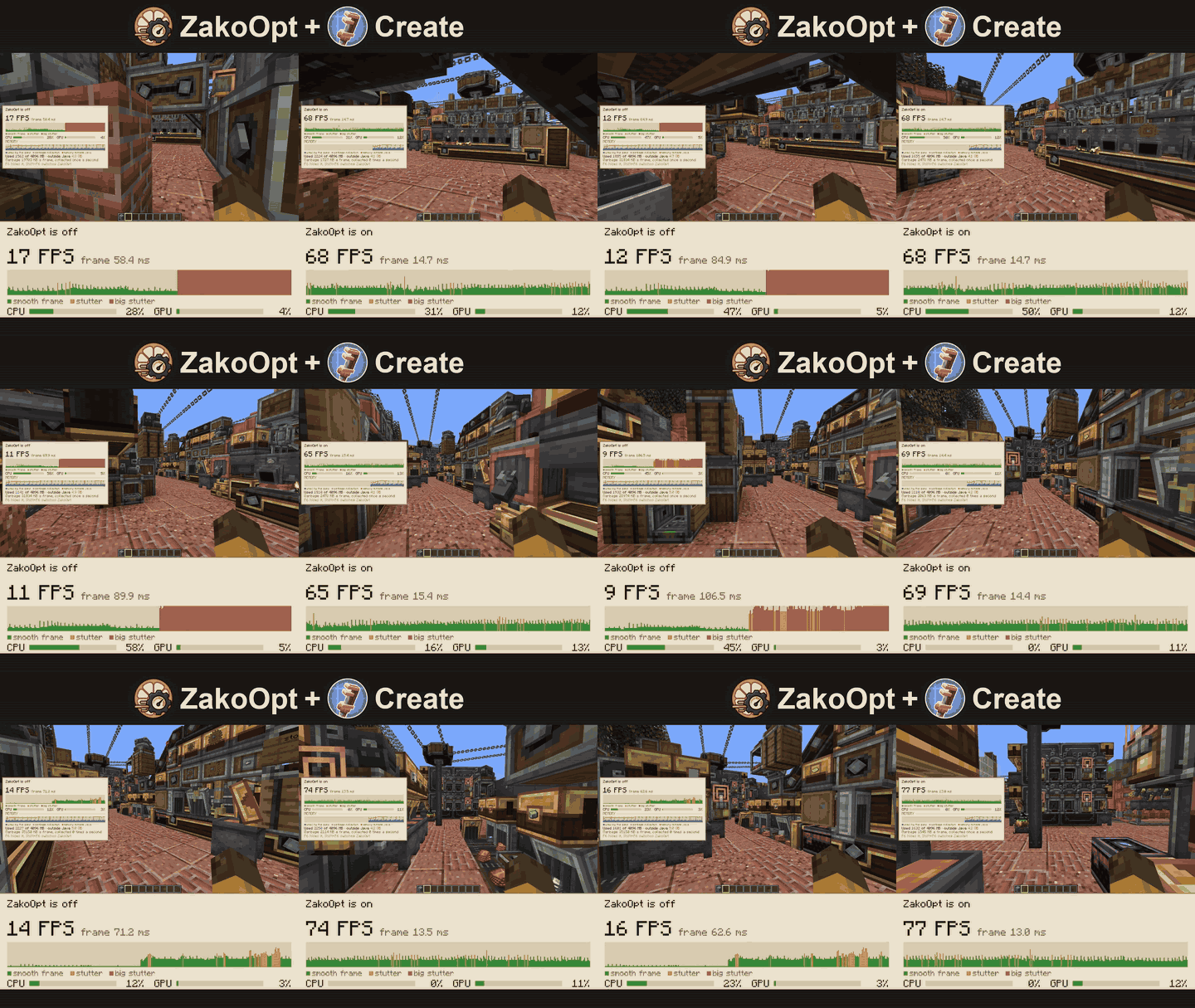
A factory district with 16 Create factories: 13 FPS without ZakoOpt, 91 FPS with it.
Features
Every optimization has its own toggle: with Sodium in Video Settings → ZakoOpt, without it through Mod Menu. Some features are not available on every version.
Requirements: Minecraft 1.21.1, 1.21.4, 1.21.8, 1.21.10, 1.21.11, 26.1.2, 26.2 or 26.3. Fabric on every version (with Fabric API), NeoForge on 1.21.1 and 26.x. ImmediatelyFast is required, Sodium is optional. Works with VulkanMod, Iris, Lithium. Client-side only.
Bugs and crashes: GitHub Issues, with your game version, mod list and latest.log or crash report.
LGPL-3.0. If you fork it or use the code, keep the credit: Zako, t.me/StarikZako.
Project description from CurseForge.
Pick your setup
Choose the version and loader you play, then open the matching release.
Check the dependencies, then try the file in a copied instance before changing a world you care about.
Recent files
zakoopt-2.1.2-26.3.jar
11 Nov 2026
zakoopt-2.1.2-26.2.jar
11 Nov 2026
zakoopt-2.1.2-26.1.2.jar
11 Nov 2026
zakoopt-2.1.1-26.3.jar
8 Nov 2026
zakoopt-2.1.1-26.2.jar
8 Nov 2026
zakoopt-2.1.1-26.1.2.jar
8 Nov 2026
zakoopt-2.1.0-26.3.jar
7 Nov 2026
zakoopt-2.1.0-26.2.jar
7 Nov 2026
zakoopt-2.1.0-26.1.2.jar
7 Nov 2026
zakoopt-2.0.4-26.3.jar
2 Nov 2026
zakoopt-2.0.4-26.2.jar
2 Nov 2026
zakoopt-2.0.4-26.1.2.jar
2 Nov 2026
Looking for an older file? The official CurseForge project page is in Resources.
 mod
One recipe viewer for everything: EMI's interface, JEI's plugins, and where every item really comes from.
 mod
Displays more information about some items on the item.
 mod
Pick up, pet, throw and catch your companions.