Minecraft version
Back to mods 
CurseForge · Minecraft mod
Chaos Chatplus
Modern chat servers: emojis, GIFs, item sharing, @mentions, private messages and safe in-game screenshots.
Choose a version Pick your version below, then grab the matching file.
Quick answer
Which Chaos Chatplus release should I use?
Latest stable file Chaos ChatPlus 1.1.1 - NeoForge 26.3
Game version 26.3
Loader NeoForge
Chaos ChatPlus 1.1.1 - NeoForge 26.3 targets 26.3 with NeoForge. The project page does not say whether this file belongs on the client, dedicated server, or both. No extra mods listed for this file.
Where it goes
Is Chaos Chatplus required on the client, server, or both?
The project page does not say whether this file belongs on the client, dedicated server, or both.
Client Source doesn’t say
Dedicated server Source doesn’t say
Loader for this release NeoForge
Required install it here Optional supported, not mandatory Not supported do not install here Source doesn’t say do not assume
The source does not explicitly classify this release as client-only or server-only.
What else does Chaos ChatPlus 1.1.1 - NeoForge 26.3 need?
Chaos ChatPlus 1.1.1 - NeoForge 26.3. Change the file and its required mods may change too.
This file does not list any required mods. Do not add a library just because a different file uses it.
This file does not list any required or optional mods.
Before you install it
Add Chaos Chatplus without breaking your instance.
Built for Chaos ChatPlus 1.1.1 - NeoForge 26.3. Pick another file and the loader, install side or required mods may change.
- 01
Stick to this file
Use Chaos ChatPlus 1.1.1 - NeoForge 26.3. It targets 26.3 with NeoForge; another release may have different loader, side or dependency requirements.
- 02
Bring the mods it needs
This file does not list any required mods. Do not add a library just because a different file uses it.
- 03
Put it on the correct side
The project page does not say whether this file belongs on the client, dedicated server, or both.
- 04
Pick the file you checked
Use the “Get this file” button beside Chaos ChatPlus 1.1.1 - NeoForge 26.3. It opens that exact file at the source.
About this project
What does Chaos Chatplus add?
Chaos ChatPlus
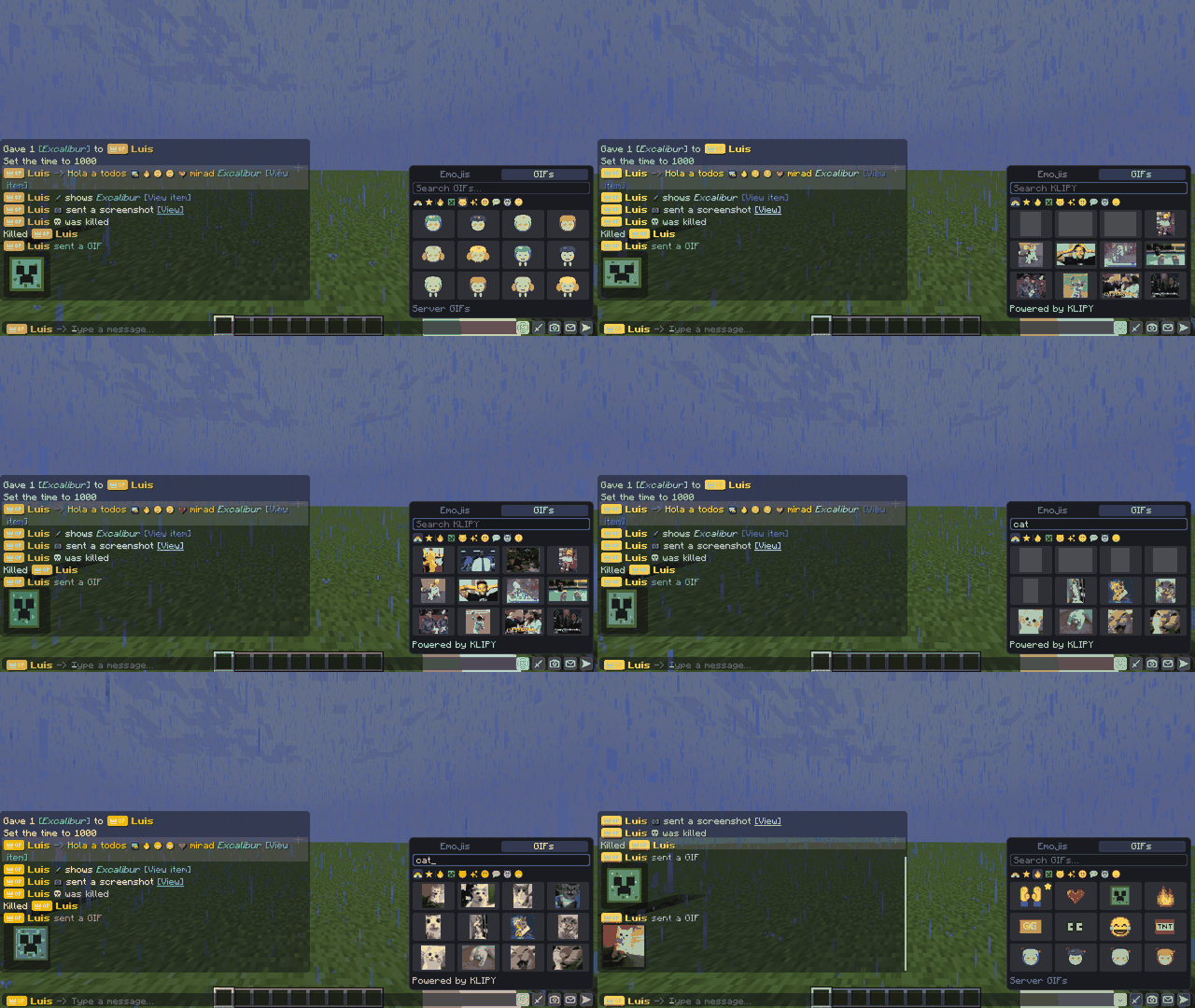
A modern chat for Fabric servers. Emojis, GIFs, item sharing, @mentions, private messages and safe in-game screenshots, all in a clean, minimalist chat that fits Minecraft's style.
✨ Features
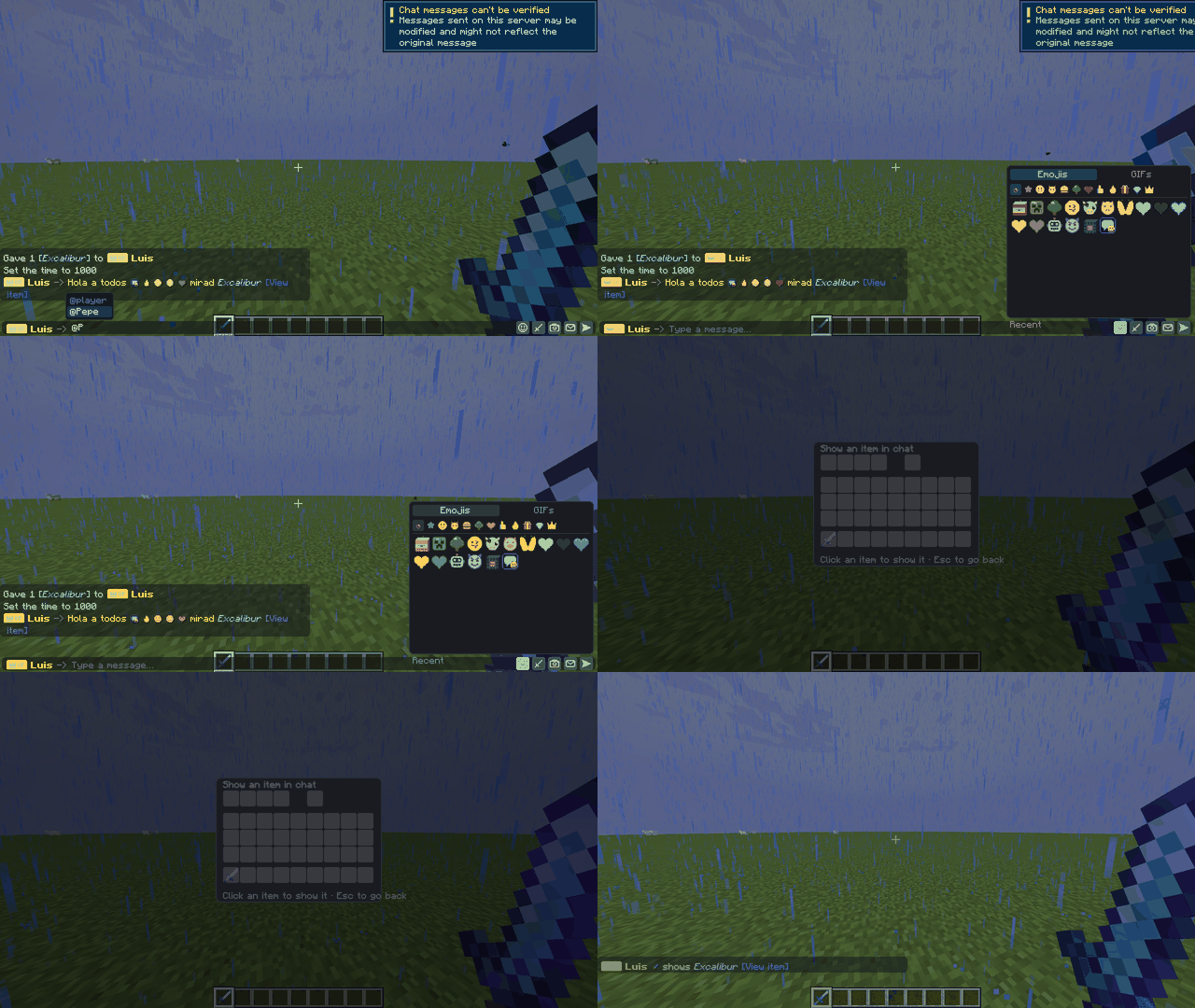
😀 Emojis
- 197 built-in pixel-art emojis (32x32) in 10 categories: faces, hearts, gestures, symbols, objects, Minecraft, animals, food and nature.
- Emoji picker with Recent and Favorites, plus autocomplete: type
:fireand pick it. - Unicode emojis such as 😂 ❤️ 🔥 are converted automatically.
- Custom server emojis: drop PNG files into
config/chaoschatplus/emojis/<category>/and they appear in seconds, with no restart. Uploads by players can require approval with/emoji approve.
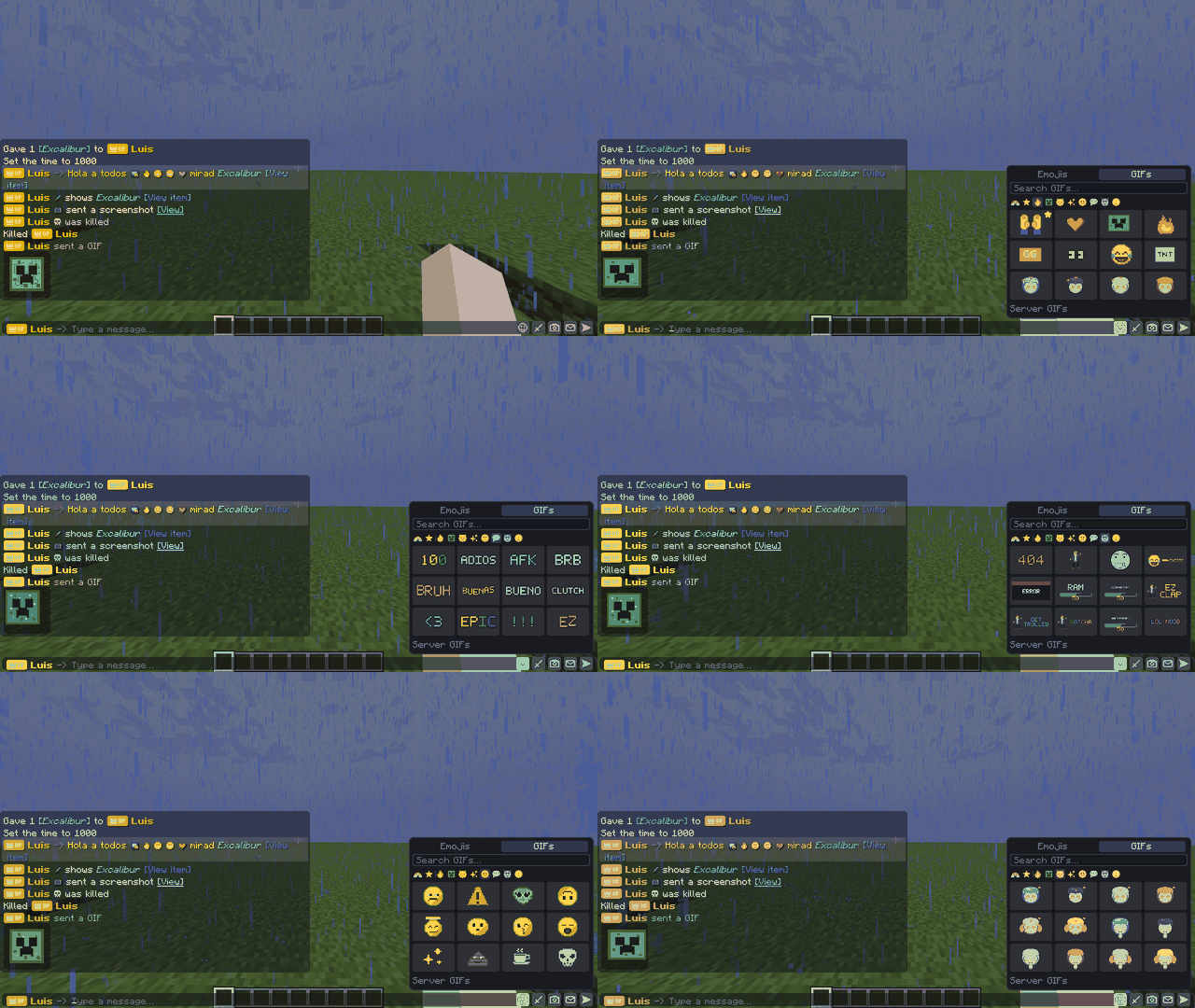
🎞️ GIFs
- 360 built-in GIFs (text stickers, effects, troll and pranks, emojis, anime-style chibis), all original art.
- Add your own: drop GIFs into
config/chaoschatplus/gifs/<category>/. Each subfolder becomes a category, and big GIFs are shrunk automatically. - Favorites: right-click any GIF to save it.
- Optional KLIPY search (the GIF API that replaced Tenor): add a free KLIPY API key to the server config to unlock the Custom tab and search millions of GIFs.
🗡️ Item sharing
- Show any item from your inventory with a clean [View item] link that shows enchantments, name and lore.
- You can also type
\[item\]in chat.
📷 Safe screenshots
- Only in-game captures can be sent (no uploading files from your PC), which keeps NSFW content out.
- Camera mode: move freely and scroll to zoom before you shoot.
- Report button, automatic hiding after several reports, and a moderation review screen for OPs.
- Optional automatic NSFW check with Sightengine.
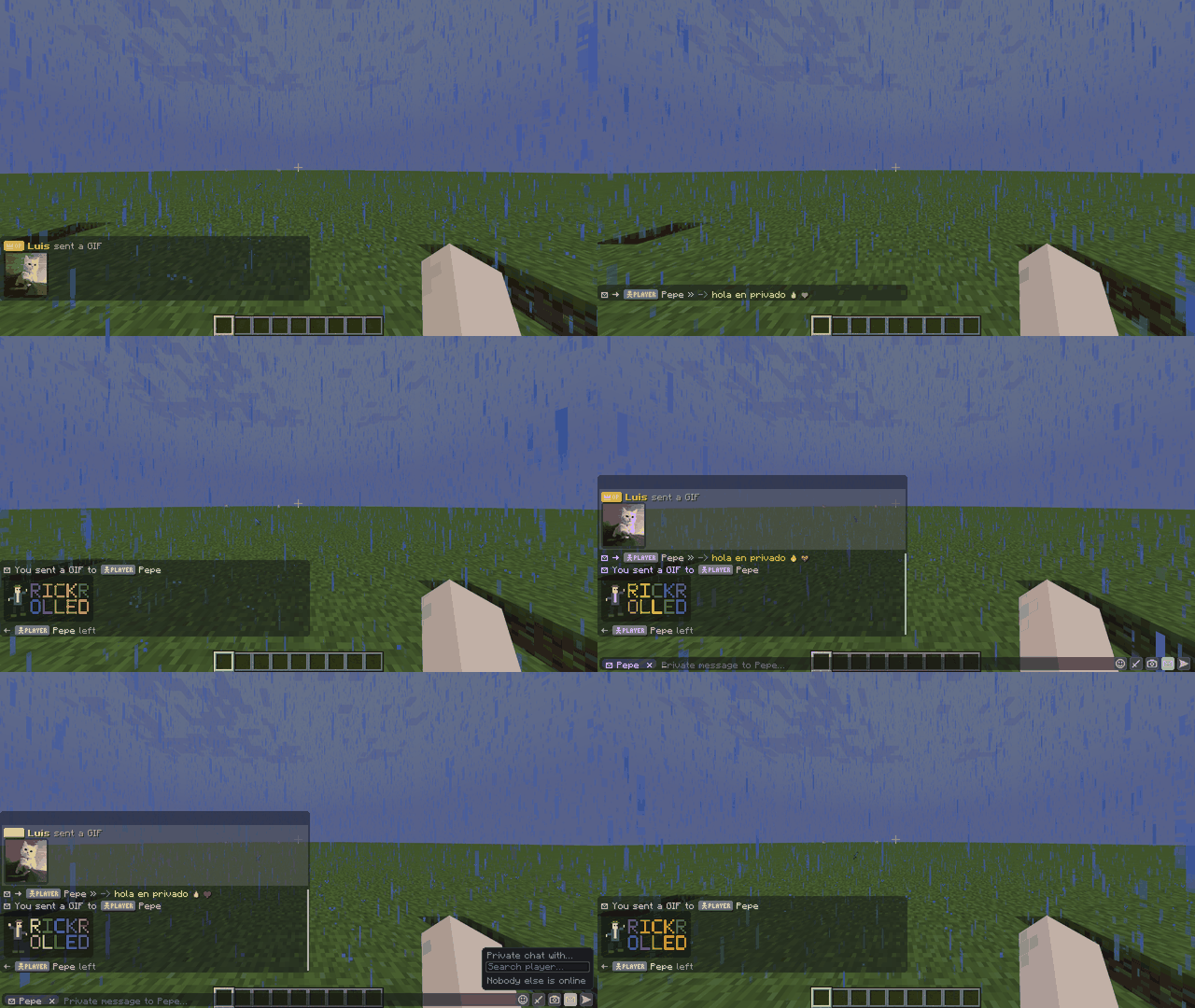
💬 Mentions and private messages
- @name highlights the message and plays a sound for that player.
@everyone,@hereand@rankcan be restricted by permission. - Private mode in the chat bar: pick a player (5 random players plus a search box) and your text, emojis, GIFs, items and screenshots go only to them.
☠️ Styled messages
- Styled death messages and join/leave messages, with a special welcome for first-time players.
🏷️ Chaos Ranks support (optional)
If the server has Chaos Ranks, rank badges appear in the chat and in the chat bar, and permissions can be granted per rank. Without Chaos Ranks, everything works normally and no badges are shown.
📦 Requirements
- Minecraft 1.21.1, Fabric Loader and Fabric API.
- Required on both the server and every client. Players without the mod are told which version to install when they try to join.
- No resource pack needed: the emojis and rank badges added by the server are sent through the mod.
⚙️ Configuration
Everything is set in config/chaoschatplus/config.json:
- Who can use each feature, by OP level and/or Chaos Ranks rank.
- Cooldowns, screenshot size and expiry, mention color and sound.
- KLIPY API key (optional).
Commands: /chatplus reload, /chatplus restore, /chatplus shot list|view|delete, /emoji list|approve|deny|remove|alias.
🔎 About KLIPY
GIF search in the Custom tab is Powered by KLIPY. To follow KLIPY's integration requirements, searches and GIFs are loaded directly from KLIPY on each player's game using the server's key, results are shown as provided, and KLIPY GIFs are never stored on disk. Content filtering is configured in the KLIPY Partner Panel. Get a free key at partner.klipy.com.
📜 Notes
- All emojis, GIFs and icons included are original art made for this mod.
- Not an official Minecraft product. Not approved by or associated with Mojang or Microsoft.
Project description from CurseForge.
Pick your setup
Chaos Chatplus by Minecraft version and loader
Choose the version and loader you play, then open the matching release.
Minecraft version
26.2
3 loader buildsMinecraft version
26.1
3 loader buildsMinecraft version
1.21.4
3 loader buildsMinecraft version
1.21.1
3 loader buildsMinecraft version
1.20.1
3 loader buildsCheck the dependencies, then try the file in a copied instance before changing a world you care about.
Recent files
Chaos Chatplus versions and loaders
Chaos ChatPlus 1.1.1 - NeoForge 26.3
chaoschatplus-neoforge-26.3-1.1.1.jar
18 Oct 2026
Client Source doesn’t say Server Source doesn’t say Dependencies No extras listed Listed on Release listing
Check the 26.3 · NeoForge setup NeoForge26.3 release
Chaos ChatPlus 1.1.1 - Forge 26.3
chaoschatplus-forge-26.3-1.1.1.jar
18 Oct 2026
Client Source doesn’t say Server Source doesn’t say Dependencies No extras listed Listed on Release listing
Check the 26.3 · Forge setup Forge26.3 release
Chaos ChatPlus 1.1.1 - Fabric 26.3
chaoschatplus-fabric-26.3-1.1.1.jar
18 Oct 2026
Client Source doesn’t say Server Source doesn’t say Dependencies 1 required · 1 unchecked Listed on Release listing
Check the 26.3 · Fabric setup Fabric26.3 release
Chaos ChatPlus 1.1.1 - NeoForge 26.2
chaoschatplus-neoforge-26.2-1.1.1.jar
18 Oct 2026
Client Source doesn’t say Server Source doesn’t say Dependencies No extras listed Listed on Release listing
Check the 26.2 · NeoForge setup NeoForge26.2 release
Chaos ChatPlus 1.1.1 - Forge 26.2
chaoschatplus-forge-26.2-1.1.1.jar
18 Oct 2026
Client Source doesn’t say Server Source doesn’t say Dependencies No extras listed Listed on Release listing
Check the 26.2 · Forge setup Forge26.2 release
Chaos ChatPlus 1.1.1 - Fabric 26.2
chaoschatplus-fabric-26.2-1.1.1.jar
18 Oct 2026
Client Source doesn’t say Server Source doesn’t say Dependencies 1 required · 1 unchecked Listed on Release listing
Check the 26.2 · Fabric setup Fabric26.2 release
Chaos ChatPlus 1.1.1 - NeoForge 26.1
chaoschatplus-neoforge-26.1-1.1.1.jar
18 Oct 2026
Client Source doesn’t say Server Source doesn’t say Dependencies No extras listed Listed on Release listing
Check the 26.1 · NeoForge setup NeoForge26.1 release
Chaos ChatPlus 1.1.1 - Forge 26.1
chaoschatplus-forge-26.1-1.1.1.jar
18 Oct 2026
Client Source doesn’t say Server Source doesn’t say Dependencies No extras listed Listed on Release listing
Check the 26.1 · Forge setup Forge26.1 release
Chaos ChatPlus 1.1.1 - Fabric 26.1
chaoschatplus-fabric-26.1-1.1.1.jar
18 Oct 2026
Client Source doesn’t say Server Source doesn’t say Dependencies 1 required · 1 unchecked Listed on Release listing
Check the 26.1 · Fabric setup Fabric26.1 release
Chaos ChatPlus 1.1.1 - NeoForge 1.21.4
chaoschatplus-neoforge-1.21.4-1.1.1.jar
18 Oct 2026
Client Source doesn’t say Server Source doesn’t say Dependencies No extras listed Listed on Release listing
Check the 1.21.4 · NeoForge setup 1.21.4NeoForge release
Chaos ChatPlus 1.1.1 - Forge 1.21.4
chaoschatplus-forge-1.21.4-1.1.1.jar
18 Oct 2026
Client Source doesn’t say Server Source doesn’t say Dependencies No extras listed Listed on Release listing
Check the 1.21.4 · Forge setup 1.21.4Forge release
Chaos ChatPlus 1.1.1 - Fabric 1.21.4
chaoschatplus-fabric-1.21.4-1.1.1.jar
18 Oct 2026
Client Source doesn’t say Server Source doesn’t say Dependencies 1 required · 1 unchecked Listed on Release listing
Check the 1.21.4 · Fabric setup Fabric1.21.4 release
Looking for an older file? The official CurseForge project page is in Resources.