Minecraft version
Back to mods 
CurseForge · Minecraft mod
Bedrock Creative Tabs
Configurable bedrock style creative tabs
Choose a version Pick your version below, then grab the matching file.
Quick answer
Which Bedrock Creative Tabs release should I use?
Latest stable file bedrock_creative_tabs-1.0.jar
Game version 1.20.1
Loader Forge, NeoForge
Bedrock Creative Tabs bedrock_creative_tabs-1.0.jar targets 1.20.1 with Forge, NeoForge. The project page does not say whether this file belongs on the client, dedicated server, or both. No extra mods listed for this file.
Where it goes
Is Bedrock Creative Tabs required on the client, server, or both?
The project page does not say whether this file belongs on the client, dedicated server, or both.
Client Source doesn’t say
Dedicated server Source doesn’t say
Loader for this release Forge, NeoForge
Required install it here Optional supported, not mandatory Not supported do not install here Source doesn’t say do not assume
The source does not explicitly classify this release as client-only or server-only.
What else does Bedrock Creative Tabs bedrock_creative_tabs-1.0.jar need?
bedrock_creative_tabs-1.0.jar. Change the file and its required mods may change too.
This file does not list any required mods. Do not add a library just because a different file uses it.
This file does not list any required or optional mods.
Before you install it
Add Bedrock Creative Tabs without breaking your instance.
Built for Bedrock Creative Tabs bedrock_creative_tabs-1.0.jar. Pick another file and the loader, install side or required mods may change.
- 01
Stick to this file
Use bedrock_creative_tabs-1.0.jar. It targets 1.20.1 with Forge, NeoForge; another release may have different loader, side or dependency requirements.
- 02
Bring the mods it needs
This file does not list any required mods. Do not add a library just because a different file uses it.
- 03
Put it on the correct side
The project page does not say whether this file belongs on the client, dedicated server, or both.
- 04
Pick the file you checked
Use the “Get this file” button beside bedrock_creative_tabs-1.0.jar. It opens that exact file at the source.
About this project
What does Bedrock Creative Tabs add?
Bedrock Creative Tabs
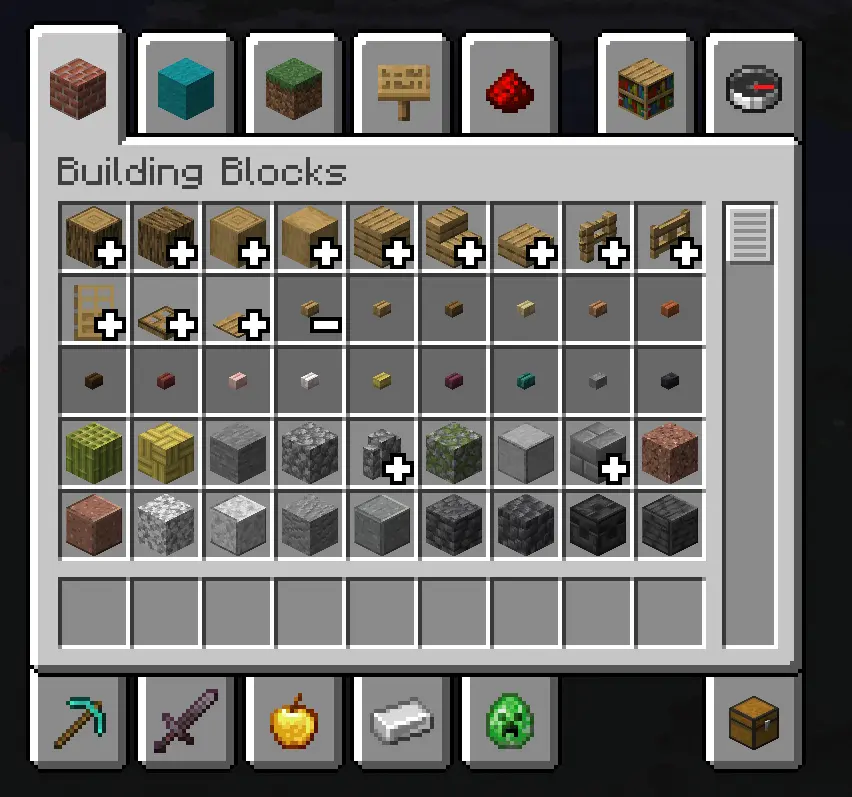
Configurable creative tabs for NeoForge: a resource pack names a set of item stacks and the tabs they belong to, and each of those tabs shows them as one icon that opens where it stands — the way Bedrock Edition groups its creative inventory. Nothing about which stacks fold, or where, is written in code.
This is a client-side mod. But for stability, it's recommended to install this mod on dedicated servers.
Resource pack
One JSON file per group, at assets/<namespace>/bedrock_creative_tabs/creative_group/<path>.json:
{
  "creative_tabs": [
    "minecraft:ingredients"
  ],
  "icon": {
    "id": "minecraft:red_dye"
  },
  "entries": [
    "#c:dyes"
  ],
  "priority": 0
}
A definition is reloaded with F3+T (or by switching packs). Reloading also rebuilds the tabs, so a change shows up as soon as the reload finishes.
| Field | Type | Notes |
|---|---|---|
entries |
List<Entry> | Required, at least one. The stacks the group claims; any one entry matching is a match. A single entry may be written without the list. |
icon |
Item Stack | Optional. What the closed icon draws. Defaults to the first member the fold found on that tab. |
creative_tabs |
List of Tab IDs | Required, at least one. The tabs this group folds in. minecraft:search is refused. |
priority |
Int | Optional, defaults to 0. When two groups claim the same stack, the higher priority wins; a tie falls back to load order. |
Also don't forget to translate your group's name with creative_group.<namespace>.<path> language keys.
Entries
An entry says one thing: whether it claims a stack. Five types ship with the mod.
| Form | Meaning |
|---|---|
"minecraft:oak_planks" |
That item, by id. |
"#minecraft:planks" |
Every item in that tag. |
{ "type": "bedrock_creative_tabs:item", "id": "minecraft:oak_planks" } |
The same, written out. |
{ "type": "bedrock_creative_tabs:item_tag", "tag": "minecraft:planks" } |
The same, written out. |
{ "type": "bedrock_creative_tabs:block_tag", "tag": "minecraft:mineable/pickaxe" } |
Every item that places a block in that block tag. |
{ "type": "bedrock_creative_tabs:has_component", "component": "minecraft:enchantments" } |
Every stack that carries that component, whatever its item. |
{ "type": "bedrock_creative_tabs:regex", "pattern": "minecraft:.*_concrete" } |
Every item whose full id matches a regular expression. |
You do not have to catch that by eye: every entry that matches no item at all is logged, naming the group and the entry.
WARN Creative group bedrock_creative_tabs:planks: entry #c:planks matches no item
If an entry fails to parse — most often because it names a type that no installed mod provides, or because the type was written without its namespace — that entry is dropped with a warning in the log and the rest of the definition still loads; a group left with no entries at all is refused while it loads, so a broken group is never silently an empty one.
Adding an entry type
An entry type is a MapCodec registered under bedrock_creative_tabs:group_entry_type:
public final class MyEntryTypes {
    public static final DeferredRegister<MapCodec<? extends GroupEntry>> REGISTRY = DeferredRegister.create(BctRegistries.GROUP_ENTRY_TYPE, "mymod");

    public static final DeferredHolder<MapCodec<? extends GroupEntry>, MapCodec<RegexEntry>> REGEX = REGISTRY.register("regex", () -> RegexEntry.CODEC);
}

public record RegexEntry(Pattern pattern) implements GroupEntry {
    public static final MapCodec<RegexEntry> CODEC = Codec.STRING.comapFlatMap(RegexEntry::parse, entry -> entry.pattern.pattern()).fieldOf("pattern");

    @Override
    public boolean matches(ItemStack stack) {
        // The full id, namespace included: writing that into the pattern is what a pack does to narrow it.
        return this.pattern.matcher(BuiltInRegistries.ITEM.getKey(stack.getItem()).toString()).matches();
    }

    @Override
    public MapCodec<RegexEntry> codec() {
        return CODEC;
    }
}
Project description from CurseForge.
Pick your setup
Bedrock Creative Tabs by Minecraft version and loader
Choose the version and loader you play, then open the matching release.
Minecraft version
1.21.1
1 loader buildMinecraft version
1.20.1
2 loader buildsCheck the dependencies, then try the file in a copied instance before changing a world you care about.
Recent files
Bedrock Creative Tabs versions and loaders
bedrock_creative_tabs-1.0.jar
10 Oct 2026
Client Source doesn’t say Server Source doesn’t say Dependencies No extras listed Listed on Release listing
Check the 1.20.1 · Forge setup 1.20.1ForgeNeoForge release
bedrock_creative_tabs-1.0.jar
10 Oct 2026
Client Source doesn’t say Server Source doesn’t say Dependencies No extras listed Listed on Release listing
Check the 1.21.1 · NeoForge setup 1.21.1NeoForge release
bedrock_creative_tabs-1.0.jar
9 Oct 2026
Client Source doesn’t say Server Source doesn’t say Dependencies No extras listed Listed on Release listing
Check the 26.1.2 · NeoForge setup NeoForge26.1.2 release
bedrock_creative_tabs-1.0-beta.1.jar
8 Oct 2026
Client Source doesn’t say Server Source doesn’t say Dependencies No extras listed Listed on Release listing
Check the 26.1.2 · NeoForge setup NeoForge26.1.2 beta
Looking for an older file? The official CurseForge project page is in Resources.
 mod
mod CurseForge + Modrinth · Minecraft
Cobblemon: Charms
A progression-based charm system for Cobblemon. Catch Pokémon to unlock type-specific charms that influence spawns around you. Complete your Pokédex to earn the Shiny Charm, and combine charms into a single Multi-Charm. Fully configurable.
 mod
mod CurseForge + Modrinth · Minecraft
Knight Lib
A library that serves as a bridge between mods.
 mod
mod CurseForge · Minecraft
Projectile Trajectory Preview
Display the trajectory of your projectiles such as arrows, ender pearls, snowballs, eggs and more!