Fabric API Needed by GOD AUTHORITY · WORLD CONTROL World Control v1.3.1 — Time Lock Fix
requiredMatching file found Matched file: [1.21.11] Fabric API 0.141.6+1.21.11
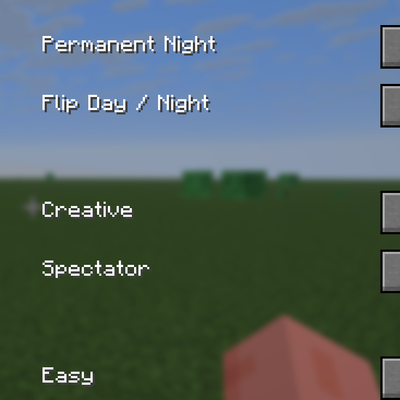
CurseForge · Minecraft mod
A command-free Fabric 1.21.11 world-control panel for instantly managing time, game mode, difficulty, weather, and special testing utilities from an in-game GUI.
Quick answer
GOD AUTHORITY · WORLD CONTROL World Control v1.3.1 — Time Lock Fix targets 1.21.11 with Fabric. The project page does not say whether this file belongs on the client, dedicated server, or both. All 1 required mods have matching files.
Where it goes
The project page does not say whether this file belongs on the client, dedicated server, or both.
The source does not explicitly classify this release as client-only or server-only.
World Control v1.3.1 — Time Lock Fix. Change the file and its required mods may change too.
Install Fabric API first. We found matching files for this game-version and loader setup.
We only count dependency files that match this setup. A file for another loader does not fill the gap.
Before you install it
Built for GOD AUTHORITY · WORLD CONTROL World Control v1.3.1 — Time Lock Fix. Pick another file and the loader, install side or required mods may change.
Use World Control v1.3.1 — Time Lock Fix. It targets 1.21.11 with Fabric; another release may have different loader, side or dependency requirements.
Install Fabric API first. We found matching files for this game-version and loader setup.
The project page does not say whether this file belongs on the client, dedicated server, or both.
Use the “Get this file” button beside World Control v1.3.1 — Time Lock Fix. It opens that exact file at the source.
About this project
God Authority · World Control is a Fabric 1.21.11 utility mod designed for fast world control, testing, sandbox use, PvP preparation, and mod-development environments.
Instead of repeatedly opening menus, changing world settings, or typing vanilla commands, World Control provides a dedicated in-game control panel that lets you prepare world-state changes from one place and apply them through a simple GUI.
The mod is especially useful when testing other mods, experimenting with combat situations, preparing controlled environments, switching between survival and creative workflows, or rapidly changing world conditions without relying on vanilla command input.
The interface is fully in English.
Press:
F8
to open the World Control interface.
The control panel is designed as a compact in-game utility screen. Most settings can be selected first and then applied together using the confirmation button at the bottom of the GUI.
World Control includes several time-management options:
No Change
Leaves the current time behavior unchanged.
Permanent Day
Locks the world into daytime.
Permanent Night
Locks the world into nighttime.
Resume Cycle
Restores the normal day/night cycle.
Flip Day / Night
Switches the current time to the opposite half of the Minecraft day.
This allows a testing world to remain permanently bright, permanently dark, return to normal progression, or quickly swap between day and night.
The control panel can switch the player between Minecraft's standard game modes:
The system is designed as a direct world-control utility rather than a command interface.
World difficulty can be changed from the same GUI:
This makes it easy to move between safe testing environments and full combat conditions without leaving the control panel.
World Control includes permanent weather-lock options.
Available weather locks:
Only one weather lock can be active at a time.
If no weather lock is selected, Minecraft is allowed to handle weather normally.
This is useful for:
In addition to permanent weather locking, the mod includes a separate instant-weather selector.
Available immediate weather states:
This changes the current weather immediately without requiring a permanent lock.
The two systems are intentionally separate:
Weather Lock = keep a weather state active.
Set Weather Now = change the current weather once.
The bottom of the control panel includes a confirmation button:
✔ APPLY
Settings prepared in the control panel are applied through this button.
This keeps the interface predictable and prevents accidental changes while selecting world settings.
World Control also contains a built-in All Effects Potion utility.
This feature is available inside World Control even if the standalone God Authority · All Effects Potion mod is not installed.
The built-in potion system includes:
The potions are designed as testing utilities and can be given directly from the World Control interface.
Potion stacks can contain up to:
64 items
This allows players to keep multiple testing potions in a single inventory slot.
The drinkable version does not return an empty glass bottle after use.
A core design goal of God Authority · World Control is to avoid depending on normal vanilla command usage for its primary features.
The mod is intended to remain useful in testing worlds where the player does not want to repeatedly use commands or manually change world settings.
The control panel acts as a dedicated system-level utility interface rather than a command menu.
God Authority · World Control is especially useful for:
Target platform:
Minecraft Java Edition 1.21.11
Fabric
The mod is designed for broad compatibility with Fabric 1.21.11 mod environments.
Because other mods may also modify world state, weather, time, player state, or related systems, absolute compatibility with every possible third-party mod cannot be guaranteed.
Required:
Recommended:
Use current versions compatible with Minecraft 1.21.11.
Project description from CurseForge.
Pick your setup
Choose the version and loader you play, then open the matching release.
Check the dependencies, then try the file in a copied instance before changing a world you care about.
Recent files
·GodAuthority-WorldControl-1.3.1+1.21.11.jar
10 Oct 2026
🌟GodAuthority-WorldControl-1.3.0+1.21.11.jar
8 Oct 2026
Looking for an older file? The official CurseForge project page is in Resources.
 mod
modErgonomic multiloader configuration library with sync support.
 mod
modCustomizable communcation between minecraft chat + advancements and discord.
 mod
modAdds craftable , edible and placable Polish kremowki