R-UI Lib Needed by Better Radio better_radio-forge-0.2.0+1.20.1.jar
requiredMatching file found Matched file: R-Ui Lib 0.10.0 (forge 1.20.1)

CurseForge · Minecraft mod
Take control of Minecraft’s music with playlists, smart background tracks, and simple in-game playback controls.
Quick answer
Better Radio better_radio-forge-0.2.0+1.20.1.jar targets 1.20.1 with Forge. The project page does not say whether this file belongs on the client, dedicated server, or both. All 1 required mods have matching files.
Where it goes
The project page does not say whether this file belongs on the client, dedicated server, or both.
The source does not explicitly classify this release as client-only or server-only.
better_radio-forge-0.2.0+1.20.1.jar. Change the file and its required mods may change too.
Install R-UI Lib first. We found matching files for this game-version and loader setup.
We only count dependency files that match this setup. A file for another loader does not fill the gap.
Before you install it
Built for Better Radio better_radio-forge-0.2.0+1.20.1.jar. Pick another file and the loader, install side or required mods may change.
Use better_radio-forge-0.2.0+1.20.1.jar. It targets 1.20.1 with Forge; another release may have different loader, side or dependency requirements.
Install R-UI Lib first. We found matching files for this game-version and loader setup.
The project page does not say whether this file belongs on the client, dedicated server, or both.
Use the “Get this file” button beside better_radio-forge-0.2.0+1.20.1.jar. It opens that exact file at the source.
About this project

Minecraft's soundtrack, on your terms

Minecraft's background music and discs can be hard to control while you're playing. Better Radio puts them in a personal player, so you can choose what to hear, manage a playlist, and return to tracks from your history.

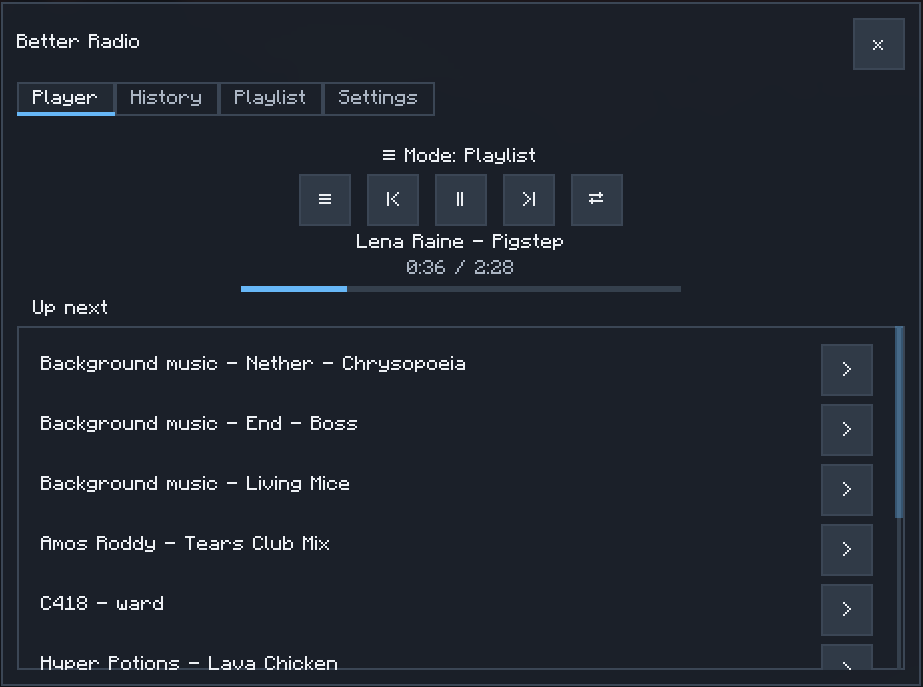
Let the game choose the next track. Free flow draws from eligible background music and discs, with a preference for tracks associated with your biome.
Make a personal mix and play it on repeat. Add tracks from the library or your listening history, then shuffle the upcoming playlist when you want a different order.
Control playback without leaving your world. Open the player to pause or resume, skip tracks, browse what you heard, search the library, and add favorites to your playlist. Music from compatible mods can appear in the library too.

Heads up: Better Radio controls gameplay background music and music discs. Menu and credits music remain under Minecraft's control.

Yes. Open the Settings tab to choose how music plays:
| Setting | Default | What it does |
|---|---|---|
| Free flow interval | Balanced | Sets the silence between tracks: Frequent (1–2 min), Balanced (2–5 min), Occasional (5–10 min), or Non-stop (2–4 sec). |
| Playlist interval | Non-stop | Sets the pause between playlist tracks using the same choices, independently of Free flow. |
| Biome preference | 100% | Controls how strongly Free flow favors music associated with the current biome. At 100%, biome-associated tracks are favored, but other eligible tracks can still play. |
| Starting mode | Last used | Choose whether a world starts in your last mode, Free flow, or Playlist. |

Better Radio is a client-side mod. Install it and R-UI Lib on each client that will use the player; no server installation is needed.

Open an issue on GitHub. Include your Minecraft, loader, Better Radio, and R-UI Lib versions, plus the listening mode and steps that led to the issue. Screenshots of the player or settings can help.

Yes. Better Radio is licensed under the MIT License. See LICENSE.
For details about the player and playback controls, see the player guide and CHANGELOG.
Project description from CurseForge.
Pick your setup
Choose the version and loader you play, then open the matching release.
Check the dependencies, then try the file in a copied instance before changing a world you care about.
Recent files
14 Oct 2026
14 Oct 2026
9 Oct 2026
Looking for an older file? The official CurseForge project page is in Resources.
 mod
Adds compatibility between several mining-related mods
 mod
Farm mobs with style!
 mod
The engine behind MingoCreator's lucky blocks: luck, data-driven drops, bosses with their own music, wishing wells and more. Required by Candy Lucky Block.