Minecraft version
Back to mods 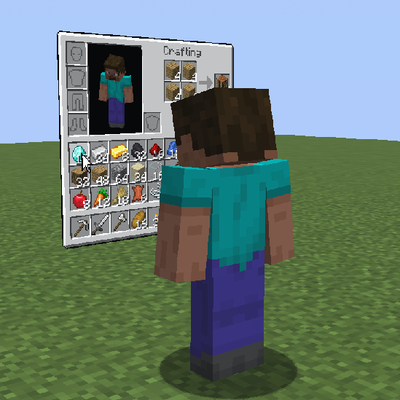
CurseForge · Minecraft mod
What is going on (WIGO)
Look at what's actually happening on other players' screens right now.
Choose a version Pick your version below, then grab the matching file.
Quick answer
Which What is going on (WIGO) release should I use?
Latest stable file wigo-neoforge-26.3-1.0.2
Game version 26.3
Loader NeoForge
What is going on (WIGO) wigo-neoforge-26.3-1.0.2 targets 26.3 with NeoForge. The project page does not say whether this file belongs on the client, dedicated server, or both. No extra mods listed for this file.
Where it goes
Is What is going on (WIGO) required on the client, server, or both?
The project page does not say whether this file belongs on the client, dedicated server, or both.
Client Source doesn’t say
Dedicated server Source doesn’t say
Loader for this release NeoForge
Required install it here Optional supported, not mandatory Not supported do not install here Source doesn’t say do not assume
The source does not explicitly classify this release as client-only or server-only.
What else does What is going on (WIGO) wigo-neoforge-26.3-1.0.2 need?
wigo-neoforge-26.3-1.0.2. Change the file and its required mods may change too.
This file does not list any required mods. Do not add a library just because a different file uses it.
This file does not list any required or optional mods.
Before you install it
Add What is going on (WIGO) without breaking your instance.
Built for What is going on (WIGO) wigo-neoforge-26.3-1.0.2. Pick another file and the loader, install side or required mods may change.
- 01
Stick to this file
Use wigo-neoforge-26.3-1.0.2. It targets 26.3 with NeoForge; another release may have different loader, side or dependency requirements.
- 02
Bring the mods it needs
This file does not list any required mods. Do not add a library just because a different file uses it.
- 03
Put it on the correct side
The project page does not say whether this file belongs on the client, dedicated server, or both.
- 04
Pick the file you checked
Use the “Get this file” button beside wigo-neoforge-26.3-1.0.2. It opens that exact file at the source.
About this project
What does What is going on (WIGO) add?
What is going on (WIGO)




WIGO displays nearby players' open menus as panels beside them in the world. You can watch another player's menu without controlling it. Panels use your own textures and fonts.
Features
- View inventories, containers, crafting, trading, books, chat drafts and supported game screens.
- See item icons, stack counts, cursor movements and tooltips.
- Choose which menus to share, who can view them, viewing sides and distance. Optional observer counter and cursor styles.
- Adjust panel size, transparency, manual or automatic brightness, height, tilt and curvature. Preview changes beside the settings.
- Set server limits for shared menus, distance, observer counts and display modes.
Requirements
- A build matching your Minecraft version and loader: Fabric, Forge or NeoForge.
- Fabric builds require Fabric API and Fabric Loader 0.19.5 or newer.
- Java 17 for Minecraft 1.16.5–1.20.4, Java 21 for 1.20.5–1.21.11, or Java 25 for 26.x. Forge 1.16.5 also supports Java 8.
Some custom screens added by other mods are unsupported.
Getting started
- Put WIGO in the
modsfolder on the server or LAN host and each participating client. - Join the same world and open a supported menu. The default sharing distance is 8 blocks.
- Press F8, then Settings. My menus controls sharing; Other players' menus changes how you see panels.
Project description from CurseForge.
Pick your setup
What is going on (WIGO) by Minecraft version and loader
Choose the version and loader you play, then open the matching release.
Minecraft version
26.2
3 loader buildsMinecraft version
26.1.2
3 loader buildsMinecraft version
26.1.1
3 loader buildsMinecraft version
26.1
3 loader buildsMinecraft version
1.21.11
3 loader buildsMinecraft version
1.21.10
3 loader buildsMinecraft version
1.21.9
3 loader buildsMinecraft version
1.21.8
3 loader buildsMinecraft version
1.21.7
3 loader buildsMinecraft version
1.21.6
3 loader buildsMinecraft version
1.21.5
3 loader buildsShowing the newest 12 of 17 game versions. Older files are in the list below.
Check the dependencies, then try the file in a copied instance before changing a world you care about.
Recent files
What is going on (WIGO) versions and loaders
wigo-neoforge-26.3-1.0.2
wigo-neoforge-26.3-1.0.2.jar
25 Oct 2026
Client Source doesn’t say Server Source doesn’t say Dependencies No extras listed Listed on Release listing
Check the 26.3 · NeoForge setup NeoForge26.3 release
wigo-forge-26.3-1.0.2
wigo-forge-26.3-1.0.2.jar
25 Oct 2026
Client Source doesn’t say Server Source doesn’t say Dependencies No extras listed Listed on Release listing
Check the 26.3 · Forge setup Forge26.3 release
wigo-fabric-26.3-1.0.2
wigo-fabric-26.3-1.0.2.jar
25 Oct 2026
Client Source doesn’t say Server Source doesn’t say Dependencies 1 required · 1 unchecked Listed on Release listing
Check the 26.3 · Fabric setup Fabric26.3 release
wigo-neoforge-26.2-1.0.2
wigo-neoforge-26.2-1.0.2.jar
25 Oct 2026
Client Source doesn’t say Server Source doesn’t say Dependencies No extras listed Listed on Release listing
Check the 26.2 · NeoForge setup NeoForge26.2 release
wigo-forge-26.2-1.0.2
wigo-forge-26.2-1.0.2.jar
25 Oct 2026
Client Source doesn’t say Server Source doesn’t say Dependencies No extras listed Listed on Release listing
Check the 26.2 · Forge setup Forge26.2 release
wigo-fabric-26.2-1.0.2
wigo-fabric-26.2-1.0.2.jar
25 Oct 2026
Client Source doesn’t say Server Source doesn’t say Dependencies 1 required · 1 unchecked Listed on Release listing
Check the 26.2 · Fabric setup Fabric26.2 release
wigo-neoforge-26.1.2-1.0.2
wigo-neoforge-26.1.2-1.0.2.jar
25 Oct 2026
Client Source doesn’t say Server Source doesn’t say Dependencies No extras listed Listed on Release listing
Check the 26.1.2 · NeoForge setup NeoForge26.1.2 release
wigo-forge-26.1.2-1.0.2
wigo-forge-26.1.2-1.0.2.jar
25 Oct 2026
Client Source doesn’t say Server Source doesn’t say Dependencies No extras listed Listed on Release listing
Check the 26.1.2 · Forge setup Forge26.1.2 release
wigo-fabric-26.1.2-1.0.2
wigo-fabric-26.1.2-1.0.2.jar
25 Oct 2026
Client Source doesn’t say Server Source doesn’t say Dependencies 1 required · 1 unchecked Listed on Release listing
Check the 26.1.2 · Fabric setup Fabric26.1.2 release
wigo-neoforge-26.1.1-1.0.2
wigo-neoforge-26.1.1-1.0.2.jar
25 Oct 2026
Client Source doesn’t say Server Source doesn’t say Dependencies No extras listed Listed on Release listing
Check the 26.1.1 · NeoForge setup NeoForge26.1.1 release
wigo-forge-26.1.1-1.0.2
wigo-forge-26.1.1-1.0.2.jar
25 Oct 2026
Client Source doesn’t say Server Source doesn’t say Dependencies No extras listed Listed on Release listing
Check the 26.1.1 · Forge setup Forge26.1.1 release
wigo-fabric-26.1.1-1.0.2
wigo-fabric-26.1.1-1.0.2.jar
25 Oct 2026
Client Source doesn’t say Server Source doesn’t say Dependencies 1 required · 1 unchecked Listed on Release listing
Check the 26.1.1 · Fabric setup Fabric26.1.1 release
Looking for an older file? The official CurseForge project page is in Resources.
 mod
mod CurseForge · Minecraft
Carpet AMS Addition
A fabric-carpet extension mod. It offers some interesting and useful features.
 mod
mod CurseForge · Minecraft
KubeGroovy
KubeGroovy is a fork of KubeJS running on Groovy instead of Javascript
 mod
mod CurseForge · Minecraft
Ad Astra: Lunar Transit
Travel between the Overworld and Ad Astra's Moon by altitude, with an ascent meter, space effects and Aeronautics ship support.