Minecraft version
Back to mods 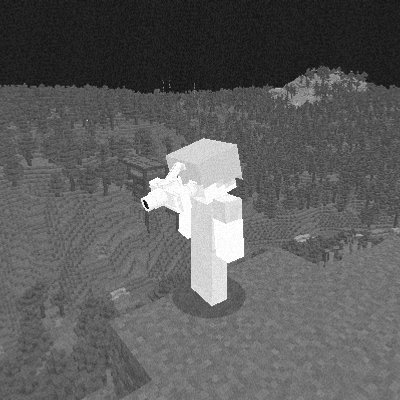
CurseForge · Minecraft mod
T7 Thermal Imager
T7 Thermal Imager, which provides the user with a wide field of view in the infrared spectrum. Bad news for anyone hiding in the bushes.
Choose a version Pick your version below, then grab the matching file.
Quick answer
Which T7 Thermal Imager release should I use?
Latest stable file t7thermal-1.0.5.jar
Game version 1.20.1
Loader Forge
T7 Thermal Imager t7thermal-1.0.5.jar targets 1.20.1 with Forge. The project page does not say whether this file belongs on the client, dedicated server, or both. No extra mods listed for this file.
Where it goes
Is T7 Thermal Imager required on the client, server, or both?
The project page does not say whether this file belongs on the client, dedicated server, or both.
Client Source doesn’t say
Dedicated server Source doesn’t say
Loader for this release Forge
Required install it here Optional supported, not mandatory Not supported do not install here Source doesn’t say do not assume
The source does not explicitly classify this release as client-only or server-only.
What else does T7 Thermal Imager t7thermal-1.0.5.jar need?
t7thermal-1.0.5.jar. Change the file and its required mods may change too.
This file does not list any required mods. Do not add a library just because a different file uses it.
This file does not list any required or optional mods.
Before you install it
Add T7 Thermal Imager without breaking your instance.
Built for T7 Thermal Imager t7thermal-1.0.5.jar. Pick another file and the loader, install side or required mods may change.
- 01
Stick to this file
Use t7thermal-1.0.5.jar. It targets 1.20.1 with Forge; another release may have different loader, side or dependency requirements.
- 02
Bring the mods it needs
This file does not list any required mods. Do not add a library just because a different file uses it.
- 03
Put it on the correct side
The project page does not say whether this file belongs on the client, dedicated server, or both.
- 04
Pick the file you checked
Use the “Get this file” button beside t7thermal-1.0.5.jar. It opens that exact file at the source.
About this project
What does T7 Thermal Imager add?
Mod that adds T7 Thermal Imaging Goggles, inspired by some games and a bit of real life. It mostly works like in games.
It is uncraftable in survival mode and can only be taken from the creative tab.
You can mount the T7 TI on a diamond helmet using an anvil, which turns it into the AVS14H helmet with the T7 mounted. To unmount it, put the AVS14H in an anvil with a wooden stick (I had no other idea for this).
- If you see any lag or bugs, feel free to comment about them, but I don't know if I will be able to fix them because I'm not a professional yet and I can't code this well on my own.
Claude helped me with the code, but I made the models and textures myself in 2025 on my phone using Blockbench in the web version, so it's obvious they won't be perfect. I had no laptop back then.
It may be incompatible with some or all shader packs, because this mod has its own shader for the thermal imaging.
Choose whether clouds are visible while wearing the helmet, in config of the mod in mods list. Default is hidden (more realistic). This affects visuals only.
Flip key (default V): raise or lower the T7 on the helmet. Raised = thermal vision off. Rebind it in Controls.
I will try to add more things to this mod over time, but I'm not sure about that because, as I said, I'm not a pro at this.
Requires Minecraft 1.20.1 and Forge.
Project description from CurseForge.
Pick your setup
T7 Thermal Imager by Minecraft version and loader
Choose the version and loader you play, then open the matching release.
Check the dependencies, then try the file in a copied instance before changing a world you care about.
Recent files
T7 Thermal Imager versions and loaders
t7thermal-1.0.5.jar
14 Oct 2026
Client Source doesn’t say Server Source doesn’t say Dependencies No extras listed Listed on Release listing
Check the 1.20.1 · Forge setup 1.20.1Forge release
t7thermal-1.0.4.jar
13 Oct 2026
Client Source doesn’t say Server Source doesn’t say Dependencies No extras listed Listed on Release listing
Check the 1.20.1 · Forge setup 1.20.1Forge release
t7thermal-1.0.3.jar
12 Oct 2026
Client Source doesn’t say Server Source doesn’t say Dependencies No extras listed Listed on Release listing
Check the 1.20.1 · Forge setup 1.20.1Forge beta
t7thermal-1.0.2.jar
11 Oct 2026
Client Source doesn’t say Server Source doesn’t say Dependencies No extras listed Listed on Release listing
Check the 1.20.1 · Forge setup 1.20.1Forge beta
t7thermal-1.0.1.jar
11 Oct 2026
Client Source doesn’t say Server Source doesn’t say Dependencies No extras listed Listed on Release listing
Check the 1.20.1 · Forge setup 1.20.1Forge beta
t7thermal-1.0.0.jar
10 Oct 2026
Client Source doesn’t say Server Source doesn’t say Dependencies No extras listed Listed on Release listing
Check the 1.20.1 · Forge setup 1.20.1Forge beta
Looking for an older file? The official CurseForge project page is in Resources.
 mod
mod CurseForge · Minecraft
Emberforge
A Tinkers' Construct 2 inspired mod: melt metals in a multiblock smeltery and build tools, weapons, armor, bows and magic staffs from parts. Around 30 materials with unique traits, plus modifiers, spells, relics, new mobs, bosses and a lot more.
 mod
mod CurseForge + Modrinth · Minecraft
EMF Compat: Take a Seat
Makes Take a Seat work correctly with animated EMF player models.
 mod
mod CurseForge + Modrinth · Minecraft
EMF Compat: Immersive Melodies
Makes Immersive Melodies work correctly with animated EMF player models.