Xaero's World Map Needed by Unboxing Records-1.20.1-0.2.2.jar
requiredMatching file found Matched file: xaeroworldmap-forge-1.20.1-1.47.0.jar

CurseForge · Minecraft mod
Lost Cities building markers and per-player loot exploration tracking for Xaero's World Map.
Quick answer
Unboxing Records-1.20.1-0.2.2.jar targets 1.20.1 with Forge. The project page does not say whether this file belongs on the client, dedicated server, or both. All 3 required mods have matching files.
Where it goes
The project page does not say whether this file belongs on the client, dedicated server, or both.
The source does not explicitly classify this release as client-only or server-only.
Unboxing Records-1.20.1-0.2.2.jar. Change the file and its required mods may change too.
Install Xaero's World Map, The Lost Cities, Xaero's Minimap first. We found matching files for this game-version and loader setup. 5 come through another mod in the chain.
5 extra mods were pulled in by other dependencies. Indented rows show who needs each one. We only count dependency files that match this setup. A file for another loader does not fill the gap.
Before you install it
Built for Unboxing Records-1.20.1-0.2.2.jar. Pick another file and the loader, install side or required mods may change.
Use Unboxing Records-1.20.1-0.2.2.jar. It targets 1.20.1 with Forge; another release may have different loader, side or dependency requirements.
Install Xaero's World Map, The Lost Cities, Xaero's Minimap first. We found matching files for this game-version and loader setup. 5 come through another mod in the chain.
The project page does not say whether this file belongs on the client, dedicated server, or both.
Use the “Get this file” button beside Unboxing Records-1.20.1-0.2.2.jar. It opens that exact file at the source.
About this project
A building exploration record mod created for DeceasedCraft.
为亡者世界整合包制作的建筑探索记录模组。
When players open the loot container of a building, it will be automatically recorded and a marker will be displayed on the Xaero map interface. The display can be toggled on or off using the shortcut key or the button at the bottom right corner.When the mouse hovers over the logo, information such as the building name will be displayed.
当玩家开启建筑的战利品容器时,会自动记录并在Xaero的地图界面上显示标识,快捷键与右下角按钮可开关显示。鼠标悬停在标识上可显示建筑名称等信息 。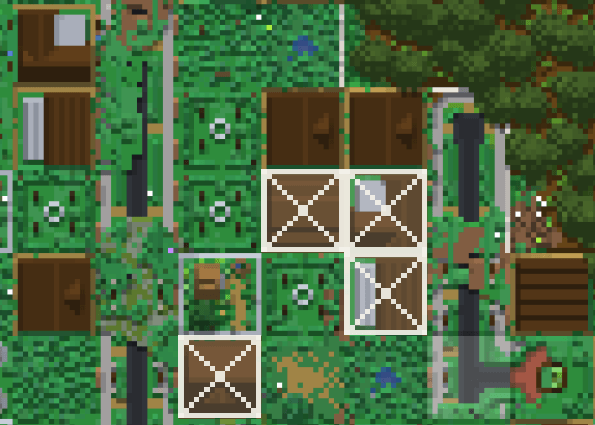
On the map interface, by using Alt + right-click on the block, you can manually add, edit, hide or delete the markers.
在地图界面使用 Alt + 右键 区块可以手动添加、编辑、隐藏、删除标识。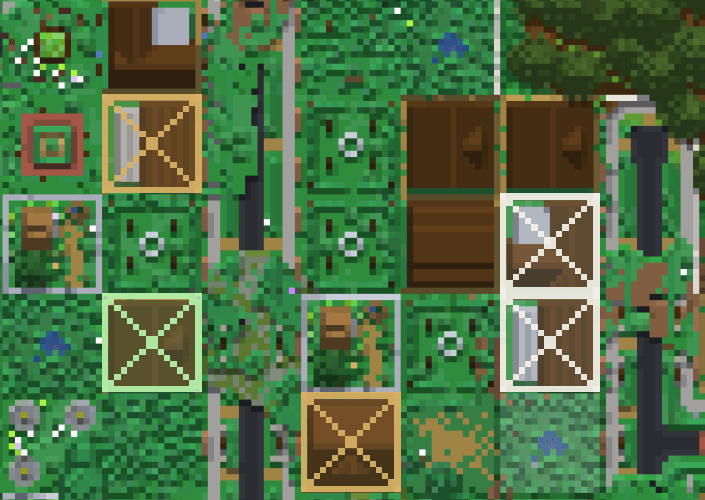
Project description from CurseForge.
Pick your setup
Choose the version and loader you play, then open the matching release.
Check the dependencies, then try the file in a copied instance before changing a world you care about.
Recent files
17 Oct 2026
17 Oct 2026
11 Oct 2026
Looking for an older file? The official CurseForge project page is in Resources.
 mod
mod🎓 Collective is a shared library with common code for all of Serilum's mods.
 mod
modClient-side radial quick-action menu with configurable wheels, profiles, shortcuts, and multiplayer-safe command and keybind access.
 mod
modCraft powerful amulets with progressively more insane powerups and effects.