Minecraft version
Back to mods 
CurseForge · Minecraft mod
Modern Music
Play NetEase Cloud Music, QQ Music, and Kugou Music in Minecraft. It supports song search, playlist import, lyrics display, and synchronized listening for multiple players.
Choose a version Pick your version below, then grab the matching file.
Quick answer
Which Modern Music release should I use?
Latest stable file modernmusic-1.20.1-1.0.0.jar
Game version 1.20.1
Loader Forge
Modern Music modernmusic-1.20.1-1.0.0.jar targets 1.20.1 with Forge. The project page does not say whether this file belongs on the client, dedicated server, or both. No extra mods listed for this file.
Where it goes
Is Modern Music required on the client, server, or both?
The project page does not say whether this file belongs on the client, dedicated server, or both.
Client Source doesn’t say
Dedicated server Source doesn’t say
Loader for this release Forge
Required install it here Optional supported, not mandatory Not supported do not install here Source doesn’t say do not assume
The source does not explicitly classify this release as client-only or server-only.
What else does Modern Music modernmusic-1.20.1-1.0.0.jar need?
modernmusic-1.20.1-1.0.0.jar. Change the file and its required mods may change too.
This file does not list any required mods. Do not add a library just because a different file uses it.
This file does not list any required or optional mods.
Before you install it
Add Modern Music without breaking your instance.
Built for Modern Music modernmusic-1.20.1-1.0.0.jar. Pick another file and the loader, install side or required mods may change.
- 01
Stick to this file
Use modernmusic-1.20.1-1.0.0.jar. It targets 1.20.1 with Forge; another release may have different loader, side or dependency requirements.
- 02
Bring the mods it needs
This file does not list any required mods. Do not add a library just because a different file uses it.
- 03
Put it on the correct side
The project page does not say whether this file belongs on the client, dedicated server, or both.
- 04
Pick the file you checked
Use the “Get this file” button beside modernmusic-1.20.1-1.0.0.jar. It opens that exact file at the source.
About this project
What does Modern Music add?
Listen to NetEase Cloud Music, QQ Music, Kugou Music, and local audio in Minecraft, with support for individual playback and synchronized listening with other players.
- Search for songs, import playlists, and manage multiple playback queues.
- Play, pause, skip tracks, seek, adjust the volume, and switch repeat modes.
- View album art, lyrics, and an in-game HUD, with ten visual themes to choose from.
- Create listening groups or listen together with your FTB Teams teammates.
- Browse and play local MP3 and WAV files. Drag and drop files to copy them into your local audio library; administrators can also drag and drop files to upload them to the server for use in individual or group queues.
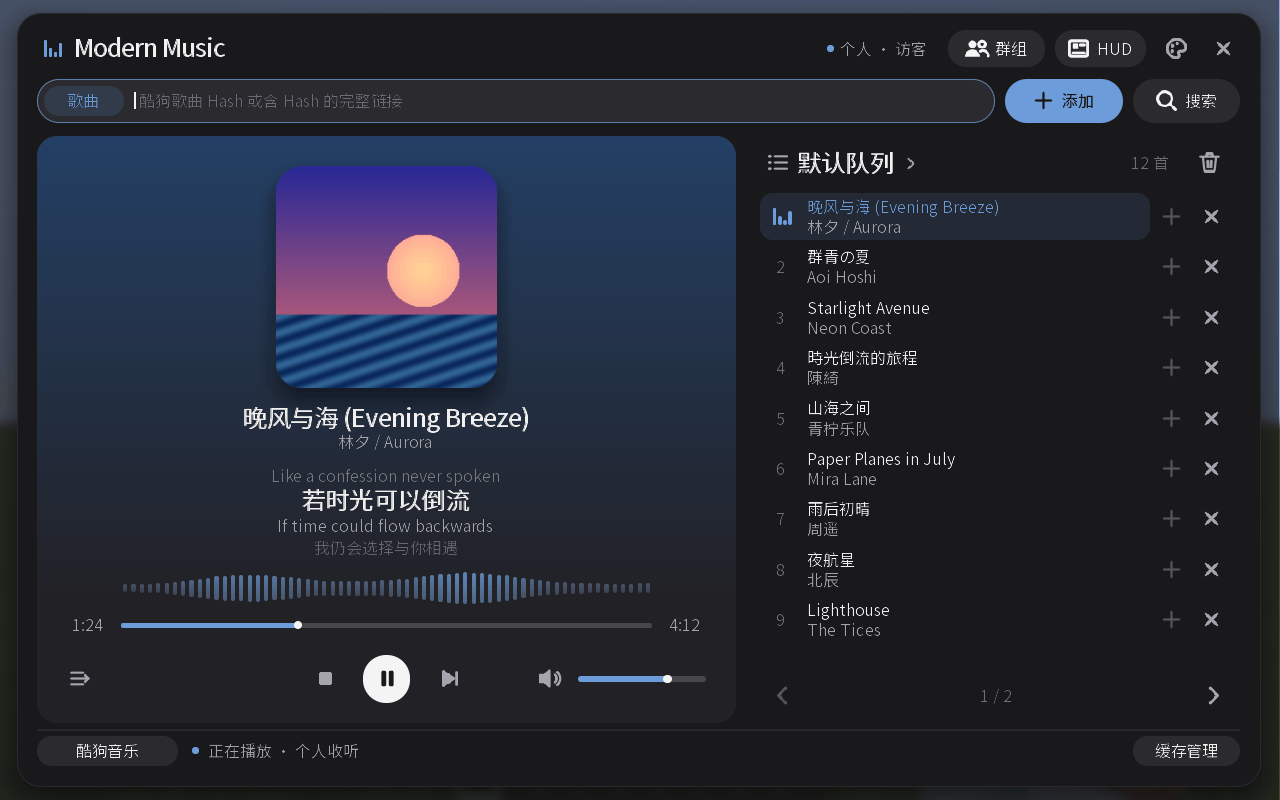
Project description from CurseForge.
Pick your setup
Modern Music by Minecraft version and loader
Choose the version and loader you play, then open the matching release.
Minecraft version
1.20.1
1 loader buildCheck the dependencies, then try the file in a copied instance before changing a world you care about.
Recent files
Modern Music versions and loaders
modernmusic-1.20.1-1.0.0.jar
24 Oct 2026
Client Source doesn’t say Server Source doesn’t say Dependencies No extras listed Listed on Release listing
Check the 1.20.1 · Forge setup 1.20.1Forge release
modernmusic-1.21.1-1.0.1.jar
24 Oct 2026
Client Source doesn’t say Server Source doesn’t say Dependencies No extras listed Listed on Release listing
Check the 1.21.1 · NeoForge setup 1.21.1NeoForge release
modernmusic-1.21.1-1.0.0.jar
11 Oct 2026
Client Source doesn’t say Server Source doesn’t say Dependencies No extras listed Listed on Release listing
Check the 1.21.1 · NeoForge setup 1.21.1NeoForge release
Looking for an older file? The official CurseForge project page is in Resources.
 mod
mod CurseForge · Minecraft
GlobalShop
All-in-One Economy, Player Market & Server Shop. Zero dependencies, supports all mods!
 mod
mod CurseForge + Modrinth · Minecraft
Insane's Survival Overhaul (aka IguanaTweaks Reborn)
Overhaul survival with many changes to existing mechanics. Weapon rebalance, enchanting rework, and much more
 mod
mod CurseForge · Minecraft
Haze - Realistic fog
Realistic fog: on some calm mornings fog settles into the valleys and glows in the sunrise, rain leaves a grey mist and swamps stay misty. Client-side.