Minecraft version
Back to mods 
CurseForge · Minecraft mod
Chisel: DecoBlocks
Add a wide variety of decorative blocks and use a chisel to transform them into unique patterns and textures!
Choose a version Pick your version below, then grab the matching file.
Quick answer
Which Chisel: DecoBlocks release should I use?
Latest stable file decorative_blocks-1.0.1-neoforge-26.1.2.jar
Game version 26.1.2
Loader NeoForge
Chisel: DecoBlocks decorative_blocks-1.0.1-neoforge-26.1.2.jar targets 26.1.2 with NeoForge. The project page does not say whether this file belongs on the client, dedicated server, or both. No extra mods listed for this file.
Where it goes
Is Chisel: DecoBlocks required on the client, server, or both?
The project page does not say whether this file belongs on the client, dedicated server, or both.
Client Source doesn’t say
Dedicated server Source doesn’t say
Loader for this release NeoForge
Required install it here Optional supported, not mandatory Not supported do not install here Source doesn’t say do not assume
The source does not explicitly classify this release as client-only or server-only.
What else does Chisel: DecoBlocks decorative_blocks-1.0.1-neoforge-26.1.2.jar need?
decorative_blocks-1.0.1-neoforge-26.1.2.jar. Change the file and its required mods may change too.
This file does not list any required mods. Do not add a library just because a different file uses it.
This file does not list any required or optional mods.
Before you install it
Add Chisel: DecoBlocks without breaking your instance.
Built for Chisel: DecoBlocks decorative_blocks-1.0.1-neoforge-26.1.2.jar. Pick another file and the loader, install side or required mods may change.
- 01
Stick to this file
Use decorative_blocks-1.0.1-neoforge-26.1.2.jar. It targets 26.1.2 with NeoForge; another release may have different loader, side or dependency requirements.
- 02
Bring the mods it needs
This file does not list any required mods. Do not add a library just because a different file uses it.
- 03
Put it on the correct side
The project page does not say whether this file belongs on the client, dedicated server, or both.
- 04
Pick the file you checked
Use the “Get this file” button beside decorative_blocks-1.0.1-neoforge-26.1.2.jar. It opens that exact file at the source.
About this project
What does Chisel: DecoBlocks add?
🧱 Chisel: DecoBlocks
Bring color, creativity, and personality to your Minecraft builds!
Chisel: DecoBlocks expands your building possibilities with 800+ decorative variants, available as blocks, stairs, and slabs.
Explore a wide variety of designs, including crystals, marble, bricks, flowers, runes, and many more, all available in Minecraft's 16 colors.
Whether you're designing a modern house, a medieval castle, or a fantasy world, find the perfect textures to bring your creations to life!
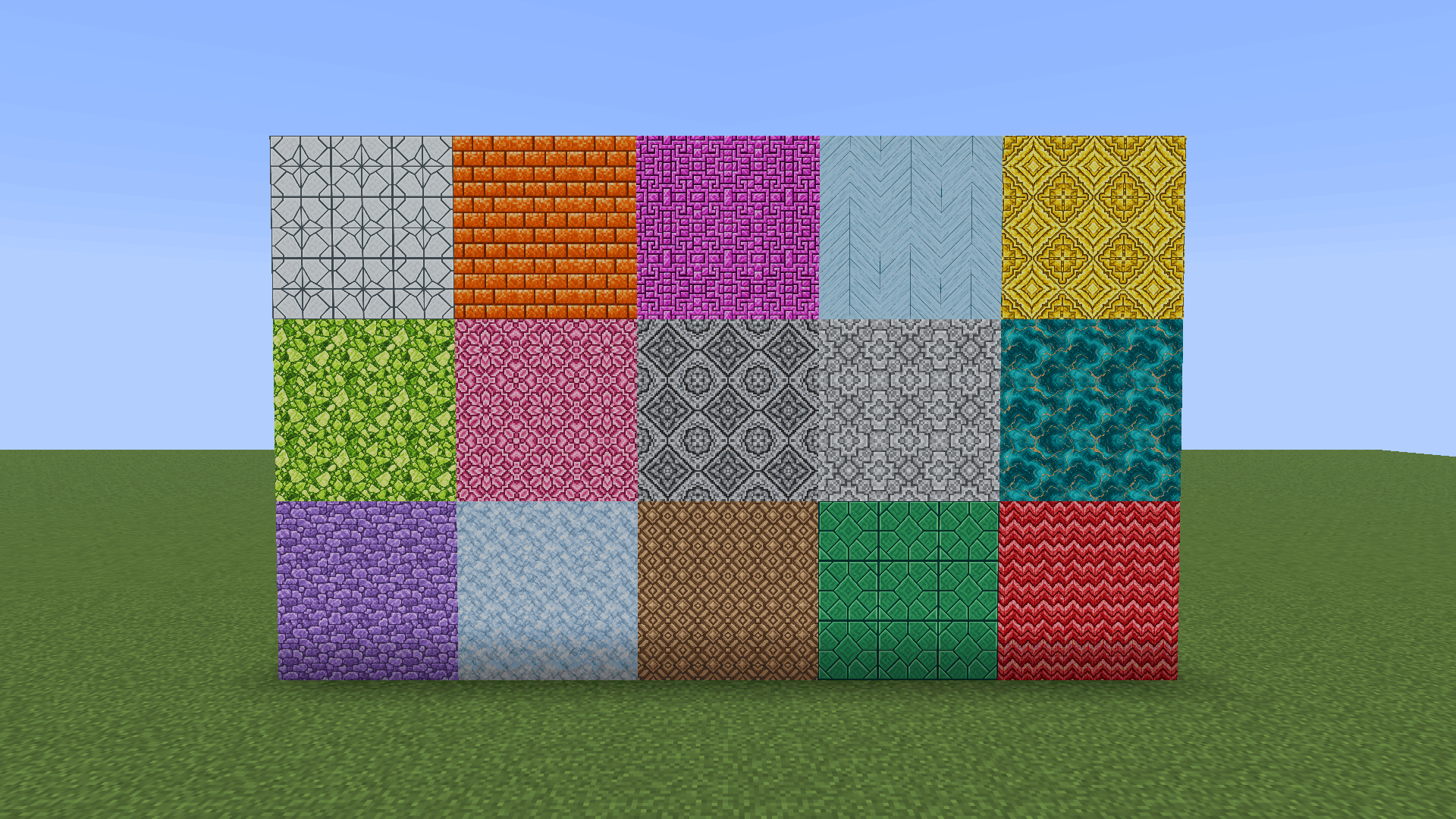
🔨 The Chisel
Craft a reusable chisel using just one iron ingot and one stick.
Right-click with the chisel to open its dedicated interface, where you can:
- Search for decorative variants.
- Filter blocks by shape.
- Browse hundreds of textures and patterns.
- Choose the perfect design for your build.
- Convert compatible materials into decorative variants.
Everything is designed to make decorating simple, fast, and enjoyable!
🔍 Interactive 3D Preview
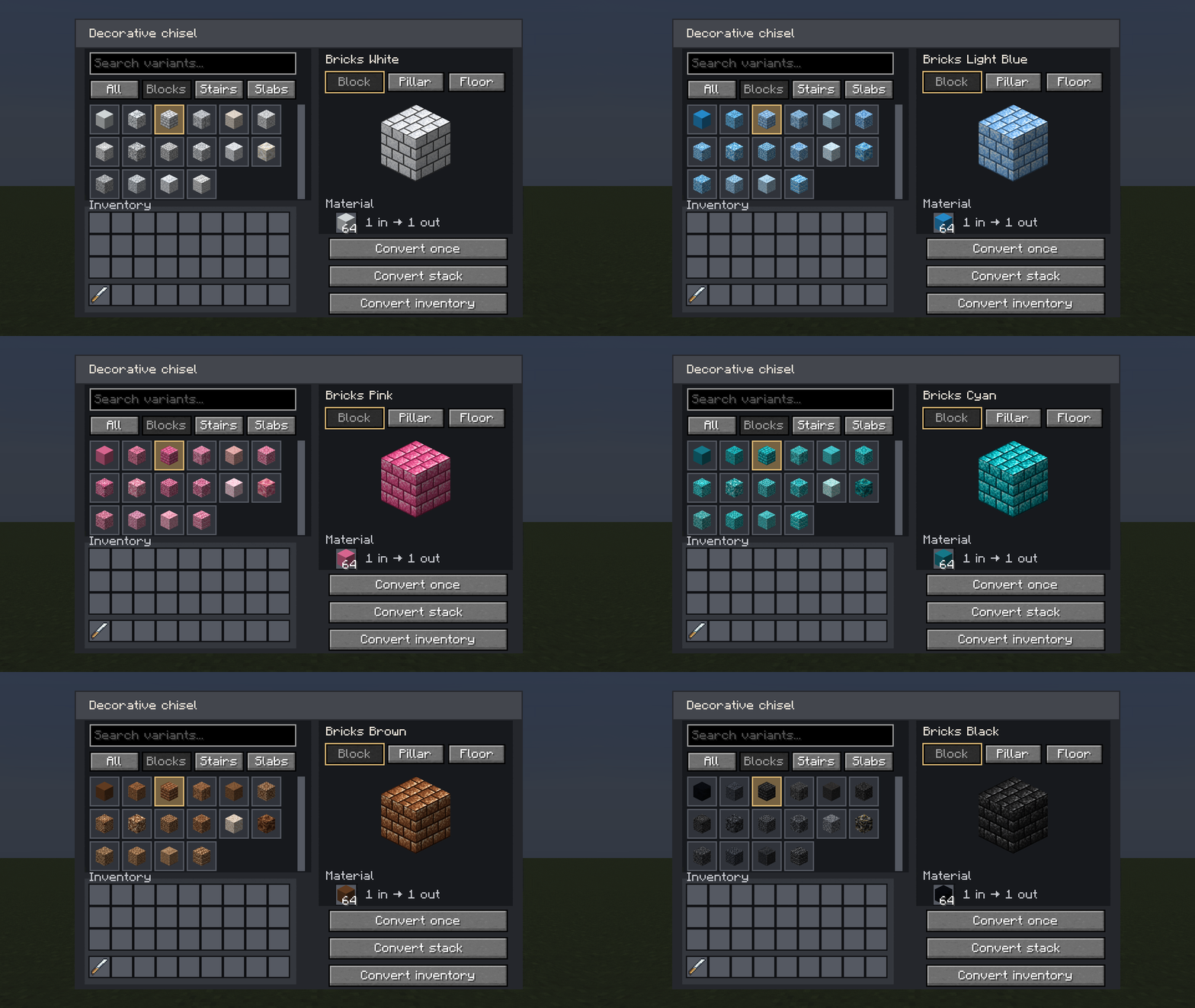
Not sure which texture to choose?
The chisel interface includes an interactive 3D preview with three viewing modes:
- Block — Preview a single block.
- Pillar — View three blocks stacked vertically to check how textures connect.
- Floor — Preview a 3×3 arrangement of nine blocks to see how patterns look across larger surfaces.
Easily compare designs before choosing the perfect one!
🔄 Easy Block Conversion
Transform your building materials in just a few clicks!
Convert a single item, an entire stack, or compatible materials directly from your inventory.
Conversions preserve colors and material quantities, with equivalent exchanges between different block shapes.
For example:
- 1 block → 2 slabs - 2 slabs → 1 block
Experiment with different decorative styles without losing your materials!
🎨 Endless Building Possibilities
With many decorative variants, 16 colors, and multiple block shapes, Chisel: DecoBlocks gives you countless ways to personalize your builds.
Create colorful floors, patterned walls, decorative pillars, detailed facades, and unique architectural designs.
From the smallest details to massive construction projects, let your imagination guide you!
✨ Build. Chisel. Decorate. Create!
Project description from CurseForge.
Pick your setup
Chisel: DecoBlocks by Minecraft version and loader
Choose the version and loader you play, then open the matching release.
Minecraft version
1.21.1
1 loader buildCheck the dependencies, then try the file in a copied instance before changing a world you care about.
Recent files
Chisel: DecoBlocks versions and loaders
decorative_blocks-1.0.1-neoforge-26.1.2.jar
12 Oct 2026
Client Source doesn’t say Server Source doesn’t say Dependencies No extras listed Listed on Release listing
Check the 26.1.2 · NeoForge setup NeoForge26.1.2 release
decorative_blocks-1.0.1-neoforge-1.21.1.jar
12 Oct 2026
Client Source doesn’t say Server Source doesn’t say Dependencies No extras listed Listed on Release listing
Check the 1.21.1 · NeoForge setup 1.21.1NeoForge release
decorative_blocks-1.0.0-neoforge-1.21.1.jar
12 Oct 2026
Client Source doesn’t say Server Source doesn’t say Dependencies No extras listed Listed on Release listing
Check the 1.21.1 · NeoForge setup 1.21.1NeoForge release
decorative_blocks-1.0.0-neoforge-26.1.2.jar
11 Oct 2026
Client Source doesn’t say Server Source doesn’t say Dependencies No extras listed Listed on Release listing
Check the 26.1.2 · NeoForge setup NeoForge26.1.2 release
Looking for an older file? The official CurseForge project page is in Resources.
 mod
CurseForge + Modrinth · Minecraft
Unusual Furniture
✨The most vanilla furniture mod available!
 mod
CurseForge + Modrinth · Minecraft
Every Compat (Stone Zone)
Universal Stone Compat: Supports Create, Rechiseled, and Others...
 mod
CurseForge + Modrinth · Minecraft
easyRoad's
Build smooth, realistic roads and highways effortlessly using procedural 3D curves and an interactive in-game editor. (Стройте плавные реалистичные дороги и шоссе без усилий с помощью процедурных 3D-кривых и интерактивного внутриигрового редактора.)