Minecraft version
Back to mods 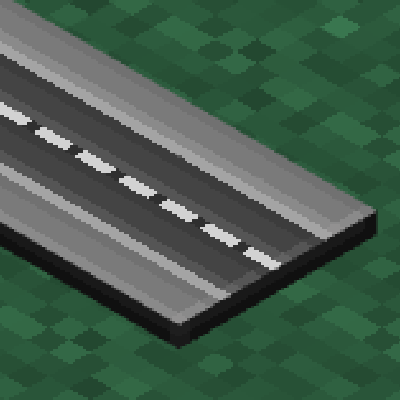
CurseForge · Minecraft mod
easyRoad's
Build smooth, realistic roads and highways effortlessly using procedural 3D curves and an interactive in-game editor. (Стройте плавные реалистичные дороги и шоссе без усилий с помощью процедурных 3D-кривых и интерактивного внутриигрового редактора.)
Choose a version Pick your version below, then grab the matching file.
Quick answer
Which easyRoad's release should I use?
Latest stable file roadbuilder-1.0.jar
Game version 1.21.1
Loader NeoForge
easyRoad's roadbuilder-1.0.jar targets 1.21.1 with NeoForge. The project page does not say whether this file belongs on the client, dedicated server, or both. No extra mods listed for this file.
Where it goes
Is easyRoad's required on the client, server, or both?
The project page does not say whether this file belongs on the client, dedicated server, or both.
Client Source doesn’t say
Dedicated server Source doesn’t say
Loader for this release NeoForge
Required install it here Optional supported, not mandatory Not supported do not install here Source doesn’t say do not assume
The source does not explicitly classify this release as client-only or server-only.
What else does easyRoad's roadbuilder-1.0.jar need?
roadbuilder-1.0.jar. Change the file and its required mods may change too.
This file does not list any required mods. Do not add a library just because a different file uses it.
This file does not list any required or optional mods.
Before you install it
Add easyRoad's without breaking your instance.
Built for easyRoad's roadbuilder-1.0.jar. Pick another file and the loader, install side or required mods may change.
- 01
Stick to this file
Use roadbuilder-1.0.jar. It targets 1.21.1 with NeoForge; another release may have different loader, side or dependency requirements.
- 02
Bring the mods it needs
This file does not list any required mods. Do not add a library just because a different file uses it.
- 03
Put it on the correct side
The project page does not say whether this file belongs on the client, dedicated server, or both.
- 04
Pick the file you checked
Use the “Get this file” button beside roadbuilder-1.0.jar. It opens that exact file at the source.
About this project
What does easyRoad's add?
EasyRoads (Road Builder)
Procedural road building mod for Minecraft NeoForge 1.21.1.
Build smooth, realistic road networks with curves, bridges, tunnels, and roundabouts in seconds.



Features • Controls • Commands • Preset Studio • Build from Source
📖 Русская версия документации / Russian documentation (README_RU.md)
⚡ Features
- 3D Bézier Curve Roads: Smooth, natural turns and slopes with no blocky steps or sharp 90° corners.
- In-Game 3D Editor (
F7): Real-time HUD and tools to place, select, move, and edit points with live ribbon preview. - Modular Road Presets (
Caps Lock): Configure multi-layer profiles (sidewalks, curbs, lanes, markings, shoulders, dividers) with live 3D preview. - Adaptive Terrain Generation:
- Viaducts & Bridges: Automatic pillars when crossing water or deep ravines.
- Tunnels: Clears mountains with smooth arched tunnel portals.
- Slopes & Embankments: Stepped retaining walls on hills and stable embankments in valleys.
- Full World Interaction:
- Move placed road nodes with instant automatic recalculation.
- Delete road segments cleanly with complete landscape restoration.
- Swap presets on already built roads with one click.
- Procedural intersections and roundabouts.
- Lossless Undo:
Ctrl+Zor/road undorestores original terrain block by block.
🎮 Controls
Global Keybinds
| Key | Action |
|---|---|
F7 |
Toggle Edit Mode |
Caps Lock |
Open Road Preset Studio |
Enter |
Build & place road along preview curve |
Ctrl + Z |
Undo last road placement |
Right Click |
Cancel active chain / deselect |
Quick Guide
- Placing roads: Press
F7, clickLMBon terrain to place points, and pressEnterto build. - Adjusting elevation: Select a point and scroll
Mouse Wheelto raise or lower it along the Y-axis. - Fine positioning: Use
Arrow KeysorWASDto move selected points horizontally. - Editing world roads: In edit mode, switch tools via the top HUD bar (
1–8) orTabto grab nodes, delete segments, change road styles, or place roundabouts.
⌨️ Commands
| Command | Permission | Description |
|---|---|---|
/road undo |
OP (Level 2) / Creative | Reverts the last road segment and restores terrain |
/road clear |
OP (Level 2) / Creative | Clears active editing preview and unsaved points |
/road stats |
OP (Level 2) / Creative | Displays network graph stats (node and edge counts) |
/road test |
OP (Level 2) / Creative | Generates a quick test segment |
🛠️ Road Preset Studio
Press Caps Lock to open the studio:
- Profile Stack: Add, remove, and reorder elements (sidewalks, curbs, lanes, dashed/solid markings, dividers).
- Generation Modes: Toggle Viaducts, Tunnels, Slopes, and Embankments (
Auto/Off). - Preset Management: Create, duplicate, rename, save, and delete custom road styles.
💻 Build from Source
Requirements: JDK 21+
git clone https://github.com/kirichVRX/EasyRoads.git
cd EasyRoads

# Windows
.\gradlew build

# Linux / macOS
./gradlew build
Compiled jar will be located in build/libs/.
📜 License & Credits
- Author: kirichVRX
- Platform: Minecraft NeoForge 1.21.1
- Issues & Suggestions: GitHub Issues
Project description from CurseForge.
Pick your setup
easyRoad's by Minecraft version and loader
Choose the version and loader you play, then open the matching release.
Check the dependencies, then try the file in a copied instance before changing a world you care about.
Recent files
easyRoad's versions and loaders
roadbuilder-1.0.jar
12 Nov 2026
Client Source doesn’t say Server Source doesn’t say Dependencies No extras listed Listed on Release listing
Check the 1.21.1 · NeoForge setup 1.21.1NeoForge release
roadbuilder-0.7_beta.jar
22 Oct 2026
Client Source doesn’t say Server Source doesn’t say Dependencies No extras listed Listed on Release listing
Check the 1.21.1 · NeoForge setup 1.21.1NeoForge release
roadbuilder-0.5.0_alpha.jar
21 Oct 2026
Client Source doesn’t say Server Source doesn’t say Dependencies No extras listed Listed on Release listing
Check the 1.21.1 · NeoForge setup 1.21.1NeoForge beta
easyRoad's_0.4_alpha
roadbuilder-0.4_alpha.jar
20 Oct 2026
Client Source doesn’t say Server Source doesn’t say Dependencies No extras listed Listed on Release listing
Check the 1.21.1 · NeoForge setup 1.21.1NeoForge alpha
Looking for an older file? The official CurseForge project page is in Resources.
 mod
CurseForge + Modrinth · Minecraft
Companion 🐕 (Fabric)
Mechanics to avoid losing your pets, but do not break the vanilla feel
 mod
CurseForge · Minecraft
Rota Core
A lightweight, native core library and unified multi-tabbed configuration hub for the Rota Mods ecosystem on NeoForge.
 mod
CurseForge · Minecraft
I/Overseer
Watch every machine in your base from one tablet: see what's working, idle, full or out of power across any tech mod, find machines through walls, pin them for alerts, and see live power draw in your hand.