HBM's Nuclear Tech Mod: Community Edition Needed by NTM CE Hazard Tool ntmhazardtool-1.0.0-dev.jar
requiredMatching file found Matched file: 2.6.1.0
CurseForge · Minecraft mod
Simple mod to add NTM CE hazards and protections to items and armor defined in json!
Quick answer
NTM CE Hazard Tool ntmhazardtool-1.0.0-dev.jar targets 1.12.2 with Forge. The project page does not say whether this file belongs on the client, dedicated server, or both. All 3 required mods have matching files.
Where it goes
The project page does not say whether this file belongs on the client, dedicated server, or both.
The source does not explicitly classify this release as client-only or server-only.
ntmhazardtool-1.0.0-dev.jar. Change the file and its required mods may change too.
Install HBM's Nuclear Tech Mod: Community Edition, ConnectedTexturesMod, MixinBooter first. We found matching files for this game-version and loader setup. 2 come through another mod in the chain.
2 extra mods were pulled in by other dependencies. Indented rows show who needs each one. We only count dependency files that match this setup. A file for another loader does not fill the gap.
Before you install it
Built for NTM CE Hazard Tool ntmhazardtool-1.0.0-dev.jar. Pick another file and the loader, install side or required mods may change.
Use ntmhazardtool-1.0.0-dev.jar. It targets 1.12.2 with Forge; another release may have different loader, side or dependency requirements.
Install HBM's Nuclear Tech Mod: Community Edition, ConnectedTexturesMod, MixinBooter first. We found matching files for this game-version and loader setup. 2 come through another mod in the chain.
The project page does not say whether this file belongs on the client, dedicated server, or both.
Use the “Get this file” button beside ntmhazardtool-1.0.0-dev.jar. It opens that exact file at the source.
About this project
This mod only works with NTM CE (Curseforge link)
This is a 1.12.2 mod. It only works with 1.12.2.
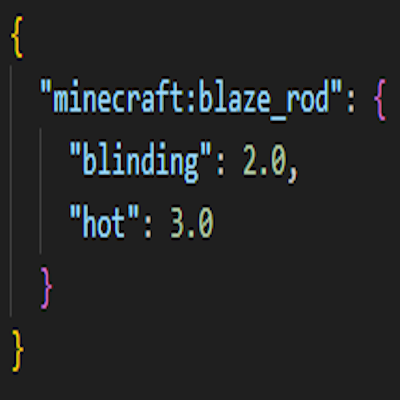
By default blaze rods become blinding and pyrophoric (hot), and pumpkins shield from blinding lights and coarse particles.
Install by dropping into your mods folder (%appdata%/.minecraft/mods or your modpacks mods folder) or using a mod manager like the Curseforge app.
Start the game once to generate the config/ntmhazardtool.cfg folder (this is a folder not a file). The folder contains a hazards.json and protections.json file, in which you can add more entries easily.
The mod must be installed on both server and client!!
Due to the hazards.json using a Map internally, it uses curly braces for the hazards per item, while the protections.json uses a List internally, therefore using square brackets.
In hazards, the format for specifying an item is "mod:item,meta". Meta can be omitted if it isn't relevant. Protections does not distinguish by meta.
Project description from CurseForge.
Pick your setup
Choose the version and loader you play, then open the matching release.
Check the dependencies, then try the file in a copied instance before changing a world you care about.
Recent files
ntmhazardtool-1.0.0.jar
11 Oct 2026
Looking for an older file? The official CurseForge project page is in Resources.