Minecraft version
Back to mods 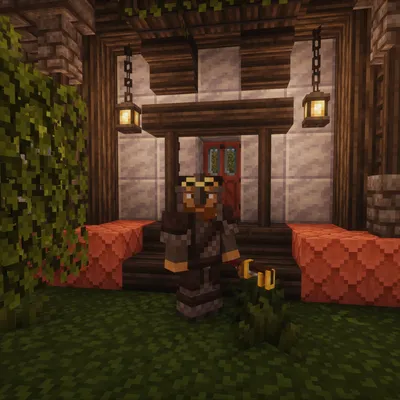
CurseForge · Minecraft mod
Create: Medieval Expanded
Create: Medieval Expanded
Choose a version Pick your version below, then grab the matching file.
Quick answer
Which Create: Medieval Expanded release should I use?
Latest stable file Create: Medieval Expanded
Game version 1.21.1
Loader NeoForge
Create: Medieval Expanded targets 1.21.1 with NeoForge. The project page does not say whether this file belongs on the client, dedicated server, or both. No extra mods listed for this file.
Where it goes
Is Create: Medieval Expanded required on the client, server, or both?
The project page does not say whether this file belongs on the client, dedicated server, or both.
Client Source doesn’t say
Dedicated server Source doesn’t say
Loader for this release NeoForge
Required install it here Optional supported, not mandatory Not supported do not install here Source doesn’t say do not assume
The source does not explicitly classify this release as client-only or server-only.
What else does Create: Medieval Expanded need?
Create: Medieval Expanded. Change the file and its required mods may change too.
This file does not list any required mods. Do not add a library just because a different file uses it.
This file does not list any required or optional mods.
Before you install it
Add Create: Medieval Expanded without breaking your instance.
Built for Create: Medieval Expanded. Pick another file and the loader, install side or required mods may change.
- 01
Stick to this file
Use Create: Medieval Expanded. It targets 1.21.1 with NeoForge; another release may have different loader, side or dependency requirements.
- 02
Bring the mods it needs
This file does not list any required mods. Do not add a library just because a different file uses it.
- 03
Put it on the correct side
The project page does not say whether this file belongs on the client, dedicated server, or both.
- 04
Pick the file you checked
Use the “Get this file” button beside Create: Medieval Expanded. It opens that exact file at the source.
About this project
What does Create: Medieval Expanded add?
Wind tunnels roar to life as Aeronautics and Aeroworks fuse with Create’s mechanical genius, letting players build flying machines, cannons, avionics systems, and medieval‑industrial contraptions that feel like they were ripped straight out of a fantasy inventor’s workshop. Every mod in your list pushes the world toward a beautifully chaotic blend of gears, steam, physics, and raw creativity, turning simple survival into a high‑stakes engineering adventure.
From towering siege engines powered by Big Cannons to elegant rope connectors, encased pipes, and avionics computers that make your airships feel alive, this pack transforms the world into a playground for mad scientists and sky‑pirates alike. Complementary Shaders drench everything in cinematic lighting, Chemica adds explosive chemistry, and CC: Tweaked ties it all together with programmable magic. It’s medieval, it’s technical, it’s ridiculous, and it’s absolutely electric — a modpack built for players who want to invent, fly, blast, automate, and dominate the skies with style.
Project description from CurseForge.
Pick your setup
Create: Medieval Expanded by Minecraft version and loader
Choose the version and loader you play, then open the matching release.
Check the dependencies, then try the file in a copied instance before changing a world you care about.
Recent files
Create: Medieval Expanded versions and loaders
Create: Medieval Expanded
Create Medieval Expanded 1.2.0 (1).jar
12 Oct 2026
Client Source doesn’t say Server Source doesn’t say Dependencies No extras listed Listed on Release listing
Check the 1.21.1 · NeoForge setup 1.21.1NeoForge release
Looking for an older file? The official CurseForge project page is in Resources.
 mod
CurseForge · Minecraft
Create: Brew n' Bolts
Create: Brew n' Bolts is a compatibility mod between Create and the Farmer's Delight addon Brewin' & Chewin'.
 mod
CurseForge · Minecraft
Create: Train Functionality
> Build on your Create train while it drives. A Functional Fob makes a carriage's blocks real: place and break them, open chests, run machines. Disassemble and your build stays in the world. Early build — back up first. ---
 mod
CurseForge · Minecraft
Scorched Guns Exosuit Expansion
Material armor plates, pauldrons, an equipment workbench and focused ExoSuit fixes for Create and Scorched Guns 2.