Minecraft version
Back to mods 
CurseForge · Minecraft mod
Fudu Flora
Adds ornamental trees, shrubs, and detailed flowers for gardens and landscaping.
Choose a version Pick your version below, then grab the matching file.
Quick answer
Which Fudu Flora release matches Forge?
Best match for your filters fudu-flora-1.20.1-0.1.9.jar
Game version 1.20.1
Loader Forge
Fudu Flora fudu-flora-1.20.1-0.1.9.jar targets 1.20.1 with Forge. The project page does not say whether this file belongs on the client, dedicated server, or both. No extra mods listed for this file.
Where it goes
Is Fudu Flora required on the client, server, or both?
The project page does not say whether this file belongs on the client, dedicated server, or both.
Client Source doesn’t say
Dedicated server Source doesn’t say
Loader for this release Forge
Required install it here Optional supported, not mandatory Not supported do not install here Source doesn’t say do not assume
The source does not explicitly classify this release as client-only or server-only.
What else does Fudu Flora fudu-flora-1.20.1-0.1.9.jar need?
fudu-flora-1.20.1-0.1.9.jar on Forge. Every mod below is checked against that same setup.
This file does not list any required mods. Do not add a library just because a different file uses it.
This file does not list any required or optional mods.
Before you install it
Add Fudu Flora without breaking your instance.
Built for Fudu Flora fudu-flora-1.20.1-0.1.9.jar on Forge. Pick another file and the loader, install side or required mods may change.
- 01
Stick to this file
Use fudu-flora-1.20.1-0.1.9.jar. It targets 1.20.1 with Forge; another release may have different loader, side or dependency requirements.
- 02
Bring the mods it needs
This file does not list any required mods. Do not add a library just because a different file uses it.
- 03
Put it on the correct side
The project page does not say whether this file belongs on the client, dedicated server, or both.
- 04
Pick the file you checked
Use the “Get this file” button beside fudu-flora-1.20.1-0.1.9.jar. It opens that exact file at the source.
About this project
What does Fudu Flora add?
Fudu Flora Mod Overview
Complete illustrated guide to the official 0.1.9 release | 14 November 2026
Fudu Flora adds garden plants, building materials, pond details, animals and working lights to Minecraft. Plant a courtyard, furnish a pond, or build a landscaped street with matching woodwork and lamps. The Automatic Ramp Tool helps turn an existing road into a rising or curved surface while retaining its materials and markings.
This guide covers the complete mod through version 0.1.9. Most plants and garden furnishings have Survival sources or recipes. The road construction tool is used in Creative mode. Models use block forms and vanilla-style pixel textures, with optional support for selected building tools and shaders.
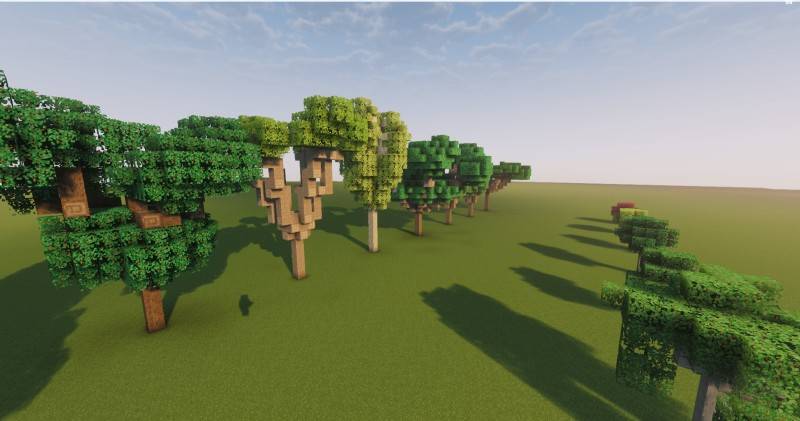
Figure 1 Fudu trees and flowers growing among vanilla vegetation.
| Collection | Included content |
|---|---|
| Planting | 13 tree variants, 10 shrubs, 11 herbaceous flowers, 3 climbers and 7 pond plants |
| Building | 18 wood families, trellises, bamboo fences, vases, rockeries, pond edging and stepping stones |
| Lighting | 30 streetlight designs and 16 compact landscape fixtures |
| Animals and tools | Goldfish, Country Cats, Black Swans, Mandarin Ducks, fish vats and Creative road construction |
| Platform | Minecraft Java 1.20.1, Forge 47.3.x and Java 17; 405 items in six Creative tabs |
Trees Shrubs and Flowers
Trees with distinct silhouettes
The tree collection includes Plane, Ginkgo, Scholar Tree, Golden Rain Tree, Camphor, Zelkova, White Poplar, Flamboyant, Golden Osmanthus, Silver Osmanthus, Banyan, Crape Myrtle and Magnolia. Species differ in branching, foliage and canopy proportions. Golden and Silver Osmanthus share the Osmanthus wood family.
Saplings grow naturally or with bone meal. Ordinary trunks start in one block; four matching Ginkgo or Banyan saplings in a 2×2 square can form a giant tree. Banyan roots hang from branches. Growth paths stop at obstructions, helping fit trees into built gardens. The world rule for reshaping vanilla trees lets each world choose its preferred vanilla tree generation.
Flower beds and shrubs
Loropetalum, Duranta, Pittosporum, Fagraea, Privet and Weeping Fig can remain shrubs or grow into small trees with bone meal. Gardenia and blue, pink and white Hydrangeas keep their shrub form. Shrubs can flower again through their growth rules or bone meal after harvesting.

Figure 2 Hydrangea and Gardenia forms rendered by Minecraft.
Carnation, Moth Orchid, Peace Lily, Cyclamen, Clivia, purple, white and yellow Marigolds, purple and blue Irises, and Daylily provide 11 herbaceous variants. Their heights and outlines suit different borders. Supported flowers can be sheared, used for dyes, planted in flower pots or arranged in vases.

Figure 3 Irises and Daylily as ground plants, potted plants and items.
Climbing Plants and Flower Arrangements
Wisteria, Climbing Rose and Trumpet Vine can climb suitable walls and narrow supports, extend along beams and hang beneath ceilings. Plant a root near a support or attach a vine beneath a suitable ceiling, then let it grow or use bone meal.
Wooden and bamboo trellises each offer posts, beams and lattice tops. Vines can share a narrow support and spread underneath the lattice. Each bone meal use advances one eligible growing point. Hanging columns beneath trellis beams and tops keep a saved length of one or two blocks, leaving room for people to pass.
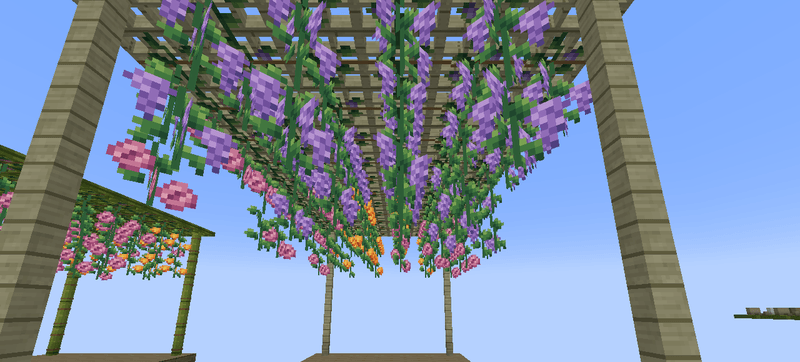
Figure 4 Hanging vines beneath a wooden trellis in a test garden.
Five vase styles
Blue Porcelain, Painted Plum Porcelain, Clear Glass, Medieval Earthenware and Medieval Metal vases hold up to four harvested flowers. Mix compatible flower types in one vase. The vase is one block tall and the complete arrangement stays below two blocks.

Figure 5 The five vase styles with mixed flowers in their native models.
Right-click to insert a flower. Sneak and right-click with an empty hand to retrieve the last flower. Breaking the vase returns its contents. Each recipe uses a Flower Pot with the appropriate terracotta, glass or iron, and arrangements are saved and synchronized in multiplayer.
Woodwork and Ruozhu Bamboo
Eighteen wood families provide matching logs, planks, stairs, slabs, fences, fence gates, doors and trapdoors. Wood comes from the tree species and six woody shrubs. Doors and trapdoors use individual patterns, with normal hinges, redstone interaction and applicable waterlogging.
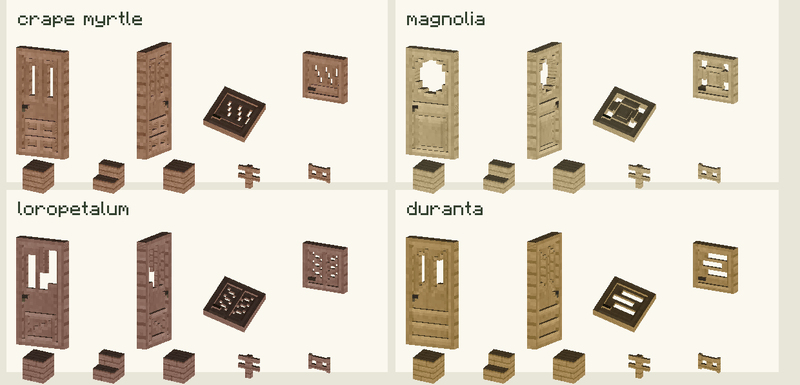
Figure 6 A selection of matching wood sets in the Minecraft model catalogue.
Bamboo clumps and equipment
Ruozhu grows in clumps of up to four stalks per block. Each stalk keeps its own height limit of 6–12 blocks. Mature clumps fill empty quadrants before spreading through four saved neighbouring directions. Natural spread uses fixed sparse ground positions; hand planting gives you direct control over the layout. Ruozhu also grows in new Bamboo Jungle chunks.
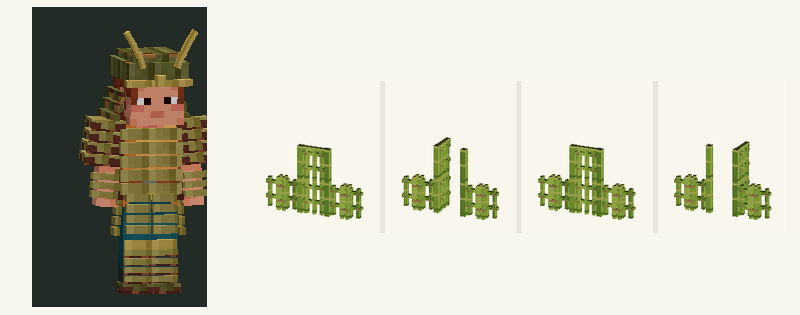
Figure 7 Bamboo armour and the hinged two-block Bamboo Palisade Gate.
Use a hoe or shovel to recover immature shoots. Bare-handed mining of a young shoot causes prick damage. Mature stalks provide internodes for fuel, panda food, planks and Bamboo Poles. Nine internodes make one vanilla Bamboo Planks; three in a vertical column make a pole. Internodes and poles also supply trellises, palisades and gates.
Bamboo Armour uses poles for crafting and repair. Base durability and protection match iron armour. Each piece adds 12.5% reduction to non-projectile damage and 12.5% fire vulnerability, reaching 50% with a full set. Fire damage uses the vulnerability rule separately.
Fallen Leaves and Garden Soil
Vanilla and mod leaves can deposit litter onto suitable open surfaces beneath the canopy. There are 33 fresh and dry litter pairs, with up to four patches in one block. Litter preserves its source appearance, quantity and orientation as it dries.
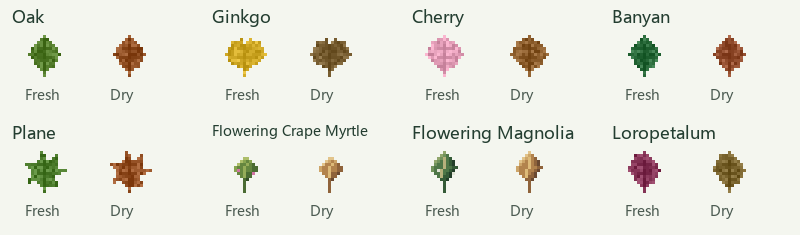
Figure 8 A selection of the actual fresh and dry litter textures.
A gradual soil cycle
Fresh litter first dries. Dry litter then takes a longer period to enrich ordinary Dirt or Grass below it, producing Nutrient-rich Dirt. The dry patches remain for an additional period before decomposing. Progress saves with the world. Collected dry leaves can also be composted or used as fuel.
Nutrient-rich Dirt gives supported plants approximately twice their normal natural growth. Clear the litter and use a hoe to make Nutrient-rich Farmland. This farmland stays hydrated without nearby water and supports faster crop growth. Harvesting mature produce consumes its fertility and returns it to ordinary hydrated farmland.
Untilled Nutrient-rich Dirt eventually returns to Grass when light and space are suitable. Litter, standing water and opaque cover pause grass recovery. Mining the farmland gives ordinary dirt.
Control the pace for each world
| Rule | Default | Effect |
|---|---|---|
| fuduLeafFallSpeed | 80 | Sets new litter production from 0 to 100 |
| fuduLeafWitherSpeed | 80 | Sets litter drying and decomposition from 0 to 100 |
A value of 0 pauses the corresponding process while keeping existing litter. At 80, clear-weather behaviour matches the previous release; 40 halves that rate and 100 gives 1.25 times the rate. Rain and thunderstorms increase leaf fall by 20% in rainy biomes. Vanilla randomTickSpeed also affects these processes.
Rockeries and Pond Gardens
Peak Stone, Ledge Stone, Pierced Stone and Belly Stone form modular scholar-stone arrangements. Connect them horizontally, stack them, or rotate a module by sneaking and right-clicking with an empty hand. Stonecutting ordinary Stone produces individual modules. Listening Spring, Layered Peaks and Winding Shore presets provide complete arrangements that remain editable after placement.
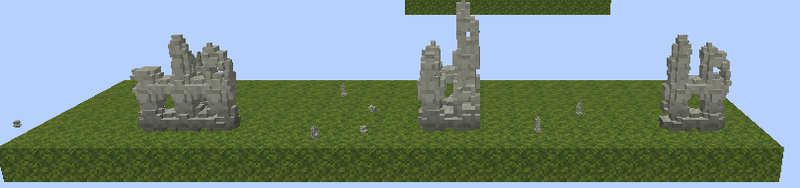
Figure 9 Three craftable rockery presets assembled from editable stone modules.
Exposed rockeries develop moss during thunderstorms. Their four moss stages are retained when collected and placed again. Pond edging connects into straight runs, corners, junctions and crossings. Small 1×1, medium 2×2 and large 2×3 stepping stones need a solid base, preserve water and develop moss when waterlogged or directly beside water.
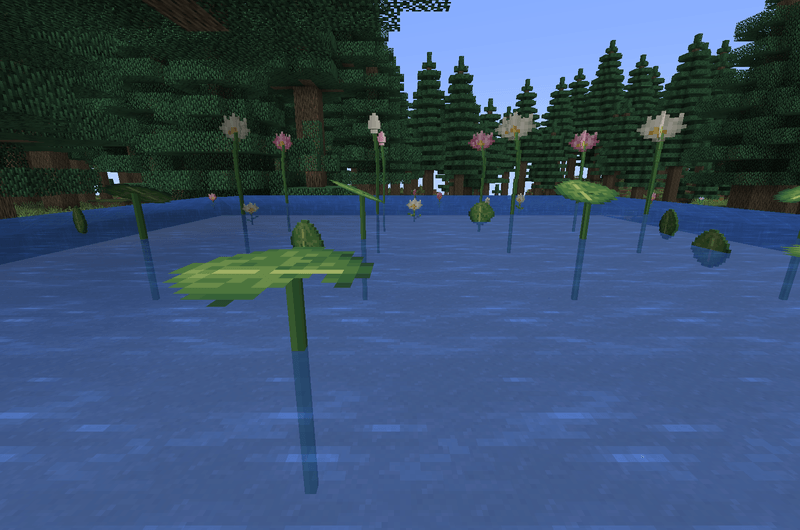
Figure 10 Lotus, leaves and other pond plants in an actual game scene.
Pink and White Lotus, Pink and White Water Lily, Lotus Leaf, Cattail and Reed form seven pond plant types. Lotus roots below one source-water block and rises two blocks above the surface. Flowers have separate stalks; the closed bud is one visual form. Independent Lotus Leaves include floating, raised, rolled and torn shapes, cycled with sneak and empty-hand right-click.
Water Lilies float on source water and suit deeper or artificial ponds. Cattail and Reed grow in shallows or suitable waterside ground. Lotus and Water Lily flowers can be harvested and arranged in vases. Find natural plants in suitable new chunks, collect them and propagate them for your own pond.
Streetlights and Angle Adjustment
Thirty streetlight designs cover garden paths and city roads. Eight garden designs include branching, floral and compact forms. Twenty-two city designs add sweeping arms, Lingnan-inspired lanterns, lotus crowns and modern road lights, with new city poles standing 10 or 12 blocks tall.

Figure 11 A road lit by city streetlights using Minecraft block light and shaders.
Lights illuminate the world with real block light. All streetlights now default to automatic day and night operation, including existing lights as they load. Their lenses become dark during the day and light up at night. Day and night checks operate independently of randomTickSpeed.
Set the angle with the Streetlight Wrench
Use the wrench on a light to open its angle panel. Enter a value or drag the slider; the preview follows your changes. Apply saves the direction, while Cancel keeps the previous angle. Rotation uses half-degree steps from 0 to 359.5 degrees. New placement snaps near cardinal directions when less than two degrees away.
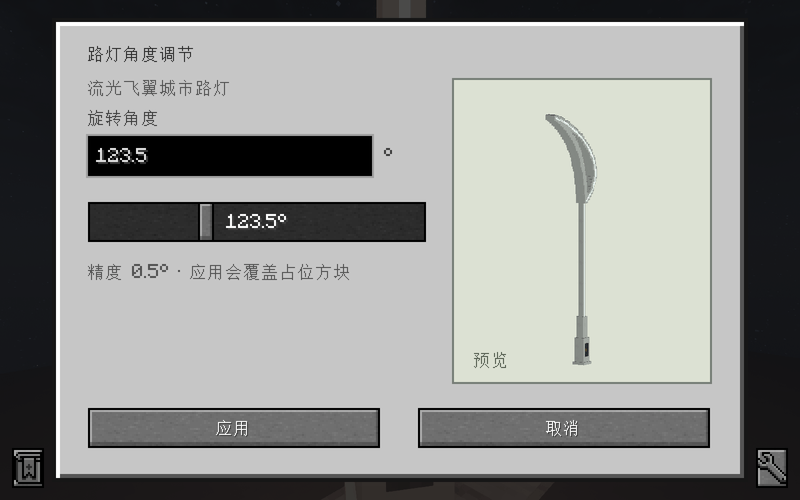
Figure 12 The native angle panel with numeric input, slider and model preview.
Lights place and dismantle as complete structures. City bases fit on a single full foundation block at any angle. The Landscape Light Debug Stick switches streetlights between automatic and always-on modes. Crafting recipes and all light tools are grouped in the Lighting Creative tab.
Landscape Lighting and Night Details
Sixteen compact fixtures add colour and low-level architectural lighting. The eight coloured fixtures combine cylindrical spotlights and rectangular floodlights with green, blue, yellow and red lenses. Empty-hand or Streetlight Wrench right-click cycles their elevation through 15, 45 and 75 degrees. Sneak-right-click toggles the fixture.

Figure 13 Four colour families lighting trees in the tested Euphoria shader setup.
The eight warm fixtures combine warm white and warm yellow with round inset lights, square inset lights, step strip lights and wall washers. Inset lights replace a paving block and sit flush with its surface. Step strips mount on lower sides of suitable blocks, stairs or slabs. Wall washers support floor and wall placement.

Figure 14 Warm white and warm yellow fixtures mounted in paving and on a wall.
Compact fixtures emit level-15 block light when lit, support waterlogging where applicable, and have Survival recipes. Automatic day and night operation is the default. The Landscape Light Debug Stick switches each fixture between automatic and always-on modes; the chosen mode is saved.
The tested Oculus and Euphoria Patches combination can use its native coloured-light system through automatic material integration. Coloured propagation follows shader settings. Standard rendering provides normal Minecraft block light and the coloured lens appearance.
Goldfish and Waterbirds
Goldfish for ponds and vats
Goldfish have twelve varieties, animated fins and tails, and natural spawning in shallow swamp water. Catch and release them with a fish bucket while retaining their variety and name. Fish Feed can be given directly or scattered as small brown pellets into water. Nearby Goldfish seek the pellets, eat a portion and recover health.
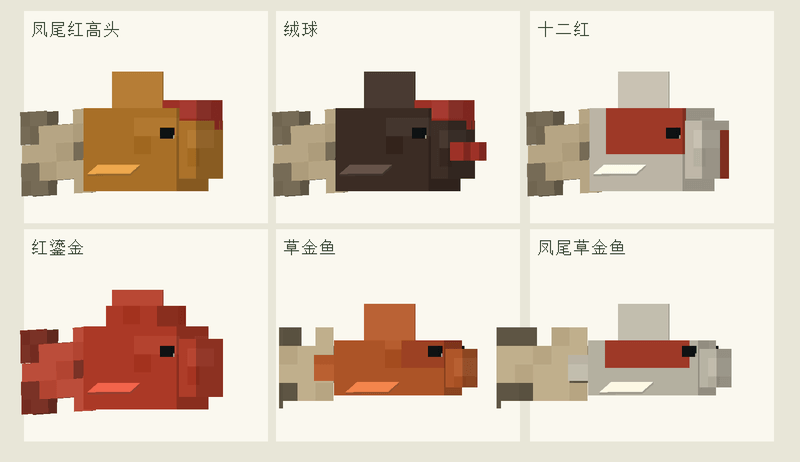
Figure 15 Six of the twelve Goldfish varieties shown by the native model renderer.
Black Swans and Mandarin Ducks
Black Swans favour inland shorelines. Mandarin Ducks favour wooded freshwater habitats. Both have adult and juvenile forms, swim at the water surface, walk on land and breed using seeds. Mandarin Ducks have distinct male and female appearances, including the male sail feathers.
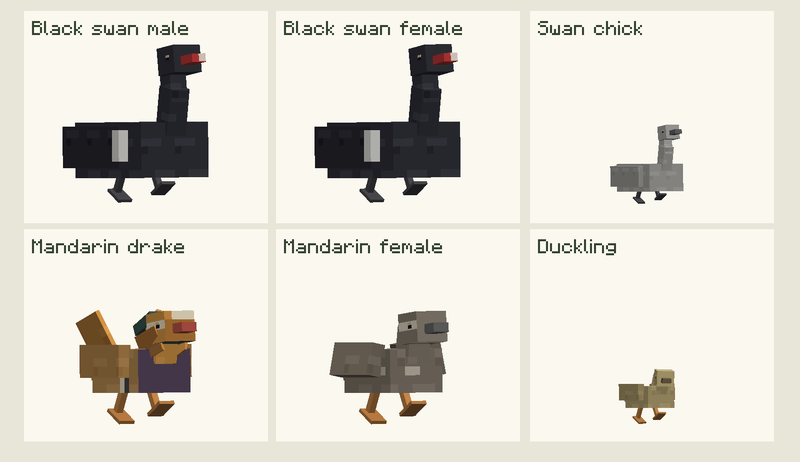
Figure 16 Adult waterbirds and their young rendered in Minecraft.
Suitable habitat conditions guide natural spawning. Spawn eggs are also available in Creative mode. Young birds can follow parents, and paired birds retain their relationship in the save.
Black Swan audio uses a credited CC0 recording. Mandarin Duck ambient calls are currently silent. The release includes a replacement resource-pack template for adding a recording. Country Cats use Minecraft’s built-in cat sounds.
Country Cats and Decorative Fish Vats
Chinese Country Cats come in tabby, orange, black-and-white, calico and black coats. Breeding two vanilla cats has a 5% chance of producing a Country Cat kitten. Country Cats can also breed within their own type. Tamed cats retain their owner and collar, with familiar sitting and following behaviour.
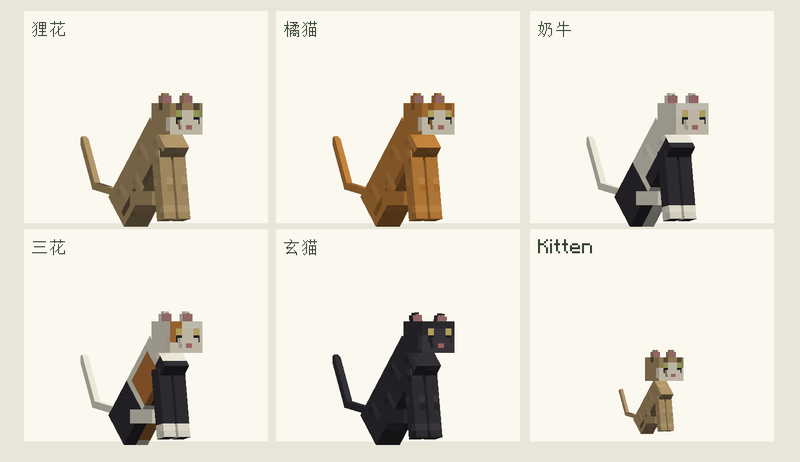
Figure 17 The five Country Cat coats and a kitten.
Their eight idle activities include paw licking, stretching, resting, yawning, face washing, ear scratching, rolling and paw play. Use the Cat Teaser in the air to choose an activity or random play, then use it on your own calm cat. Movement or danger can interrupt play.
Use the Pet Control Wand to mark two ground corners and apply the horizontal area to your cat. It roams within that area, with each side up to 128 blocks. Sneak-use the cat with the wand to restore following. On a fresh encounter, cats can approach their owner or flee an unfamiliar player according to their saved encounter behaviour.
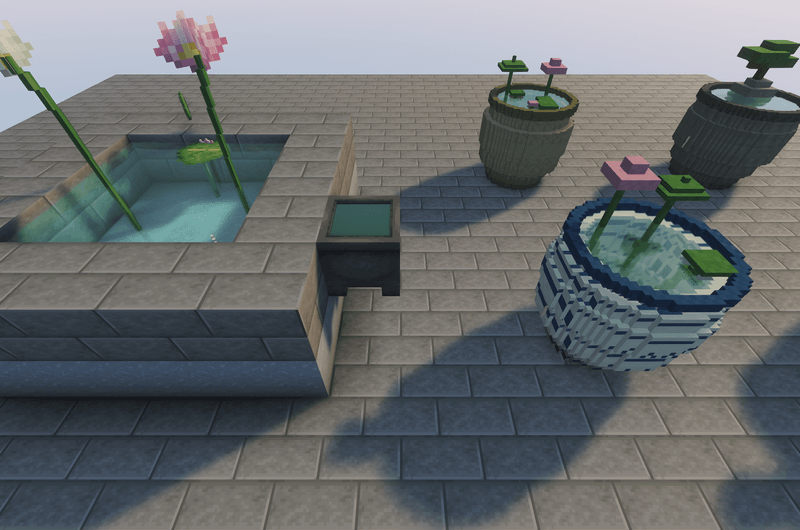
Figure 18 Four fish-vat designs with their three-dimensional garden decorations.
The brown-glazed lion-ear, blue-and-white lotus, rustic grey pottery and lotus landscape vats each occupy a 2×2 footprint. Fill them with a water bucket or release bucketed Goldfish inside. Contained water stays in the vat. Feed fish directly or scatter pellets into it. Vats place and break as complete structures, with decorations extending above the two-block body.
Automatic Ramps and Curved Roads
The Automatic Ramp Tool is in the Building Creative tab. It creates roads with 1/16-block height steps, matching collision and saved surface materials. Select the left and right road edges independently, using as many points as the shape needs within the 24-point total. A single inner point can meet several outer points to form a hairpin fan.
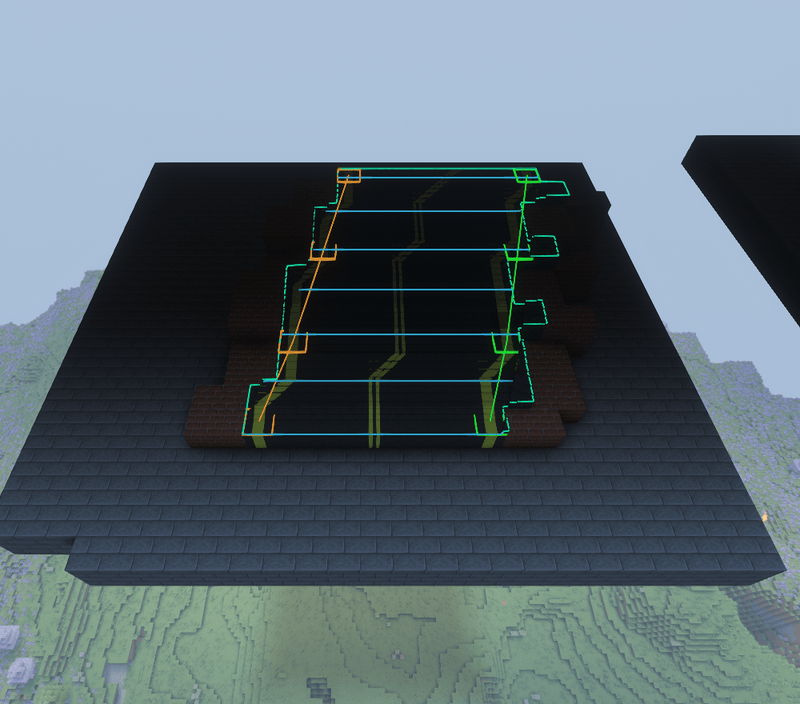
Figure 19 The fitted outline follows an existing stepped road edge in an isolated game scene.
Build a road
Right-click road blocks along one edge in the direction of travel. Each point stays fixed to the selected block. Right-click the air to switch to the other edge, then select it in the same direction.
Sneak-right-click to open the construction panel. Choose curved or segmented alignment and original-surface sampling or a single material. Adjust the current edge’s last point up or down by 1/16 block, or delete it. Review the outline, then generate the road.
Use Undo Last Construction during the current server session to restore the affected original blocks. Perform the undo before later edits alter the construction area.
Fit the road to its surroundings
For supported existing Mishang Urban Construction roads and black, grey or white concrete roads, the tool follows the connected original road footprint within the chosen section. It fills short soil pockets beside a nearby curb while preserving the sidewalk and the original columns and directions of yellow markings. Cross-block Mishang arrows are projected onto the ramp surface.
Partially covered blocks retain their original exterior road fragments. Connected old surface layers up to 1.5 blocks above the target can be replaced; an air gap stops that upward search and preserves separate overhead structures. Intersecting lower ceilings may be replaced. The ramp fills to a block-aligned underside so you can manually attach a new ceiling below it.
Work in sections: points stay within 256 blocks of the first point, with road width from 0.5 to 32 blocks and a maximum of 4096 generated cells per operation. Previously generated roads keep their saved geometry; regenerate a segment to apply the new edge and underside behaviour.
World Settings Installation and Compatibility
Install the matching Forge 1.20.1 JAR on the client and server, keeping one Fudu Flora JAR in each mods folder. Use Java 17 and Forge 47.3.x. The mod runs with Forge alone. Optional integrations become available when their corresponding mods are present.
Choose world behaviour
The native game-rule editor offers Reshape vanilla trees, Leaf fall speed and Leaf withering speed. Existing worlds can use the commands below. Turning tree reshaping off applies vanilla generation to future vanilla trees and saplings. Existing trees and Fudu species retain their behaviour.
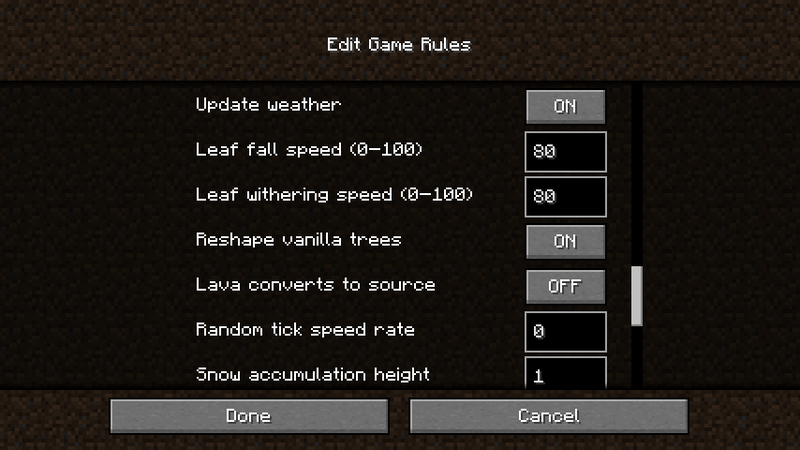
Figure 20 World creation uses Minecraft’s native game-rule editor.
/gamerule fuduModifyVanillaTrees false
/gamerule fuduLeafFallSpeed 80
/gamerule fuduLeafWitherSpeed 80
Building tools and rendering
Axiom integration supports complete-light selection and copying. The tested Axiom 5.4.2 curve tools preserve individual streetlight headings and avoid duplicate corner samples. Some blueprint thumbnails and editor previews may still show incomplete lamps. Optional Distant Horizons support supplies simplified distant streetlights; the latest 0.1.9 work focused on near rendering and roads.
Road appearance sampling supports the tested FramedBlocks and Copycat paths, with MishangUC 1.4.5 road markings. Xaero World Map 1.39.2 can sample road source materials. Shader results depend on the shader pack and its settings. Large lamp collections and heavy shader presets can still require substantial rendering performance.
Known issue for the next release: wall lights copied with Axiom may stop following the automatic day and night cycle. The corresponding behaviour of copied streetlights is pending investigation.
Updating a world
Keep a world backup before upgrading. Existing block and item identities are retained. New natural plants appear in newly generated chunks. Existing streetlights adopt automatic operation when loaded. To repair an older generated road segment, undo it or restore its original surface where needed, then generate it with the current tool.
Author: @ysastgt
Bilibili: 刘ys哈哈 | Xiaohongshu: ysastgt
Bug reports: songsong20041008@163.com
Project description from CurseForge.
Pick your setup
Fudu Flora by Minecraft version and loader
Choose the version and loader you play, then open the matching release.
Check the dependencies, then try the file in a copied instance before changing a world you care about.
Recent files
Fudu Flora versions and loaders
fudu-flora-1.20.1-0.1.9.jar
13 Nov 2026
Client Source doesn’t say Server Source doesn’t say Dependencies No extras listed Listed on Release listing
Check the 1.20.1 · Forge setup 1.20.1Forge release
fudu-flora-1.20.1-0.1.8.jar
5 Nov 2026
Client Source doesn’t say Server Source doesn’t say Dependencies No extras listed Listed on Release listing
Check the 1.20.1 · Forge setup 1.20.1Forge release
fudu-flora-1.20.1-0.1.7.jar
31 Oct 2026
Client Source doesn’t say Server Source doesn’t say Dependencies No extras listed Listed on Release listing
Check the 1.20.1 · Forge setup 1.20.1Forge release
fudu-flora-1.20.1-0.1.6.jar
26 Oct 2026
Client Source doesn’t say Server Source doesn’t say Dependencies No extras listed Listed on Release listing
Check the 1.20.1 · Forge setup 1.20.1Forge release
fudu-flora-1.20.1-0.1.5.jar
23 Oct 2026
Client Source doesn’t say Server Source doesn’t say Dependencies No extras listed Listed on Release listing
Check the 1.20.1 · Forge setup 1.20.1Forge release
fudu-flora-1.20.1-0.1.4.jar
18 Oct 2026
Client Source doesn’t say Server Source doesn’t say Dependencies No extras listed Listed on Release listing
Check the 1.20.1 · Forge setup 1.20.1Forge release
fudu-flora-1.20.1-0.1.3.jar
16 Oct 2026
Client Source doesn’t say Server Source doesn’t say Dependencies No extras listed Listed on Release listing
Check the 1.20.1 · Forge setup 1.20.1Forge release
fudu-flora-1.20.1-0.1.2.jar
14 Oct 2026
Client Source doesn’t say Server Source doesn’t say Dependencies No extras listed Listed on Release listing
Check the 1.20.1 · Forge setup 1.20.1Forge release
fudu-flora-1.20.1-0.1.1.jar
13 Oct 2026
Client Source doesn’t say Server Source doesn’t say Dependencies No extras listed Listed on Release listing
Check the 1.20.1 · Forge setup 1.20.1Forge release
fudu-flora-1.20.1-0.1.0.jar
13 Oct 2026
Client Source doesn’t say Server Source doesn’t say Dependencies No extras listed Listed on Release listing
Check the 1.20.1 · Forge setup 1.20.1Forge release
Looking for an older file? The official CurseForge project page is in Resources.
 mod
CurseForge · Minecraft
Hunting Menu
Skyrim-style compass menu (Tab), magic from Iron’s, Ars, and Epic Fight, shared mana, guild tab (Q), and home screen
 mod
CurseForge + Modrinth · Minecraft
ArborFirmaCraft
An addon for TerraFirmaCraft (TFC) adding new trees, new wood types, and tree-tapping recipes.
 mod
CurseForge + Modrinth · Minecraft
Roads and Roofs TFC
An addon for TerraFirmaCraft featuring new road and roof blocks.