Minecraft version
Back to mods 
CurseForge · Minecraft mod
Extrodius's Soda
Add 9 different soda drinks to your game, each with their own benefits when consumed.
Choose a version Pick your version below, then grab the matching file.
Quick answer
Which Extrodius's Soda release should I use?
Latest stable file extrodius_soda-1.0.5-1211.jar
Game version 1.21.1
Loader NeoForge
Extrodius's Soda extrodius_soda-1.0.5-1211.jar targets 1.21.1 with NeoForge. The project page does not say whether this file belongs on the client, dedicated server, or both. No extra mods listed for this file.
Where it goes
Is Extrodius's Soda required on the client, server, or both?
The project page does not say whether this file belongs on the client, dedicated server, or both.
Client Source doesn’t say
Dedicated server Source doesn’t say
Loader for this release NeoForge
Required install it here Optional supported, not mandatory Not supported do not install here Source doesn’t say do not assume
The source does not explicitly classify this release as client-only or server-only.
What else does Extrodius's Soda extrodius_soda-1.0.5-1211.jar need?
extrodius_soda-1.0.5-1211.jar. Change the file and its required mods may change too.
This file does not list any required mods. Do not add a library just because a different file uses it.
This file does not list any required or optional mods.
Before you install it
Add Extrodius's Soda without breaking your instance.
Built for Extrodius's Soda extrodius_soda-1.0.5-1211.jar. Pick another file and the loader, install side or required mods may change.
- 01
Stick to this file
Use extrodius_soda-1.0.5-1211.jar. It targets 1.21.1 with NeoForge; another release may have different loader, side or dependency requirements.
- 02
Bring the mods it needs
This file does not list any required mods. Do not add a library just because a different file uses it.
- 03
Put it on the correct side
The project page does not say whether this file belongs on the client, dedicated server, or both.
- 04
Pick the file you checked
Use the “Get this file” button beside extrodius_soda-1.0.5-1211.jar. It opens that exact file at the source.
About this project
What does Extrodius's Soda add?
Extrodius's Soda Mod
Tired of brewing potions? Crack open a cold one instead. This mod adds a full soda-brewing pipeline to Minecraft. Three new machines, nine unique sodas, and a couple other little things for the process.
The Machines (and the other couple things)
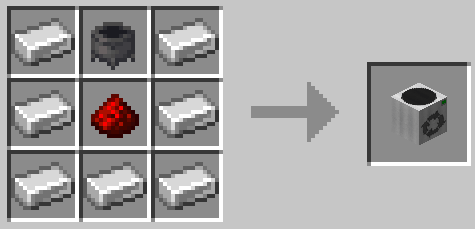
Soda Mixer: Combine dye, sugar, and a flavor ingredient with an empty can. Put in the correct items for a recipe, then click the green button 10 times, and you will end up with a flat soda. Craft it in a crafting table with 7 iron ingot, a cauldron up top, and a redstone in the center.
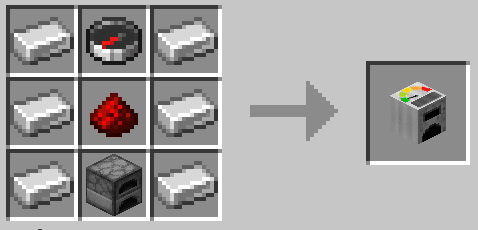
Gasifier: Wheat plus fuel fills an empty CO2 canister. Like a special furnace designed to turn wheat into CO2. Craft it in a crafting table with iron ingots on the sides, compass up top, redstone in the center, and furnace at the bottom.
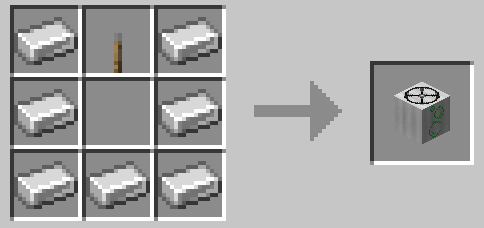
Carbonator: The last step. Load a full CO2 canister and a flat soda, crank (click) the valve, and bam, carbonation. Craft it in a crafting table with 7 iron ingots, a lever up top, and an empty space in the center.
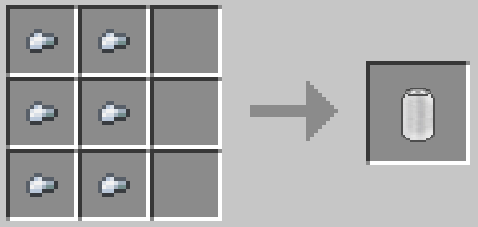
Soda Can: Important for puting tasty liquids inside of. It'll cost you just 6 iron nuggets.
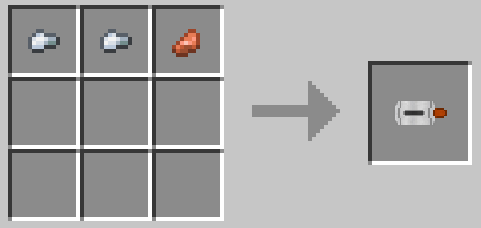
CO2 Canister: Important for making your sodas drinkable (I hate flat soda). Just a couple iron nuggets and a copper nugget. (2 Iron Ingots and 1 Copper Ingot if playing the Minecraft 1.21.1 version)
The Sodas
Each soda gives you one potion effect, except for soda #9, which is just a little more special than the rest.
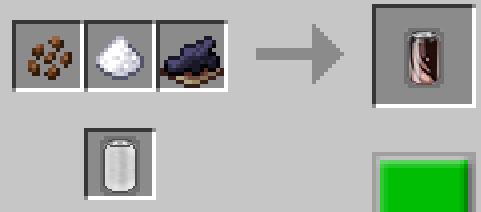
Cocoa Cola: Cocoa Beans, Sugar, and Black Dye. Gives you Haste for 4 minutes.
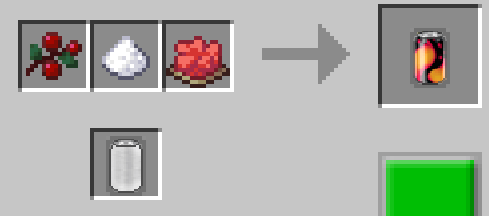
Dr. Blaze: Sweet Berries, Sugar, and Red Dye. Gives you Fire Resistance for 4 minutes.
Phanta Slime: Melon Slice, Sugar, and Lime Dye. Gives you Jump Boost for 4 minutes.
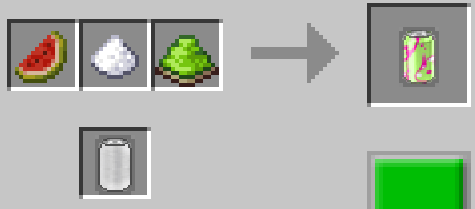
Mountain Creeper: Glow Berries, Sugar, and Yellow Dye. Gives you Speed for 4 minutes.
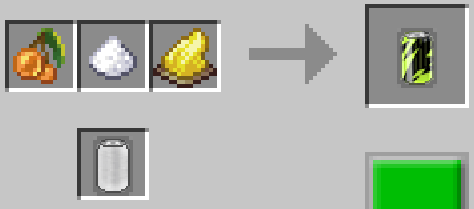
Phanta Orange: Pumpkin, Sugar, and Orange Dye. Gives you Absorption 2 for 2 minutes.
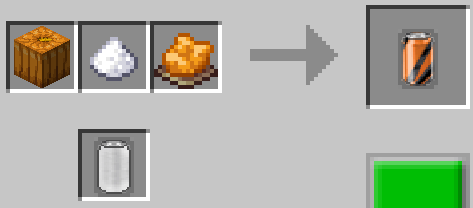
Spruce Beer: Spruce Sapling, Sugar, and Brown Dye. Gives you Resistance for 4 minutes.
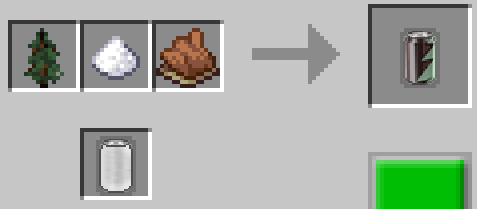
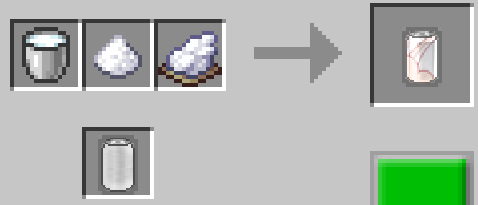
Phanta Cream: Milk, Sugar, and White Dye. Gives you Regeneration for 1 minute.
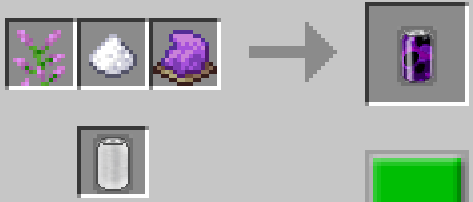
Phanta Grape: Lilac, Sugar, and Purple Dye. Gives you Night Vision for 4 minutes.
The Graveyard
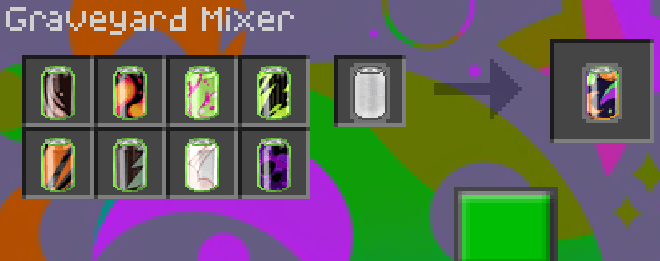
The 9th soda is created by combining all 8 of the regular sodas. The resulting beverage is called The Graveyard. You get all 8 potion effects that you would've gotten from each individual soda, plus a unique effect. The unique effect is called "Undying", and it is the equivalent of the Totem of Undying. If you reach zero hearts while the effect is active, it will save your life and bring you back to full hearts, but you do lose all your potion effects early.
To create The Graveyard you have to open the Soda Mixer machine, and click on the word "Mixer" in the UI 3 times. This switches you to the The Graveyard Mixer, giving you 8 ingredient slots instead of the normal 3. Put in the carbonated version of all 8 regular sodas, mix them up, and you will end up with one can of The Graveyard.
Potential Future Updates
- Custom sound effects
- JEI integration
- Config file
- Energy drink expansion
- Electric (FE) powered machine alternatives expansion
Changelog
Mod Version 1.0.5:
Added
- Carbonated sodas now show their item name in the flavor's color
- Carbonated sodas now show a tooltip with the effect name and level
- Flat sodas now show a gray "Needs fizz!" tooltip hint
- CO2 Canister (Full) now has a green "(Full)" in its name; CO2 Canister (Empty) now has a gray "(Empty)" in its name
Changed
- "Graveyard" renamed to "The Graveyard" (display name only)
Mod Version 1.0.3: Release.
Details
- Created by Zachary Goshen (MrExtrodius)
- Licensed under GNU GPL v3
- Available for Minecraft 26.3, 26.1.2, and 1.21.1 (NeoForge)
Project description from CurseForge.
Pick your setup
Extrodius's Soda by Minecraft version and loader
Choose the version and loader you play, then open the matching release.
Minecraft version
26.1.2
1 loader buildMinecraft version
1.21.1
1 loader buildCheck the dependencies, then try the file in a copied instance before changing a world you care about.
Recent files
Extrodius's Soda versions and loaders
extrodius_soda-1.0.5-1211.jar
17 Oct 2026
Client Source doesn’t say Server Source doesn’t say Dependencies No extras listed Listed on Release listing
Check the 1.21.1 · NeoForge setup 1.21.1NeoForge release
extrodius_soda-1.0.5-26.1.jar
17 Oct 2026
Client Source doesn’t say Server Source doesn’t say Dependencies No extras listed Listed on Release listing
Check the 26.1.2 · NeoForge setup NeoForge26.1.2 release
extrodius_soda-1.0.5-26.3.jar
17 Oct 2026
Client Source doesn’t say Server Source doesn’t say Dependencies No extras listed Listed on Release listing
Check the 26.3 · NeoForge setup NeoForge26.3 release
extrodius_soda-1.0.3.jar
15 Oct 2026
Client Source doesn’t say Server Source doesn’t say Dependencies No extras listed Listed on Release listing
Check the 1.21.1 · NeoForge setup 1.21.1NeoForge release
extrodius_soda-1.0.3.jar
13 Oct 2026
Client Source doesn’t say Server Source doesn’t say Dependencies No extras listed Listed on Release listing
Check the 26.3 · NeoForge setup NeoForge26.3 release
extrodius_soda-1.0.3.jar
13 Oct 2026
Client Source doesn’t say Server Source doesn’t say Dependencies No extras listed Listed on Release listing
Check the 26.1.2 · NeoForge setup NeoForge26.1.2 release
Looking for an older file? The official CurseForge project page is in Resources.
 mod
mod CurseForge + Modrinth · Minecraft
Brand New Day
🌅 Shows an animated day counter and statistics whenever a new Minecraft day starts!
 mod
mod CurseForge + Modrinth · Minecraft
Wiwi's Mega Trees
Adds mega variants for all vanilla trees that don't already have one
 mod
mod CurseForge + Modrinth · Minecraft
Breeze Spawn
💨 Adds a chance for breezes to spawn naturally everywhere in place of a blaze.