Minecraft version
Back to mods 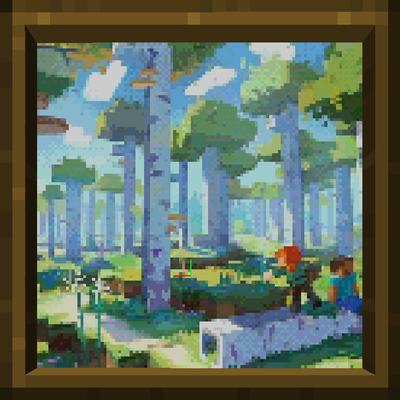
CurseForge · Minecraft mod
Mine Papers Online
Here’s the Minecraft painting modification you’ve been searching for. It offers straightforward and practical features that are easy to grasp without requiring lengthy tutorials on YouTube
Choose a version Pick your version below, then grab the matching file.
Quick answer
Which Mine Papers Online release should I use?
Latest stable file 1.12.2-forge-1.5.2
Game version 1.12.2
Loader Forge
Mine Papers Online 1.12.2-forge-1.5.2 targets 1.12.2 with Forge. The project page does not say whether this file belongs on the client, dedicated server, or both. No extra mods listed for this file.
Where it goes
Is Mine Papers Online required on the client, server, or both?
The project page does not say whether this file belongs on the client, dedicated server, or both.
Client Source doesn’t say
Dedicated server Source doesn’t say
Loader for this release Forge
Required install it here Optional supported, not mandatory Not supported do not install here Source doesn’t say do not assume
The source does not explicitly classify this release as client-only or server-only.
What else does Mine Papers Online 1.12.2-forge-1.5.2 need?
1.12.2-forge-1.5.2. Change the file and its required mods may change too.
This file does not list any required mods. Do not add a library just because a different file uses it.
This file does not list any required or optional mods.
Before you install it
Add Mine Papers Online without breaking your instance.
Built for Mine Papers Online 1.12.2-forge-1.5.2. Pick another file and the loader, install side or required mods may change.
- 01
Stick to this file
Use 1.12.2-forge-1.5.2. It targets 1.12.2 with Forge; another release may have different loader, side or dependency requirements.
- 02
Bring the mods it needs
This file does not list any required mods. Do not add a library just because a different file uses it.
- 03
Put it on the correct side
The project page does not say whether this file belongs on the client, dedicated server, or both.
- 04
Pick the file you checked
Use the “Get this file” button beside 1.12.2-forge-1.5.2. It opens that exact file at the source.
About this project
What does Mine Papers Online add?
Mine Papers Online adds a frame that shows your own pictures in the world, either a single image or a slideshow. In multiplayer, images from your computer upload to the server automatically, so every player sees them without downloading anything.
Image sources
Supported image formats: PNG, JPG, GIF, BMP, WEBP
| Sources | Description |
|---|---|
config/minepapers folder |
|
| Any folder on your computer | A folder becomes a slideshow: images change at an interval you set, and every player sees the same slide at the same time |
| Public Yandex Disk folder | |
| Public Google Drive folder | ⏱ soon |
| Direct image link |
Customization
Choose a panel, a 3D frame, a plate or graffiti (no frame, so a transparent PNG looks like a decal). The frame can use the texture of any block. Size, offset, fit mode (fill, contain, cover and more) and resolution are all adjustable. An optional Minecraft map palette with dithering makes pictures look like vanilla map art.
Feels like vanilla
Pictures attach to any surface, including floors, ceilings, slabs and fences. While placing, an outline shows where the picture will go. Pictures break like wood and drop with their settings, and you can copy them at a crafting table.
Translated into English, Russian, Japanese, Chinese.
Project description from CurseForge.
Pick your setup
Mine Papers Online by Minecraft version and loader
Choose the version and loader you play, then open the matching release.
Minecraft version
1.20.1
2 loader buildsMinecraft version
1.12.2
1 loader buildMinecraft version
1.7.10
2 loader buildsCheck the dependencies, then try the file in a copied instance before changing a world you care about.
Recent files
Mine Papers Online versions and loaders
1.12.2-forge-1.5.2
MinePapersOnline-1.12.2-forge-1.5.2.jar
25 Oct 2026
Client Source doesn’t say Server Source doesn’t say Dependencies No extras listed Listed on Release listing
Check the 1.12.2 · Forge setup Forge1.12.2 release
1.7.10-forge-1.5.2
MinePapersOnline-1.7.10-forge-1.5.2.jar
25 Oct 2026
Client Source doesn’t say Server Source doesn’t say Dependencies No extras listed Listed on Release listing
Check the 1.7.10 · Fabric setup Fabric1.7.10 release
1.20.1-fabric-1.5.2
MinePapersOnline-1.20.1-fabric-1.5.2.jar
25 Oct 2026
Client Source doesn’t say Server Source doesn’t say Dependencies No extras listed Listed on Release listing
Check the 1.20.1 · Fabric setup Fabric1.20.1 release
1.20.1-forge-1.5.2
MinePapersOnline-1.20.1-forge-1.5.2.jar
25 Oct 2026
Client Source doesn’t say Server Source doesn’t say Dependencies No extras listed Listed on Release listing
Check the 1.20.1 · Forge setup 1.20.1Forge release
1.21.1-fabric-1.5.2
MinePapersOnline-1.21.1-fabric-1.5.2.jar
25 Oct 2026
Client Source doesn’t say Server Source doesn’t say Dependencies No extras listed Listed on Release listing
Check the 1.21.1 · Fabric setup Fabric1.21.1 release
1.21.1-neoforge-1.5.2
MinePapersOnline-1.21.1-neoforge-1.5.2.jar
25 Oct 2026
Client Source doesn’t say Server Source doesn’t say Dependencies No extras listed Listed on Release listing
Check the 1.21.1 · NeoForge setup 1.21.1NeoForge release
1.21.1-neoforge-1.5.1
MinePapersOnline-1.21.1-neoforge-1.5.1.jar
16 Oct 2026
Client Source doesn’t say Server Source doesn’t say Dependencies No extras listed Listed on Release listing
Check the 1.21.1 · NeoForge setup 1.21.1NeoForge release
1.7.10-forge-1.5.1
MinePapersOnline-1.7.10-forge-1.5.1.jar
16 Oct 2026
Client Source doesn’t say Server Source doesn’t say Dependencies No extras listed Listed on Release listing
Check the 1.7.10 · Forge setup Forge1.7.10 release
1.7.10-forge-1.5.0
MinePapersOnline-1.7.10-forge-1.5.0.jar
15 Oct 2026
Client Source doesn’t say Server Source doesn’t say Dependencies No extras listed Listed on Release listing
Check the 1.7.10 · Forge setup Forge1.7.10 release
1.21.1-neoforge-1.5.0
MinePapersOnline-1.21.1-neoforge-1.5.0.jar
15 Oct 2026
Client Source doesn’t say Server Source doesn’t say Dependencies No extras listed Listed on Release listing
Check the 1.21.1 · NeoForge setup 1.21.1NeoForge release
1.7.10-forge-1.4.0
MinePapersOnline-1.7.10-forge-1.4.0.jar
14 Oct 2026
Client Source doesn’t say Server Source doesn’t say Dependencies No extras listed Listed on Release listing
Check the 1.7.10 · Forge setup Forge1.7.10 release
1.21.1-neoforge-1.4.0
MinePapersOnline-1.21.1-neoforge-1.4.0.jar
14 Oct 2026
Client Source doesn’t say Server Source doesn’t say Dependencies No extras listed Listed on Release listing
Check the 1.21.1 · NeoForge setup 1.21.1NeoForge release
Looking for an older file? The official CurseForge project page is in Resources.
 mod
CurseForge + Modrinth · Minecraft
Ars Nouveau
Craft custom spells, summon magical servants, and make powerful wearables and tools!
 mod
CurseForge · Minecraft
magical mobs
magical mobs expands Iron’s Spells ’n Spellbooks with spellcasting enemies and more fiendish foes!
 mod
CurseForge · Minecraft
Wither Storm Teleport
make wither storm able to teleport through dimensions