Minecraft version
Back to mods 
CurseForge · Minecraft mod
HUD Customizer
Customize your Minecraft HUD with pixel-art styles, drag-and-drop layouts, and optional Sodium integration.
Choose a version Pick your version below, then grab the matching file.
Quick answer
Which HUD Customizer release should I use?
Latest stable file HUD Customizer 1.0.0 — Forge — Minecraft 26.3
Game version 26.3
Loader Forge
HUD Customizer 1.0.0 — Forge — Minecraft 26.3 targets 26.3 with Forge. The project page does not say whether this file belongs on the client, dedicated server, or both. No extra mods listed for this file.
Where it goes
Is HUD Customizer required on the client, server, or both?
The project page does not say whether this file belongs on the client, dedicated server, or both.
Client Source doesn’t say
Dedicated server Source doesn’t say
Loader for this release Forge
Required install it here Optional supported, not mandatory Not supported do not install here Source doesn’t say do not assume
The source does not explicitly classify this release as client-only or server-only.
What else does HUD Customizer 1.0.0 — Forge — Minecraft 26.3 need?
HUD Customizer 1.0.0 — Forge — Minecraft 26.3. Change the file and its required mods may change too.
This file does not list any required mods. Do not add a library just because a different file uses it.
This file does not list any required or optional mods.
Before you install it
Add HUD Customizer without breaking your instance.
Built for HUD Customizer 1.0.0 — Forge — Minecraft 26.3. Pick another file and the loader, install side or required mods may change.
- 01
Stick to this file
Use HUD Customizer 1.0.0 — Forge — Minecraft 26.3. It targets 26.3 with Forge; another release may have different loader, side or dependency requirements.
- 02
Bring the mods it needs
This file does not list any required mods. Do not add a library just because a different file uses it.
- 03
Put it on the correct side
The project page does not say whether this file belongs on the client, dedicated server, or both.
- 04
Pick the file you checked
Use the “Get this file” button beside HUD Customizer 1.0.0 — Forge — Minecraft 26.3. It opens that exact file at the source.
About this project
What does HUD Customizer add?

Your HUD. Your style.
Make Minecraft's interface feel like your own.
HUD Customizer lets you move HUD elements, choose Minecraft-inspired pixel-art styles, and build a layout that suits the way you play. Use the live preview to arrange your interface, then save it for gameplay. Keep the classic look, mix different designs, or use a clean text-only style for coordinates and performance information.
- 13 customizable sections: Hotbar, Hearts, Head, Food, XP Bar, Armor, Air, Keystrokes, Armor HUD, Direction, Effects HUD, Coordinates, and FPS / Ping.
- Drag-and-drop editing: move elements in the preview, hide what you don't need, and restore hidden elements.
- A large style library: pixel-art HUD designs, food-themed hunger icons, equipment layouts, compass artwork, and effect frames.
- Live information: coordinates, biome, FPS, connection latency, equipment durability, and potion-effect timers.
- Clear editing controls: Save, Cancel, and Reset HUD, with a confirmation before resetting.
- Flexible layouts: responsive controls across GUI scales, with saved positions mapped to the in-game HUD.

Move an element. Choose a style. Make it yours.
Press H to open the editor. Drag an element inside the preview and choose a design from its section. Click Save to keep your changes, or Cancel to restore the saved layout. The editor is also available from Video Settings.
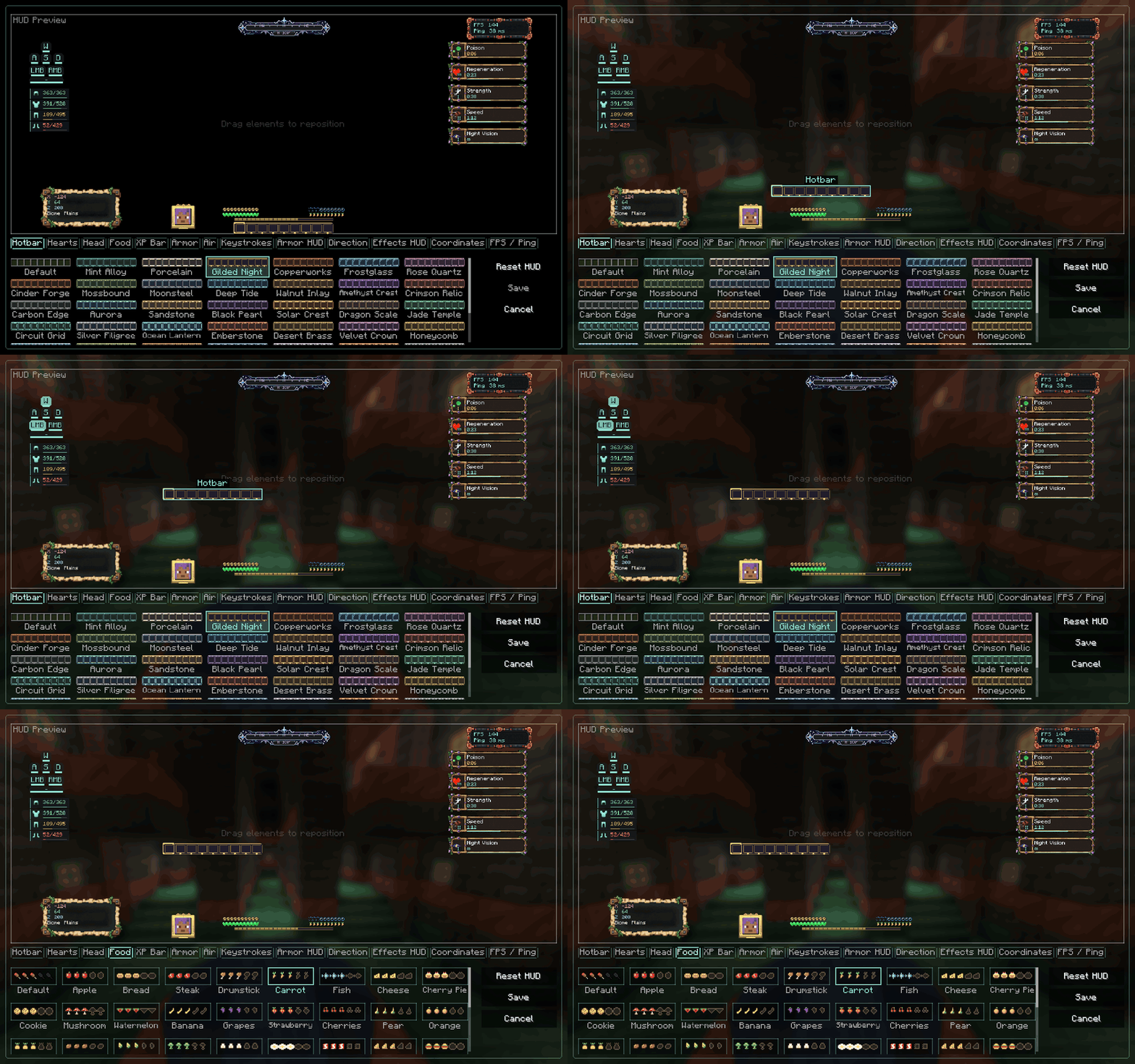
Recorded from the actual mod interface. Smooth, short looping demonstration.

One HUD. With or without Sodium.
Sodium is optional. HUD Customizer works on its own. On supported Sodium versions, its settings appear inside Sodium's video-settings interface. Open HUD Customizer to reveal the editor beside Sodium's sidebar, with a smooth sliding animation. Switching to another settings section cancels unsaved HUD edits.
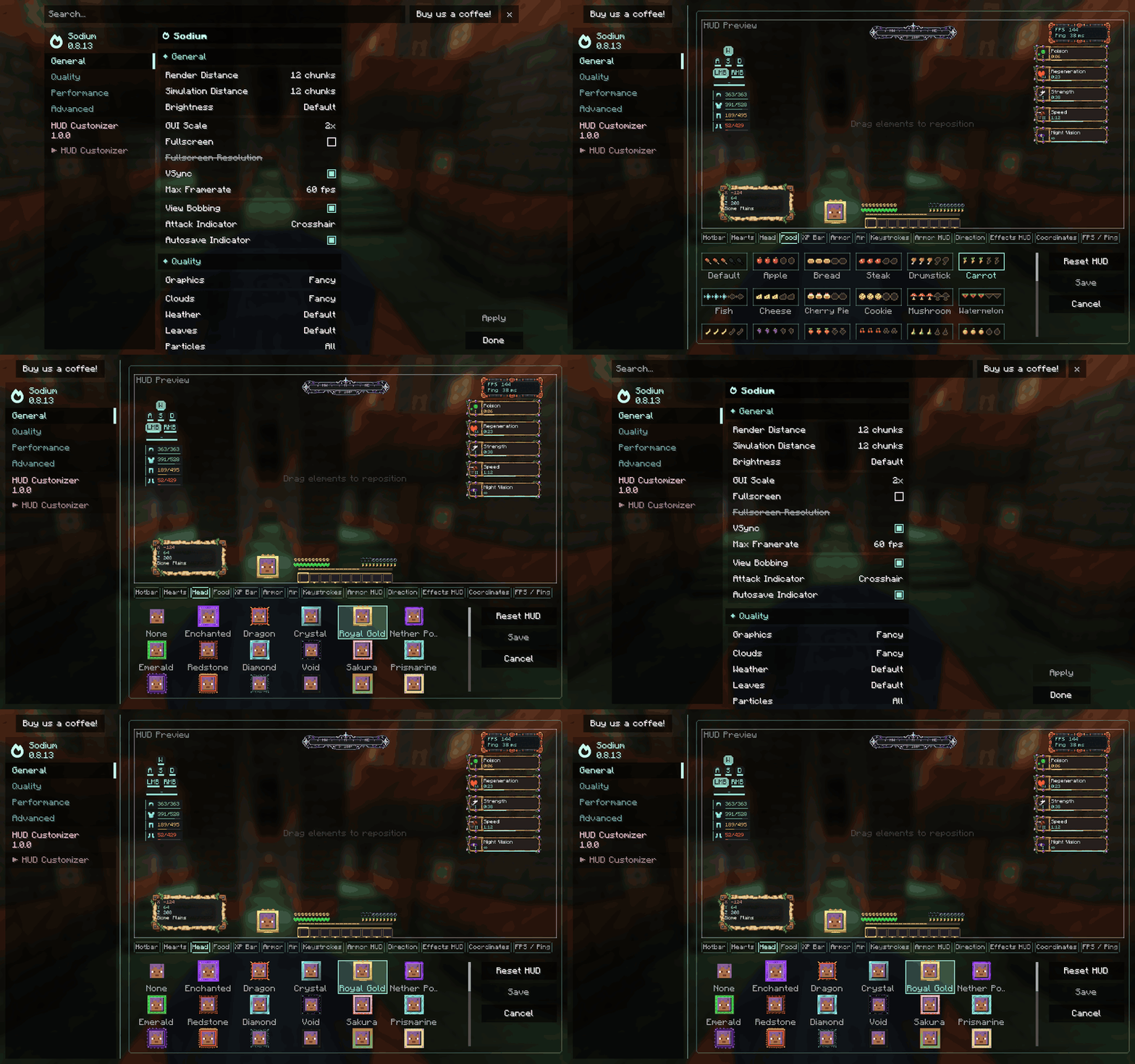
Sodium compatibility has been tested on Fabric builds for the supported Minecraft versions, and on NeoForge builds for 1.21.1, 1.21.11, and 26.3. Forge builds and the NeoForge 1.20.1 build work independently; no official Sodium build was available for those combinations during testing. Embeddium compatibility is not currently claimed.
Choose the right file
Download the file matching both your Minecraft version and mod loader. Each combination has its own JAR.
| Minecraft | Loaders | Java |
|---|---|---|
| 1.20.1 | Fabric, NeoForge, Forge | 17 |
| 1.21.1 | Fabric, NeoForge, Forge | 21 |
| 1.21.11 | Fabric, NeoForge, Forge | 21 |
| 26.3 | Fabric, NeoForge, Forge | 25 |
Installation: install the matching loader, place HUD Customizer in your mods folder, and launch the game. Fabric builds also require Fabric API. Install a compatible Sodium version only if you want its integration. This is a client-side mod; install it on your game client.
Created by Haider x
All Rights Reserved (ARR)
Project description from CurseForge.
Pick your setup
HUD Customizer by Minecraft version and loader
Choose the version and loader you play, then open the matching release.
Minecraft version
1.21.11
3 loader buildsMinecraft version
1.21.1
3 loader buildsMinecraft version
1.20.1
3 loader buildsCheck the dependencies, then try the file in a copied instance before changing a world you care about.
Recent files
HUD Customizer versions and loaders
HUD Customizer 1.0.0 — Forge — Minecraft 26.3
hudcustomizer-forge-1.0.0+mc26.3.jar
14 Oct 2026
Client Source doesn’t say Server Source doesn’t say Dependencies No extras listed Listed on Release listing
Check the 26.3 · Forge setup Forge26.3 release
HUD Customizer 1.0.0 — NeoForge — Minecraft 26.3
hudcustomizer-neoforge-1.0.0+mc26.3.jar
14 Oct 2026
Client Source doesn’t say Server Source doesn’t say Dependencies No extras listed Listed on Release listing
Check the 26.3 · NeoForge setup NeoForge26.3 release
HUD Customizer 1.0.0 — Fabric — Minecraft 26.3
hudcustomizer-fabric-1.0.0+mc26.3.jar
14 Oct 2026
Client Source doesn’t say Server Source doesn’t say Dependencies No extras listed Listed on Release listing
Check the 26.3 · Fabric setup Fabric26.3 release
HUD Customizer 1.0.0 — Forge — Minecraft 1.21.11
hudcustomizer-forge-1.0.0+mc1.21.11.jar
14 Oct 2026
Client Source doesn’t say Server Source doesn’t say Dependencies No extras listed Listed on Release listing
Check the 1.21.11 · Forge setup Forge1.21.11 release
HUD Customizer 1.0.0 — NeoForge — Minecraft 1.21.11
hudcustomizer-neoforge-1.0.0+mc1.21.11.jar
14 Oct 2026
Client Source doesn’t say Server Source doesn’t say Dependencies No extras listed Listed on Release listing
Check the 1.21.11 · NeoForge setup NeoForge1.21.11 release
HUD Customizer 1.0.0 — Fabric — Minecraft 1.21.11
hudcustomizer-fabric-1.0.0+mc1.21.11.jar
14 Oct 2026
Client Source doesn’t say Server Source doesn’t say Dependencies No extras listed Listed on Release listing
Check the 1.21.11 · Fabric setup Fabric1.21.11 release
HUD Customizer 1.0.0 — Forge — Minecraft 1.20.1
hudcustomizer-forge-1.0.0+mc1.20.1.jar
14 Oct 2026
Client Source doesn’t say Server Source doesn’t say Dependencies No extras listed Listed on Release listing
Check the 1.20.1 · Forge setup 1.20.1Forge release
HUD Customizer 1.0.0 — NeoForge — Minecraft 1.20.1
hudcustomizer-neoforge-1.0.0+mc1.20.1.jar
14 Oct 2026
Client Source doesn’t say Server Source doesn’t say Dependencies No extras listed Listed on Release listing
Check the 1.20.1 · NeoForge setup 1.20.1NeoForge release
HUD Customizer 1.0.0 — Fabric — Minecraft 1.20.1
hudcustomizer-fabric-1.0.0+mc1.20.1.jar
14 Oct 2026
Client Source doesn’t say Server Source doesn’t say Dependencies No extras listed Listed on Release listing
Check the 1.20.1 · Fabric setup Fabric1.20.1 release
HUD Customizer 1.0.0 — Forge — Minecraft 1.21.1
hudcustomizer-forge-1.0.0.jar
14 Oct 2026
Client Source doesn’t say Server Source doesn’t say Dependencies No extras listed Listed on Release listing
Check the 1.21.1 · Forge setup Forge1.21.1 release
HUD Customizer 1.0.0 — NeoForge — Minecraft 1.21.1
hudcustomizer-neoforge-1.0.0.jar
14 Oct 2026
Client Source doesn’t say Server Source doesn’t say Dependencies No extras listed Listed on Release listing
Check the 1.21.1 · NeoForge setup 1.21.1NeoForge release
HUD Customizer 1.0.0 — Fabric — Minecraft 1.21.1
hudcustomizer-1.0.0.jar
14 Oct 2026
Client Source doesn’t say Server Source doesn’t say Dependencies 1 required · 1 unchecked Listed on Release listing
Check the 1.21.1 · Fabric setup Fabric1.21.1 release
Looking for an older file? The official CurseForge project page is in Resources.
 mod
CurseForge + Modrinth · Minecraft
Howling Werewolf
Become a werewolf, master multiple forms and skills, survive Hunters armed with Silver, and conquer the Alpha Trial.
 mod
CurseForge · Minecraft
Kuso_Penguin | 凑企鹅
Turn players and mobs into penguins, then make them dance with built-in or custom animations. 让玩家和生物变成企鹅,并用内置或自定义动作跳舞。
 mod
CurseForge · Minecraft
Estaciones Festivas
Seasonal chests, Halloween scares, Santa gifts and configurable New Year, Mexico, US and Ireland festivals activated by real-world dates.