Minecraft version
Back to mods 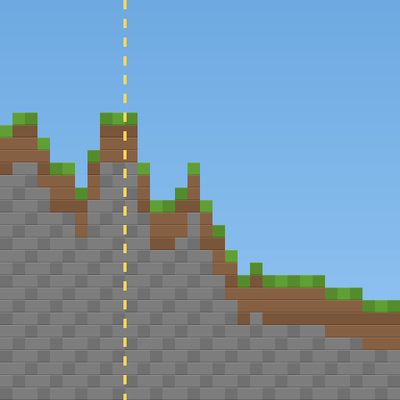
CurseForge · Minecraft mod
ForceBlend
Smooths the border between old and newly generated terrain, once per world, with a backup first. Works on Fabric and NeoForge, in singleplayer and on servers.
Choose a version Pick your version below, then grab the matching file.
Quick answer
Which ForceBlend release matches 26.3?
Best match for your filters ForceBlend 1.2.1 (NeoForge)
Game version 1.21, 1.21.8, 1.21.5
Loader NeoForge
ForceBlend 1.2.1 (NeoForge) targets 1.21, 1.21.8, 1.21.5 with NeoForge. The project page does not say whether this file belongs on the client, dedicated server, or both. No extra mods listed for this file.
Where it goes
Is ForceBlend required on the client, server, or both?
The project page does not say whether this file belongs on the client, dedicated server, or both.
Client Source doesn’t say
Dedicated server Source doesn’t say
Loader for this release NeoForge
Required install it here Optional supported, not mandatory Not supported do not install here Source doesn’t say do not assume
The source does not explicitly classify this release as client-only or server-only.
What else does ForceBlend 1.2.1 (NeoForge) need?
ForceBlend 1.2.1 (NeoForge) on 26.3. Every mod below is checked against that same setup.
This file does not list any required mods. Do not add a library just because a different file uses it.
This file does not list any required or optional mods.
Before you install it
Add ForceBlend without breaking your instance.
Built for ForceBlend 1.2.1 (NeoForge) on 26.3. Pick another file and the loader, install side or required mods may change.
- 01
Stick to this file
Use ForceBlend 1.2.1 (NeoForge). It targets 1.21, 1.21.8, 1.21.5 with NeoForge; another release may have different loader, side or dependency requirements.
- 02
Bring the mods it needs
This file does not list any required mods. Do not add a library just because a different file uses it.
- 03
Put it on the correct side
The project page does not say whether this file belongs on the client, dedicated server, or both.
- 04
Pick the file you checked
Use the “Get this file” button beside ForceBlend 1.2.1 (NeoForge). It opens that exact file at the source.
About this project
What does ForceBlend add?
Original mod by Mauro0805. Maintained by Mauro0805 and SasnycoN
ForceBlend prepares existing Overworld chunks so Minecraft can blend new terrain beside them after seed or terrain-generator changes, chunk imports, or deletions. Minecraft generates the terrain; ForceBlend marks the existing side of the border.
Opening a world
ForceBlend defaults to once per world. A read-only client analysis shows affected chunks, regions, deferred work, and estimated processing time. By default you get Prepare world (backup is on), Open without changes, or Cancel. With automatic backup turned off, the backup option comes first, followed by Prepare without backup (risky). Processing uses native Minecraft screens with progress and completion, not desktop dialogs.
Dedicated servers have no menu and always complete a full-world backup before applying. On clients the backup is on by default and can be turned off in the settings. ZIPs go under backups/forceblend/<world>/, outside the source world. They exclude only the root runtime session.lock. Keep your own restorable copy of important worlds.
Settings and migration
Edit config/forceblend.properties; Fabric Mod Menu optionally provides a settings screen. Automatic analysis and client backup default on, detailed logging defaults off, the chunk limit defaults to unlimited, and processing threads default to all available processors.
Once mode records successful, non-deferred completion in forceblend.json. Existing forceblendonce.json markers are honored. Every-opening mode ignores those markers for later imports, seed changes, or deletions. Replace the old ForceBlend Once JAR with the correct loader build; do not install both.
Source and permission
MIT-licensed, free, usable in any modpack without asking, and open to forks. Updates, response times, and pull-request review are not guaranteed.
Source: Mauro0805/ForceBlend. Release notes and the changelog are on GitHub.
Project description from CurseForge.
Pick your setup
ForceBlend by Minecraft version and loader
Choose the version and loader you play, then open the matching release.
Minecraft version
26.2
2 loader buildsMinecraft version
26.1.2
2 loader buildsMinecraft version
26.1.1
2 loader buildsMinecraft version
26.1
2 loader buildsMinecraft version
1.21.11
2 loader buildsMinecraft version
1.21.10
2 loader buildsMinecraft version
1.21.9
2 loader buildsMinecraft version
1.21.8
2 loader buildsMinecraft version
1.21.7
2 loader buildsMinecraft version
1.21.6
2 loader buildsMinecraft version
1.21.5
2 loader buildsShowing the newest 12 of 32 game versions. Older files are in the list below.
Check the dependencies, then try the file in a copied instance before changing a world you care about.
Recent files
ForceBlend versions and loaders
ForceBlend 1.2.1 (NeoForge)
ForceBlend-neoforge-1.2.1.jar
25 Oct 2026
Client Source doesn’t say Server Source doesn’t say Dependencies No extras listed Listed on Release listing
Check the 26.3 · NeoForge setup 1.211.21.81.21.51.21.4 release
ForceBlend 1.2.1 (Fabric)
ForceBlend-1.2.1.jar
25 Oct 2026
Client Source doesn’t say Server Source doesn’t say Dependencies No extras listed Listed on Release listing
Check the 26.3 · Fabric setup 1.211.18.11.19.31.20.2 release
ForceBlend 1.2.0 (NeoForge)
ForceBlend-neoforge-1.2.0.jar
25 Oct 2026
Client Source doesn’t say Server Source doesn’t say Dependencies No extras listed Listed on Release listing
Check the 26.3 · NeoForge setup NeoForge26.3 release
ForceBlend 1.2.0 (Fabric)
ForceBlend-1.2.0.jar
25 Oct 2026
Client Source doesn’t say Server Source doesn’t say Dependencies No extras listed Listed on Release listing
Check the 26.3 · Fabric setup 1.211.18.11.19.31.20.2 release
ForceBlend Once 1.1.0 (NeoForge)
ForceBlendOnce-neoforge-1.1.0.jar
18 Oct 2026
Client Source doesn’t say Server Source doesn’t say Dependencies No extras listed Listed on Release listing
Check the 26.3 · NeoForge setup NeoForge26.3 release
ForceBlend Once 1.1.0 (Fabric)
ForceBlendOnce-1.1.0.jar
15 Oct 2026
Client Source doesn’t say Server Source doesn’t say Dependencies No extras listed Listed on Release listing
Check the 26.3 · Fabric setup Fabric26.3 release
ForceBlend Once 1.0.0 (Fabric)
ForceBlendOnce-1.0.0.jar
15 Oct 2026
Client Source doesn’t say Server Source doesn’t say Dependencies No extras listed Listed on Release listing
Check the 26.3 · Fabric setup Fabric26.3 release
Looking for an older file? The official CurseForge project page is in Resources.
 mod
mod CurseForge + Modrinth · Minecraft
Uncraft Everything
Crafted wrong item? Uncraft everything with this mod!
 mod
mod CurseForge · Minecraft
Sparkle's Morpher
A comprehensive model loader for Minecraft
 mod
mod CurseForge · Minecraft
ReplayModCinematics: Camera Paths for Replay Mod
Unofficial Replay Mod add-on: smooth camera paths, orbits and entity-follow shots. For Forge, NeoForge and Fabric.