Fabric API Needed by custom view model custom-view-model-26.2-1.0.0+26.2.jar
requiredMatching file found Matched file: [26.2] Fabric API 0.161.0+26.2
CurseForge · Minecraft mod
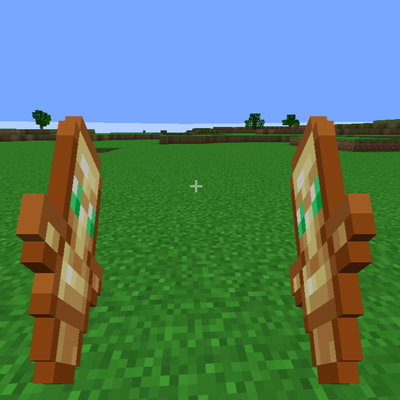
It gives you complete control over your first-person item and hand viewmodel position, rotation, and size, with support for hand splitting, keybind toggling, presets, and Mod Menu integration!
Quick answer
custom view model custom-view-model-26.2-1.0.0+26.2.jar targets 26.2 with Fabric. The project page does not say whether this file belongs on the client, dedicated server, or both. All 1 required mods have matching files.
Where it goes
The project page does not say whether this file belongs on the client, dedicated server, or both.
The source does not explicitly classify this release as client-only or server-only.
custom-view-model-26.2-1.0.0+26.2.jar. Change the file and its required mods may change too.
Install Fabric API first. We found matching files for this game-version and loader setup.
We only count dependency files that match this setup. A file for another loader does not fill the gap.
Before you install it
Built for custom view model custom-view-model-26.2-1.0.0+26.2.jar. Pick another file and the loader, install side or required mods may change.
Use custom-view-model-26.2-1.0.0+26.2.jar. It targets 26.2 with Fabric; another release may have different loader, side or dependency requirements.
Install Fabric API first. We found matching files for this game-version and loader setup.
The project page does not say whether this file belongs on the client, dedicated server, or both.
Use the “Get this file” button beside custom-view-model-26.2-1.0.0+26.2.jar. It opens that exact file at the source.
About this project
Custom View Model is a client-side Fabric mod that lets you fully customize the appearance of your held items and hands in first-person view.
Whether you want your tools closer to the center of the screen, your weapons lower, or your hands at a completely different angle, Custom View Model gives you full control over their position, rotation, and scale. All changes are previewed in real time through an easy-to-use configuration screen, allowing you to fine-tune your preferred view without restarting the game.
Features:
* Adjust the position of held items and hands.
* Customize rotation on all axes.
* Change the scale of held items and hands.
* Real-time preview while editing.
* Simple and intuitive configuration interface.
* Client-side only, so it does not need to be installed on servers.
* Works without affecting gameplay or other players.
This mod is designed for players who want a cleaner first-person view, improved visibility during gameplay, or a personalized look that matches their preferences.
Project description from CurseForge.
Pick your setup
Choose the version and loader you play, then open the matching release.
Check the dependencies, then try the file in a copied instance before changing a world you care about.
Recent files
15 Oct 2026
15 Oct 2026
15 Oct 2026
15 Oct 2026
15 Oct 2026
15 Oct 2026
Looking for an older file? The official CurseForge project page is in Resources.
 mod
See your death dimension and block coordinates in a private local message, then click to copy plain XYZ. Client-side for NeoForge 1.21.1.
 mod
Color you hud in any color you want
 mod
Adds 16 new melee weapons to the game