Military Arms Core Needed by Fire Support firesupport-1.20.1-0.1.1.jar
requiredMatching file found Matched file: military-arms-core-1.20.1-0.1.0.jar

CurseForge · Minecraft mod
Call in airstrikes, artillery, missiles, gunships, drones and orbital weapons with a personal supply and research system.
Quick answer
Fire Support firesupport-1.20.1-0.1.1.jar targets 1.20.1 with Forge. The project page does not say whether this file belongs on the client, dedicated server, or both. All 2 required mods have matching files.
Where it goes
The project page does not say whether this file belongs on the client, dedicated server, or both.
The source does not explicitly classify this release as client-only or server-only.
firesupport-1.20.1-0.1.1.jar. Change the file and its required mods may change too.
Install Military Arms Core, GeckoLib first. We found matching files for this game-version and loader setup.
We only count dependency files that match this setup. A file for another loader does not fill the gap.
Before you install it
Built for Fire Support firesupport-1.20.1-0.1.1.jar. Pick another file and the loader, install side or required mods may change.
Use firesupport-1.20.1-0.1.1.jar. It targets 1.20.1 with Forge; another release may have different loader, side or dependency requirements.
Install Military Arms Core, GeckoLib first. We found matching files for this game-version and loader setup.
The project page does not say whether this file belongs on the client, dedicated server, or both.
Use the “Get this file” button beside firesupport-1.20.1-0.1.1.jar. It opens that exact file at the source.
About this project

Call in tactical support from the sky, mark targets for gunship fire, or deploy armed drones into battle. Fire Support brings 45 weapon configurations to Minecraft, including airstrikes, artillery, guided missiles, and orbital weapons.

Aircraft, projectiles, explosions, lingering smoke, flames and optical weapons have dedicated visuals and sound. Attack-area previews are visible only to the player requesting the strike.
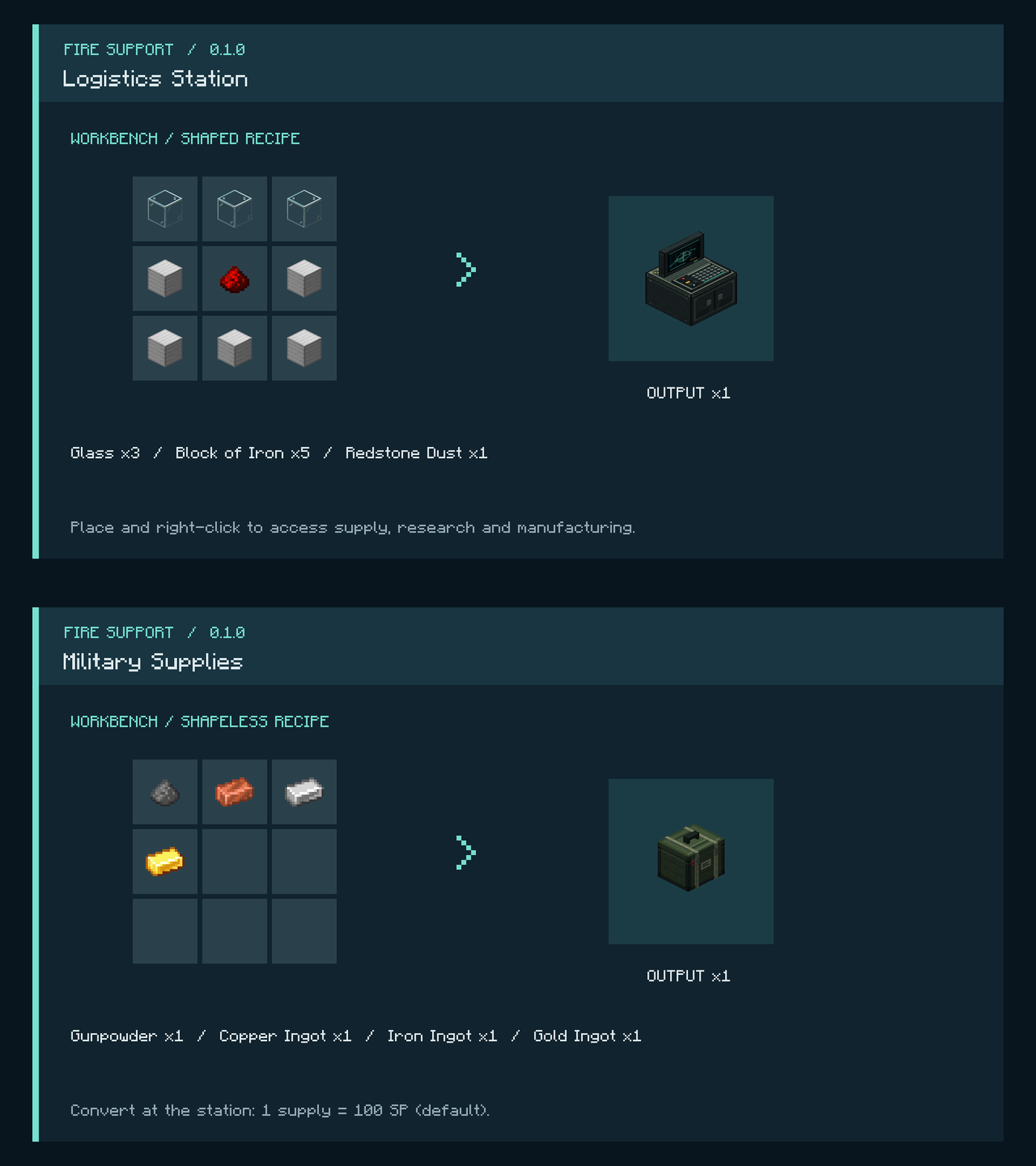
Start by crafting a Logistics Station from 5 iron blocks, 3 glass blocks and 1 redstone dust. Craft Military Supplies with one gunpowder, copper ingot, iron ingot and gold ingot.
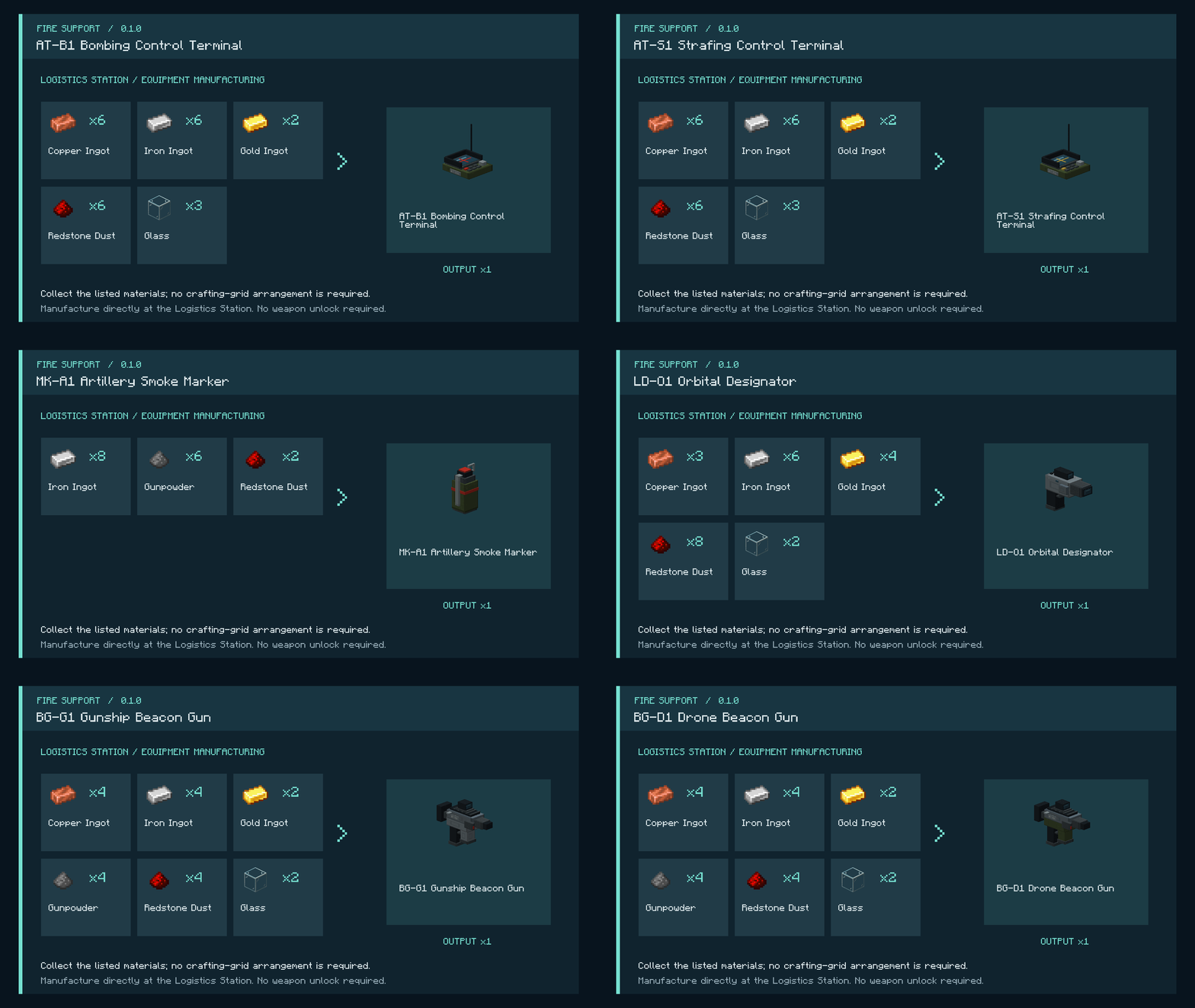
At the station you can:
| Equipment or action | Default control |
|---|---|
| Choose a weapon configuration | R while holding support equipment |
| Open camera and visual settings | O |
| Start or cancel aerial targeting | Right-click |
| Rotate the aerial attack area | A / D |
| Adjust the targeting camera height | Mouse wheel |
| Confirm an aerial strike | Left-click after route preparation |
| Throw an artillery marker | Hold right-click, then release |
| Fire a sticky beacon | Right-click with a beacon gun |
| Designate a missile or orbital target | Hold right-click with the designator |
| Recall your drones | X while holding the drone beacon gun |
Key bindings can be changed in Minecraft's controls menu.
Only drone weapons can be used in the Nether and the End. Other support types check the caller and target for deep underground locations or thick cover; the HUD explains when a request is unavailable.
Terrain destruction, friendly fire, self-damage and ignition of flammable blocks are enabled by default. World/server configuration controls these rules, SP conversion and SP capacity.
Project description from CurseForge.
Pick your setup
Choose the version and loader you play, then open the matching release.
Check the dependencies, then try the file in a copied instance before changing a world you care about.
Recent files
16 Oct 2026
15 Oct 2026
Looking for an older file? The official CurseForge project page is in Resources.