Minecraft version
Back to mods 
CurseForge · Minecraft mod
Ultra Fast Pregen
Ultra Fast Pregen pre-generates your world much faster than other pre-generators by using every CPU core, so players never wait on chunk generation.
Choose a version Pick your version below, then grab the matching file.
Quick answer
Which Ultra Fast Pregen release should I use?
Latest stable file ultrafastpregen-neoforge-26.1.2-26.2-15.1.jar
Game version 26.1.2, 26.2
Loader NeoForge
Ultra Fast Pregen ultrafastpregen-neoforge-26.1.2-26.2-15.1.jar targets 26.1.2, 26.2 with NeoForge. The project page does not say whether this file belongs on the client, dedicated server, or both. No extra mods listed for this file.
Where it goes
Is Ultra Fast Pregen required on the client, server, or both?
The project page does not say whether this file belongs on the client, dedicated server, or both.
Client Source doesn’t say
Dedicated server Source doesn’t say
Loader for this release NeoForge
Required install it here Optional supported, not mandatory Not supported do not install here Source doesn’t say do not assume
The source does not explicitly classify this release as client-only or server-only.
What else does Ultra Fast Pregen ultrafastpregen-neoforge-26.1.2-26.2-15.1.jar need?
ultrafastpregen-neoforge-26.1.2-26.2-15.1.jar. Change the file and its required mods may change too.
This file does not list any required mods. Do not add a library just because a different file uses it.
This file does not list any required or optional mods.
Before you install it
Add Ultra Fast Pregen without breaking your instance.
Built for Ultra Fast Pregen ultrafastpregen-neoforge-26.1.2-26.2-15.1.jar. Pick another file and the loader, install side or required mods may change.
- 01
Stick to this file
Use ultrafastpregen-neoforge-26.1.2-26.2-15.1.jar. It targets 26.1.2, 26.2 with NeoForge; another release may have different loader, side or dependency requirements.
- 02
Bring the mods it needs
This file does not list any required mods. Do not add a library just because a different file uses it.
- 03
Put it on the correct side
The project page does not say whether this file belongs on the client, dedicated server, or both.
- 04
Pick the file you checked
Use the “Get this file” button beside ultrafastpregen-neoforge-26.1.2-26.2-15.1.jar. It opens that exact file at the source.
About this project
What does Ultra Fast Pregen add?
Ultra Fast Pregen
Ultra Fast Pregen pre-generates your world much faster than other pre-generators by using every CPU core, so players never wait on chunk generation. The blocks, biomes and light are the same as Minecraft's own generation.
Running CraftBukkit, Spigot, Paper or Folia? Get the plugin: Ultra Fast Pregen (Bukkit)
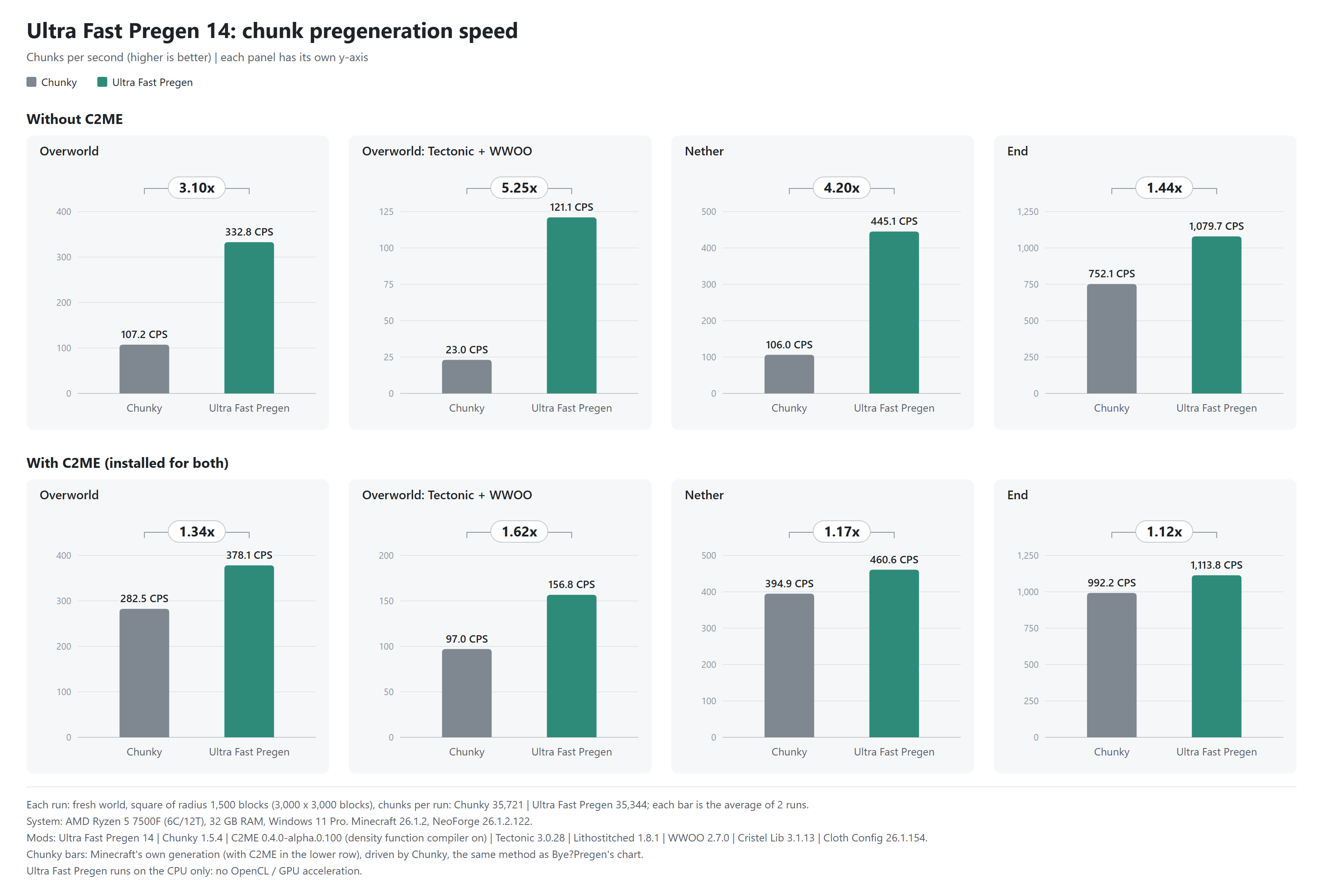
Speed
Against Chunky (version 14, AMD Ryzen 5 7500F, NeoForge 26.1.2, a fresh 3000×3000 block area, average of 2 runs):
| World | Chunky | Ultra Fast Pregen |
|---|---|---|
| Overworld | 107.2 chunks/s | 332.8 chunks/s (3.1× faster) |
| Overworld with Tectonic + WWOO | 23.0 chunks/s | 121.1 chunks/s (5.3× faster) |
| Nether | 106.0 chunks/s | 445.1 chunks/s (4.2× faster) |
| End | 752.1 chunks/s | 1,079.7 chunks/s (1.4× faster) |
With C2ME installed for both: 1.1× to 1.6× faster.
Version 15 is faster than these numbers from 14: whole Overworld runs without other mods are 21% faster on NeoForge 26.1.2 and 17% faster on Fabric 26.2 (i9-11900T, 16 threads, 2,000 × 2,000 blocks). In All the Mods 9: 51.5 → 60.1 chunks/s (+17%).
On different CPUs (3000×3000 blocks, earlier versions):
| CPU | Area (block) | Time | Speed |
|---|---|---|---|
| AMD Ryzen 5 7500F (6 cores / 12 threads) | 3000×3000 | 1 min 54 s | 308.8 chunks/s |
| AMD Ryzen 5 7530U (6 cores / 12 threads) | 3000×3000 | 3 min 01 s | 195.2 chunks/s |
| Intel Core i9-11900T ES (8 cores / 16 threads) | 3000×3000 | 5 min 02 s | 116.9 chunks/s |
| Intel Xeon (hosted, 4 vCPU 3.00Ghz) | 3000×3000 | 9 min 17 s | 63.3 chunks/s |
It uses all cores, so it is best run before players join, or while few are online. It runs on the CPU only (no GPU).
Features
- Vanilla-matching worlds. Terrain, biomes, structures, caves, features and light are checked block for block against vanilla, including large biomes, amplified, nether, end, caves and floating islands.
- Any radius, square or circle. Set the radius in blocks, take the area from the world border, or center it on the world spawn. Trees along a circle's edge are not cut off.
- Resumable. Stop at any time and continue with
/pregen resume. A run cut short by a server stop or crash continues by itself once the server is back. - Safe with existing worlds. Chunks that already exist are kept, and new terrain joins them without a visible seam.
- Seamless borders. Trees, ores and other large features are not cut off where generation areas meet.
- Low-memory friendly. Automatically adjusts to the memory available, down to a 2 GB heap.
- Works with other mods. Detects mods that change world generation and adapts, including Lithium, SuperChunk and big modpacks. If a batch still fails because of another mod, it is generated again the way Minecraft does instead of stopping.
- C2ME, Distant Horizons and Voxy. C2ME is supported, chunk storage included; on the 26.x builds, generated chunks go straight into Distant Horizons' LoD (and Voxy's, in singleplayer).
- API for other mods. Start and stop runs, follow their progress, receive every saved chunk (for map and LoD mods), and declare how their own world generation changes work with the fast paths.
- Any dimension. Overworld, Nether, End and modded dimensions.
Tested with
All six builds, in the Overworld, Nether and End, with every saved chunk checked: C2ME, Lithium / Canary, Noisium, FerriteCore, ModernFix, Starlight / ScalableLux, Distant Horizons, Voxy, Terralith, Biomes O' Plenty, YUNG's Better Caves and Alex's Caves (132 of 132 runs passed with version 15), and the All the Mods 9, All the Mods 10 and Prominence II modpacks. Full results: https://github.com/Pongsapat3791/Ultra-Fast-Pregen/blob/main/COMPATIBILITY.md
Not supported yet: Moonrise (it replaces Minecraft's chunk system); /pregen start says so and starts nothing. Paper and Folia, which have it built in, are supported by the Bukkit plugin.
Commands (op level 2; in singleplayer the world's owner, cheats or not)
| Command | What it does |
|---|---|
/pregen radius <blocks> |
The radius of the next /pregen start |
/pregen shape <square|circle> |
A square, or a circle (every chunk whose center lies within the radius) |
/pregen worldborder |
Take the center and size from the world border |
/pregen spawn |
Center on the world spawn |
/pregen start |
Generate the chosen area around the center |
/pregen start <world_k> |
Generate an area world_k x 1000 blocks across around the center |
/pregen resume |
Continue the last run |
/pregen stop |
Stop after the current batch |
/pregen status |
Progress, speed, ETA and memory |
/pregen center [x z] |
Set the center (default 0 0) |
/pregen world [dimension] |
Choose the dimension |
/pregen reset |
Forget which chunks were pre-generated |
/pregen set [key value] |
Show or change a setting of the config file |
Operators see the progress, speed and ETA on a boss bar.
Example
| Command | What it does |
|---|---|
/pregen radius 2500, /pregen shape circle, /pregen start |
Generate every chunk within 2,500 blocks of the center |
/pregen start 4 |
Generate a 4000 x 4000 block square around the center |
/pregen world minecraft:the_nether then /pregen start 4 |
Generate a 4000 x 4000 block square in the Nether |
Config
config/ultrafastpregen.conf, reloaded on every start (or change it with /pregen set):
| Key | Default | Meaning |
|---|---|---|
batch_size |
1000 |
Size of each generation step in blocks (512-10000) |
threads |
max |
Worker threads |
skip_existing_chunks |
true |
Keep existing chunks; false overwrites the whole area |
parallel_steps |
true |
Structures, caves and features on all threads; false if a worldgen mod crashes |
terrain_pipeline |
auto |
auto picks the fast path when it is safe; vanilla always uses Minecraft's own steps |
resume_after_restart |
true |
Continue a run cut short by a server stop or crash once the server has started |
Versions
| Loader | Minecraft | Java |
|---|---|---|
| Fabric (no Fabric API needed) | 1.20 to 1.20.6, one jar | 17+ (21+ from 1.20.5) |
| Forge | 1.20 to 1.20.4, one jar | 17+ |
| Fabric (no Fabric API needed) | 1.21 and 1.21.1, one jar | 21+ |
| NeoForge | 1.21 and 1.21.1, one jar | 21+ |
| NeoForge | 26.1.2 and 26.2, one jar | 25+ |
| Fabric (no Fabric API needed) | 26.1 to 26.2, one jar | 25+ |
Server side only: players do not need it. It also works in singleplayer.
Also as a plugin for CraftBukkit, Spigot, Paper and Folia 26.2, one jar for all four: Ultra Fast Pregen (Bukkit)
Link and Manager
Two mods that work with Ultra Fast Pregen 15.1 or later. Install them next to it; players do not need them.
- Ultra Fast Pregen Link: generates the world outside the world players are in, on this server or on others, then adds only the chunks the world does not have yet.
- Ultra Fast Pregen Manager: a web page inside your server. Pick an area on a map, press Start, and watch the run. It also shows the machines of a Link network and which of them generates what.
Notes
It uses all CPU cores, so the server may stutter if players are online. Lower
threadsby 1-2 if needed.Chunks currently loaded by a nearby player may not receive features from newly generated neighbors.
Memory: 4 GB recommended for the server, for example:
java -Xms4G -Xmx4G -jar server.jar noguiMore memory lets it use a larger batch for slightly better speed. With less than 4 GB the batch size is lowered automatically and generation is a little slower.
Source, test results and benchmark tool: https://github.com/Pongsapat3791/Ultra-Fast-Pregen · License: LGPL-3.0
Project description from CurseForge.
Pick your setup
Ultra Fast Pregen by Minecraft version and loader
Choose the version and loader you play, then open the matching release.
Minecraft version
26.1.2
2 loader buildsMinecraft version
26.1.1
1 loader buildMinecraft version
26.1
1 loader buildMinecraft version
1.21.1
3 loader buildsMinecraft version
1.21
2 loader buildsMinecraft version
1.20.6
1 loader buildMinecraft version
1.20.5
1 loader buildMinecraft version
1.20.4
2 loader buildsMinecraft version
1.20.3
2 loader buildsMinecraft version
1.20.2
2 loader buildsMinecraft version
1.20.1
2 loader buildsShowing the newest 12 of 13 game versions. Older files are in the list below.
Check the dependencies, then try the file in a copied instance before changing a world you care about.
Recent files
Ultra Fast Pregen versions and loaders
ultrafastpregen-neoforge-26.1.2-26.2-15.1.jar
1 Nov 2026
Client Source doesn’t say Server Source doesn’t say Dependencies No extras listed Listed on Release listing
Check the 26.2 · NeoForge setup NeoForge26.1.226.2 release
ultrafastpregen-neoforge-1.21-1.21.1-15.1.jar
1 Nov 2026
Client Source doesn’t say Server Source doesn’t say Dependencies No extras listed Listed on Release listing
Check the 1.21.1 · NeoForge setup 1.211.21.1NeoForge release
ultrafastpregen-forge-1.20-1.20.4-15.1.jar
1 Nov 2026
Client Source doesn’t say Server Source doesn’t say Dependencies No extras listed Listed on Release listing
Check the 1.20.4 · Forge setup 1.20.21.20.1Forge1.20 release
ultrafastpregen-fabric-26.1-26.2-15.1.jar
1 Nov 2026
Client Source doesn’t say Server Source doesn’t say Dependencies No extras listed Listed on Release listing
Check the 26.2 · Fabric setup Fabric26.126.1.126.1.2 release
ultrafastpregen-fabric-1.21-1.21.1-15.1.jar
1 Nov 2026
Client Source doesn’t say Server Source doesn’t say Dependencies No extras listed Listed on Release listing
Check the 1.21.1 · Forge setup 1.21Forge1.21.1 release
ultrafastpregen-fabric-1.20.x-15.1.jar
1 Nov 2026
Client Source doesn’t say Server Source doesn’t say Dependencies No extras listed Listed on Release listing
Check the 1.20.6 · Fabric setup 1.20.2Fabric1.20.51.20.1 release
ultrafastpregen-neoforge-26.1.2-15.jar
26 Oct 2026
Client Source doesn’t say Server Source doesn’t say Dependencies No extras listed Listed on Release listing
Check the 26.1.2 · NeoForge setup NeoForge26.1.2 release
ultrafastpregen-neoforge-1.21.1-15.jar
26 Oct 2026
Client Source doesn’t say Server Source doesn’t say Dependencies No extras listed Listed on Release listing
Check the 1.21.1 · NeoForge setup 1.21.1NeoForge release
ultrafastpregen-forge-1.20.1-15.jar
26 Oct 2026
Client Source doesn’t say Server Source doesn’t say Dependencies No extras listed Listed on Release listing
Check the 1.20.1 · Forge setup 1.20.1Forge release
ultrafastpregen-fabric-26.2-15.jar
26 Oct 2026
Client Source doesn’t say Server Source doesn’t say Dependencies No extras listed Listed on Release listing
Check the 26.2 · Forge setup Forge26.2 release
ultrafastpregen-fabric-1.21.1-15.jar
26 Oct 2026
Client Source doesn’t say Server Source doesn’t say Dependencies No extras listed Listed on Release listing
Check the 1.21.1 · Fabric setup Fabric1.21.1 release
ultrafastpregen-fabric-1.20.1-15.jar
26 Oct 2026
Client Source doesn’t say Server Source doesn’t say Dependencies No extras listed Listed on Release listing
Check the 1.20.1 · Forge setup 1.20.1Forge release
Looking for an older file? The official CurseForge project page is in Resources.
 mod
CurseForge · Minecraft
Ember's Questing
Powerful data driven questing mod using LDLib2 for maximum customizability
 mod
CurseForge · Minecraft
PvZ GardenCraft
Bring Plants vs. Zombies to Minecraft with classic zombies, custom content, and more PvZ-inspired features!
 mod
CurseForge · Minecraft
Scalpel (Modpack Utility)
Cut unwanted items, blocks and entities out of your modpack before they load, along with their recipes, tags, loot and world generation, or just hide them.