Minecraft version
Back to mods 
CurseForge · Minecraft mod
ZakeysFPS
A simple, lightweight and customisable FPS display with adjustable size, colours, custom hex support and automatic F3 hiding.
Choose a version Pick your version below, then grab the matching file.
Quick answer
Which ZakeysFPS release should I use?
Latest stable file ZakeysFPS 1.1.0
Game version 26.3
Loader NeoForge
ZakeysFPS 1.1.0 targets 26.3 with NeoForge. The project page does not say whether this file belongs on the client, dedicated server, or both. No extra mods listed for this file.
Where it goes
Is ZakeysFPS required on the client, server, or both?
The project page does not say whether this file belongs on the client, dedicated server, or both.
Client Source doesn’t say
Dedicated server Source doesn’t say
Loader for this release NeoForge
Required install it here Optional supported, not mandatory Not supported do not install here Source doesn’t say do not assume
The source does not explicitly classify this release as client-only or server-only.
What else does ZakeysFPS 1.1.0 need?
ZakeysFPS 1.1.0. Change the file and its required mods may change too.
This file does not list any required mods. Do not add a library just because a different file uses it.
This file does not list any required or optional mods.
Before you install it
Add ZakeysFPS without breaking your instance.
Built for ZakeysFPS 1.1.0. Pick another file and the loader, install side or required mods may change.
- 01
Stick to this file
Use ZakeysFPS 1.1.0. It targets 26.3 with NeoForge; another release may have different loader, side or dependency requirements.
- 02
Bring the mods it needs
This file does not list any required mods. Do not add a library just because a different file uses it.
- 03
Put it on the correct side
The project page does not say whether this file belongs on the client, dedicated server, or both.
- 04
Pick the file you checked
Use the “Get this file” button beside ZakeysFPS 1.1.0. It opens that exact file at the source.
About this project
What does ZakeysFPS add?
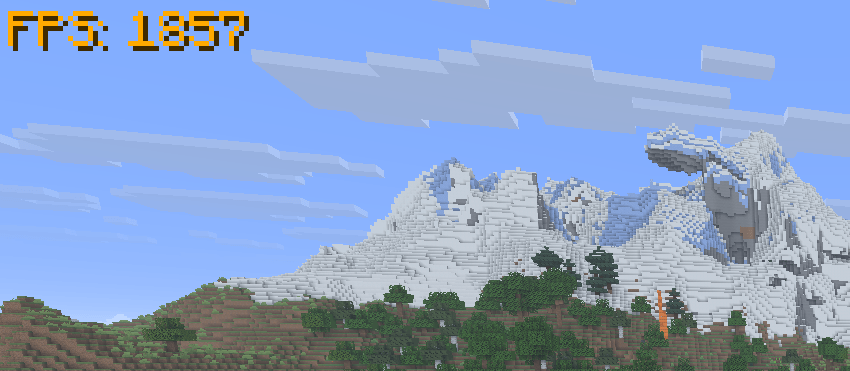
ZakeysFPS is a simple, lightweight and customisable FPS display for Minecraft.
It gives you a clean FPS counter without needing to keep the F3 debug screen open, with built-in options to customise how it looks.
Features
Live FPS counter – Displays your current FPS directly on screen.
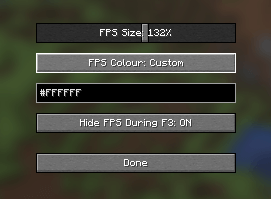
Adjustable size – Scale the FPS display from 50% to 200%.
Colour presets – Quickly choose from a selection of built-in colours.
Custom colours – Enter your own HEX colour code for full colour customisation.
Automatic F3 hiding – Optionally hides the FPS counter whenever the F3 debug screen is open and automatically shows it again when closed.
In-game settings menu – Press
]by default to open the ZakeysFPS settings.Client-side only – No server installation required.
Lightweight – Designed to do one job without adding unnecessary features or clutter.
Compatibility
Minecraft: 26.3
Mod Loader: NeoForge
Environment: Client-side
ZakeysFPS does not increase or optimise your FPS — it simply provides a lightweight and customisable way to display it.
Keybind
The default keybind for opening the settings menu is:
] – Open ZakeysFPS Settings
This can be changed at any time through Minecraft's normal Controls → Key Binds menu.

Created by Zakey7
Project description from CurseForge.
Pick your setup
ZakeysFPS by Minecraft version and loader
Choose the version and loader you play, then open the matching release.
Check the dependencies, then try the file in a copied instance before changing a world you care about.
Recent files
ZakeysFPS versions and loaders
ZakeysFPS 1.1.0
zakeyfps-1.1.0.jar
18 Oct 2026
Client Source doesn’t say Server Source doesn’t say Dependencies No extras listed Listed on Release listing
Check the 26.3 · NeoForge setup NeoForge26.3 release
ZakeysFPS 1.0.0
zakeyfps-1.0.0.jar
16 Oct 2026
Client Source doesn’t say Server Source doesn’t say Dependencies No extras listed Listed on Release listing
Check the 26.3 · NeoForge setup NeoForge26.3 release
Looking for an older file? The official CurseForge project page is in Resources.
 mod
mod CurseForge + Modrinth · Minecraft
Noob's Container Searcher
A client side Fabric mod that remembers the contents of containers and villagers you open, then lets you search saved items later with a command or keybind. Basically a Item Finder.
 mod
mod CurseForge · Minecraft
LoadShift
Set an FPS target and LoadShift adjusts your graphics and shader settings to hit it.
 mod
mod CurseForge · Minecraft
PA9's Texture Builder (Neoforge Port)
Automatic block variation while you build — no hotbar cycling required.