Minecraft version
Back to mods 
CurseForge · Minecraft mod
Runic Core
Mine gems, awaken runes, and build customizable cores that enhance your weapons, tools, and armor.
Choose a version Pick your version below, then grab the matching file.
Quick answer
Which Runic Core release should I use?
Latest stable file Runic Core 1.0.4 - Runebound Tomes
Game version 1.21.1
Loader NeoForge
Runic Core 1.0.4 - Runebound Tomes targets 1.21.1 with NeoForge. The project page does not say whether this file belongs on the client, dedicated server, or both. No extra mods listed for this file.
Where it goes
Is Runic Core required on the client, server, or both?
The project page does not say whether this file belongs on the client, dedicated server, or both.
Client Source doesn’t say
Dedicated server Source doesn’t say
Loader for this release NeoForge
Required install it here Optional supported, not mandatory Not supported do not install here Source doesn’t say do not assume
The source does not explicitly classify this release as client-only or server-only.
What else does Runic Core 1.0.4 - Runebound Tomes need?
Runic Core 1.0.4 - Runebound Tomes. Change the file and its required mods may change too.
This file does not list any required mods. Do not add a library just because a different file uses it.
This file does not list any required or optional mods.
Before you install it
Add Runic Core without breaking your instance.
Built for Runic Core 1.0.4 - Runebound Tomes. Pick another file and the loader, install side or required mods may change.
- 01
Stick to this file
Use Runic Core 1.0.4 - Runebound Tomes. It targets 1.21.1 with NeoForge; another release may have different loader, side or dependency requirements.
- 02
Bring the mods it needs
This file does not list any required mods. Do not add a library just because a different file uses it.
- 03
Put it on the correct side
The project page does not say whether this file belongs on the client, dedicated server, or both.
- 04
Pick the file you checked
Use the “Get this file” button beside Runic Core 1.0.4 - Runebound Tomes. It opens that exact file at the source.
About this project
What does Runic Core add?
Mine gems. Awaken runes. Build your own equipment upgrades.
Runic Core adds a mining-based progression system for weapons, tools, and armor. Craft a core from Runic Steel, permanently bind your chosen runes to it, and fuse it with your equipment at the Runic Anvil.
Build your core
| Core | Rune sockets | Equipment |
|---|---|---|
| Tier 1 | 1 | Weapons and tools |
| Tier 2 | 2 | Weapons and tools |
| Tier 3 | 3 | Weapons and tools |
| Armor Runic Core | 1 per piece | Armor — four runes across a full set |
Regular core upgrades preserve existing bound runes. Crafting an Armor Runic Core requires an empty Tier 1 core. Bound runes cannot be removed or replaced, but the Runic Anvil can detach an intact core from equipment so you can reuse it.
Mine, awaken, bind, fuse
- Mine Runic Steel in newly generated Overworld terrain and smelt it into ingots.
- Find raw gems underground. Gems are mined rather than crafted.
- Use the Awakening Workbench to turn gems into runes. Stat runes have three tiers, with stronger bonuses at higher tiers.
- Use the Runic Workbench to bind runes permanently into a compatible core.
- Use the Runic Anvil to fuse a populated core with compatible equipment, or defuse it to recover the intact core and equipment.
All three stations require an Infused Charge Crystal. Mine raw charge crystals, then infuse one with blaze powder and an ender pearl. Sneak-right-click a station to install it. Each crystal powers five successful operations; failed operations do not consume a use. The Runic Anvil can chip, become damaged, and eventually break through use.
Eight implemented gem families
Rune effects depend on the equipment receiving them:
- Emberstone: auto-smelting, Ember Fire, and fire-related armor utilities.
- Bloodgarnet: mining speed, weapon damage, or maximum health.
- Sunshard: daytime bonuses.
- Verdantite: emerald-related drops or villager trading discounts.
- Tideheart: underwater mining, combat, and breathing or movement benefits.
- Rosequartz: XP-powered tool repair and XP-level-dependent combat or armor bonuses.
- Moonopal: nighttime bonuses.
- Amberglow: increased maximum durability.
Read the in-game tooltips for the tier, compatible equipment, and exact effects. Loose cores and spare inventory equipment do not grant equipped bonuses.
Visible customization
Core sockets display the actual runes you insert, including partially filled cores. Supported held equipment and worn humanoid armor display core fittings, with inventory indicators as well. Equipment using unusual custom renderers may require additional compatibility support.
Recipes and item showcase
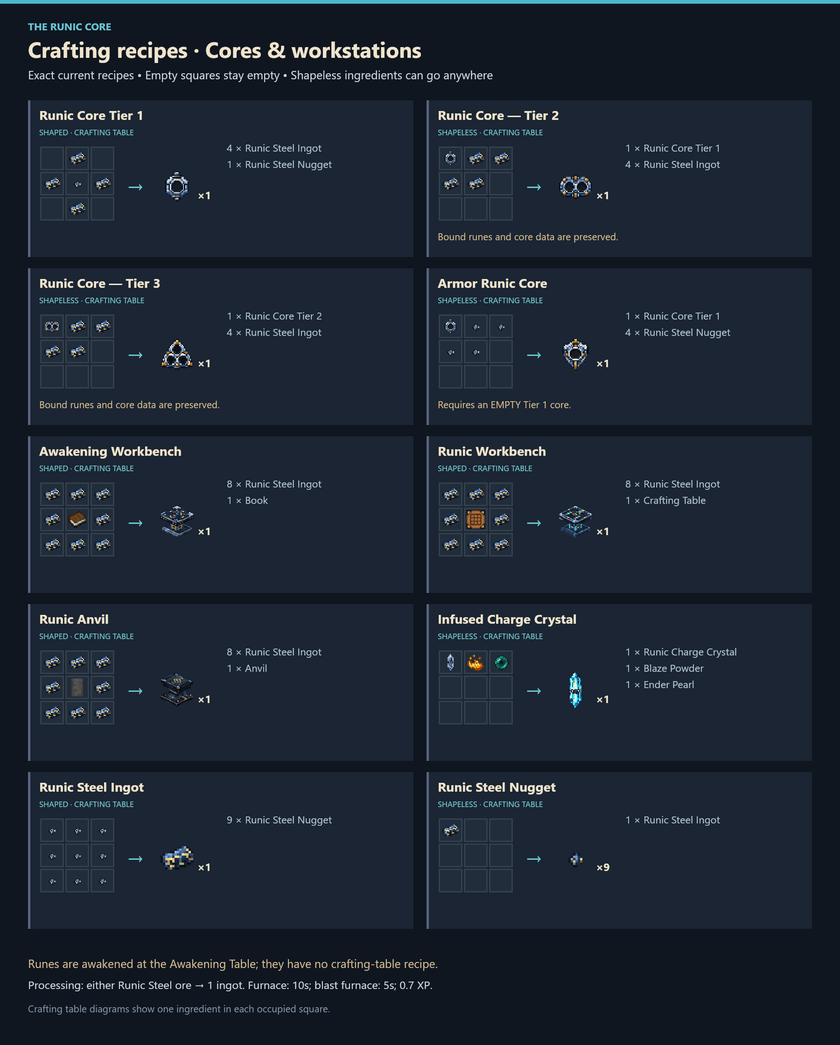
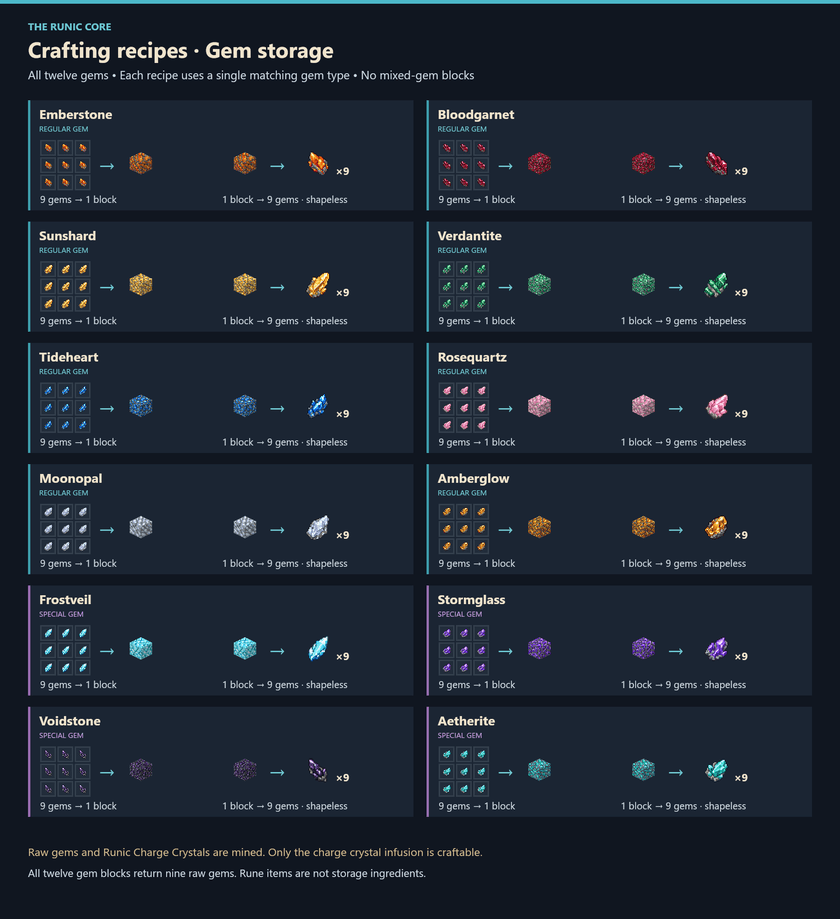
Use the guides below for core upgrades, workstations, and all twelve gem-storage recipes. Click a guide to view it separately. Gem storage recipes use nine matching raw gems per block and return nine gems when unpacked. Rune items are not storage ingredients.
Core and workstation recipes
Gem storage recipes
Open the full gallery and development item showcase
Installation and compatibility
Minecraft 1.21.1 · NeoForge 21.1.253 · Java 21. This build requires that exact Minecraft/NeoForge pair and has no additional required gameplay or library mods. Install it on both the client and server for multiplayer.
The twelve gem families and their artwork are present. Frostveil, Stormglass, Voidstone, and Aetherite are reserved for future effect updates; their presence in the recipe guides does not imply completed special effects. Balance and broader mod compatibility are still being tested. Existing chunks will not generate the new ores retroactively.
The development item showcase includes development fixtures and is an asset overview, not a promise that every displayed test item is survival content.
Project description from CurseForge.
Pick your setup
Runic Core by Minecraft version and loader
Choose the version and loader you play, then open the matching release.
Check the dependencies, then try the file in a copied instance before changing a world you care about.
Recent files
Runic Core versions and loaders
Runic Core 1.0.4 - Runebound Tomes
runiccore-1.0.4.jar
31 Oct 2026
Client Source doesn’t say Server Source doesn’t say Dependencies No extras listed Listed on Release listing
Check the 1.21.1 · NeoForge setup 1.21.1NeoForge release
Runic Core 1.0.3
runiccore-1.0.3.jar
29 Oct 2026
Client Source doesn’t say Server Source doesn’t say Dependencies No extras listed Listed on Release listing
Check the 1.21.1 · NeoForge setup 1.21.1NeoForge release
Runic Core 1.0.2
runiccore-1.0.2.jar
26 Oct 2026
Client Source doesn’t say Server Source doesn’t say Dependencies No extras listed Listed on Release listing
Check the 1.21.1 · NeoForge setup 1.21.1NeoForge release
Runic Core 1.0.1
runiccore-1.0.1.jar
23 Oct 2026
Client Source doesn’t say Server Source doesn’t say Dependencies No extras listed Listed on Release listing
Check the 1.21.1 · NeoForge setup 1.21.1NeoForge release
Runic Core 1.0.0
runiccore-1.0.0.jar
22 Oct 2026
Client Source doesn’t say Server Source doesn’t say Dependencies No extras listed Listed on Release listing
Check the 1.21.1 · NeoForge setup 1.21.1NeoForge release
runiccore-0.1.0.jar
18 Oct 2026
Client Source doesn’t say Server Source doesn’t say Dependencies No extras listed Listed on Release listing
Check the 1.21.1 · NeoForge setup 1.21.1NeoForge beta
Looking for an older file? The official CurseForge project page is in Resources.
 mod
CurseForge + Modrinth · Minecraft
Forgeweave
Modular tools, armor and a smeltery, craft parts, pick materials, earn traits, level your gear, and melt the world down.
 mod
CurseForge · Minecraft
Neural Exosuit
A modular sci-fi exosuit that deploys from a neural band, with per-skin helmet visors, a full HUD, jetpack, shield, Aegis hearts, grapple and FE-powered upgrade chips.
 mod
CurseForge · Minecraft
Biomancy (Unofficial Port)
Neoforge Port for Biomancy