Fabric API Needed by Realtime 3D Chess, Multiplayer or bots and customisable ♟️ chess3d-fabric-1.0.4.jar
requiredMatching file found Matched file: [1.21.1] Fabric API 0.116.17+1.21.1
CurseForge · Minecraft mod
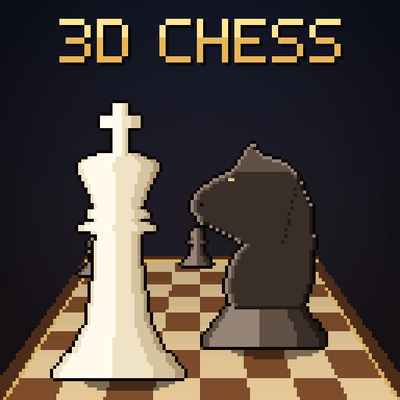
A chess table with real 3D pieces. Play a friend or a bot (five levels), point at a piece to see its moves, and pick from seven boards and seven chess sets, including marble, gold, sci-fi and fantasy.
Quick answer
Realtime 3D Chess, Multiplayer or bots and customisable ♟️ chess3d-fabric-1.0.4.jar targets 1.21.1 with Fabric. The project page does not say whether this file belongs on the client, dedicated server, or both. All 1 required mods have matching files.
Where it goes
The project page does not say whether this file belongs on the client, dedicated server, or both.
The source does not explicitly classify this release as client-only or server-only.
chess3d-fabric-1.0.4.jar. Change the file and its required mods may change too.
Install Fabric API first. We found matching files for this game-version and loader setup.
We only count dependency files that match this setup. A file for another loader does not fill the gap.
Before you install it
Built for Realtime 3D Chess, Multiplayer or bots and customisable ♟️ chess3d-fabric-1.0.4.jar. Pick another file and the loader, install side or required mods may change.
Use chess3d-fabric-1.0.4.jar. It targets 1.21.1 with Fabric; another release may have different loader, side or dependency requirements.
Install Fabric API first. We found matching files for this game-version and loader setup.
The project page does not say whether this file belongs on the client, dedicated server, or both.
Use the “Get this file” button beside chess3d-fabric-1.0.4.jar. It opens that exact file at the source.
About this project
A chess table for Minecraft with real 3D pieces. Sit a friend down across the board, or play a bot if there's nobody about.
There are no menus to move pieces. You play on the board itself. Point at one of your pieces and the squares it can move to light up. Right-click to pick it up, then right-click where you want it to go. Pieces slide across the board, knights hop, and anything you take flies off and lines up beside the board.
| Item | Recipe |
|---|---|
| Chess Table | White carpet, black carpet, white carpet along the top, three planks across the middle, and a stick in each bottom corner |
The table is 4 blocks wide and 3 deep. Place it from where you want to sit as White: the board runs away from you with your pieces nearest. It's in the creative menu too.
Right-click the edge of the table to open its menu.
All the rules are in: castling, en passant, promotion, check and checkmate, stalemate, draws by repetition, the fifty-move rule, and running out of time. The panel in the top left shows both players, the clocks, whose move it is and the last few moves.
You can also offer a draw, resign, or (against a bot) take your last move back.
| Bot | |
|---|---|
| Novice | Just learned how the pieces move. Leaves things hanging. |
| Easy | Thinks a couple of moves ahead. |
| Medium | Spots simple tricks and doesn't give much away. |
| Hard | Thinks for about a second and plays its best move. |
| Expert | Takes its time. Good luck. |
Bots take a moment over each move, so they never slap one down instantly. You can even sit two bots down and watch them play each other.
Seven of each. Mix and match however you like.
| Boards | Chess sets |
|---|---|
| Classic Walnut | Classic Staunton |
| Rustic Planks | Carved Wood |
| Marble | Marble |
| Gold & Onyx | Gold & Silver |
| Sci-Fi Grid | Sci-Fi Hover (glowing pieces that float) |
| Fantasy Ruins | Fantasy Figures (dragons, wizards, castle towers) |
| Tournament | Blocky |
Project description from CurseForge.
Pick your setup
Choose the version and loader you play, then open the matching release.
Check the dependencies, then try the file in a copied instance before changing a world you care about.
Recent files
25 Oct 2026
25 Oct 2026
23 Oct 2026
22 Oct 2026
19 Oct 2026
Looking for an older file? The official CurseForge project page is in Resources.
 mod
modA reimagining of Minecraft with old, more complex mechanics and new ones. /// переосмысление майнкрафта со старыми усложнёнными механиками и новыми
 mod
modA customizable HUD overlay for FPS, ping, TPS, and coordinates in Minecraft.
 mod
modFavorite/pin/bookmark your items, and never accidentally drop your diamond pickaxe into the void again.