
Minecraft version
Back to mods 
CurseForge · Minecraft mod
ShadowLOD
More FPS, with or without shaders, without altering how your game looks.
Choose a version Pick your version below, then grab the matching file.
Quick answer
Which ShadowLOD release should I use?
Latest stable file Shadowlod 1.0.0
Game version 1.20.1
Loader Forge
Shadowlod 1.0.0 targets 1.20.1 with Forge. The project page does not say whether this file belongs on the client, dedicated server, or both. No extra mods listed for this file.
Where it goes
Is ShadowLOD required on the client, server, or both?
The project page does not say whether this file belongs on the client, dedicated server, or both.
Client Source doesn’t say
Dedicated server Source doesn’t say
Loader for this release Forge
Required install it here Optional supported, not mandatory Not supported do not install here Source doesn’t say do not assume
The source does not explicitly classify this release as client-only or server-only.
What else does Shadowlod 1.0.0 need?
Shadowlod 1.0.0. Change the file and its required mods may change too.
This file does not list any required mods. Do not add a library just because a different file uses it.
This file does not list any required or optional mods.
Before you install it
Add ShadowLOD without breaking your instance.
Built for Shadowlod 1.0.0. Pick another file and the loader, install side or required mods may change.
- 01
Stick to this file
Use Shadowlod 1.0.0. It targets 1.20.1 with Forge; another release may have different loader, side or dependency requirements.
- 02
Bring the mods it needs
This file does not list any required mods. Do not add a library just because a different file uses it.
- 03
Put it on the correct side
The project page does not say whether this file belongs on the client, dedicated server, or both.
- 04
Pick the file you checked
Use the “Get this file” button beside Shadowlod 1.0.0. It opens that exact file at the source.
About this project
What does ShadowLOD add?
More FPS, with or without shaders, without changing how your game looks.
Crafted by Hardek



ShadowLOD makes Minecraft lighter and smoother to render, with or without shaders. Distant mobs turn into flat pictures of their own model, far block entities and particles are skipped, chunk loading causes lesser stutter, and with shaders on, shadows are only drawn where you can see them. It basically means that your world looks almost the same, your graphics card just does less work.

- Smart shadows : objects only go into the shadow map when their shadow can land somewhere you can see.
- Shadow cache : the terrain shadow is kept and reused until something changes, and updates are spread over several frames to avoid stutter.
- Distant mob LOD : beyond 32 blocks, mobs are drawn as flat pictures of their real model, up to 128 blocks.
- Render distances : adjustable limits for block entities, particles and translucent sorting.
- Smooth frames : chunk loading is spread over frames and slowed down right after a lag spike.
- Auto tuning : when the frame rate drops below your target, some distances go down a little on their own.
- Thread priorities : the render thread comes first, world generation and Distant Horizons work in the background.
- Any shader pack : packs that need a safer setup are detected automatically. (Such as Euphoria Patches, or RayTraced Shaders for exemple)

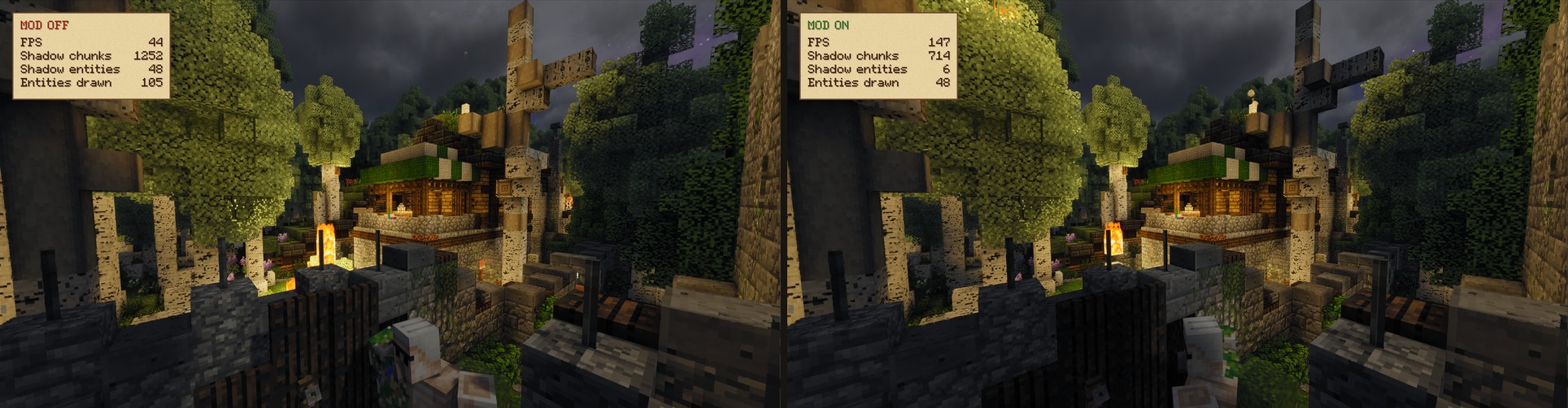
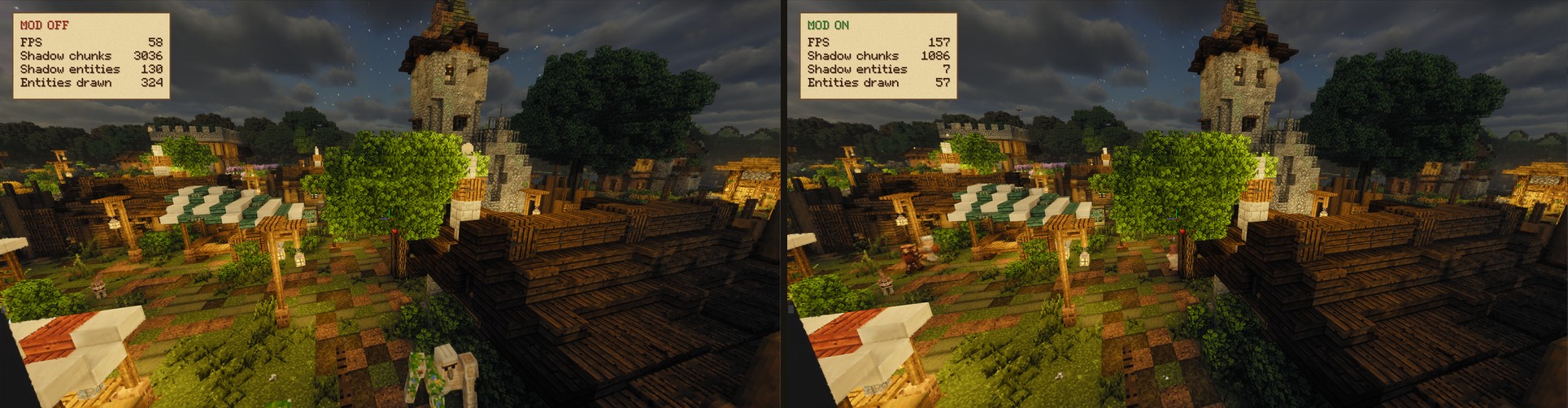
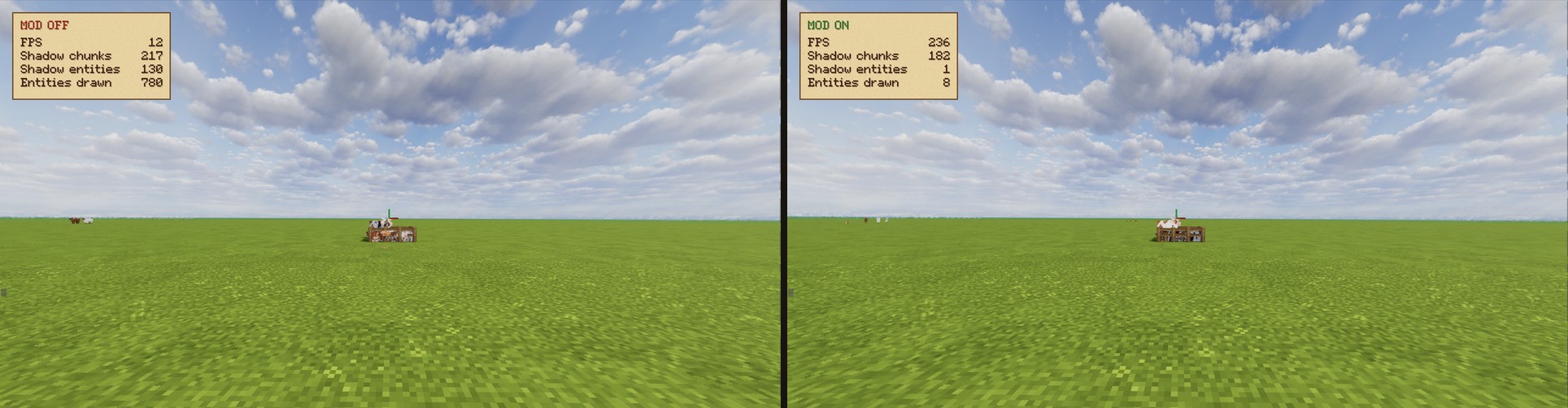
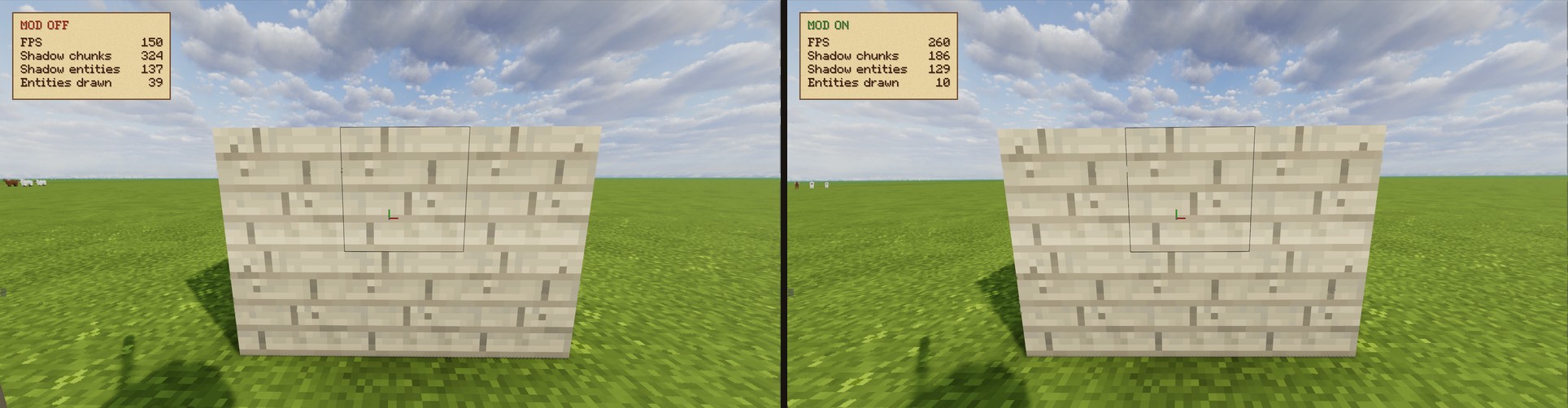
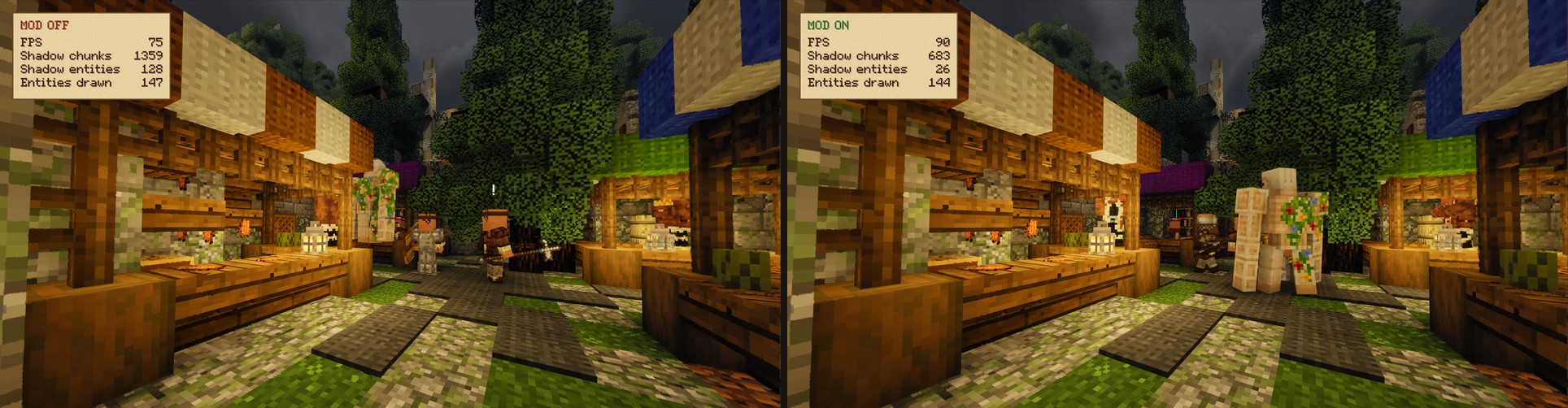
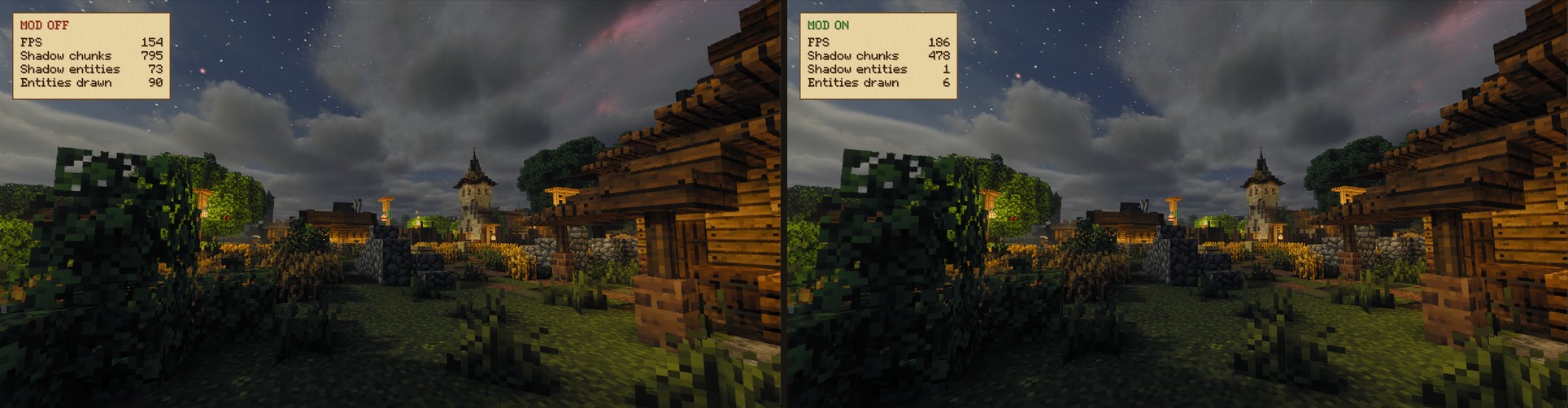
Same spot, same settings, frame rate set to Unlimited. Only the mod is turned off (left) or on (right).
| Scene | Off | On | Gain |
|---|---|---|---|
| 🧱 Wall on a flat world | 150 FPS | 260 FPS | ×1.73 |
| 🏘️ Village house | 44 FPS | 147 FPS | ×3.34 |
| 🏰 Village with a tower | 58 FPS | 157 FPS | ×2.71 |
| 🛒 Market with villagers | 75 FPS | 90 FPS | ×1.20 |
| 🌙 Village at night | 154 FPS | 186 FPS | ×1.21 |
| 🐄 Pen with 130 cows, far away | 12 FPS | 236 FPS | ×19.7 |
Ryzen 7 9800X3D, Radeon RX 9070 XT, 1440p, Photon shaders, Distant Horizons. Your results depend on the scene and your hardware.

| Mod | Status | What works | Not yet |
|---|---|---|---|
| Embeddium | ✅ | Everything | |
| Oculus (all shader packs) | ✅ | Everything | |
| Distant Horizons | ✅ | Everything | |
| C2ME | ✅ ² | Everything | |
| Entity Model Features / Fresh Animations | ✅ | Everything | |
| Physics Mod | ✅ | Everything | |
| Entity Culling | ✅ ¹ | Everything | |
| Faster Iris Shadow Mapper | ✅ ¹ | Everything | |
| ImmediatelyFast, ModernFix, FerriteCore | ✅ | Everything | |
| Luxium | 🟧 | Distant mob LOD, render distances, smooth frames | Shadow culling and shadow cache ³ |
| Create | 🟧 | Everything for the rest of the world | Create machines and contraptions ³ |
| Vanillin / Flywheel | 🟧 | Everything for the rest of the world | Chests, bells and minecarts drawn by Vanillin ³ |
✅ Fully works.
🟧 Works, some features are not applied yet.
¹ Recommended alongside ShadowLOD, they cover different parts of rendering.
² C2ME threads get a lower priority so world generation does not take frames from rendering. Remove "c2me" from lowPriorityThreads to give it full speed.
³ Dedicated support is planned in a future update.
Requirements: Minecraft 1.20.1, Forge 47 or newer. Embeddium and Oculus are optional.
Installation: drop the .jar into your mods folder, or install it with the CurseForge app.

- Numpad
/: turn the mod on or off. - Numpad
*: turn the shadow optimizations on or off. - F3 : live stats for every feature.
All settings are in the mod menu, or in config/shadowlod-client.toml.
Even more FPS: these settings trade a bit of visual quality for speed.
| Setting | Default | Faster | What you lose |
|---|---|---|---|
occlusion |
false | true | Hides terrain behind hills and buildings. Slight pop-in when the camera moves fast. |
shadowUpdateInterval |
1 | 2 | Shadows update every other frame and can lag behind when you turn. |
shadowTerrainPercent |
100 | 70 | Distant terrain stops casting shadows sooner. |
shadowEntityDistance |
16 | 8 | Mobs further away lose their shadow. |
sunStepDegrees |
0.25 | 1.0 | Shadows move with the sun in visible steps. |
impostorDistance |
32 | 24 | Mobs turn into pictures closer to you. |
maxEntityDistance |
128 | 96 | Mobs disappear sooner. |
maxBlockEntityDistance |
32 | 24 | Chests, signs and banners disappear sooner. |
maxParticleDistance |
40 | 24 | Particles disappear sooner. |

- ✅ Play with it, make videos and screenshots with it.
- ✅ Use it in modpacks, simply link back to the official page please!
- ❌ Don't reupload the mod elsewhere.
- ❌ Don't modify it or publish your own version without my permission.
See LICENSE.md for details.
© 2026 Hardek. This is NOT an official Minecraft product. Not approved by or associated with Mojang or Microsoft.
Project description from CurseForge.
Pick your setup
ShadowLOD by Minecraft version and loader
Choose the version and loader you play, then open the matching release.
Check the dependencies, then try the file in a copied instance before changing a world you care about.
Recent files
ShadowLOD versions and loaders
Shadowlod 1.0.0
shadowlod-1.0.0.jar
20 Oct 2026
Client Source doesn’t say Server Source doesn’t say Dependencies No extras listed Listed on Release listing
Check the 1.20.1 · Forge setup 1.20.1Forge release
Looking for an older file? The official CurseForge project page is in Resources.
 mod
mod CurseForge + Modrinth · Minecraft
Spatial GUI
A client-side mod that renders inventory & container screens as a 3D plane.
 mod
mod CurseForge + Modrinth · Minecraft
Latitude
Latitude overhauls world generation so biomes follow realistic latitude bands—from equatorial jungles to polar tundras.
 mod
mod Modrinth · Minecraft
Bear Minimum
A small mod that adds more bear varieties and rebalances polar bears.