Minecraft version
Back to mods 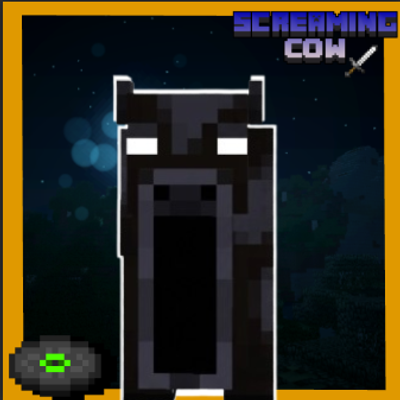
CurseForge · Minecraft mod
The Screaming cow
Inspired by ZziggsStudio's Screaming Villager, the Screaming Cow mod adds a terrifying, fast hostile mob with glowing eyes that roams the world and drops a cool music disc.
Choose a version Pick your version below, then grab the matching file.
Quick answer
Which The Screaming cow release should I use?
Latest stable file [FIXED]screamingcow-1.0.0-forge-1.20.1.jar
Game version 1.20.1
Loader Forge
The Screaming cow [FIXED]screamingcow-1.0.0-forge-1.20.1.jar targets 1.20.1 with Forge. The project page does not say whether this file belongs on the client, dedicated server, or both. No extra mods listed for this file.
Where it goes
Is The Screaming cow required on the client, server, or both?
The project page does not say whether this file belongs on the client, dedicated server, or both.
Client Source doesn’t say
Dedicated server Source doesn’t say
Loader for this release Forge
Required install it here Optional supported, not mandatory Not supported do not install here Source doesn’t say do not assume
The source does not explicitly classify this release as client-only or server-only.
What else does The Screaming cow [FIXED]screamingcow-1.0.0-forge-1.20.1.jar need?
[FIXED]screamingcow-1.0.0-forge-1.20.1.jar. Change the file and its required mods may change too.
This file does not list any required mods. Do not add a library just because a different file uses it.
This file does not list any required or optional mods.
Before you install it
Add The Screaming cow without breaking your instance.
Built for The Screaming cow [FIXED]screamingcow-1.0.0-forge-1.20.1.jar. Pick another file and the loader, install side or required mods may change.
- 01
Stick to this file
Use [FIXED]screamingcow-1.0.0-forge-1.20.1.jar. It targets 1.20.1 with Forge; another release may have different loader, side or dependency requirements.
- 02
Bring the mods it needs
This file does not list any required mods. Do not add a library just because a different file uses it.
- 03
Put it on the correct side
The project page does not say whether this file belongs on the client, dedicated server, or both.
- 04
Pick the file you checked
Use the “Get this file” button beside [FIXED]screamingcow-1.0.0-forge-1.20.1.jar. It opens that exact file at the source.
About this project
What does The Screaming cow add?
Dive into a terrifying and surprising atmosphere with the Screaming Cow mod, directly inspired by the famous Screaming Villager mod created by ZziggsStudio!
🌟 Overview
Forget about the peaceful, harmless cows you are used to seeing in Minecraft's plains. With this mod, your survival gameplay takes a deeply unsettling turn. You will face the Screaming Cow—a mysterious creature with piercing eyes that glow in the dark, featuring an oversized jaw and ready to emerge straight from the shadows.
⚙️ Main Features
Aggressive Behavior: Unlike vanilla cows, the Screaming Cow is a fast, hostile creature that will spot players from a distance and sprint straight toward them.
Natural Spawning: It roams naturally across the surface of your worlds, turning every night exploration or forest walk into a true nightmare.
Unique Loot: Defeating this terrifying creature rewards you with a custom music disc.
Creepy Details: Featuring a unique 3D model and emissive glowing eyes, it is bound to shock your friends in multiplayer.
Grab your weapons, turn down the lights, and try to survive the madness of the Screaming Cow!
Project description from CurseForge.
Pick your setup
The Screaming cow by Minecraft version and loader
Choose the version and loader you play, then open the matching release.
Check the dependencies, then try the file in a copied instance before changing a world you care about.
Recent files
The Screaming cow versions and loaders
[FIXED]screamingcow-1.0.0-forge-1.20.1.jar
20 Oct 2026
Client Source doesn’t say Server Source doesn’t say Dependencies No extras listed Listed on Release listing
Check the 1.20.1 · Forge setup 1.20.1Forge release
[BROKEN!!!]screamingcow-1.0.0-forge-1.20.1.jar
screamingcow-1.0.0-forge-1.20.1.jar
20 Oct 2026
Client Source doesn’t say Server Source doesn’t say Dependencies No extras listed Listed on Release listing
Check the 1.20.1 · Forge setup 1.20.1Forge release
Looking for an older file? The official CurseForge project page is in Resources.
 mod
mod CurseForge · Minecraft
The Triangle Wraith
why did you come here you're not meant to be here leave.
 mod
mod CurseForge · Minecraft
Snow Golem Plus
added 48 snow golems with their own snowballs and powers
 mod
mod CurseForge · Minecraft
the goatman remastered
it knows your here but wonders why you came here