Minecraft version
Back to mods 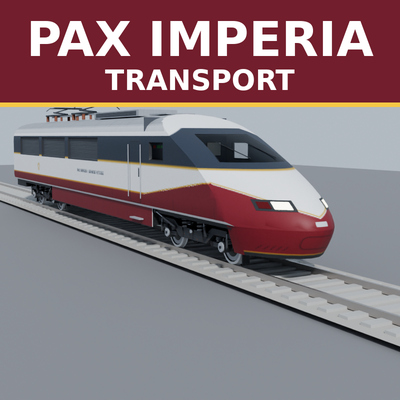
CurseForge · Minecraft mod
PaxImperia Transport System
Made for the Pax Imperia geopolitical roleplay server, usable on any server or in singleplayer.
Choose a version Pick your version below, then grab the matching file.
Quick answer
Which PaxImperia Transport System release should I use?
Latest stable file PaxImperia-Transport-System-1.25.7.jar
Game version 1.21.1
Loader NeoForge
PaxImperia Transport System PaxImperia-Transport-System-1.25.7.jar targets 1.21.1 with NeoForge. The project page does not say whether this file belongs on the client, dedicated server, or both. No extra mods listed for this file.
Where it goes
Is PaxImperia Transport System required on the client, server, or both?
The project page does not say whether this file belongs on the client, dedicated server, or both.
Client Source doesn’t say
Dedicated server Source doesn’t say
Loader for this release NeoForge
Required install it here Optional supported, not mandatory Not supported do not install here Source doesn’t say do not assume
The source does not explicitly classify this release as client-only or server-only.
What else does PaxImperia Transport System PaxImperia-Transport-System-1.25.7.jar need?
PaxImperia-Transport-System-1.25.7.jar. Change the file and its required mods may change too.
This file does not list any required mods. Do not add a library just because a different file uses it.
This file does not list any required or optional mods.
Before you install it
Add PaxImperia Transport System without breaking your instance.
Built for PaxImperia Transport System PaxImperia-Transport-System-1.25.7.jar. Pick another file and the loader, install side or required mods may change.
- 01
Stick to this file
Use PaxImperia-Transport-System-1.25.7.jar. It targets 1.21.1 with NeoForge; another release may have different loader, side or dependency requirements.
- 02
Bring the mods it needs
This file does not list any required mods. Do not add a library just because a different file uses it.
- 03
Put it on the correct side
The project page does not say whether this file belongs on the client, dedicated server, or both.
- 04
Pick the file you checked
Use the “Get this file” button beside PaxImperia-Transport-System-1.25.7.jar. It opens that exact file at the source.
About this project
What does PaxImperia Transport System add?
Railways
- Track planner: smooth curved tracks (Bézier splines), up to 96 m per section, gradients, embankments, viaducts, branch lines with switches, double track.
- Survival construction: the planner lays a ghost track; a work train (work locomotive, material wagons, track layer) drives to the site and builds it, felling trees in its way.
- Tunnels: the tunnel boring machine digs a lined, lit tube through hills and lays the track inside.
- Stations and platforms: station markers, high/low platform blocks matched to each train's floor height.
- Driving: drive yourself (throttle notches, brakes, horn) or let the autopilot run the line, stop at stations and follow routes through switches.
- Rolling stock (all modelled in Blender, with detailed bogies and interiors): electric locomotives, high-speed train, double-deck commuter train, metro and rubber-tyred metro, tram, mainline coaches, diesel freight locomotive, covered wagons, hoppers, tank wagons, container flats, armoured train.
- Railway workshop: every rail vehicle is built at the workshop from crafted parts (bogies, traction motors, body panels, pantographs, cabs…).
- Freight: loading and filling stations fill and empty wagons automatically.
- Real train sounds (CC0 recordings) and an automatic third-person view when you board, looking in the direction of travel.
Roads
- Road planner: gravel path, local road, departmental road, national road, 2×2 expressway and motorway with central barrier.
- Road paver: a tracked machine that follows the plan, earthworks, fills, lays asphalt and paints the lines. Junctions, crossings and slip roads are drawn automatically.
- Smooth slopes: asphalt is laid in 1/8-block layers on climbs, so roads ramp up instead of stepping.
- Road tunnels: where a road goes under a hill, a roadheader digs a horseshoe tunnel with concrete lining, lighting, cut-and-cover portals and retaining walls; the paver then lays the road.
Planning on the map (JourneyMap)
Right-click the full-screen map › Tracer d'ici (Pax Imperia), add points, ask for a quote, then order. The server works out a smooth route and its vertical profile, and puts tunnels only under big obstacles. You can force or forbid a tunnel between two points. The quote lists the cost, the materials needed (rails, asphalt, dye, fill, lining segments) and every tunnel with its position. Terrain is loaded in the background, so the server never freezes. Without JourneyMap, use /trace devis and /trace commande.
Performance
- Three automatic detail levels (near, far, silhouette) and a "small PC" client mode.
- Trains far from players are simulated without entities.
- Long map plans are computed in the background, in small slices each tick.
Configuration
- Server:
serverconfig/paxrail-server.toml(build speeds, train limits, road gauge, prices, slopes, tunnels…). - Client:
config/paxrail-client.toml(detail distances, small PC mode, camera). /paxrail test …demo commands are disabled on dedicated servers unless enabled in the config.
Credits
- Train sounds: CC0 recordings from freesound.org (full list in
assets/paxrail/sounds/credits.txt). - Models, textures and code: Pax Imperia.
License
All rights reserved.
Project description from CurseForge.
Pick your setup
PaxImperia Transport System by Minecraft version and loader
Choose the version and loader you play, then open the matching release.
Check the dependencies, then try the file in a copied instance before changing a world you care about.
Recent files
PaxImperia Transport System versions and loaders
PaxImperia-Transport-System-1.25.7.jar
29 Oct 2026
Client Source doesn’t say Server Source doesn’t say Dependencies No extras listed Listed on Release listing
Check the 1.21.1 · NeoForge setup 1.21.1NeoForge release
PaxImperia-Transport-System-1.25.6.jar
26 Oct 2026
Client Source doesn’t say Server Source doesn’t say Dependencies No extras listed Listed on Release listing
Check the 1.21.1 · NeoForge setup 1.21.1NeoForge release
PaxImperia-Transport-System-1.25.5.jar
25 Oct 2026
Client Source doesn’t say Server Source doesn’t say Dependencies No extras listed Listed on Release listing
Check the 1.21.1 · NeoForge setup 1.21.1NeoForge release
PaxImperia-Transport-System-1.25.4.jar
23 Oct 2026
Client Source doesn’t say Server Source doesn’t say Dependencies No extras listed Listed on Release listing
Check the 1.21.1 · NeoForge setup 1.21.1NeoForge release
PaxImperia-Transport-System-1.25.3.jar
23 Oct 2026
Client Source doesn’t say Server Source doesn’t say Dependencies No extras listed Listed on Release listing
Check the 1.21.1 · NeoForge setup 1.21.1NeoForge release
PaxImperia-Transport-System-1.25.2.jar
21 Oct 2026
Client Source doesn’t say Server Source doesn’t say Dependencies No extras listed Listed on Release listing
Check the 1.21.1 · NeoForge setup 1.21.1NeoForge release
PaxImperia-Transport-System-1.25.1.jar
20 Oct 2026
Client Source doesn’t say Server Source doesn’t say Dependencies No extras listed Listed on Release listing
Check the 1.21.1 · NeoForge setup 1.21.1NeoForge release
Looking for an older file? The official CurseForge project page is in Resources.
 mod
mod CurseForge + Modrinth · Minecraft
Energy Meter
Easily measure your energy rates.
 mod
mod CurseForge · Minecraft
Wrights
Wrights copy a build and place it again, from your inventory, a bound chest or digital storage.
 mod
mod CurseForge + Modrinth · Minecraft
Not Enough Animations
Bringing first-person animations to the third-person