Minecraft version
Back to mods 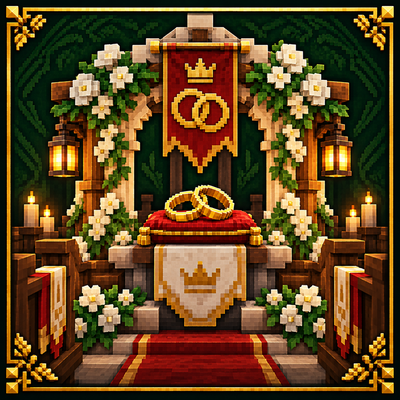
CurseForge · Minecraft mod
Realm Marriage
Bring love to Minecraft with romantic weddings, player-chosen officiants, interactive ceremonies, wedding rings, shared finances and marriage certificates!
Choose a version Pick your version below, then grab the matching file.
Quick answer
Which Realm Marriage release should I use?
Latest stable file realm-marriage-0.1.0.jar
Game version 1.21.1
Loader NeoForge
Realm Marriage realm-marriage-0.1.0.jar targets 1.21.1 with NeoForge. The project page does not say whether this file belongs on the client, dedicated server, or both. No extra mods listed for this file.
Where it goes
Is Realm Marriage required on the client, server, or both?
The project page does not say whether this file belongs on the client, dedicated server, or both.
Client Source doesn’t say
Dedicated server Source doesn’t say
Loader for this release NeoForge
Required install it here Optional supported, not mandatory Not supported do not install here Source doesn’t say do not assume
The source does not explicitly classify this release as client-only or server-only.
What else does Realm Marriage realm-marriage-0.1.0.jar need?
realm-marriage-0.1.0.jar. Change the file and its required mods may change too.
This file does not list any required mods. Do not add a library just because a different file uses it.
This file does not list any required or optional mods.
Before you install it
Add Realm Marriage without breaking your instance.
Built for Realm Marriage realm-marriage-0.1.0.jar. Pick another file and the loader, install side or required mods may change.
- 01
Stick to this file
Use realm-marriage-0.1.0.jar. It targets 1.21.1 with NeoForge; another release may have different loader, side or dependency requirements.
- 02
Bring the mods it needs
This file does not list any required mods. Do not add a library just because a different file uses it.
- 03
Put it on the correct side
The project page does not say whether this file belongs on the client, dedicated server, or both.
- 04
Pick the file you checked
Use the “Get this file” button beside realm-marriage-0.1.0.jar. It opens that exact file at the source.
About this project
What does Realm Marriage add?
Realm Marriage
Love, commitment and unforgettable medieval weddings in Minecraft!
Realm Marriage introduces a fully interactive marriage system designed for survival, roleplay and multiplayer servers.
Propose to another player, organize a beautiful wedding, choose your own officiant, invite witnesses and celebrate your love through an immersive medieval ceremony!
With wedding rings, marriage certificates, shared finances and optional integrations with other Realm mods, every wedding becomes a memorable experience.
💍 Marriage Proposals
Every great love story starts with a proposal!
- Craft an Engagement Ring.
- Propose to another player.
- Accept or reject marriage proposals.
- Cancel an engagement before the ceremony.
- Organize the wedding together.
Both partners must agree before the marriage can proceed.
💒 Medieval Wedding Ceremonies
Build and place a beautiful Wedding Altar to organize your ceremony.
The couple can:
- Choose their own wedding officiant.
- Invite up to two witnesses.
- Select their matrimonial financial arrangement.
- Approve the ceremony agreement together.
- Exchange wedding vows.
- Receive official wedding rings and certificates.
The officiant is chosen by the couple!
Any player can be invited to officiate a wedding. No special class, religious role or administrator permissions are required.
Both partners and the officiant must be present to complete a ceremony.
⚖️ Speak Now or Forever Hold Your Peace!
Realm Marriage introduces an interactive wedding objection system!
During the ceremony, guests receive a special notification:
"Speak now or forever hold your peace!"
Guests have 10 seconds to press G and raise an objection.
When someone objects:
- The ceremony is temporarily paused.
- The guest can explain their objection.
- The officiant can give the guest and the couple an opportunity to speak.
- Both partners must agree before the ceremony continues.
- Either partner may cancel the wedding.
The objection key can be customized through Minecraft's controls.
❤️ Interactive Wedding Vows
The ceremony doesn't end with a simple click!
The officiant guides the couple through their vows.
Each partner must individually confirm their commitment.
Selected witnesses then sign the ceremony record.
Only after these steps can the marriage be officially confirmed.
🎉 Wedding Celebrations
Successful weddings feature beautiful visual and audio effects:
- Animated wedding rings.
- Golden particles.
- Romantic rose particles.
- Custom medieval ceremony sounds.
- Beautiful parchment-style interfaces.
- Special wedding celebration effects.
Visual effects and sound preferences can be customized.
💰 Marriage & Shared Finances
With Chronicles RP installed, couples can choose between three financial arrangements.
Combined Finances
Combine both partners' wallet balances into a shared account during marriage.
Separate Finances
Keep individual wallets completely separate.
Joint Account
Keep personal wallets while gaining access to an additional shared account.
Partners can deposit and withdraw shared money through the Wedding Altar.
Existing Realm mods continue to use personal wallets unless they explicitly integrate with the marriage payment API.
💔 Divorce System
Not every story lasts forever.
Realm Marriage also includes a persistent divorce system.
- Either partner can request a divorce.
- Divorce is possible even when the other partner is offline.
- Shared funds are divided according to the previously approved agreement.
- Pending payouts remain available for collection.
- Players can marry again after a divorce.
The default financial division is 50/50, but couples can agree on a different percentage before marriage.
📜 Official Marriage Certificates
After the wedding, each partner can receive:
- A Wedding Ring.
- An official Marriage Certificate.
Certificates use server-verified records to prevent fake marriages.
When integrated with Realm Identity, marriage information can also appear in identity documentation, with privacy controls for spouse information.
👑 Kingdom Wedding Fees
With compatible Realm mods installed, governments can configure wedding fees.
When Realm Council is available, the current sworn President can adjust the fee within administrator-defined limits.
Confirmed fees can be transferred to the Crown Ledger treasury.
The default wedding fee is 0 €.
🔗 Optional Integrations
- Chronicles RP: Roleplay character names and virtual wallets.
- Realm Council: Government-controlled marriage fees.
- Crown Ledger: Wedding fee payments to the treasury.
- Realm Identity: Marital status and certificate verification.
- Realm Notifications: Personal wedding-related notifications.
All integrations are optional.
Players can marry for free with separate finances even without Chronicles RP.
📦 Requirements
- Minecraft 1.21.1
- NeoForge 21.1.256+
- Java 21
- Install on the server and all participating clients.
🚀 Getting Started
- Craft an Engagement Ring.
- Propose to another player.
- Build and place the Wedding Altar.
- Choose an officiant and optionally invite witnesses.
- Agree on the financial arrangement.
- Gather everyone at the altar.
- Begin the ceremony.
- Exchange vows and celebrate your marriage!
Developed by ROCKABITS
Part of the Realm mod collection.
Project description from CurseForge.
Pick your setup
Realm Marriage by Minecraft version and loader
Choose the version and loader you play, then open the matching release.
Check the dependencies, then try the file in a copied instance before changing a world you care about.
Recent files
Realm Marriage versions and loaders
realm-marriage-0.1.0.jar
20 Oct 2026
Client Source doesn’t say Server Source doesn’t say Dependencies No extras listed Listed on Release listing
Check the 1.21.1 · NeoForge setup 1.21.1NeoForge release
Looking for an older file? The official CurseForge project page is in Resources.
 mod
CurseForge · Minecraft
MODTOOLS - Staff Moderation
An administration and moderation tool for Minecraft servers.
 mod
CurseForge · Minecraft
Integrated Stronghold
Integrated Stronghold is a mod that replaces the old and bland vanilla stronghold structure with a heavily detailed dungeon built with modded blocks from Create, Quark, and Supplementaries.
 mod
CurseForge · Minecraft
Amberbound: Dinosaurs & Fossils
Dig up fossils, clean them on a preparation table, collect bones of 23 prehistoric species and mount life-size skeletons in your own museum. Dinosaur revival coming soon!